The Epomaker TH80 V2 PRO is a 75% gasket-mount mechanical keyboard with 78 keys, a metal hot-swappable knob, a 1.06-inch glass LCD and a 10,000mAh battery. It costs $77.99, or $79.99 with the silent switches.
- Specs at a Glance
- Unboxing and First Impressions
- Design Deep Dive
- Typing Experience: Creamy Jade Stock
- Keycap Compatibility Catalog
- Battery: The 10,000mAh Question
- Software: The VIA Question, Answered
- Connectivity and Latency
- The TH80 Naming Trap: Which Board Are You Buying?
- How It Compares at $78
- The Category Question: Is the Screen a Gimmick?
- Verdict: Is the TH80 V2 PRO Worth It?
- Where to Buy
- FAQ
The battery is the headline and it is not marketing noise. At 10,000mAh this board carries roughly two and a half times the capacity of almost everything else in its price bracket, and it is the only sub-$80 75% board we have tested where wireless battery life is a genuine reason to buy rather than a footnote.
Should I buy the TH80 V2 PRO? If you want a wireless 75% board you can carry between desks for a fortnight without thinking about a cable, yes, and the screen and knob earn their place. If you remap keys constantly and want VIA or QMK, no. The TH80 V2 PRO does not support either, and that is the one place this board genuinely falls short of a Keychron V1 Max.
Best for: Anyone who wants long wireless battery life in a compact layout. Office and desk-sharing setups where a screen showing the active connection mode saves real time. Mac and Windows users who switch between both, since the board ships dual-labelled for each.
Skip if: You want open-source firmware. You want an aluminium case. You plan to buy the black version and care about premium keycap materials, because the black colourway uses different keycaps to the white and pink ones.
One thing to know up front: This is a review unit provided by Epomaker. We do not accept payment for coverage, and Epomaker had no editorial input into what follows. Where we could not verify a number, we say so plainly rather than filling the gap with marketing copy.
More Read

Specs at a Glance
| Spec | Detail |
|---|---|
| Layout | 75% ANSI US (78 keys + 1 knob) |
| Mount | Gasket mount, 5-layer dampening |
| Case | ABS plastic (Black / White / Pink) |
| Plate | Polycarbonate, flex-cut |
| Switches | Epomaker Creamy Jade (linear) or Sea Salt Silent V2 (silent linear) |
| Switch specs | 45±5gf actuation, 50 to 51±5gf bottom-out |
| Keycaps | Cherry profile. Black: PC plastic, dye-sub. White/Pink: PBT, double-shot |
| Stabilizers | Plate-mounted, pre-lubed |
| Screen | 1.06-inch glass LCD (time, date, battery %, connection mode, GIFs) |
| Knob | Metal, hot-swappable for a standard switch |
| Battery | 10,000mAh (2 x 5,000mAh cells) |
| Connectivity | Tri-mode: 2.4GHz / Bluetooth 5.0 / USB-C |
| Paired devices | Up to 5 |
| Polling rate | 1000Hz wired and 2.4GHz, 125Hz Bluetooth |
| Stated latency | 2ms wired, 5ms 2.4GHz, 11ms Bluetooth |
| Hot-swap | 3-pin and 5-pin |
| Dimensions | 323 x 141 x 47mm |
| Front / back height | 18.5mm / 32.5mm, 2-stage angle |
| Weight | 0.95kg |
| Software | EPOMAKER Hub / Upgear (browser-based) |
| Price | $77.99 Creamy Jade, $79.99 Sea Salt Silent V2 |
Unboxing and First Impressions
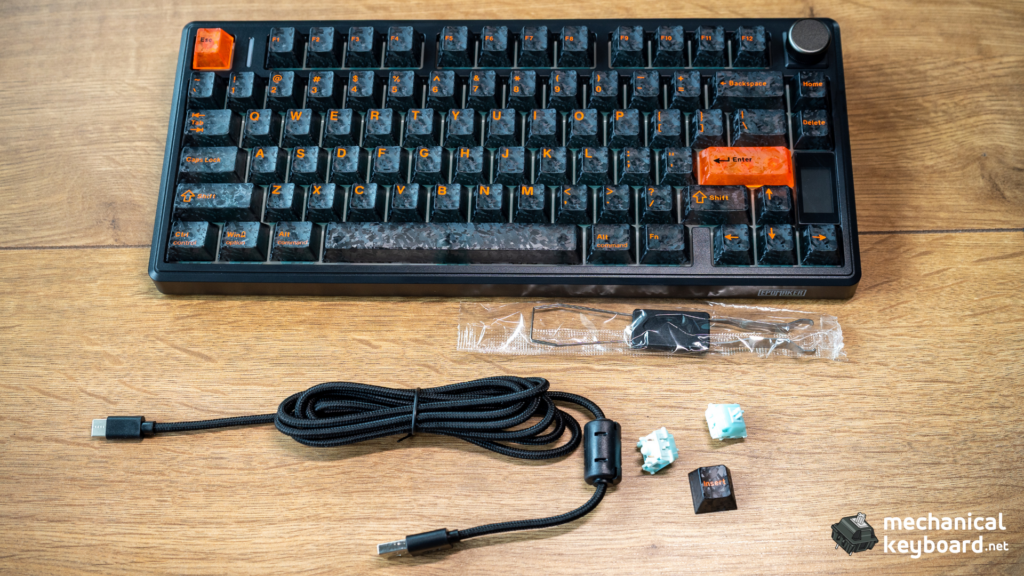
The box is the standard black-and-orange Epomaker affair with a wireframe render on the front and the feature list underneath. Inside, the bundle is better than the price suggests: the board, a braided USB-A to USB-C cable, keycap and switch pullers, three spare Creamy Jade switches, and a spare “Insert” keycap.
That spare keycap matters more than it sounds. Because the knob is hot-swappable, Epomaker ships the exact keycap you need to replace it: pull the whole knob module out, drop in a switch, fit the Insert cap, and you have a normal key where the volume dial was. Most boards that offer a hot-swap knob leave you hunting for a matching keycap.
Lifting the board out, the first thing that registers is the weight. 0.95kg is heavy for an ABS plastic 75% board, and the reason is obvious once you know the spec: that is a lot of battery sitting in the bottom case.
One naming warning before you buy. See the section further down. Epomaker has shipped five boards called TH80, and two of them have nearly identical names. Make sure you are looking at the 2026 TH80 V2 PRO and not a 2024 TH80 Pro V2, because they are different keyboards with different batteries.
Design Deep Dive
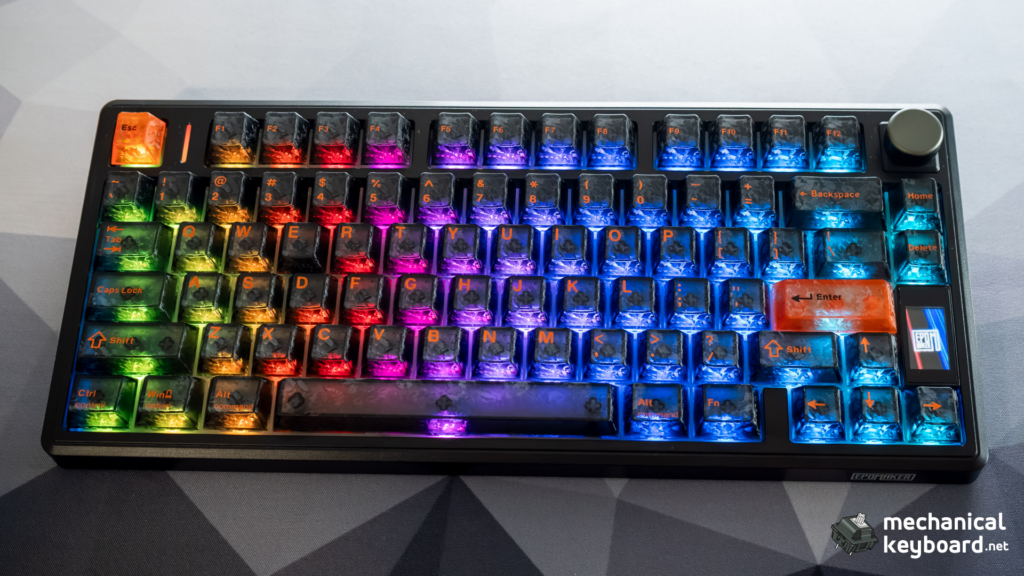
The TH80 V2 PRO looks like a 75% board should: function row, arrow cluster, a short nav column on the right, no numpad. The layout is conservative and that is a point in its favour. If you are weighing 75% against the other compact sizes, our mechanical keyboard sizes guide lays out what each layout costs you.
The two design decisions that separate it from the pack are the screen and the knob, sitting side by side above the arrow cluster.
The 1.06-inch glass LCD
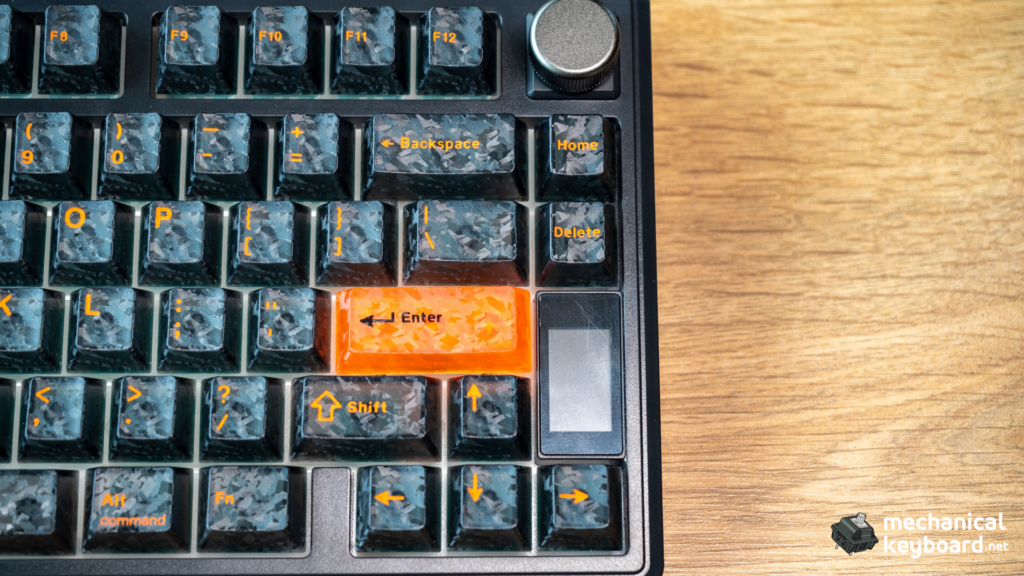
The screen is small, glass-covered, and genuinely useful rather than decorative. Out of the box it shows the time and date, exact battery percentage, and the active connection mode: wired, 2.4GHz, or which Bluetooth slot.
That last one is the feature that earns its keep. If you pair this board to a desktop over the dongle, a laptop over Bluetooth, and a tablet over a second Bluetooth slot, the screen tells you which one you are on before you start typing. On most budget boards you find out by typing into the wrong machine.
Hold FN and press the knob and the screen becomes an interactive on-board menu. You can change the RGB effect, static colour, brightness and animation speed, switch the Mac and Windows layouts, and toggle the screen itself, all without software.
You can also load custom GIFs and images through the web configurator. One limit worth knowing: the maximum frame count for a GIF is 255. There is no file size limit, just the frame count. Epomaker confirmed that to a reviewer who asked directly, and it is not in the manual.
The hot-swappable knob
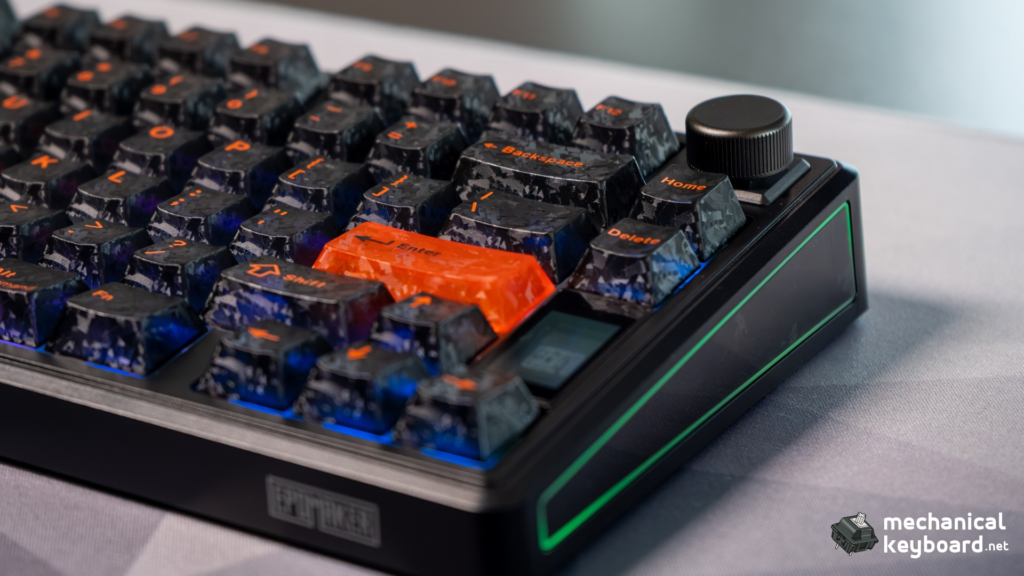
Metal, machined, with detented steps and a satisfying click as a button. It controls volume by default, and FN plus the knob press toggles it between volume control and screen navigation.
The clever part is that the whole module is hot-swappable. Pull the metal knob off, pull the encoder module out of the socket, and the socket accepts a normal 3-pin or 5-pin switch. That, plus the included Insert keycap, means you can reclaim the position for a normal key and a macro. Epomaker is one of only a handful of brands offering this, and it is the single most enthusiast-minded feature on the board.
Colourways and the keycap catch
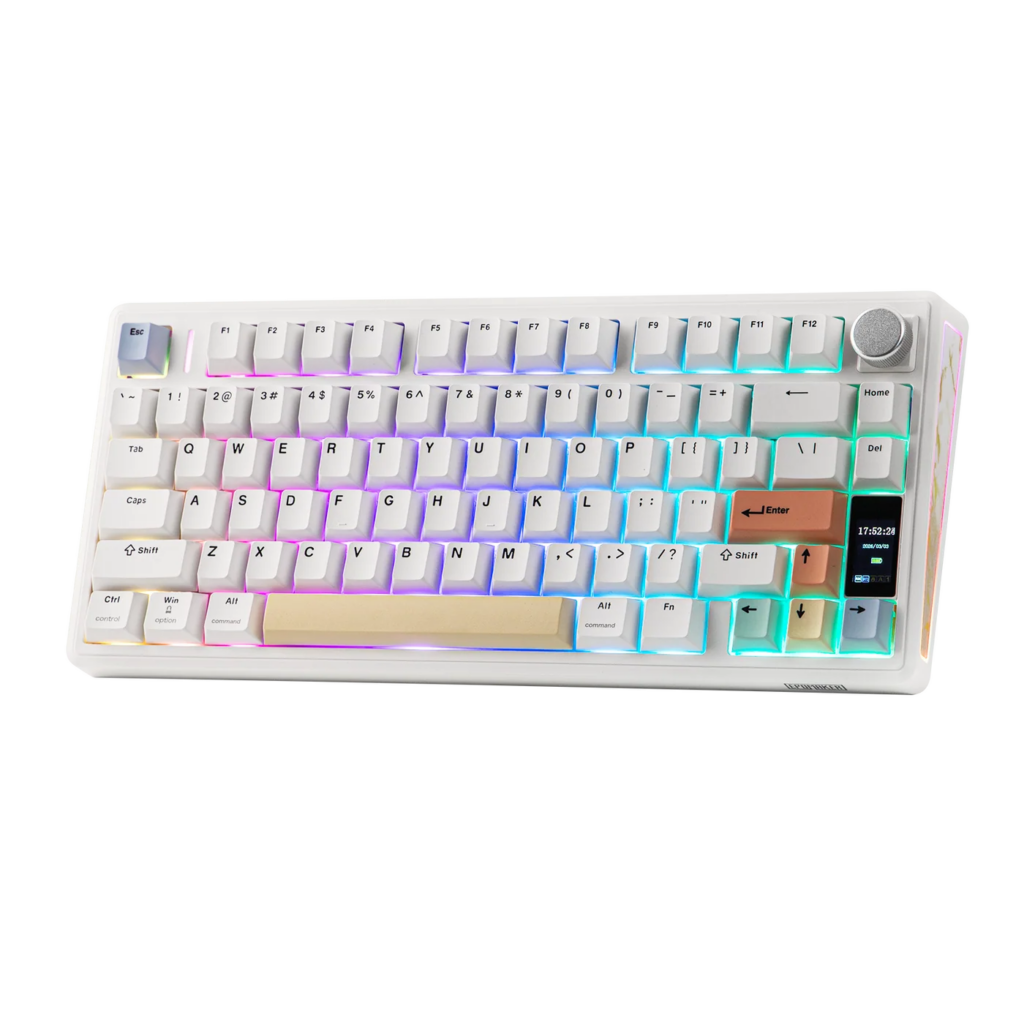
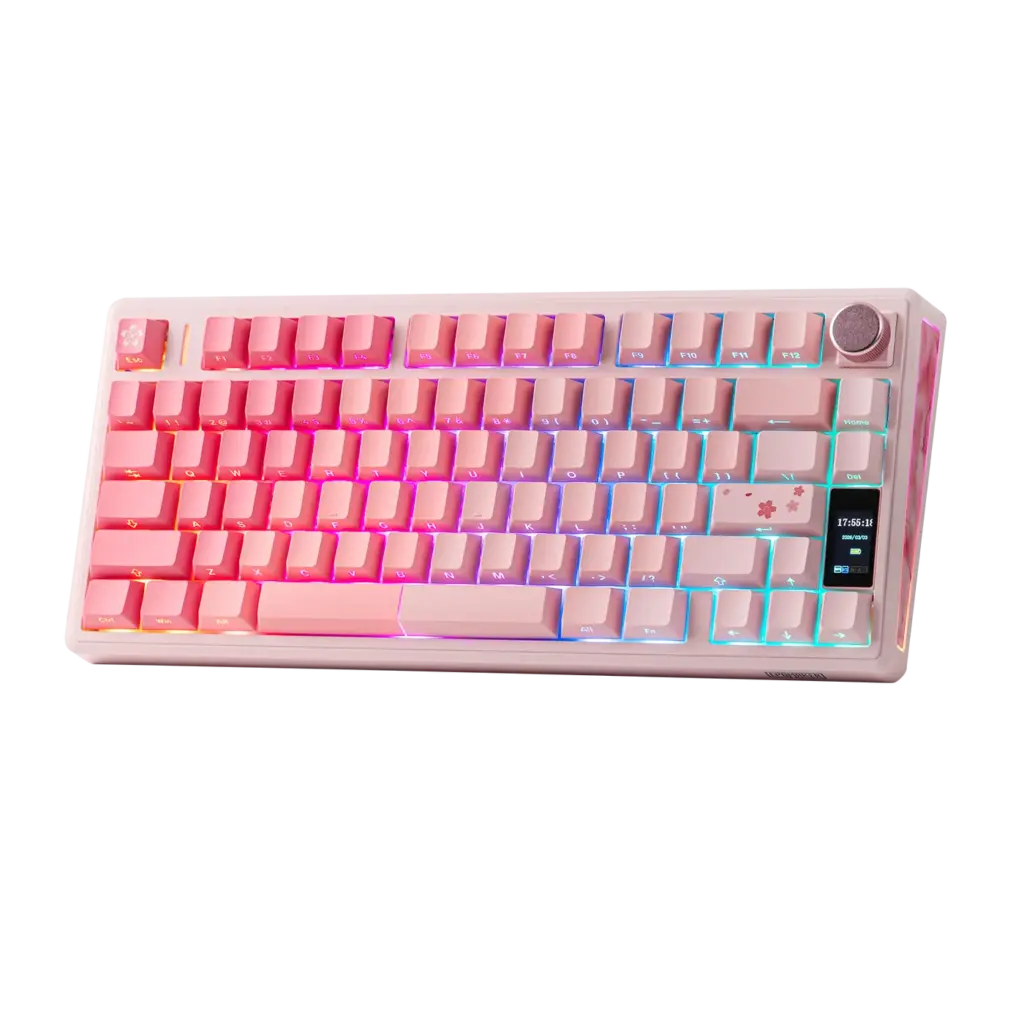
Three options: Black, White, Pink. They are not simple recolours. Each has its own keycap treatment, and the material differs in a way the store page does not spell out.
The black version uses PC plastic keycaps with dye-sublimated legends. The white and pink versions use PBT double-shot keycaps.
That matters if you are choosing between them. Double-shot PBT legends are moulded through the cap and cannot wear off. Dye-sub on PC is durable in normal use but is a different, lighter material, and it will feel less dense under the finger. If you want the most durable keycaps and the longest-lived legends, the white or pink version is the better buy. The black version is the one we have, and it is the one most reviews are written about, so this distinction almost never gets mentioned.
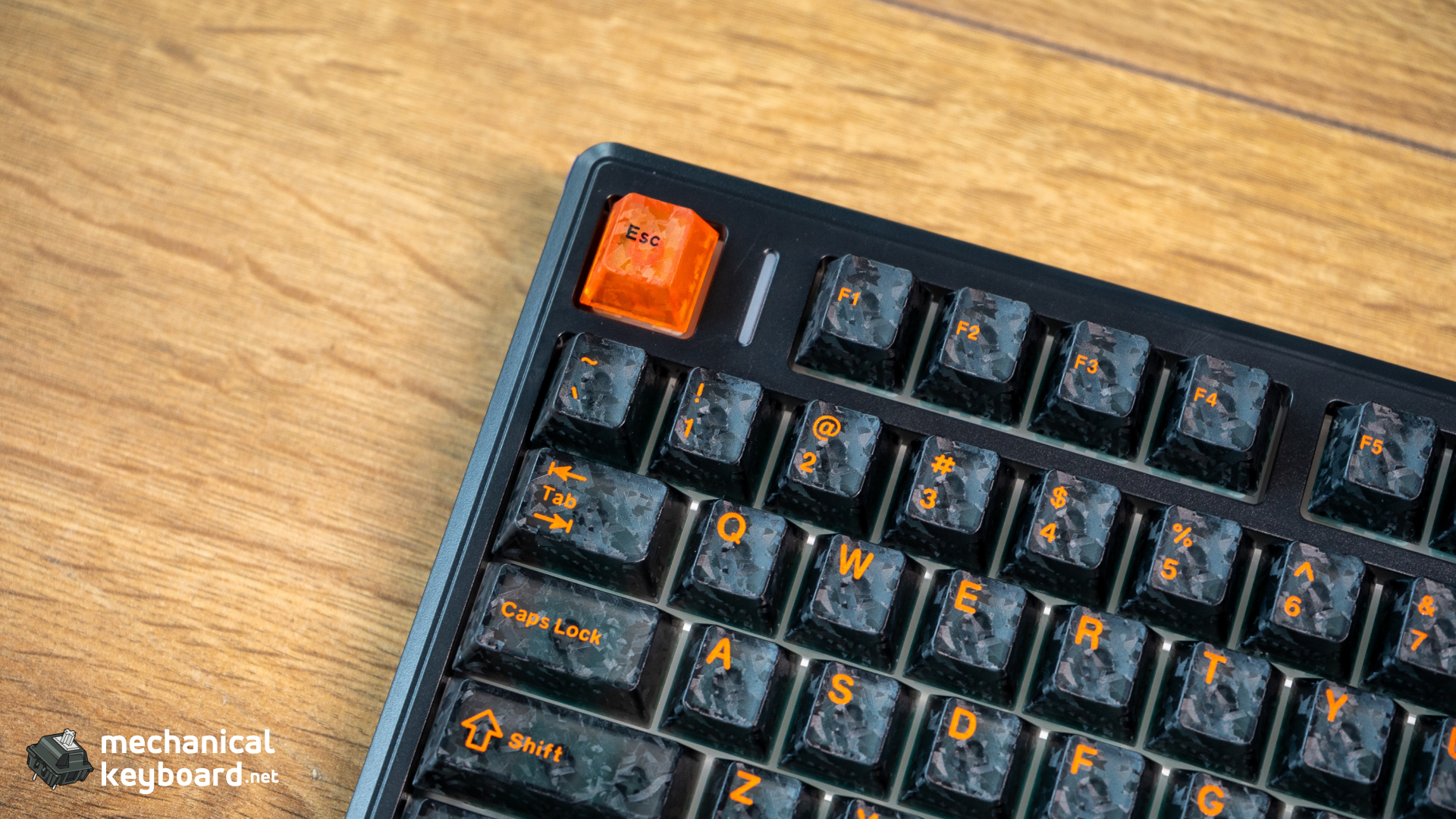
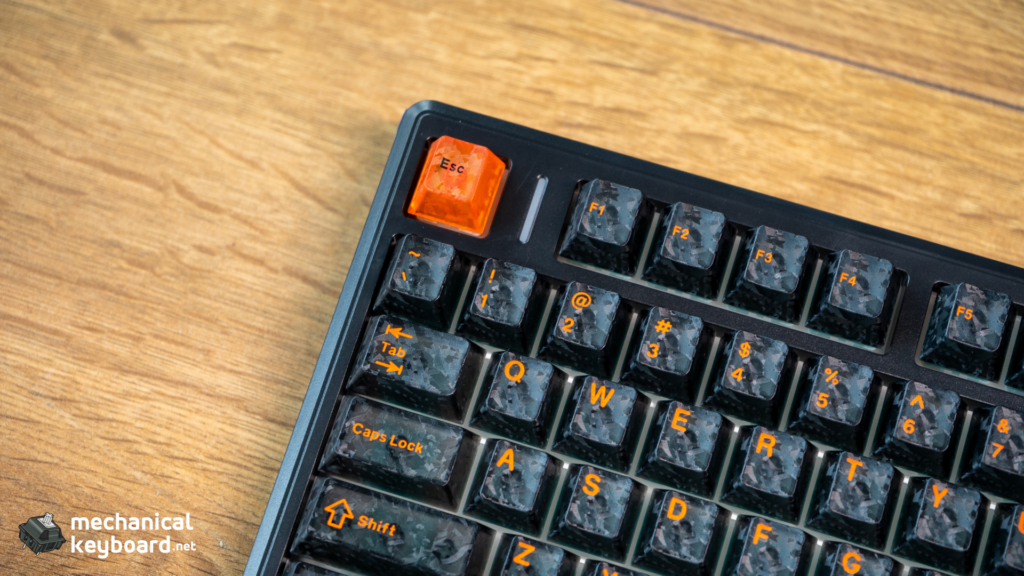
The black version’s semi-transparent caps do look good with the RGB, and the lighting is bright and even. One honest caveat with the black caps: the legends are not backlit, so in bright daylight the lettering on the semi-transparent caps is not illuminated. That is the trade for the look.
Typing Experience: Creamy Jade Stock
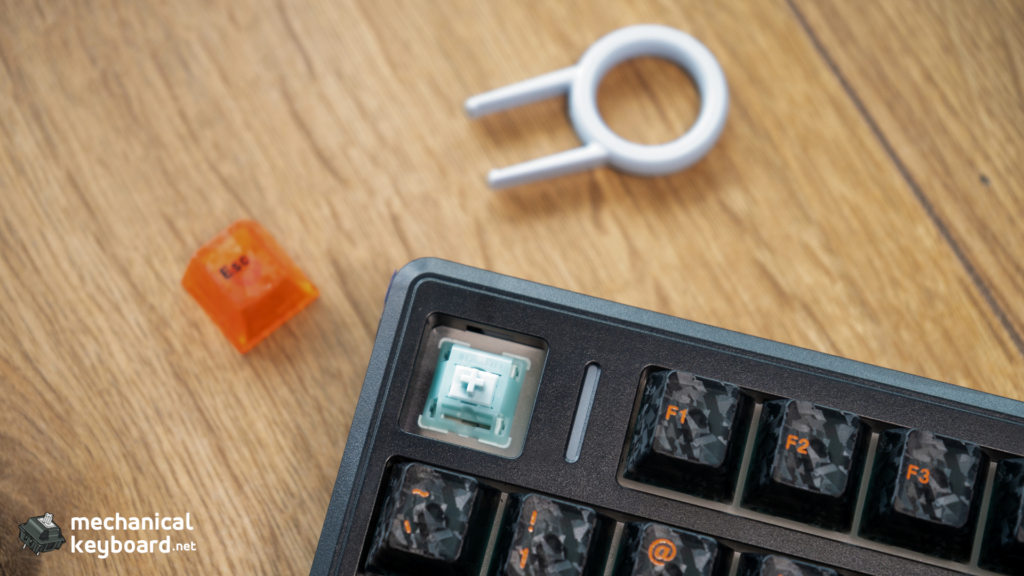
The Creamy Jade is a linear switch, factory lubed, with a POK stem, PC upper housing and PA66 bottom housing. POK is a stiff, low-friction material and it shows: the switches are smooth from the first keystroke, with no scratch and no ping.
The numbers: 45±5gf actuation, 50±5gf bottom-out, 2.0±0.4mm pre-travel, 3.6±0.4mm total travel. That is a light, standard-travel linear. It will feel familiar immediately if you have used Gateron Reds or Yellows, and it is a good first mechanical switch because it gives nothing up on the corners.
How it sounds. The five-layer stack does what it promises. The character is a deep, soft, cushioned bottom-out rather than a sharp clack. The flex-cut polycarbonate plate adds a slight bounce, and the gasket mount on this board is a real one, not a marketing label on a stiff tray mount. The board gives when you press into the plate.
Our honest framing: this is a “creamy deep thock” board, not a bright clacky one. If you want the clacky, higher-pitched end of the spectrum, this is not the board for you, and no amount of foam will change that. If you want a soft, dense, office-friendly sound, it is one of the better sub-$80 boards at it.
On consistency: the factory lube is even across the board on our unit, with no obvious outliers. That matters more than the specific spec numbers, because inconsistent factory lube is the most common complaint about budget pre-builts.
Ergonomics. Front height is 18.5mm and back height is 32.5mm, with a two-stage adjustable angle. That is a standard-to-tall profile for a 75% board, so if you are coming from a low-profile board budget for a short adjustment period. You do not need a wrist rest at the flat setting. At the raised setting you probably will, over a long session, particularly if your desk is high. The board is heavy enough at 0.95kg that it does not slide around, which matters more than it sounds for a plastic-cased board.
Keycap Compatibility Catalog
The board uses a standard MX stem on a 75% ANSI layout with south-facing LEDs, so keycap compatibility is straightforward, with three things worth knowing.
Any MX-compatible set fits. Cherry, OEM, MDA, XDA, DSA, SA, and the rest. There is no low-profile or Choc constraint here. The only genuine limits are layout-specific keys: you need a 75% base kit that includes a 1.75u right shift and the correct function row, and if you want to keep the knob you simply do not cover that position.
South-facing LEDs mean no interference. Because the LEDs face away from the keycaps, Cherry-profile and other sculpted caps do not hit the switch housing. This is the configuration you want, and it is not universal on budget boards.
What ships is Cherry profile already. So if you like the shape, you only need to change if you want PBT over PC (the black version) or a different aesthetic. If you want the PBT double-shot caps of the white and pink variants, they are a straight swap.
One aesthetic note: the board has side lighting in addition to per-key RGB, and tall sculpted profiles like SA will hide the side glow against the case. If the side light is part of why you want this board, stay on a low or uniform profile.
Battery: The 10,000mAh Question
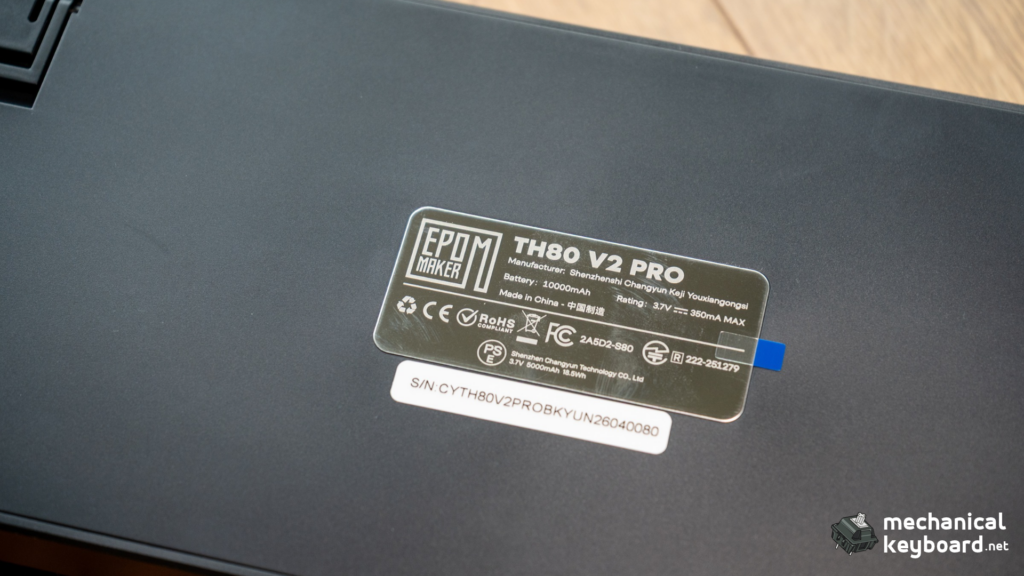
Epomaker rates this board at over 200 hours of wireless use on the 10,000mAh cell. Here is what almost nobody tells you: the hours figure is not in the spec table on the product page. The cheaper TH80 V2 page lists its hours (200 hours RGB off, 40 hours RGB on). The TH80 V2 PRO page does not.
So we went looking for a measured figure across the published coverage, and there isn’t one. What exists instead is a remarkable spread:
- One review states the 10,000mAh battery provides “up to 10 hours” of cordless use. That is not credible and appears to be an error.
- Another reports around 30 hours with RGB on. That is also inconsistent with the vendor claim, though closer to plausible than 10.
- Most others simply repeat “over 200 hours” from the marketing copy without testing it.
- One long-term reviewer says the 200-hour claim “lines up” with daily use while running RGB and the screen. We are sceptical of a claim that specific without a measurement behind it.
Our position, stated plainly: we are not going to invent a number to sound authoritative, and neither should any other review. What the capacity buys you is real regardless of the exact figure. At 10,000mAh this board has roughly 2.5 times the capacity of the 4,000mAh cells that dominate the $50 to $80 bracket, and more than three times a 3,000mAh board. Even with RGB and the screen running, that is a wireless board you charge occasionally rather than weekly, which is the actual point.
For the record on the class: the Ajazz AK820 Pro and the Aula F75 both carry 4,000mAh. The Keychron V1 Max carries 4,000mAh. The older 2024 TH80 Pro V2 carried 3,000mAh and was rated at roughly 8 hours with RGB on. The TH80 V2 PRO’s capacity is not a marginal upgrade over any of them, it is a different category.
What will eat the battery: the LCD screen staying on, RGB at high brightness, and polling at 1000Hz on 2.4GHz rather than Bluetooth’s 125Hz. Turning the screen off with FN + Home is the single biggest lever, followed by RGB brightness.
Play and charge works. The board charges over USB-C while in use, so you can top up mid-session without stopping.
Software: The VIA Question, Answered
This is where the published coverage is most wrong, and it is worth being precise because it changes whether this board is right for you.
The TH80 V2 PRO does not support VIA or QMK.
Configuration runs through EPOMAKER Hub, also referred to as the Upgear driver. It is a Chrome-based web configurator that works both online and offline, and it needs no installation.
Epomaker’s own documentation confirms this. The TH80 V2 PRO manual page points configuration at the Hub, and the Upgear software guide lists the TH80 V2 Pro among its supported boards. Epomaker’s VIA JSON download index, which is where a board gets its VIA definition file, lists boards like the TH26, Hack70, AULA F65, RT98, LUMA100 and AULA F75 Ultra. The TH80 V2 PRO is not on it.
Where the confusion comes from.
Epomaker shipped the TH80 Pro V2 VIA in 2024. That board did support VIA, had a 3,000mAh battery and a 1.14-inch screen, and cost $99.99. It is a different keyboard with a reversed name. Several outlets reviewing the 2026 board have carried the VIA claim over from the 2024 one, and at least one major site’s specification block for the “TH80 V2 Pro” lists the 2024 board’s 3,000mAh battery and its Mulan and Flamingo switches. That is the 2024 keyboard being reviewed under the 2026 keyboard’s name.
What you actually get: key remapping, macros, layers, RGB per key, the screen’s GIF upload, and per-profile storage, all in a browser tab, with on-board memory keeping your settings across devices. The interface is functional and reasonably clear.
Two real limitations:
- Full software control requires a wired connection – You must plug in with the USB-C cable to do the deep configuration. The board works perfectly in wireless mode, but plan on a cable for setup.
- The manual does not explain the driver – Multiple reviewers, including us, had to find the Hub rather than being told about it. It is a documentation failure, not a hardware one, and it is the most repeated complaint about this board.
If you want to understand what the open-source route normally offers and judge the gap yourself, our VIA guide walks through it end to end.
Is the Hub enough? For most buyers, yes. If you are the kind of person who maintains multiple layers, uses tap-hold logic, and switches layouts per application, no. That is the honest boundary, and it is why the Keychron V1 Max remains the right answer for that buyer even at a higher price.
Connectivity and Latency
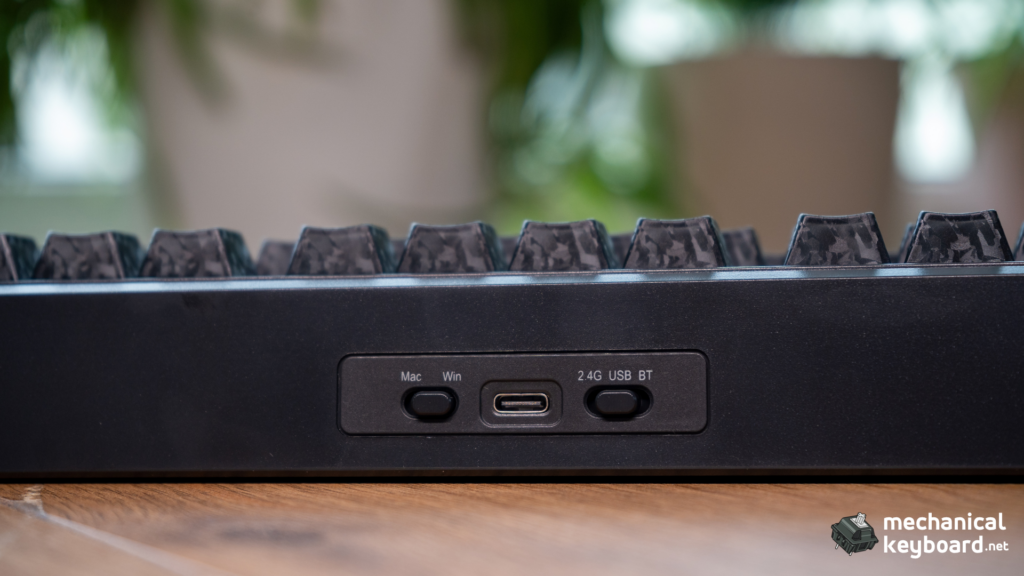
Tri-mode, and all three modes work: USB-C wired, 2.4GHz over the bundled dongle, and Bluetooth 5.0 with three slots. Up to five devices can be paired, and switching is done on the keyboard with FN + Q/W/E for the Bluetooth slots and FN + R for 2.4GHz, holding the combination to pair.
Polling rate is 1000Hz wired and on 2.4GHz, dropping to 125Hz on Bluetooth. Stated latency is 2ms wired, 5ms on 2.4GHz and 11ms over Bluetooth. One published review claims 500Hz for this board, which does not match the vendor specification or any other source, so treat the 1000Hz figure as the accurate one. For context on what those numbers mean in practice, our polling rate guide breaks down where the differences become perceptible.
In use: 2.4GHz is indistinguishable from wired for typing and fine for gaming. Bluetooth is for the devices that need it, and the 11ms figure is the reason we would not game on it.
One honest flag: a published review reported occasional Bluetooth connection drops. We did not reproduce that on our unit, and it is a single report, but if you plan to rely on Bluetooth as your primary mode, test it during your return window. The 2.4GHz dongle is the mode to use if stability matters most.
Mac and Windows: the board ships dual-labelled with both legends on the modifiers, and a physical toggle on the rear switches the layout. This is genuinely better than swapping keycaps. Note that the Mac layout does not include a right Option key.
The TH80 Naming Trap: Which Board Are You Buying?
This section exists because the naming is genuinely confusing, almost every search result gets it wrong, and getting it wrong means ending up with the wrong battery.
Epomaker has shipped five boards under the TH80 name.
| Board | Year | Battery | Screen | Software | Launch price |
|---|---|---|---|---|---|
| TH80 | 2022 | 4,000mAh | No | Epomaker driver | $99.99 |
| TH80 Pro | 2022-23 | 4,000mAh | No | Epomaker driver | $99 |
| TH80 Pro V2 VIA | 2024 | 3,000mAh | 1.14-inch | VIA | $99.99 |
| TH80 V2 | 2026 | 8,000mAh | No | EPOMAKER Hub | $68.99 |
| TH80 V2 PRO | 2026 | 10,000mAh | 1.06-inch | EPOMAKER Hub | $77.99 |
The two you need to keep apart are TH80 Pro V2 (2024) and TH80 V2 PRO (2026). Same four words, reversed order, different products, different generations.
The 2024 board is discontinued on Epomaker’s own store. Searching the official store for TH80 returns three results, and the TH80 Pro V2 is not one of them. If you find one second-hand, know that you are buying a 3,000mAh board with VIA support, not a 10,000mAh board without it.
TH80 V2 vs TH80 V2 PRO: the $9 question
This comparison does not exist anywhere else, and it is the decision most buyers of these two boards are actually making.
| TH80 V2 | TH80 V2 PRO | |
|---|---|---|
| Price | $68.99 | $77.99 |
| Battery | 8,000mAh | 10,000mAh |
| Battery (vendor) | 200h RGB off, 40h RGB on | 200h+ |
| Screen | None | 1.06-inch glass LCD |
| Knob | Yes, not hot-swappable | Metal, hot-swappable |
| RGB | Per-key + side and back light | Per-key + side light |
| Keys | 79 keys + knob | 78 keys + knob |
| Weight | 0.9kg | 0.95kg |
| Height | 20mm front, 34mm back, 3 angles | 18.5mm front, 32.5mm back, 2 angles |
| Keycaps | Cherry profile PBT | Black: PC dye-sub. White/Pink: PBT double-shot |
The verdict on the $9: if the screen appeals to you, pay the $9 without hesitating. You get the LCD, the interactive on-board menu, a hot-swappable knob with the swap keycap included, and 2,000mAh more capacity. If you never wanted a screen, the TH80 V2 is the smarter buy and it is slightly lighter and slightly taller.
One detail to note in that table: Epomaker lists the TH80 V2 as 79 keys + knob and the TH80 V2 PRO as 78 keys + knob, while the V2’s own body copy says 78 keys. Count on your own unit rather than trusting either page, and if you want the layout maths behind 75% boards, our key count by size reference breaks it down. Our unit’s printed layout makes sense as a 75% with a knob occupying one position.
How It Compares at $78
The budget 75% bracket has converged. Gasket mount, hot-swap, tri-mode wireless and south-facing RGB are now table stakes between $49 and $80. Three things still separate boards: battery capacity, firmware openness, and out-of-box acoustics.
| Board | Price | Battery | Firmware | Screen | Notes |
|---|---|---|---|---|---|
| Epomaker TH80 V2 PRO | $77.99 | 10,000mAh | EPOMAKER Hub | 1.06-inch LCD | Hot-swap knob, 5-layer stack |
| Epomaker TH80 V2 | $68.99 | 8,000mAh | EPOMAKER Hub | No | Same family, cheaper |
| Ajazz AK820 Pro | ~$67.99 | 4,000mAh | Own software | TFT screen | The screen-and-knob alternative |
| Aula F75 | ~$48.99 | 4,000mAh | Own software | No | The acoustic value pick |
| Keychron V1 Max | ~$93.99 | 4,000mAh | QMK / VIA | No | The firmware pick |
| RK R75 | ~$58.99 | Wired only (base) | QMK / VIA | No | Cheapest VIA route |
Against the Ajazz AK820 Pro, the closest rival: both have a screen and a knob, so it comes down to battery and software. The AK820 Pro has 4,000mAh against 10,000mAh here. The TH80 V2 PRO also uses a driverless browser configurator, which the AK820 Pro does not. If battery life is your priority, this board wins clearly.
Against the Keychron V1 Max, the enthusiast pick: the Keychron has native QMK and VIA, which is a genuine advantage and not a small one if you remap regularly. The TH80 V2 PRO counters with 2.5 times the battery, a screen, and a $16 lower price. Choose Keychron for firmware, Epomaker for battery and features.
Against the Aula F75, the value pick: the F75 sounds fantastic and costs roughly $29 less. It has no screen and less than half the battery. If you want the best sound per dollar, buy the F75. If you want to stop thinking about charging, buy this.
For a wider sweep of the bracket, our best mechanical keyboards under $100 roundup covers the rest of the field.
The Category Question: Is the Screen a Gimmick?
Budget boards with screens get dismissed as gimmicks, and often the criticism is fair. A screen that only shows an animation is a novelty you stop noticing after a week.
This one is different in a specific, testable way: it displays the active connection mode and the exact battery percentage. On a tri-mode board paired to several devices, those are the two facts you actually need, and they are otherwise buried in an OS menu or a guess. We found ourselves checking it constantly during multi-device switching, and it changed how we used the board rather than just decorating it.
The GIF support is the gimmick part, and we are comfortable saying so. It is fun, it is well executed, and it is not a reason to buy the board.
The real category question is whether this is a budget board at all. At $77.99 with a 10,000mAh battery, a working LCD and a hot-swap knob, the answer is that it is a mid-tier board wearing a budget price. What it is not is an enthusiast board, and the missing VIA support is exactly where that line sits. Epomaker has prioritised battery, hardware features and out-of-box sound over firmware openness, and for most buyers that is the right trade.
Verdict: Is the TH80 V2 PRO Worth It?
The TH80 V2 PRO is the best battery proposition in the budget 75% bracket by a wide margin, and it pairs that with hardware features that normally cost more: a functional LCD, a metal hot-swap knob, and a gasket mount with five layers of dampening that you can actually feel.
The typo that follows this board around is the VIA claim. It does not support VIA or QMK, and that is the one thing that would push a buyer toward a Keychron V1 Max instead. If you do not need open-source firmware, that limitation is irrelevant, and everything else about this board is above its price.
Score breakdown: – Build quality: 8/10 – Typing experience: 8.5/10 – Switches (Creamy Jade): 8.5/10 – Battery: 9.5/10 – Screen and knob: 9/10 – Software: 7/10 – Connectivity: 8.5/10 – Value for money: 9/10
Who should buy it: anyone who wants a wireless 75% board they can carry between desks for weeks without a cable. Office and shared-desk setups where the connection-mode readout saves real time. Mac and Windows dual users. Anyone who wants enthusiast hardware features without paying enthusiast prices.
Who should skip it: anyone who remaps keys regularly and wants VIA or QMK, who should look at the Keychron V1 Max or an RK R75. Anyone who wants an aluminium case. Anyone who wants the absolute best sound per dollar, which is the Aula F75‘s job. And anyone who wants a screen but would rather have a full-size layout, who should look at the TH99 PRO.
Where to Buy
| Source | Price | Notes |
|---|---|---|
| Epomaker official | $77.99 (Creamy Jade), $79.99 (Sea Salt Silent V2) | Direct, 1-year warranty, 30-day returns |
| Amazon | Around $78 to $80 | Easier returns, regional pricing varies |
The Sea Salt Silent V2 costs $2 more than the Creamy Jade. If you share an office or type at night, that $2 is the best value on the page. Epomaker runs sales regularly, and this board has been seen below $72, so it is worth waiting if you are not in a hurry.
FAQ
Is the Epomaker TH80 V2 PRO worth it?
Yes, if battery life and hardware features matter more to you than firmware openness. At $77.99 you get a 10,000mAh battery, a functional LCD, a hot-swap metal knob and a genuine gasket mount with five layers of dampening. If you want VIA or QMK, buy a Keychron V1 Max instead.
Does the TH80 V2 PRO support VIA or QMK?
No. It is configured through EPOMAKER Hub, also called the Upgear driver, which is a browser-based configurator and needs no installation. Several published reviews claim VIA support, but that is carried over from the 2024 TH80 Pro V2 VIA, which is a different keyboard. Epomaker’s own VIA JSON index does not list the TH80 V2 PRO.
How long does the battery last?
Epomaker rates it at over 200 hours of wireless use, and the product page does not list a separate RGB-on figure. No published review has measured it, and the claims that exist range from an implausible 10 hours to a repeated 200. We have not measured a full discharge cycle either, so we will not invent a number. What is certain is the capacity: 10,000mAh is roughly 2.5 times the 4,000mAh cells used by the Ajazz AK820 Pro, the Aula F75 and the Keychron V1 Max.
What is the difference between the TH80 V2 and the TH80 V2 PRO?
The PRO adds a 1.06-inch glass LCD, raises the battery from 8,000mAh to 10,000mAh, and makes the knob hot-swappable with a replacement keycap included, for $9 more. The TH80 V2 is lighter and slightly taller.
Is the TH80 V2 PRO the same as the TH80 Pro V2?
No, and this is the most common confusion with this board. The TH80 Pro V2 VIA is a discontinued 2024 board with a 3,000mAh battery, a 1.14-inch screen and VIA support. The TH80 V2 PRO is a 2026 board with a 10,000mAh battery, a 1.06-inch screen and no VIA. The names are reversed versions of each other.
Can I use magnetic or Hall Effect switches in it?
No. The TH80 V2 PRO is a mechanical hot-swap board. It takes 3-pin and 5-pin MX-compatible mechanical switches. The similarly named Creamy Jade Magnetic switch is a Hall Effect switch for magnetic boards like the HE80 and will not work here.
Is the screen actually useful or just a gimmick?
The GIF support is a gimmick, and we would not buy the board for it. The telemetry is not: seeing the exact battery percentage and which device you are connected to, at a glance, on a board paired to five devices, is genuinely useful and saves a lot of typing into the wrong machine.
Can I replace the volume knob with a normal key?
Yes. The entire knob module is hot-swappable. Pull the metal knob off, pull the encoder out of its socket, fit a 3-pin or 5-pin switch, and use the included Insert keycap. This is one of very few boards that offers it.
What keycaps fit the TH80 V2 PRO?
Any MX-compatible set, in any profile. The board uses south-facing LEDs, so Cherry-profile and other sculpted caps will not interfere with the switch housing. You need a 75% base kit for the 1.75u right shift and function row.
Do the keycaps differ between colourways?
Yes for casual and most competitive play. It runs 1000Hz polling on wired and 2.4GHz with 2ms to 5ms stated latency, and the 2.4GHz connection is stable. It is not a Hall Effect board, so there is no rapid trigger or adjustable actuation. Use the 2.4GHz dongle rather than Bluetooth for gaming.
Does it work with Mac?
es, and better than most budget boards. The keycaps are dual-labelled with both Mac and Windows legends and a physical toggle on the rear switches the layout. Note that there is no right Option key.