The Keydous NJ98-CP V4 is a Hall Effect keyboard that combines a near-full-size layout, magnetic switches, wireless connectivity and a detachable screen. On paper, it looks like an interesting option for someone who wants one keyboard for both work and gaming.
- Keydous NJ98-CP V4: Quick Verdict
- Keydous NJ98-CP V4 Specifications
- Unboxing Experience: Ordinary Packaging, Nice Extras
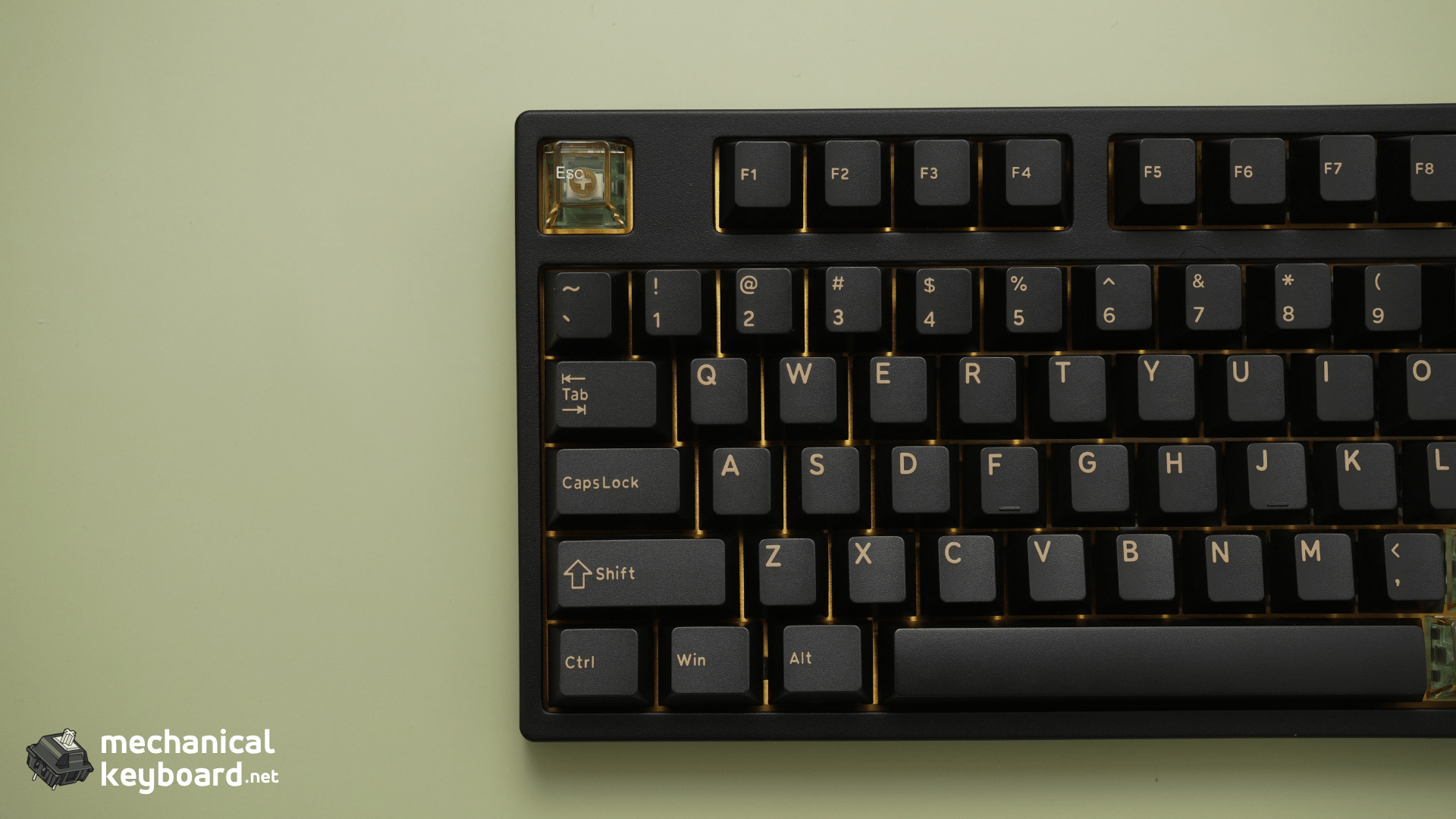
- Design and Build Quality: Black Samurai Looks Fantastic
- Gateron Magnetic Jade Pro Switches: A Fantastic Typing Experience
- Keydous NJ98-CP V4 Sound Test: Creamy Right Out of the Box
- Magnetic Docking Screen: Surprisingly Useful
- Software and Web Driver: Functional, but Needs Improvement
- Gaming Performance: Good in Wired and Wireless Modes
- Connectivity: Wired, 2.4GHz and Bluetooth Tested
- Is the Keydous NJ98-CP V4 a Full-Size Hall Effect Keyboard?
- Is the NJ98-CP V4 Good for Typing and Gaming?
- What Could Keydous Improve?
- Keydous NJ98-CP V4 Pros and Cons
- Is the Keydous NJ98-CP V4 Worth Buying?
- Final Verdict
- Frequently Asked Questions
But what impressed me most wasn’t the advertised 8,000Hz polling rate or the magnetic display.
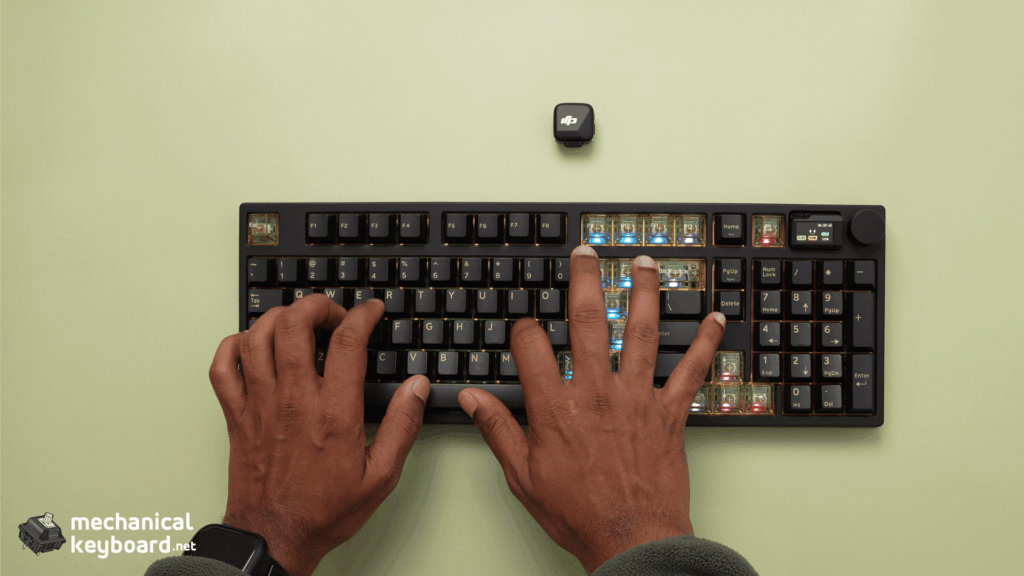
It was the typing experience.
I’ve been using the Keydous NJ98-CP V4 Black Samurai edition with a brass plate and Gateron Magnetic Jade Pro linear switches, and the combination feels fantastic. The switches are exceptionally smooth, the stock sound is beautifully creamy, and the keyboard feels premium right out of the box.
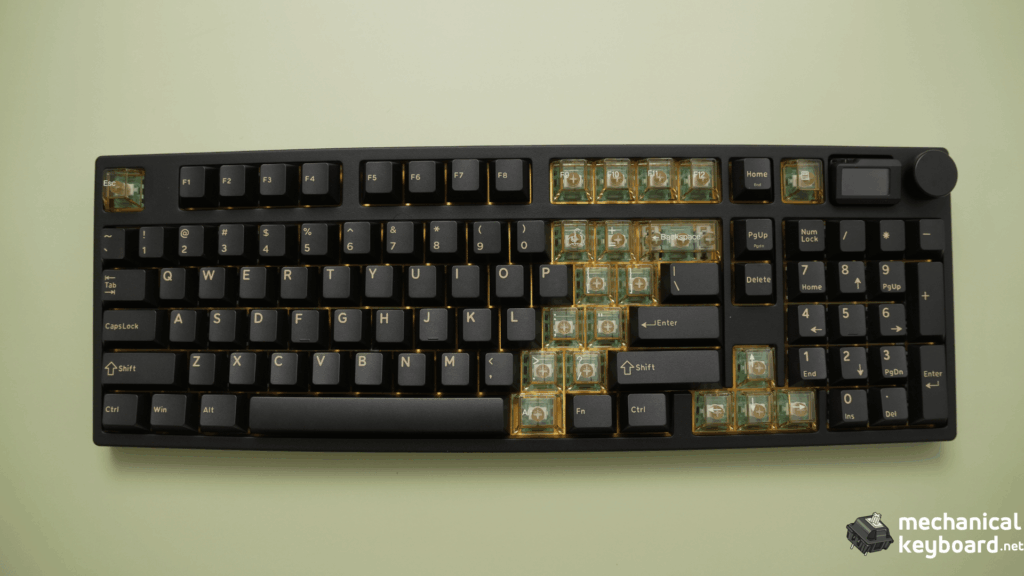
The 98-key layout is practical, the stabilizers are impressively quiet, and the magnetic screen is a definite conversation starter.
It’s not perfect, though. The software can feel sluggish, and I encountered an installation issue during my initial setup.

So, is the Keydous NJ98-CP V4 worth buying? After spending time typing, gaming and exploring its features, here’s my experience.
Review disclosure: Keydous provided the NJ98-CP V4 used in this review. All opinions are based on my own experience with the keyboard, and the company did not determine the verdict.
Keydous NJ98-CP V4: Quick Verdict
The Keydous NJ98-CP V4 gets a strong recommendation from me, especially if you’re looking for a Hall Effect keyboard that doesn’t sacrifice everyday typing comfort for gaming features.
My Black Samurai configuration stands out for three reasons: its excellent stock sound, premium-feeling construction and versatile 98-key layout.
The Gateron Magnetic Jade Pro switches are smooth and stable, and I didn’t notice any distracting stabilizer rattle. The brass plate complements the design beautifully, while the included translucent keycaps give the keyboard an even more distinctive look.
The magnetic screen is useful for checking battery and connection information, and uploading custom images was surprisingly easy.
Gaming performance was good in my experience, and all three connection modes worked without noticeable responsiveness issues.
My biggest complaint is the software. While the settings are straightforward once everything is working, the interface occasionally feels sluggish, and installation wasn’t entirely smooth.
What I liked most: Creamy stock sound, excellent switches, sturdy build quality, practical layout and customizable screen.
What could be better: Software responsiveness, driver installation experience and keycaps that tend to attract finger oils.
Who should buy it: Anyone looking for a numpad-equipped magnetic keyboard that feels equally at home during gaming and everyday productivity.
Keydous NJ98-CP V4 Specifications
| Specification | Details |
|---|---|
| Model | Keydous NJ98-CP V4 HE |
| Reviewed colour | Black Samurai |
| Layout | 98-key compact full-size |
| Switches tested | Gateron Magnetic Jade Pro Linear |
| Plate | Brass |
| Keycaps | Double-shot PBT, Cherry profile |
| Connectivity | USB-C wired, 2.4GHz wireless, Bluetooth |
| Advertised polling rate | 8,000Hz wired and 2.4GHz, 125Hz Bluetooth |
| Battery capacity | 8,000mAh |
| Display | Detachable magnetic docking screen |
| Screen customization | 3 GIFs and 5 static images |
| Knob | Volume control and mute |
| Dimensions | 403 × 138 × 40mm |
| Advertised weight | Approximately 1.4kg |
| Driver | Keydous desktop software and web driver |
| Operating systems | Windows, macOS and other supported platforms |
The specifications above are from Keydous. Different colourways, plate materials and switch configurations are available, so the typing sound and feel may differ from the exact version I’m reviewing.
Unboxing Experience: Ordinary Packaging, Nice Extras
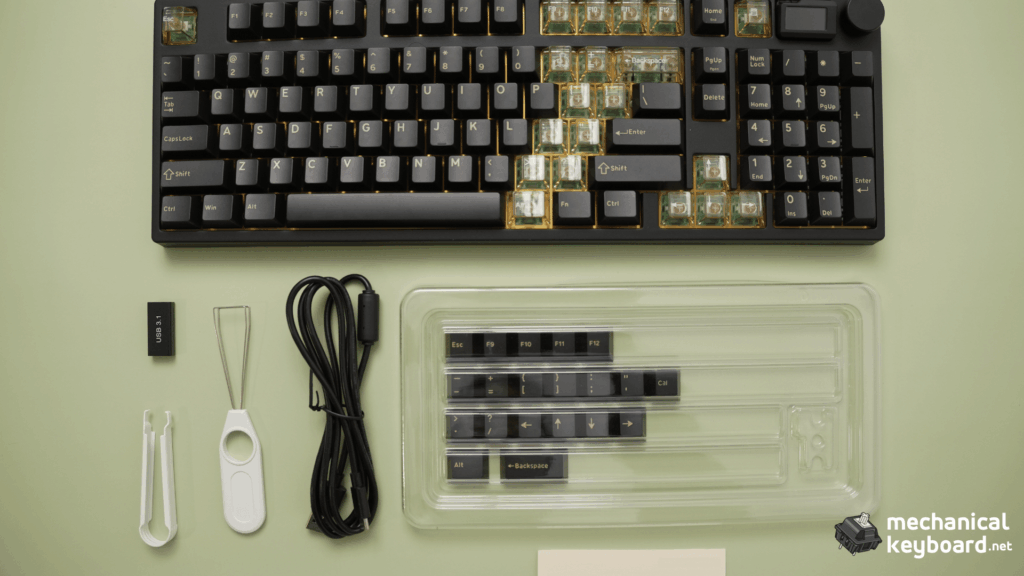
The unboxing experience was fairly straightforward.
Everything was presented as expected, but there wasn’t anything particularly exciting about the packaging itself. I’ve experienced keyboards with more elaborate presentations, and the NJ98-CP V4 doesn’t try to turn opening the box into a premium event.
However, the Black Samurai edition has a nice surprise.
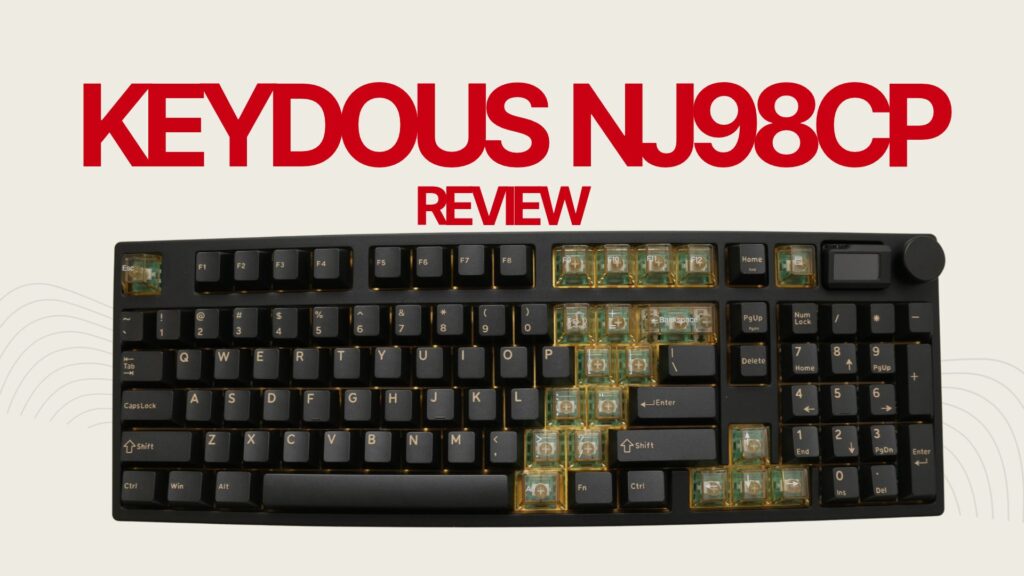
Alongside the keyboard and standard accessories, my unit included 19 additional translucent keycaps.
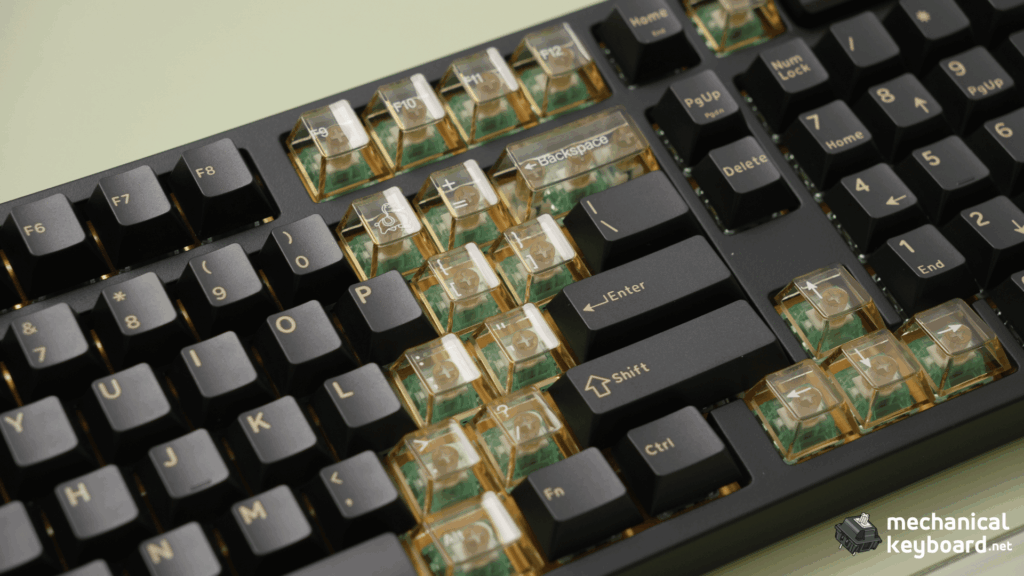
These are easily one of my favourite things about this particular version.
The translucent, tea-coloured appearance contrasts beautifully with the dark Black Samurai body, giving the keyboard a more distinctive look.
You can change the appearance without immediately spending money on a new keycap set, which is always appreciated.
What’s included in the box?
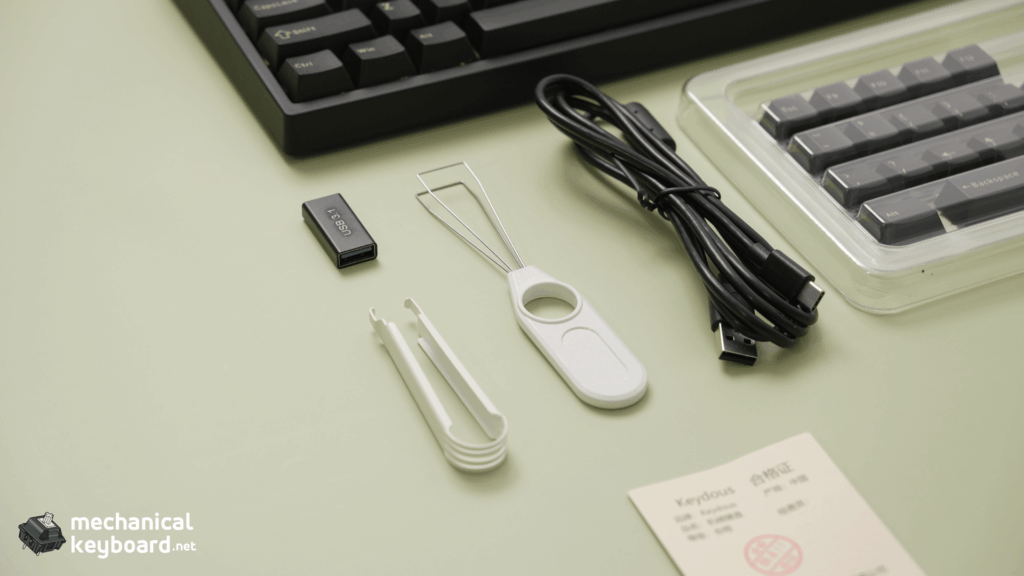
My review unit contained:
- Keydous NJ98-CP V4 keyboard
- Switch and keycap puller
- USB Type-C cable
- Dust cover
- 2.4GHz wireless dongle
- User manual
- 19 additional translucent keycaps
One thing worth noting is that the Black Samurai variant doesn’t include Mac-specific keycaps. Some of the other colourways do.
Overall, the packaging isn’t anything special, but the additional keycaps are a thoughtful inclusion that makes the Black Samurai edition more appealing.
Design and Build Quality: Black Samurai Looks Fantastic
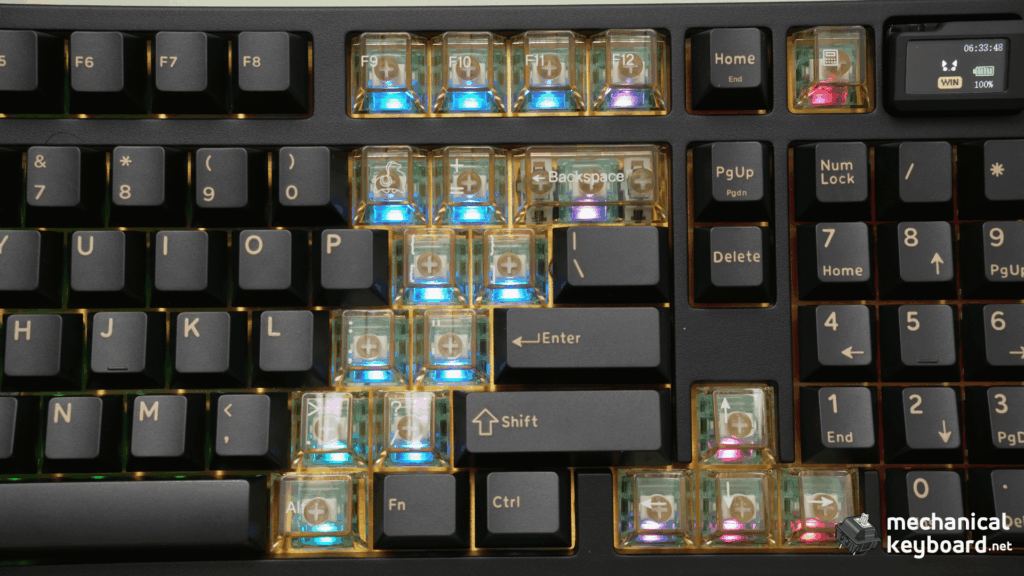
The first thing that caught my attention after removing the keyboard from its packaging was the design.
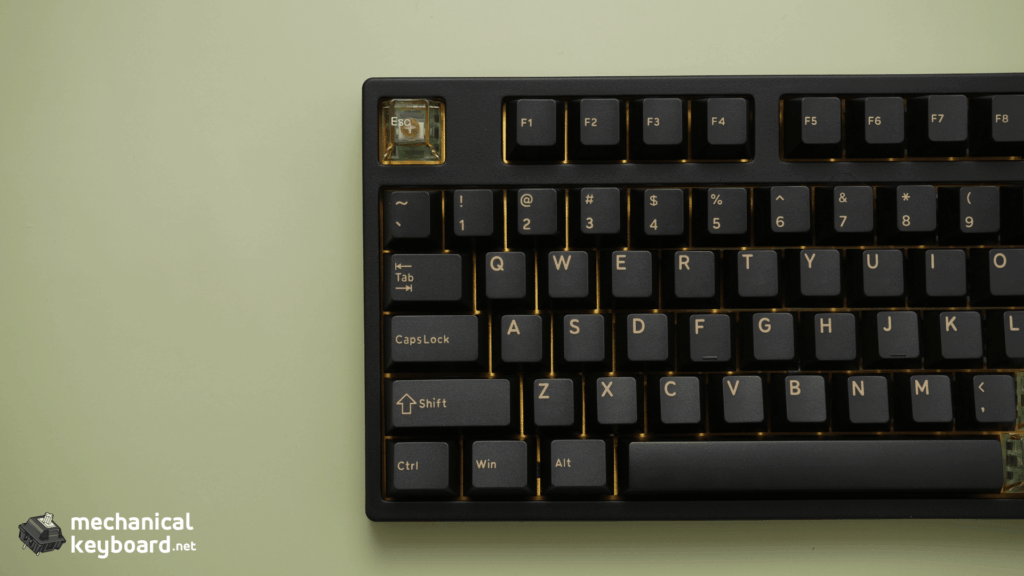
The Black Samurai edition looks fantastic.
The dark colour scheme gives it a clean, premium appearance, while the brass plate provides a subtle contrast that makes the keyboard more visually interesting.
I especially like how the overall design manages to look distinctive without being overly flashy.
When you pick it up, the keyboard feels sturdy and substantial.
There isn’t any immediate impression of cheap construction. Everything feels properly assembled, and the keyboard has the reassuring solidity I like from a premium mechanical keyboard.
The brass plate also contributes to the character of this particular configuration, both visually and in how the overall keyboard feels during typing.
A practical 98-key layout
One of the reasons I enjoy using the NJ98-CP V4 is its layout.
I’ve used plenty of compact keyboards, and while I appreciate the extra mouse space they provide, they aren’t always the most convenient for everyday tasks.
With the NJ98-CP V4, you get a dedicated numpad alongside the main typing area, function row and navigation controls.
That makes it much easier to switch between work and gaming without feeling like you’re sacrificing essential keys.
The layout felt natural to me.
I didn’t experience a significant adjustment period, and the keyboard was comfortable to use for everyday typing.
It’s the kind of layout I can see myself sticking with long-term.
The magnetic screen adds personality
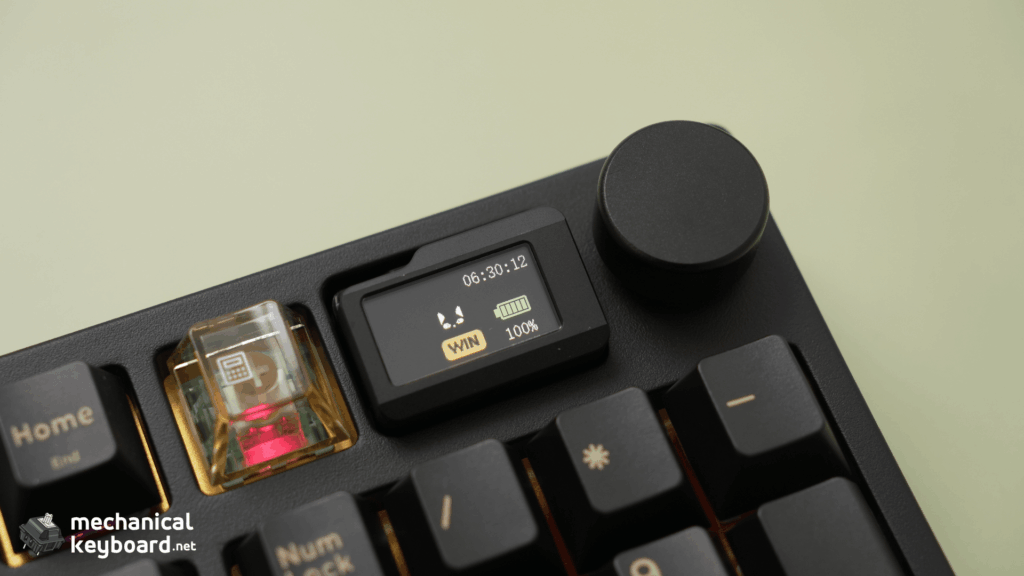
One of the most interesting features of the Keydous NJ98-CP V4 is its detachable magnetic docking screen. Unlike a traditional built-in display, this screen can be easily removed and reattached using its magnetic connection. It snaps neatly into place without any complicated installation, making it a unique and convenient addition to the keyboard.
Beyond its appearance, the display shows useful information such as the time, battery level, connection mode, Caps Lock and Num Lock status. It also includes a built-in calculator and supports custom images and GIFs, making it both functional and a definite conversation starter.
It sits beside the control knob and gives the NJ98-CP V4 a distinct appearance compared with many other magnetic gaming keyboards.
It’s also a conversation starter.
The screen makes the keyboard feel a little more interesting, especially when you start customizing what it displays.
I’ll cover its functionality in more detail below, but from an aesthetic perspective alone, it works surprisingly well.
Gateron Magnetic Jade Pro Switches: A Fantastic Typing Experience
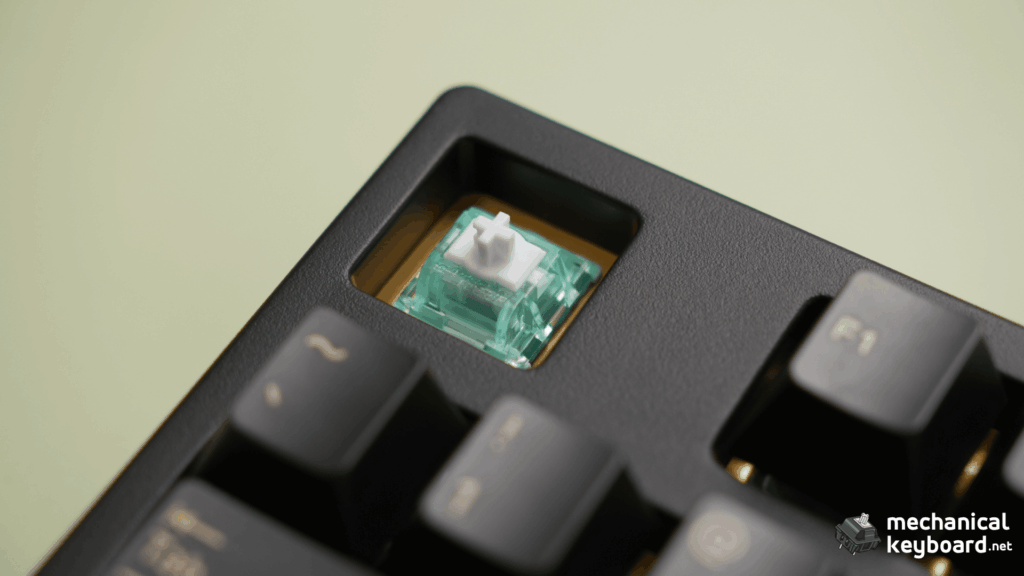
The Gateron Magnetic Jade Pro linear switches are easily one of the highlights of this keyboard.
I’ve reviewed and tested several different magnetic keyboards, and one thing I’ve learned is that Hall Effect technology alone doesn’t guarantee a pleasant typing experience.
Switch smoothness, key stability, stabilizer quality and overall sound tuning matter just as much.
Thankfully, Keydous has done a very good job with this configuration.
Smooth and consistent keypresses
The Magnetic Jade Pro switches feel extremely smooth.
There’s no noticeable scratchiness during the keypress, and the movement feels consistent from the beginning to the end of the stroke.
Another thing that impressed me was the stability.
I didn’t notice any meaningful switch wobble while typing, which helps make the entire experience feel more controlled and premium.
Every keypress feels pleasing, and I found myself enjoying the keyboard even during ordinary everyday tasks.
Stabilizers are excellent out of the box
The larger keys are equally impressive.
The stabilizers on my unit feel smooth, and I didn’t notice any distracting rattling from the spacebar or other stabilized keys.
This is something I pay particular attention to when reviewing keyboards.
You can have excellent switches, but if the spacebar rattles or feels inconsistent, it can ruin an otherwise enjoyable typing experience.
That hasn’t been the case here.
The NJ98-CP V4 feels remarkably well put together straight out of the box, without requiring me to modify the stabilizers or switches.
Keycaps: Comfortable, but attract oils
The Black Samurai keycaps feel comfortable and suit the keyboard’s design well.
They’re not something I would immediately want to replace for everyday use.
However, I did notice that they tend to attract finger oils.
If you’re particular about keeping your keyboard looking spotless, you may find yourself cleaning the keycaps more often.
It’s a relatively minor complaint, but something worth considering, especially with the dark colour scheme.
The additional translucent keycaps are a welcome bonus and give you more flexibility over the appearance.
Overall, I genuinely love the typing experience.
It’s good enough that I could see myself using this as my primary keyboard.
Keydous NJ98-CP V4 Sound Test: Creamy Right Out of the Box
If there’s one area where the NJ98-CP V4 exceeded my expectations, it’s the sound.
My configuration uses Gateron Magnetic Jade Pro switches paired with a brass plate, and the result is a beautifully creamy sound profile.
Each keypress has a smooth, pleasing character that makes typing genuinely enjoyable.
It doesn’t have the excessively sharp or aggressive sound that some gaming-focused keyboards produce.
Instead, the sound feels rounded and satisfying.
How does the NJ98-CP V4 sound?
I’d describe the stock sound as:
Creamy, smooth, consistent and satisfying.
The keys have a pleasing sound during normal typing, and the larger stabilized keys don’t introduce the distracting rattling that can sometimes spoil an otherwise good keyboard.
What’s particularly impressive is that this is the stock experience.
I haven’t needed to modify the keyboard to enjoy its sound.
There is always room to experiment with different compatible magnetic switches and acoustic modifications, but I wouldn’t consider modifications necessary to enjoy this configuration.
That’s a big positive.
Is it one of the best-sounding Hall Effect keyboards?
If you’re searching for a creamy Hall Effect keyboard, the NJ98-CP V4 deserves consideration.
Sound is subjective, and I wouldn’t claim it’s the best-sounding Hall Effect keyboard on the market without directly comparing a much wider selection under controlled conditions.
However, based on my experience, this is one of the more enjoyable stock magnetic keyboard sound profiles I’ve encountered.
For comparison, the Chilkey SF60 Diamond Edition I reviewed has a sharper, clackier stock sound with a firmer bottom-out feel.
The NJ98-CP V4 suits my preference for a creamier typing experience much better.
If you’re unfamiliar with these descriptions, our guide to thocky, creamy and clacky keyboard sounds explains how the different sound profiles compare.
The important takeaway is that the NJ98-CP V4 already sounds excellent in the configuration I tested.
Magnetic Docking Screen: Surprisingly Useful
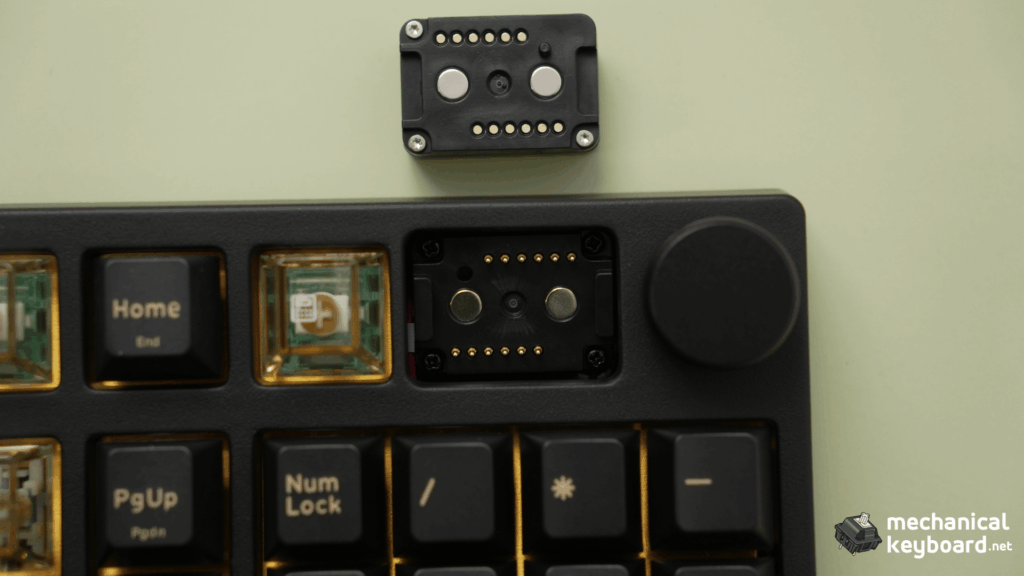
The magnetic docking screen is more than just a decorative feature.
By default, it provides several useful pieces of information, including the current time, battery level, connection mode, Caps Lock status and Num Lock status.
Having this information visible without opening software is convenient.
The screen also includes a built-in calculator, which is an interesting addition to a keyboard that already has a dedicated numpad.
I wouldn’t buy the keyboard solely for its calculator, but it’s a neat extra.
Custom images and GIFs
One feature I particularly enjoyed was the ability to customize the screen.
Keydous allows up to eight uploaded images or animations, consisting of:
- 3 animated GIFs
- 5 static images
You can upload your preferred images and switch between them.
I tried this myself, and the process was surprisingly simple.
The software made it easy to upload the images I wanted, and customization didn’t require much effort.
This is the sort of feature that could easily have been unnecessarily complicated, so I was pleased with how straightforward it felt.
Whether you want to display an animation, a favourite image or something that complements your desk setup, the screen adds personality to the keyboard.
Volume knob and controls
The knob is just as straightforward.
Rotating it adjusts the system volume.
Pressing it mutes the audio, and pressing it again unmutes it.
That’s all I really need from a dedicated volume control.
It’s simple, convenient and works naturally during everyday use.
Together, the screen and knob make the NJ98-CP V4 feel more feature-rich without getting in the way of the typing experience.
Software and Web Driver: Functional, but Needs Improvement
The software is probably the weakest part of my overall experience with the NJ98-CP V4.
Not because the available settings are difficult to understand, but because the experience isn’t quite as polished as the physical keyboard.
The installation problem I encountered
During my initial setup, I ran into an error while installing the Keydous software.
I had initially attempted to install it on a drive other than my C: drive.
That was when the issue occurred.
After installing the software on my C: drive and accessing the web driver, everything started working correctly.
I didn’t capture the exact error message, so I can’t conclusively say the installation location caused the problem.
It’s simply what happened during my setup and how I eventually got everything working.
If you experience a similar issue, checking the installation location and trying the official web driver may be useful troubleshooting steps.
I wouldn’t treat installing to C: as a confirmed requirement, though.
How is the software to use?
Once everything was working, the actual settings were relatively straightforward.
I didn’t find myself struggling to understand the interface or locate the main controls.
The software provides access to the keyboard’s magnetic switch settings, key mapping, RGB configuration and other features.
However, the interface occasionally feels sluggish.
It’s noticeable, particularly when navigating the software, but it hasn’t been a major problem for me.
I would still like Keydous to improve the overall responsiveness and make installation more reliable.
The hardware feels premium, and the software should ideally match that experience.
You can find the appropriate software through the official Keydous driver download page.
Make sure you select the driver for the NJ98-CP V4 HE, rather than confusing it with the separate NJ98-CP V4S TMR model.
Gaming Performance: Good in Wired and Wireless Modes
Although the NJ98-CP V4 has become one of my favourite keyboards for typing, gaming is clearly an important part of its feature set.
It uses Hall Effect magnetic switches, which allow the keyboard to detect key travel through magnetic sensing.
Unlike a conventional mechanical switch that activates at a fixed physical point, compatible Hall Effect keyboards can offer adjustable actuation and Rapid Trigger.
If you’re unfamiliar with the technology, our Hall Effect keyboard explainer covers how magnetic switches work.
Wired gaming experience
I initially used the NJ98-CP V4 in wired mode because I wanted to take advantage of its advertised maximum polling-rate capability.
Keydous specifies support for up to 8,000Hz polling in wired mode.
In practical gaming, the keyboard performed well.
Keypresses felt consistent, and I didn’t encounter any obvious responsiveness problems that negatively affected my experience.
The smooth Magnetic Jade Pro switches were also pleasant to use during gaming.
2.4GHz wireless gaming
Keydous also advertises up to 8,000Hz polling over its 2.4GHz wireless connection.
I tried the keyboard over 2.4GHz, and it worked really well.
The experience felt responsive, and I didn’t notice any meaningful delay compared with my normal expectations for a gaming keyboard.
That makes the wireless functionality particularly appealing.
You can keep your desk free from an additional cable while still using the keyboard’s gaming-oriented wireless mode.
A note about 8,000Hz polling
It’s worth making one distinction here.
Although Keydous advertises an 8,000Hz polling rate in wired and 2.4GHz modes, I haven’t independently verified that figure using dedicated testing equipment.
Similarly, I haven’t performed controlled input-latency measurements.
My assessment is based on how the keyboard behaved during real gaming sessions.
From that perspective, the experience was positive.
However, I wouldn’t claim a specific latency advantage over competing keyboards without proper measurements.
Connectivity: Wired, 2.4GHz and Bluetooth Tested
The NJ98-CP V4 supports three connection modes:
- USB-C wired
- 2.4GHz wireless
- Bluetooth
I tested all three, and the overall experience was excellent.
Switching to wireless didn’t introduce any obvious issues during my normal use, and the keyboard responded quickly when waking from inactivity.
Wake-up behaviour
One thing that particularly impressed me was how quickly the keyboard wakes.
With some wireless keyboards, you can experience a short delay after they’ve been idle.
The NJ98-CP V4 felt almost immediate in my usage.
I didn’t notice any frustrating wake-up delays or connection interruptions during the time I spent testing it.
This makes it convenient to use throughout the day, particularly if you’re frequently moving between tasks.
Of course, this reflects my experience rather than a measured wake-up latency.
Battery capacity and endurance
The NJ98-CP V4 includes an 8,000mAh battery, according to Keydous.
That’s a substantial advertised capacity, but capacity alone doesn’t tell you exactly how long a keyboard will last between charges.
Battery life depends on factors such as RGB brightness, display usage, wireless connection mode and polling settings.
Keydous publishes laboratory battery figures, but I haven’t completed my own controlled endurance test.
For that reason, I won’t give a specific number of days or hours based on personal usage.
What I can say is that wireless connectivity and wake-up behaviour were both excellent during my testing.
Is the Keydous NJ98-CP V4 a Full-Size Hall Effect Keyboard?
This is an important distinction, particularly if you’re searching for a full-size magnetic keyboard.
The NJ98-CP V4 uses a 98-key compact full-size layout, often grouped with 96% or 1800-compact keyboards.
It isn’t a traditional 104-key full-size keyboard.
However, it retains much of the functionality people associate with a full-size board, including the dedicated numpad.
That makes it an interesting alternative if you want a full-size Hall Effect keyboard but would prefer something that occupies slightly less desk space.
Why choose a 98-key layout?
The biggest advantage is versatility.
Smaller magnetic keyboards, particularly 60% and 65% models, are excellent for maximizing mouse space.
But they aren’t always ideal for users who regularly work with numbers, spreadsheets or applications that benefit from a numpad.
The NJ98-CP V4 offers a middle ground.
You still have a relatively compact layout while retaining most of the dedicated keys needed for normal work.
In my experience, that makes it considerably easier to use as an everyday keyboard.
The tradeoff is that it takes up more space than a compact 75% or 60% keyboard.
If your priority is maximizing mouse movement for competitive FPS gaming, a smaller layout may be more appropriate.
But if you want a magnetic keyboard for both productivity and gaming, the NJ98-CP V4 is a compelling choice.
Is the NJ98-CP V4 Good for Typing and Gaming?
This is where I think the keyboard really shines.
Many Hall Effect keyboards are marketed primarily toward competitive gaming, with an emphasis on polling rates, adjustable actuation and Rapid Trigger.
Those features can be useful, but they don’t automatically make a keyboard enjoyable for everyday use.
With the NJ98-CP V4, I feel like Keydous has achieved a good balance.
The magnetic switches provide gaming-focused capabilities, while the smooth typing feel, creamy sound, numpad and volume knob make the keyboard comfortable for normal desktop tasks.
I particularly appreciate that the keyboard doesn’t feel like something I would only want to use while playing games.
I could easily see myself keeping it connected throughout the day for work, typing and gaming.
And that’s one of the strongest compliments I can give a keyboard.
What Could Keydous Improve?
Despite how much I enjoy the NJ98-CP V4, there are still a few areas I’d like to see improved.
1. Software polish
The software works, but the occasional sluggishness makes it feel less refined than the hardware.
Improving responsiveness and installation reliability would make a noticeable difference.
2. Keycap maintenance
The Black Samurai keycaps look great, but they tend to attract finger oils.
It’s not a deal-breaker, but they may require more frequent cleaning to maintain their appearance.
3. Mac keycap availability
The Black Samurai variant doesn’t include Mac-specific keycaps.
Although the keyboard supports Mac usage, including the additional keycaps would have been a nice touch.
4. A more memorable unboxing experience
The packaging is functional, but fairly ordinary.
Considering how premium the keyboard itself feels, a slightly more refined presentation would have been welcome.
None of these issues ruined my experience, but they’re worth knowing before buying.
Keydous NJ98-CP V4 Pros and Cons
| Pros | Cons |
|---|---|
| Premium, sturdy build | Software occasionally feels sluggish |
| Excellent Black Samurai design | Initial software installation issue |
| Beautifully creamy stock sound | Keycaps attract finger oils |
| Smooth Gateron Magnetic Jade Pro switches | No Mac-specific keycaps with Black Samurai |
| No noticeable stabilizer rattle | Ordinary unboxing experience |
| Practical 98-key layout | Larger footprint than compact gaming layouts |
| 19 additional translucent keycaps | |
| Easy screen customization | |
| Useful calculator and volume knob | |
| Good wired and wireless gaming experience | |
| Fast wake-up during testing | |
| Three connection modes |
Is the Keydous NJ98-CP V4 Worth Buying?
Yes. Based on my experience, the NJ98-CP V4 is an excellent option if you’re looking for a Hall Effect keyboard that combines gaming features with a genuinely enjoyable typing experience.
It’s especially appealing in the Black Samurai configuration I tested.
The brass plate and Gateron Magnetic Jade Pro switches produce a creamy stock sound that I really enjoy, while the overall build feels sturdy and premium.
The magnetic screen adds a unique touch, the knob is useful, and all three connection modes worked well during my testing.
The software could certainly use more polish, but it hasn’t been enough to overshadow the strengths of the keyboard.
Keydous listed the NJ98-CP V4 HE at a starting price of $139.99 USD when checked on October 15, 2026. The actual price will depend on the selected configuration, region and any ongoing promotions.
For the overall package, I think it offers compelling value, particularly for anyone who wants a compact numpad-equipped magnetic keyboard.
Final Verdict
The Keydous NJ98-CP V4 is one of those keyboards that makes a strong impression once you start using it.
Its design initially caught my attention, but the typing experience is what genuinely won me over.
The Gateron Magnetic Jade Pro switches feel excellent, the brass plate configuration sounds beautifully creamy, and the keyboard feels premium enough that I could see myself using it as my primary board.
I also like how practical it is.
The 98-key layout works well for everyday tasks, the magnetic screen adds personality, and the three connection modes provide plenty of flexibility.
The software isn’t perfect, and the Black Samurai keycaps do require some maintenance, but those drawbacks haven’t significantly changed how much I’ve enjoyed using it.
If you’re looking for a Hall Effect keyboard with a numpad, excellent stock typing sound and gaming functionality, the Keydous NJ98-CP V4 deserves a place on your shortlist.
For more options, check out our Best Hall Effect Keyboards guide.
Frequently Asked Questions
Is the Keydous NJ98-CP V4 a full-size keyboard?
Not exactly. It uses a 98-key compact full-size layout rather than a traditional 104-key full-size arrangement. However, it retains a dedicated numpad and many of the keys found on a full-size keyboard.
Is the Keydous NJ98-CP V4 good for gaming?
Yes, based on my experience. I tested the keyboard in wired and 2.4GHz wireless modes, and gaming performance was good. I didn’t notice obvious responsiveness problems, although I haven’t independently measured input latency.
Does the Keydous NJ98-CP V4 support 8,000Hz wireless polling?
According to Keydous, the keyboard supports up to 8,000Hz polling in both wired and 2.4GHz modes. Bluetooth operates at a lower rate. I tested the wireless connection successfully but didn’t independently verify the polling frequency.
How does the Keydous NJ98-CP V4 sound?
My Black Samurai review unit with a brass plate and Gateron Magnetic Jade Pro switches has a creamy, smooth stock sound. I didn’t notice distracting stabilizer rattle or switch wobble.
Can you customize the NJ98-CP V4 screen?
Yes. The magnetic display supports up to three GIFs and five static images. I tested the upload process and found it straightforward.
Does the NJ98-CP V4 support Bluetooth?
Yes. It supports Bluetooth, 2.4GHz wireless and USB-C wired connectivity. All three connection modes worked well during my testing.
Does the NJ98-CP V4 have a calculator?
Yes. The magnetic docking screen has a built-in calculator, along with status information such as battery level, time, connection mode and lock-key indicators.
Is the Keydous NJ98-CP V4 good for typing?
Absolutely, in my experience. The Magnetic Jade Pro switches feel smooth and stable, and the creamy stock sound makes the keyboard particularly enjoyable for everyday typing.
Does the Black Samurai edition include Mac keycaps?
No. The Black Samurai edition doesn’t include Mac-specific keycaps, although some other NJ98-CP V4 colourways do.
Is the NJ98-CP V4 better than a 75% Hall Effect keyboard?
It depends on your priorities. The NJ98-CP V4 provides a dedicated numpad and more direct access to commonly used keys. A 75% keyboard takes up less desk space, which may be preferable for competitive gaming or smaller setups.
Is the Keydous NJ98-CP V4 worth it?
For me, yes. The combination of smooth magnetic switches, creamy typing sound, premium-feeling construction, practical layout and wireless connectivity makes it an appealing all-round keyboard. Its main weakness is the software experience.