

Keyboard polling rate is how often your keyboard reports its state to your computer, measured in Hz (times per second). A 1000Hz keyboard reports 1,000 times per second, once every 1ms. An 8000Hz keyboard reports 8,000 times per second, once every 0.125ms. The marketing claims this makes your inputs faster. The reality is more complicated than that, and for most people, it makes no difference at all.
- Quick Takeaways
- What Is Keyboard Polling Rate?
- Scan Rate vs Polling Rate: The Distinction That Changes Everything
- What Is True 8K Polling Rate?
- The 0.125ms Latency Myth
- 1000Hz vs 8000Hz: What the Numbers Actually Mean
- Does 8K Polling Rate Cause CPU Lag or FPS Drops?
- Wireless 8K Polling in 2026: The Breakthrough That Matters
- What Polling Rate Do Pro Gamers Use?
- How to Check Your Keyboard Polling Rate
- Best 8K Polling Rate Keyboards in 2026
- Do You Need 8K Polling Rate?
- Frequently Asked Questions
- Our Verdict
This guide explains what keyboard polling rate actually means, why the scan rate vs polling rate distinction matters more than any spec sheet will tell you, what 8K polling rate does and does not do, and whether any of it is worth caring about in 2026.
Quick Takeaways
- Polling rate is how often your keyboard sends input data to your PC. Higher Hz means more frequent reports and lower theoretical latency.
- 1000Hz (1ms) is the current standard and sufficient for all typing and the vast majority of gaming
- 8000Hz (0.125ms) reduces theoretical latency by 0.875ms over 1000Hz – below the threshold of human perception for keyboard input
- Scan rate and polling rate are different things. A keyboard advertising 8K polling may not be scanning at 8K internally
- True 8K polling, as defined by Wooting, requires the keyboard to have a fresh report ready at the exact moment of each USB poll
- 8K polling can cause minor CPU overhead and FPS instability on some systems
- In 2026, wireless 8K polling is now real – Keychron Q Ultra and V Ultra achieved it at CES 2026
- For competitive FPS gaming with Hall Effect rapid trigger, 8K polling provides a small but genuine technical benefit
What Is Keyboard Polling Rate?
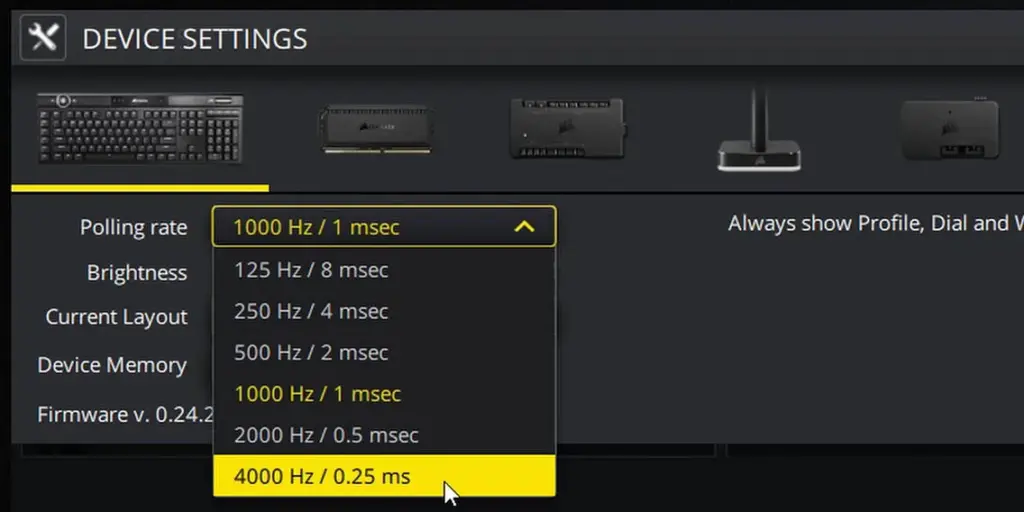
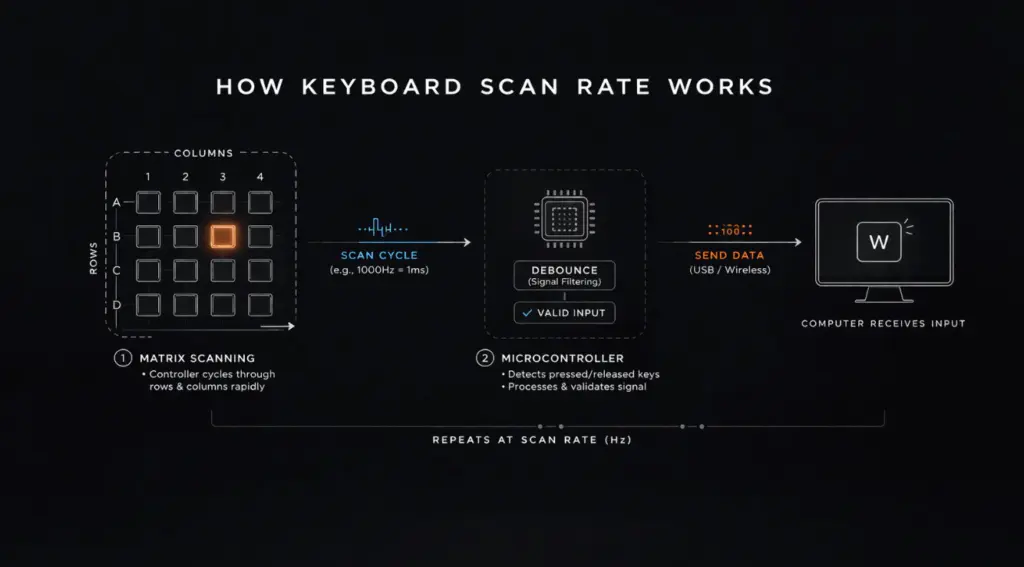
Every keyboard runs on a simple loop: check which keys are pressed, package that information, send it to the computer, repeat. Polling rate is the frequency of that last step, the sending. At 125Hz, your keyboard sends an update every 8ms. At 1000Hz, every 1ms. At 8000Hz, every 0.125ms.
The polling rate determines the maximum frequency at which your computer can know a key was pressed. If you press a key at the exact wrong moment in a 1000Hz cycle, your system might not register it for up to 1ms after the physical press. At 8000Hz, that worst-case wait drops to 0.125ms.
| Polling Rate | Reports Per Second | Interval Between Reports | Typical Use |
|---|---|---|---|
| 125Hz | 125 | 8ms | Budget / office keyboards |
| 500Hz | 500 | 2ms | Older gaming keyboards |
| 1000Hz | 1,000 | 1ms | Current standard for gaming |
| 2000Hz | 2,000 | 0.5ms | High-end gaming (2024+) |
| 4000Hz | 4,000 | 0.25ms | Premium gaming (2025+) |
| 8000Hz | 8,000 | 0.125ms | Flagship gaming (2025-2026) |
Most mid-to-high-end mechanical keyboards since 2020 ship at 1000Hz by default. The jump to 8000Hz is a new frontier, with brands like Keychron, Wooting, and Razer pushing it as a premium differentiator in 2025 and 2026.
Scan Rate vs Polling Rate: The Distinction That Changes Everything
This is the part almost every polling rate article skips, and it is the most important thing to understand when evaluating any 8K keyboard claim.
Scan rate is how often the keyboard’s internal firmware checks each key for a state change internally. Polling rate is how often the keyboard reports that state to your computer over USB. They are two separate processes and both must be high for a keyboard to deliver genuinely low latency.
| Scan Rate | Polling Rate | |
|---|---|---|
| What it measures | Internal key detection speed | USB reporting frequency |
| Where it happens | Inside keyboard firmware | Over USB connection to PC |
| Who controls it | Keyboard firmware / PCB | USB descriptor + firmware |
| What happens if it is low | Key presses detected slowly internally | Reports sent infrequently to PC |
A keyboard can scan its keys at 8000Hz internally but only report at 1000Hz. It can also advertise 8000Hz polling while generating that report slightly after the USB poll window has already started, meaning the data is actually delivered one full cycle late. This is the gap between marketing 8K and what Wooting calls true 8K polling rate.
What Is True 8K Polling Rate?
Wooting introduced this term when launching the 80HE, and it is worth understanding precisely. True 8K polling means the keyboard has a fresh, up-to-date report ready at the exact microsecond the USB bus polls for input, every single time, at 0.125ms intervals. Most keyboards that claim 8K polling do not achieve this because they are working asynchronously: the scan happens on its own timer, the USB poll happens on its own timer, and they are not perfectly synchronised.
When these two timers are not in sync, the report that gets delivered to your computer may already be one scan cycle old by the time it is sent. The effective latency is then the sum of one scan cycle plus the polling interval, not just the polling interval alone. Wooting designed the entire firmware architecture of the 80HE around eliminating this mismatch, which is why they are one of the only brands to explicitly use the phrase true 8K rather than just advertising the polling rate number.
For most users, this distinction is academic. For competitive FPS players where Hall Effect rapid trigger and sub-millisecond reset detection matter, it is the difference between a genuine performance advantage and a spec sheet number.
The 0.125ms Latency Myth
Here is the claim you will see everywhere: 8000Hz polling rate equals 0.125ms latency. It sounds like simple maths. It is not accurate.
Keyboard latency is not determined by polling rate alone. It is the sum of a chain of steps: key press physically occurs, switch actuates, firmware scans and detects the change, firmware packages the report, USB bus transmits it, your PC receives and processes it, the operating system queues it, and your game or application reads it. Polling rate only affects one of those steps. Research shows that for keyboard input specifically, the debounce algorithm, firmware scan loop, and OS input queue typically contribute more total latency than the polling interval itself.
The practical implication: a keyboard with a well-optimised firmware and a 1000Hz polling rate will often feel more responsive than a keyboard with a poorly optimised firmware running at 8000Hz. This is why brands like Wooting focus on the entire input pipeline, not just the polling rate spec.
73% of gamers believe higher polling rate directly equals lower latency. The reality is that polling rate is one factor in a longer chain, and for keyboard input it is rarely the bottleneck.
1000Hz vs 8000Hz: What the Numbers Actually Mean
To understand whether 8K polling rate is worth it for you, it helps to put the numbers in context. The theoretical latency improvement from 1000Hz to 8000Hz is 0.875ms. That is the worst-case reduction in the waiting time between a keypress and the USB report being sent.
| Comparison | 1000Hz | 8000Hz | Difference |
|---|---|---|---|
| Poll interval | 1ms | 0.125ms | 0.875ms |
| Worst-case poll wait | 1ms | 0.125ms | 0.875ms |
| Average poll wait | 0.5ms | 0.0625ms | 0.4375ms |
| Typical total input latency | 5-12ms | 4-11ms | ~1ms |
| Human perception threshold | ~13ms for visual, ~5ms for tactile | ||
| CPU overhead | Minimal | 8x higher than 1000Hz | Potentially relevant |
The 0.875ms theoretical gain sits well below the threshold of human perception for tactile input. In blind testing, experienced gamers cannot reliably identify whether a keyboard is polling at 1000Hz or 8000Hz. This does not mean the spec is meaningless, but it does mean the benefit is real only in very specific conditions: competitive FPS at the highest level, particularly when combined with Hall Effect rapid trigger where cumulative micro-latency differences compound.
Does 8K Polling Rate Cause CPU Lag or FPS Drops?
Yes, potentially, and this is something Keychron acknowledged directly when they launched their 8K lineup. Running a keyboard at 8000Hz forces your CPU to process input interrupt requests 8 times more often than at 1000Hz. On modern gaming CPUs with multiple cores this overhead is effectively zero. But on CPU-limited systems, particularly older machines or those running CPU-heavy titles at maximum settings, the additional interrupt load can cause measurable FPS instability.
This is why Keychron ships the Q Ultra and V Ultra at 1000Hz by default, with 8K polling as an opt-in setting. Their recommendation is to only enable 8K if you have a newer generation system that can handle the additional interrupt frequency without impacting frame pacing. For competitive players with high-end builds, enabling it is fine. For everyone else, 1000Hz remains the better default.
Wireless 8K Polling in 2026: The Breakthrough That Matters
Until CES 2026, wireless keyboards were hard-capped at 1000Hz polling. Bluetooth physically cannot exceed this. The only way to get wireless gaming performance close to wired was a proprietary 2.4GHz dongle, which most brands ran at 1000Hz.
Keychron changed this with the Q Ultra and V Ultra series announced at CES 2026. These are the first mainstream keyboards to achieve 8000Hz polling over a 2.4GHz wireless connection. The Q Ultra also features a 660-hour battery life on a single charge, which is possible because it runs ZMK firmware, a wireless-first operating system built on the Zephyr RTOS, replacing the QMK firmware Keychron had used previously.
This matters for two reasons. First, the gap between wired and wireless input latency is now effectively closed at the hardware level. Second, if you are a competitive gamer who previously used wired keyboards purely for polling rate reasons, a wireless option now exists that matches the spec. The Keychron Q Ultra starts at around $200 depending on layout and switch choice.
For more on how Hall Effect technology works in tandem with polling rate on boards like the Wooting 80HE, read our full guide: What Is a Hall Effect Keyboard?
What Polling Rate Do Pro Gamers Use?
For keyboards specifically, 1000Hz remains the overwhelming standard across professional esports in 2026. The performance gains from higher keyboard polling rates are small enough that most pros have not changed. The situation is different for mice, where 2000Hz and 4000Hz polling is increasingly common in Valorant, CS2, and Apex Legends professional circuits because mouse precision at high DPI compounds the benefit of more frequent position reports.
A handful of pro players on sponsored deals with Wooting use the 80HE at its maximum polling rate, but the competitive rationale there is the rapid trigger feature, not the polling rate itself. The polling rate happens to come along for the ride.
If you are optimising your setup for competitive play, the better investment of your time is checking your keyboard’s debounce settings and firmware version rather than chasing a higher polling rate. A well-tuned 1000Hz keyboard will outperform a poorly tuned 8000Hz keyboard in real-world input latency.
How to Check Your Keyboard Polling Rate
Testing your actual polling rate takes about two minutes and is worth doing if you want to verify what your keyboard is actually reporting versus what the spec sheet claims.
Method 1: Keyboard Inspector (Windows)
- Download Keyboard Inspector from GitHub (open source, no install required)
- Run it and press any key repeatedly for 5-10 seconds
- Read the average report interval at the bottom of the window
- 1000Hz will show approximately 1.0ms average interval; 8000Hz will show approximately 0.125ms
Method 2: Online Polling Rate Tester
- Open typequicker.com/tools/keyboard-polling-rate-test in Chrome
- Press and hold any key for 3-5 seconds
- The tool will report your estimated polling rate based on input event timing
Note: browser-based testers are less precise than native tools because browser input event timing has its own overhead. Use a native tool for accurate results if you are debugging a specific latency issue.
If your keyboard supports polling rate switching, check your keyboard’s manual for the toggle shortcut. Many gaming keyboards use Fn + a number key. Keychron 8K boards use their Keychron software to switch between 1000Hz and 8000Hz modes.
Best 8K Polling Rate Keyboards in 2026
If you have decided 8K polling is worth having, here are the keyboards that actually deliver it.
Keychron Q Ultra
The most significant 8K keyboard launch of 2026. The Q Ultra brings 8000Hz polling in both wired and wireless modes, uses Hall Effect switches with rapid trigger, runs ZMK firmware, and offers a 660-hour battery life. Available in 75%, 80%, and 100% layouts. This is the keyboard that made 8K wireless mainstream. If you want the full spec breakdown, the Q Ultra is also covered in our Best Mechanical Keyboard for Mac guide alongside its wireless performance on macOS.
Wooting 80HE
The board that defined what true 8K polling actually means. The 80HE uses Lekker Hall Effect switches, achieves synchronous 8K polling (not interpolated), and pairs it with rapid trigger as low as 0.1mm. Wired only, but at the time of writing it remains the most technically rigorous 8K implementation available. If polling rate matters to you for competitive reasons, the Wooting 80HE is the reference point.
Razer Huntsman V3 Pro
Razer’s Gen-3 optical switches run on HyperPolling at up to 8000Hz. Unlike Hall Effect boards, the Huntsman uses optical actuation, which means no adjustable actuation point but an extremely fast fixed response. A solid option if you prefer optical and want 8K polling without the Hall Effect premium.
For a full comparison of the switch technologies in these boards, see our guide: Optical vs Mechanical vs Magnetic Switches
Do You Need 8K Polling Rate?
For almost everyone, no. Here is the honest breakdown by use case.
| Use Case | Do You Need 8K? | What Actually Matters |
|---|---|---|
| Typing / writing | No | Switch feel, actuation weight |
| Casual gaming | No | 1000Hz is more than enough |
| Competitive FPS (mid-level) | No | Rapid trigger matters more |
| Competitive FPS (pro / top 1%) | Marginal benefit | True 8K + rapid trigger combined |
| Wireless gaming | Now possible | Keychron Q Ultra is the option |
| Mac / general use | No | Mac-compatible layout and BT stability |
The one genuine use case where 8K polling rate provides a measurable benefit is competitive FPS gaming, specifically in combination with Hall Effect rapid trigger, where the cumulative micro-latency improvements across polling rate, scan rate, debounce, and rapid trigger sensitivity all add up. Even then, the benefit is in the range of 1-2ms total, and the bigger gains usually come from reducing debounce time and optimising rapid trigger sensitivity rather than chasing polling rate numbers.
If you are spending $200+ on a keyboard anyway, getting 8K polling included is a reasonable feature to have. Paying a premium specifically for 8K polling rate, or upgrading a perfectly good 1000Hz keyboard just for the polling rate, is not worth it for the vast majority of people.
For context on how keyboard input latency compares to switch actuation speed, read our full breakdown: Linear vs Tactile vs Clicky Switches
Frequently Asked Questions
Does polling rate matter for keyboard typing?
No. For typing, polling rate makes zero practical difference. The human hand is far too slow for the 0.875ms interval between 1000Hz and 8000Hz polls to register. Polling rate only becomes relevant at the extreme end of competitive gaming where reaction times are measured in milliseconds.
Can you feel the difference between 1000Hz and 8000Hz?
In controlled testing, the overwhelming majority of users cannot feel any difference between 1000Hz and 8000Hz polling in real-world use. The theoretical latency reduction is 0.875ms, which is below the threshold of human perception for keyboard input.
Does 8000Hz keyboard polling cause CPU lag or FPS drops?
Yes, potentially. Running at 8000Hz forces your CPU to process input reports 8 times more frequently than at 1000Hz. On most modern gaming PCs this overhead is negligible, but on CPU-limited systems it can cause minor FPS instability. Keychron ships their 8K keyboards defaulting to 1000Hz for this reason.
What polling rate do pro gamers use?
Most professional gamers use 1000Hz polling rate for keyboards. 1000Hz is the standard across virtually all competitive play because the speed advantage of higher keyboard polling rates is nearly imperceptible compared to the benefit for mice.
Does 8K polling rate work on wireless keyboards?
Yes, in 2026 it does. Keychron’s Q Ultra and V Ultra series announced at CES 2026 are the first mainstream keyboards to achieve 8K polling over a 2.4GHz wireless connection. This was considered a significant technical milestone and the first time wireless polling matched wired at the 8K level.
What is true 8K polling rate?
True 8K polling, as defined by Wooting, means the keyboard has a report ready every 0.125ms at the exact same moment the USB bus polls for input. Most keyboards that advertise 8K are interpolating and generating the report slightly late, which reduces the actual latency benefit. Wooting’s 80HE was designed specifically around synchronous 8K polling.
What is the difference between keyboard scan rate and polling rate?
Scan rate is how often the keyboard firmware checks each key internally. Polling rate is how often it reports to your computer over USB. A keyboard can scan at 8000Hz but only report at 1000Hz. Both must be high to deliver genuinely low latency, and a mismatch is why many 8K polling claims are misleading.
Is 8000Hz keyboard good for gaming?
For most gamers, 1000Hz is perfectly sufficient. 8000Hz offers a theoretical 0.875ms improvement which is undetectable in practice for most players. The genuine benefit of 8K polling emerges specifically in combination with Hall Effect rapid trigger in competitive FPS, where sub-millisecond differences in reset detection compound with other latency reductions.
Our Verdict
Keyboard polling rate matters, but not nearly as much as the marketing suggests. At 1000Hz you are already receiving input reports every millisecond, which is fast enough for any human on the planet. The jump to 8000Hz buys you 0.875ms of theoretical improvement, which is real but imperceptible for typing and noticeable only at the highest level of competitive FPS gaming.
The more meaningful distinction is between keyboards that achieve true 8K polling (Wooting) and those that advertise the number without synchronising their scan rate and USB reporting cycle. And in 2026, the genuinely interesting development is not 8K itself but wireless 8K, which Keychron made real with the Q Ultra and finally removed the last hardware argument for going wired.
If your current keyboard polls at 1000Hz and you are not a professional FPS player, you have nothing to upgrade. If you are buying new and 8K polling comes included in a board you would buy anyway, it is a reasonable feature to have. Just do not let the polling rate number be the reason you choose one keyboard over another.