The Keydous NJ80-CP V3 is a 75% Hall Effect keyboard that combines magnetic switches, Rapid Trigger, wireless connectivity and RGB lighting in a compact layout.
- Keydous NJ80-CP V3: Quick Verdict
- Keydous NJ80-CP V3 Specifications
- Unboxing Experience: Nothing Fancy, Just the Essentials
- Design and Build Quality: The Dark Colourway Looks Fantastic
- Gateron Magnetic Jade Pro Switches: Comfortable but Firm
- Keydous NJ80-CP V3 Sound Test: Deep but a Little Too Muted
- Gaming Performance: Excellent for Valorant
- Keydous NJ80-CP V3 Software: My Experience With Two Web Drivers
- Connectivity: Wired, 2.4 GHz and Bluetooth
- Rotary Knob: Simple and Convenient
- Keydous NJ80-CP V3 vs NJ98-CP V4: Which Should You Buy?
- What I Liked and What Keydous Could Improve
- Is the Keydous NJ80-CP V3 Worth Buying?
- Final Verdict
- Frequently Asked Questions
But specifications are only part of the story. A gaming keyboard also needs to feel good, sound satisfying and deliver a reliable experience when you’re actually using it.
I’ve been testing the Keydous NJ80-CP V3 in the Dark colourway with Gateron Magnetic Jade Pro switches, using it for everyday typing and playing Valorant.
There are quite a few things I love about this keyboard. The build quality is excellent for a plastic-bodied board, the RGB looks fantastic, and the gaming experience was especially enjoyable.
However, it’s not perfect. The switches feel a little heavier than I personally prefer, and the typing sound is more muted than I’d like.
Having also reviewed the Keydous NJ98-CP V4, I wanted to see whether the smaller NJ80 could deliver a similarly satisfying experience.

Here’s how it performed.
Review disclosure: Keydous provided the NJ80-CP V3 for this review. All observations and opinions are based on my own testing. Keydous did not determine the verdict, and I tested the keyboard without modifications.
Keydous NJ80-CP V3: Quick Verdict
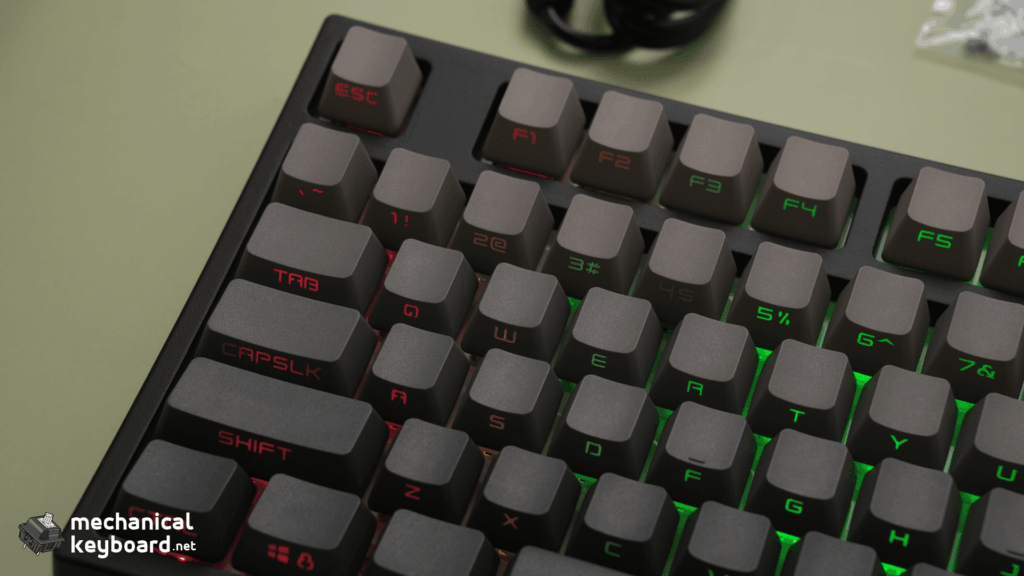
The Keydous NJ80-CP V3 is a compelling option for anyone who enjoys competitive gaming and prefers a compact 75% keyboard.
The Dark colourway looks excellent, especially with its front-facing keycap legends and bright RGB lighting. Build quality is another highlight, with a sturdy plastic case that feels premium and shows no noticeable flex or creaking.
Gaming performance impressed me as well. After adjusting Rapid Trigger settings, A/D movement while peeking corners in Valorant felt particularly responsive.
The typing experience is comfortable, and the stabilizers are impressively clean. However, the Gateron Magnetic Jade Pro switches feel slightly heavy to me, with a firm bottom-out and a sound profile that’s a little too muted toward the end of each keystroke.
What I liked most: Overall design, RGB lighting, solid construction and gaming responsiveness.
What could be better: Switch feel, hard bottom-out and overly muted typing sound.
Who should buy it: Gamers who want a 75% Hall Effect keyboard that also handles everyday typing comfortably.
Keydous NJ80-CP V3 Specifications
| Specification | Details |
|---|---|
| Model | Keydous NJ80-CP V3 HE |
| Colour reviewed | Dark |
| Layout | 75%, 80 keys |
| Switches tested | Gateron Magnetic Jade Pro |
| Switch technology | Linear Hall Effect magnetic |
| Case | Plastic on reviewed unit |
| Keycaps | PBT with front-facing legends |
| Connectivity | USB-C, 2.4 GHz and Bluetooth 5.0 |
| Advertised polling rate | Up to 8,000 Hz wired and 2.4 GHz |
| Advertised actuation range | 0.1–3.3 mm |
| Battery capacity | 4,800 mAh |
| RGB lighting | South-facing RGB |
| Volume control | Rotary knob with push-to-mute |
| Software tested | Keydous web driver and qmk.top/v4 |
Technical figures are based on Keydous’s published specifications. Polling rate, latency and battery capacity were not independently measured.
Keydous listed the NJ80-CP V3 at a starting price of $99.99 USD during research on October 16, 2026. The price of a specific configuration may differ.
Unboxing Experience: Nothing Fancy, Just the Essentials
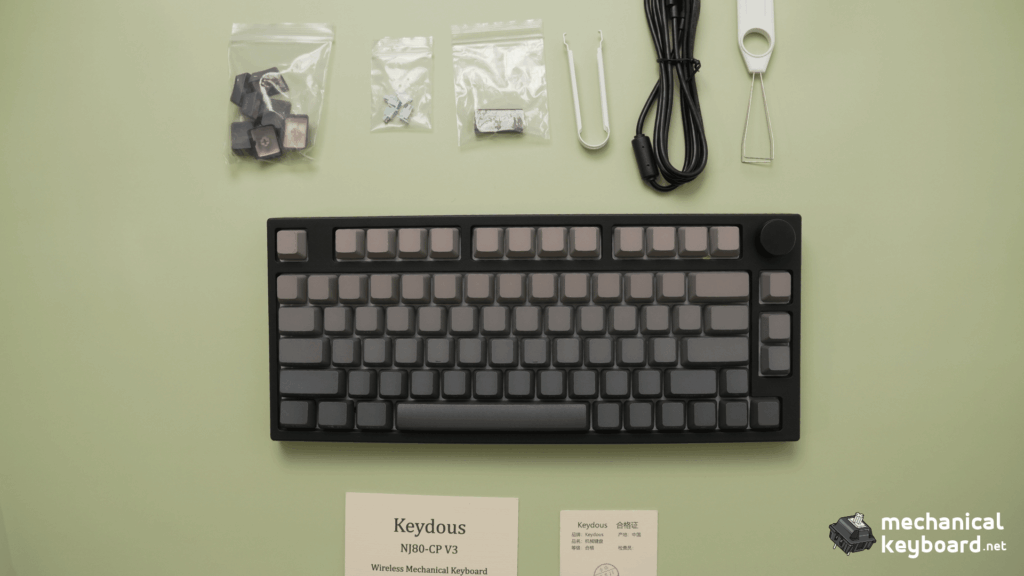
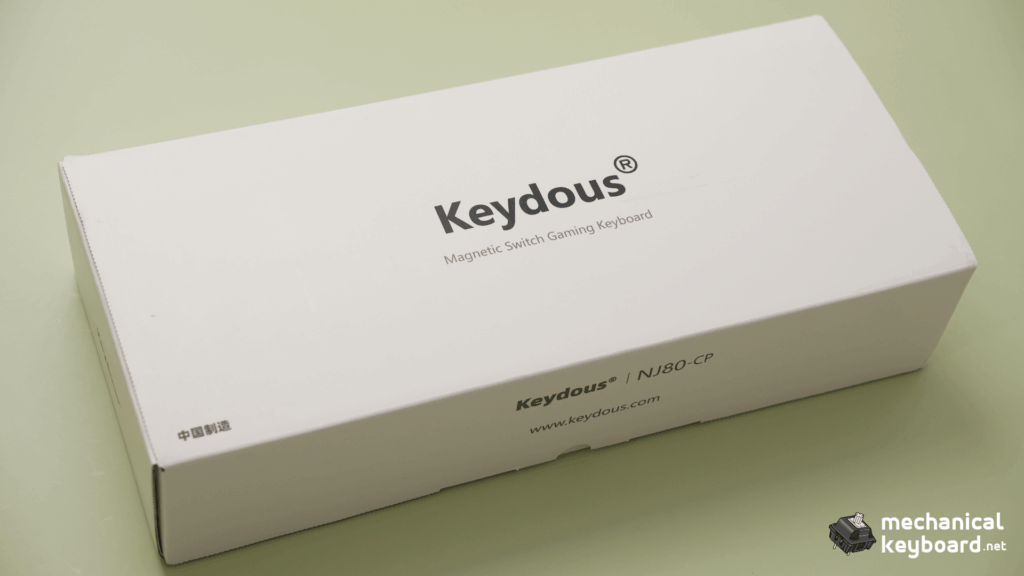
The unboxing experience of the NJ80-CP V3 is fairly straightforward.
The packaging is simple, without anything particularly elaborate or memorable about the presentation.
Inside my box, I received:
- Keydous NJ80-CP V3 keyboard
- Combined switch and keycap puller
- USB Type-C cable
- Dust cover
- 2.4 GHz wireless dongle
These are the accessories that came with my review unit.
While I’ve experienced keyboards with more elaborate packaging, the NJ80 keeps things functional.
Fortunately, the keyboard itself makes a much better impression once you take it out of the box.
Design and Build Quality: The Dark Colourway Looks Fantastic
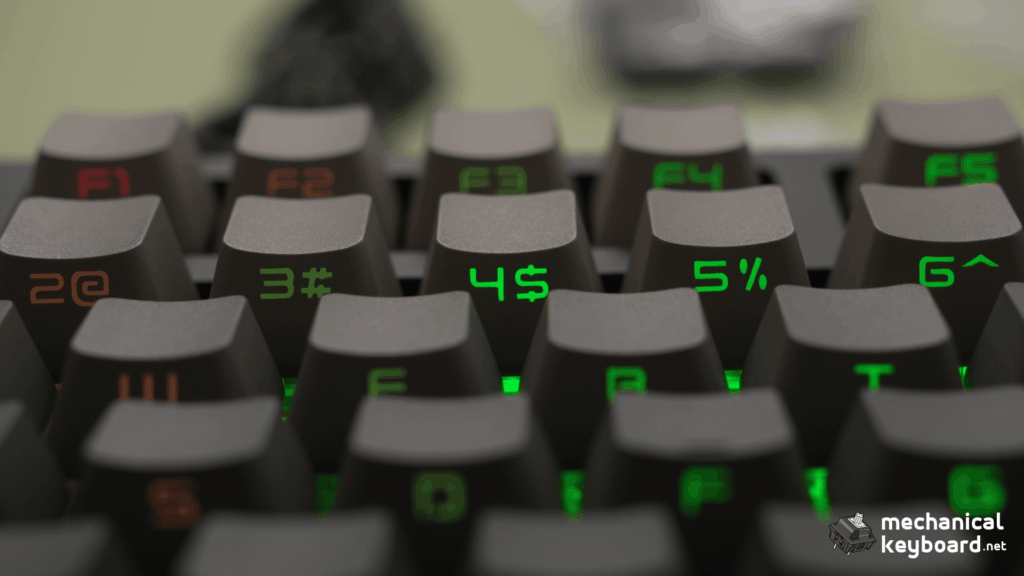
One of the first things I noticed about the NJ80-CP V3 was how good the Dark colourway looks.
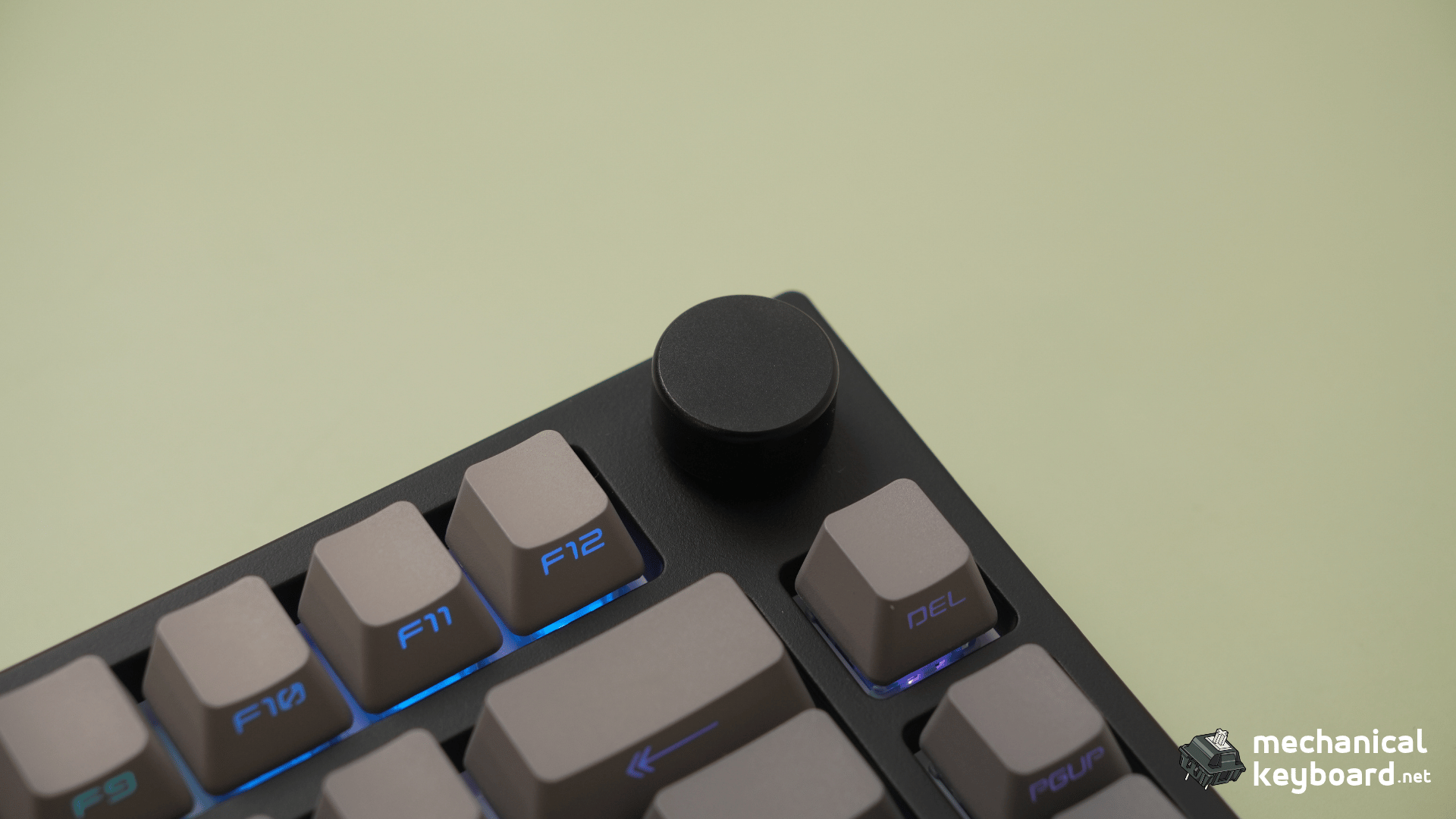
My review unit features a black plastic body with grey keycaps and legends positioned on the front-facing sides rather than the tops.
It’s a clean design that looks particularly good in a dark or all-black desk setup.
The overall appearance reminds me of the popular AULA F75, with its compact proportions, function row, rotary knob and relatively minimal design.
A sturdy plastic case that feels premium
Despite having a plastic case, the NJ80 feels surprisingly solid.
There’s no noticeable flex when applying pressure, and I didn’t experience any creaking from the case.
It doesn’t feel cheap or flimsy.
In fact, the overall construction feels sturdy enough that I wouldn’t have any concerns using it as my primary keyboard.
This is something I particularly appreciate because a keyboard doesn’t necessarily need an aluminium case to feel well built.
The NJ80 is a good example of that.
Smooth keycaps that don’t attract fingerprints easily
The stock keycaps feel smooth, without the grainy or textured finish found on some other PBT keycaps.
They’re comfortable to type on, and I actually prefer how they handle fingerprints compared with the keycaps on my NJ98-CP V4 Black Samurai.
On the NJ98, I noticed finger oils appearing more easily during use.
That hasn’t been as noticeable with the NJ80.
It’s a small advantage, but one that makes the keyboard easier to maintain.
RGB lighting is one of the highlights
The RGB lighting is probably one of my favourite design elements.
On the Dark colourway, the lighting shines around the keycaps and illuminates the front-facing legends.
The green RGB configuration I photographed looks particularly good against the dark body.
The lighting is bright enough to be noticeable and gives the keyboard personality without making the design feel overly flashy.
Overall, the NJ80 is a great-looking keyboard, especially for someone who enjoys RGB lighting but prefers an understated desk setup.
Gateron Magnetic Jade Pro Switches: Comfortable but Firm
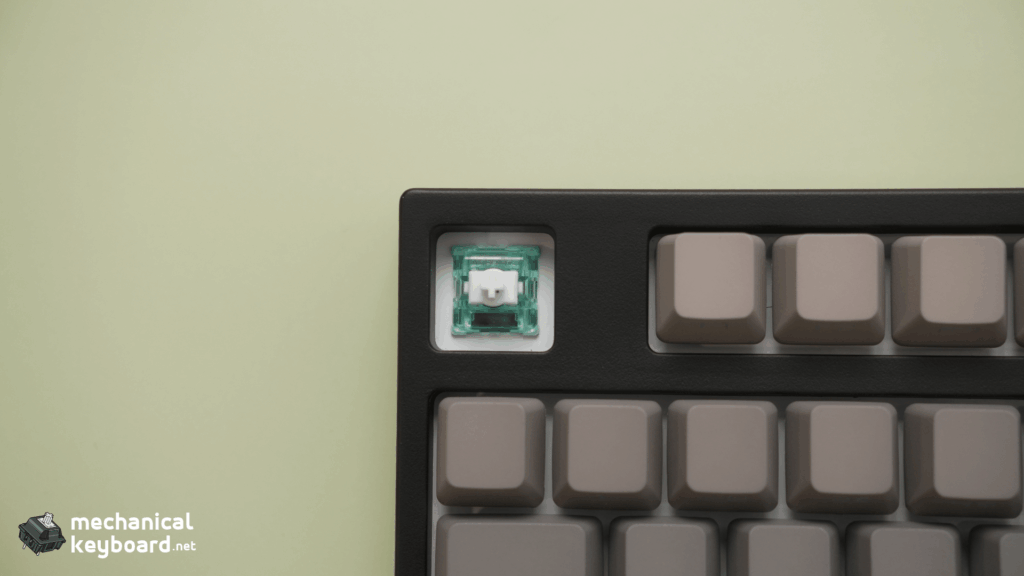
My NJ80-CP V3 came equipped with Gateron Magnetic Jade Pro linear Hall Effect switches.
Unlike conventional mechanical switches that use physical electrical contacts to register an input, Hall Effect switches use magnetic sensing to detect key movement.
On supported keyboards, this allows features such as adjustable actuation and Rapid Trigger.
However, the actual typing experience matters just as much as the technology.
How smooth are the switches?
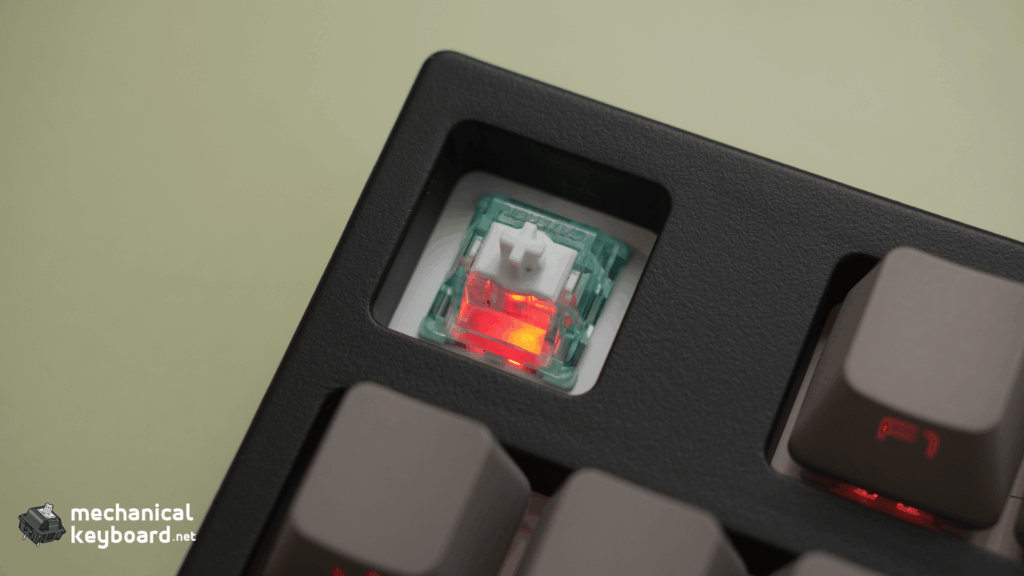
In my experience, the switches aren’t exceptionally smooth.
They feel slightly heavier than I personally prefer, particularly when compared with the typing experience of my NJ98-CP V4.
That doesn’t necessarily make them bad switches.
The NJ80 still feels pleasant to type on, but I wouldn’t describe the keypresses as especially effortless.
The difference became more noticeable when moving between the two keyboards.
Hard bottom-out feel
Another thing I noticed was the relatively hard bottom-out.
When pressing a key all the way down, there’s a firm stop rather than a particularly cushioned landing.
Some users may enjoy this more direct feedback.
Personally, I prefer a softer and smoother typing experience.
Is the NJ80 comfortable for long typing sessions?
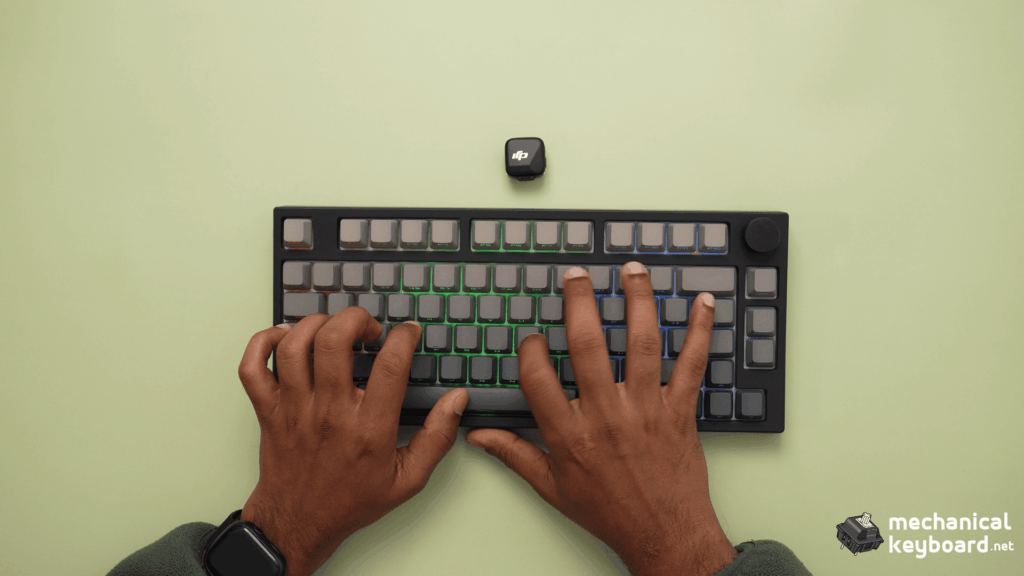
Surprisingly, yes.
Despite the heavier-feeling switches and firm bottom-out, the NJ80 remained comfortable during longer typing sessions.
I didn’t notice any unusual finger fatigue, and typing felt consistent without obvious accidental keypresses.
That makes it a capable everyday keyboard, even though much of its feature set is aimed at gaming.
I tested the switches, keycaps and internals in their fully stock configuration.
Keydous NJ80-CP V3 Sound Test: Deep but a Little Too Muted
Sound is one of the more interesting aspects of the NJ80-CP V3.
With the Gateron Magnetic Jade Pro switches installed, the keyboard produces a relatively deep and muted typing sound.
Initially, each keystroke sounds quite pleasant.
However, as the keypress finishes, the sound becomes more subdued than I personally enjoy.
It’s almost as though the final part of each keystroke loses some of the character that makes the initial press satisfying.
Is the NJ80 thocky or creamy?
I would describe the sound as deep and muted rather than particularly bright or clacky.
There are some satisfying characteristics to it, but I wouldn’t call it as creamy as my NJ98-CP V4.
The NJ98 has a more rounded and satisfying sound to my ears.
The NJ80 is still nice to type on, but its stock sound doesn’t quite deliver the same level of enjoyment for me.
Could the sound dampening be better?
I think so.
My biggest criticism of the NJ80 is that the sound feels a little too muted.
I would have preferred a more lively or satisfying finish to each keystroke.
That doesn’t mean the keyboard sounds bad. In fact, I generally enjoy typing on it.
However, I believe there is room for Keydous to refine the overall acoustic experience.
This is my personal assessment of the sound. I haven’t disassembled the keyboard or identified a specific foam, plate or other internal component as the cause.
Stabilizers: No noticeable rattle
One area where the NJ80 performs exceptionally well is its stabilizers.
I tested the larger keys, including the spacebar and other stabilized keys, and didn’t notice any distracting rattling.
The sound was clean and consistent during my testing.
That’s particularly impressive for a keyboard I haven’t modified.
Poorly tuned stabilizers can make even a good keyboard sound unpleasant, but I didn’t encounter that issue here.
Overall, the NJ80 delivers a good stock sound and excellent stabilizer performance, even if the overall acoustic character isn’t quite my favourite.
Gaming Performance: Excellent for Valorant
Gaming is where the NJ80-CP V3 impressed me the most.
I tested the keyboard while playing Valorant, focusing particularly on movement responsiveness and corner peeking.
The experience was fantastic.
Keypresses felt responsive, and I didn’t encounter any obvious input problems during gameplay.
Rapid Trigger and A/D corner peeking
One feature I spent time experimenting with was Rapid Trigger.
On a compatible Hall Effect keyboard, Rapid Trigger allows a key to reset dynamically as it moves upward instead of always relying on a fixed reset point.
This can be particularly useful when making rapid directional changes in first-person shooters.
After adjusting the Rapid Trigger settings, I paid attention to how A/D movement felt when peeking corners in Valorant.
Alongside my Logitech G Pro Superlight 2 mouse, the overall experience felt extremely responsive.
Movement inputs felt immediate, and I enjoyed how the keyboard responded during these situations.
This was one of the highlights of my experience with the NJ80.
However, I want to make one distinction.
These are my subjective impressions while gaming. I haven’t independently measured input latency or performed controlled tests to quantify any improvement from Rapid Trigger.
Does 8,000 Hz polling make a difference?
According to Keydous, the NJ80-CP V3 supports polling rates of up to 8,000 Hz in both wired and 2.4 GHz modes.
For comparison, a keyboard polling at 1,000 Hz has a nominal polling interval of 1 millisecond, while 8,000 Hz corresponds to 0.125 milliseconds.
That difference doesn’t directly translate into an equivalent improvement in total keyboard input latency.
Actual responsiveness also depends on factors such as switch scanning, firmware processing and other parts of the input chain.
I haven’t independently verified the NJ80’s polling rate.
What I can say is that gaming felt responsive and enjoyable during my testing.
If you’re exploring other magnetic gaming keyboards, check out our Best Hall Effect Keyboards guide.
Keydous NJ80-CP V3 Software: My Experience With Two Web Drivers
Software is an important part of the NJ80-CP V3 because it allows users to customize magnetic switch behaviour.
However, my experience wasn’t entirely straightforward.
The Keydous web driver felt limited
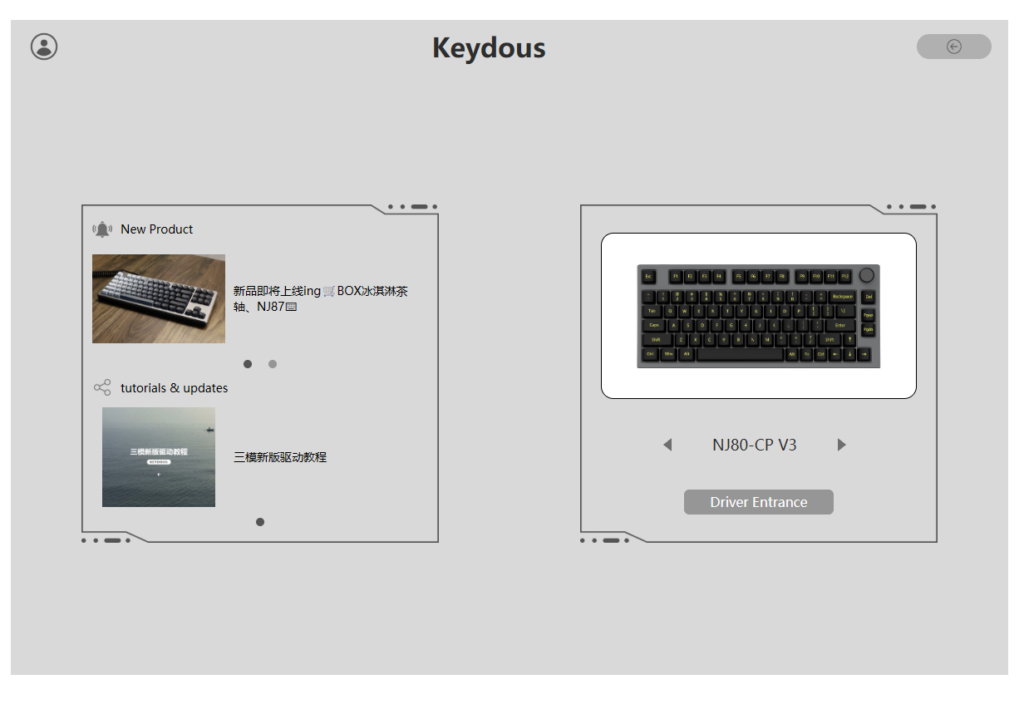
I initially tried the Keydous web application.
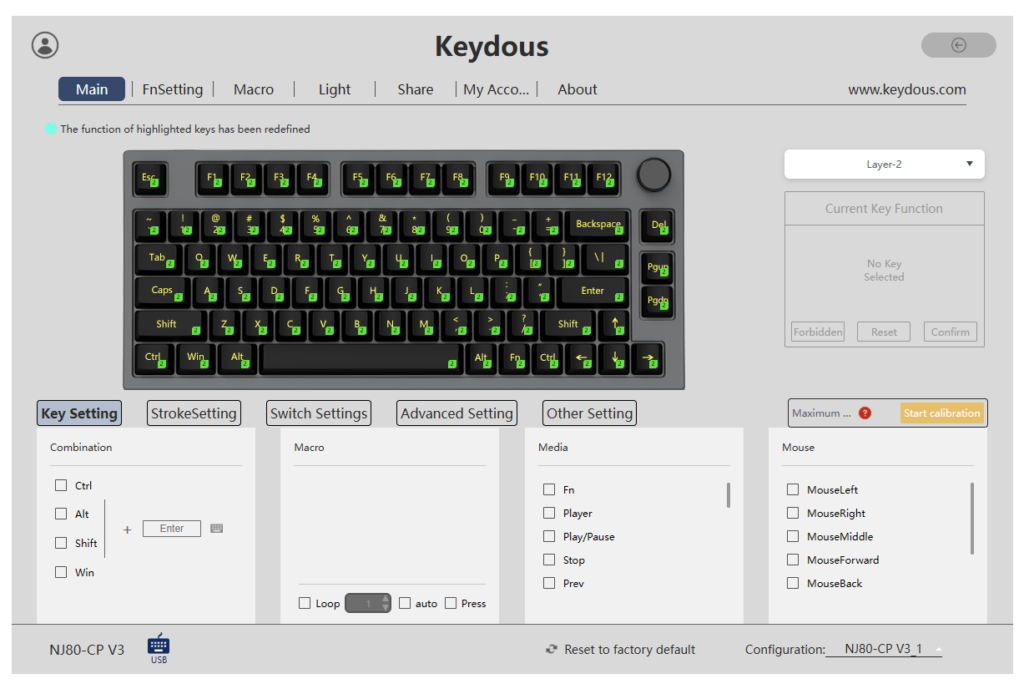
While I could access the application, I found its available features limited for the changes I wanted to make.
In particular, I wanted more control over the keyboard’s Rapid Trigger settings.
Using qmk.top for Rapid Trigger

I then tried qmk.top/v4.
This was where I was able to adjust the Rapid Trigger settings on my NJ80-CP V3.
That made the software much more useful for my gaming setup.
I haven’t recorded the exact actuation and reset values I used, so I won’t recommend a particular numerical preset based on my own testing.
One important clarification: my success using qmk.top/v4 doesn’t establish that every NJ80-CP V3 firmware revision is officially supported by that application. The website name also shouldn’t be taken as proof that this keyboard runs QMK or supports VIA.
My experience applies to the review unit I tested.
Could the software experience be better?
Yes.
Ideally, I’d prefer a more straightforward experience where all the important keyboard settings are clearly available through one application.
The hardware experience is strong, and a more polished software setup would make it easier to take full advantage of the magnetic switches.
I haven’t tested every software feature or performed a broader reliability assessment, so I won’t make unsupported claims about functions I didn’t use.
Connectivity: Wired, 2.4 GHz and Bluetooth
The NJ80-CP V3 offers three connection methods:
- USB-C wired
- 2.4 GHz wireless
- Bluetooth
I tried all three modes, and each worked well during my testing.
I didn’t experience any obvious connection problems while trying them.
Which connection is best for gaming?
Personally, I always prefer using a wired connection when gaming competitively.
That’s how I primarily used the NJ80 during Valorant sessions.
The 2.4 GHz and Bluetooth options remain useful for everyday usage, particularly if you want to reduce cables on your desk.
I wouldn’t describe the wireless modes as inferior based on my tests, since both worked fine.
However, I also haven’t performed controlled latency comparisons between the three modes.
Battery life
Keydous advertises a 4,800 mAh battery for the triple-mode NJ80-CP V3.
Because I spent most of my time using the keyboard wired, I haven’t tracked how long the battery lasts between charges.
For that reason, I can’t provide an accurate real-world battery endurance estimate.
Battery capacity alone doesn’t establish how many hours of usage you can expect, particularly when RGB brightness, polling rate and wireless mode can affect power consumption.
Rotary Knob: Simple and Convenient
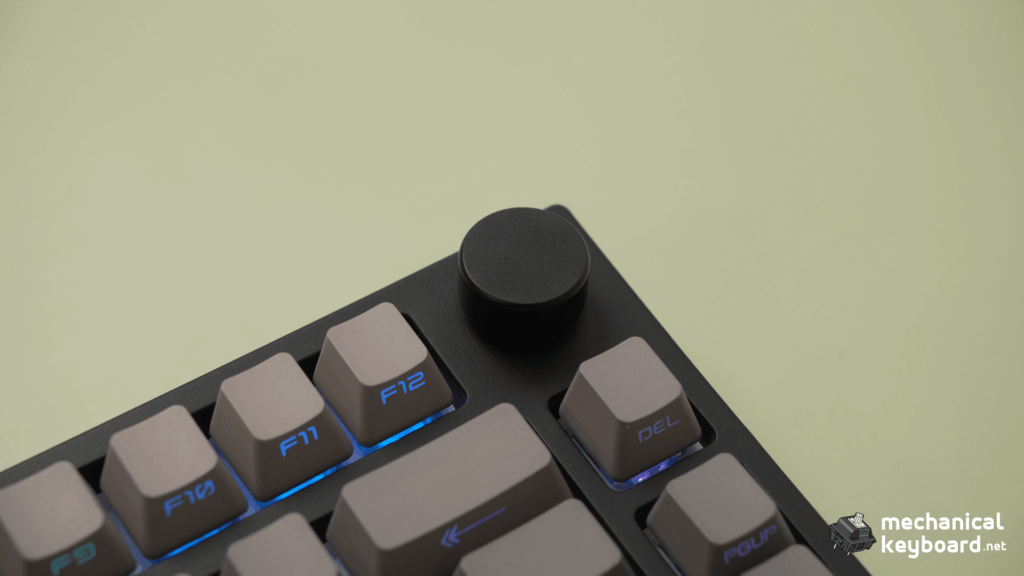
The NJ80-CP V3 includes a rotary knob in the top-right corner.
During my testing, it worked exactly as I expected.
Rotating the knob adjusts the system volume, while pressing it mutes the audio.
It’s a simple feature, but one I appreciate having on a compact keyboard.
Instead of relying on keyboard shortcuts, I can quickly adjust the volume without interrupting what I’m doing.
Keydous NJ80-CP V3 vs NJ98-CP V4: Which Should You Buy?
I’ve spent time using both keyboards, and I don’t think there’s one universal winner.
The NJ80-CP V3 and NJ98-CP V4 are designed for different preferences and setups.
| Feature | NJ80-CP V3 | NJ98-CP V4 |
|---|---|---|
| Layout | 75%, 80 keys | 98-key compact full-size |
| Numpad | No | Yes |
| Detachable screen | No | Yes |
| Switches in my units | Gateron Magnetic Jade Pro | Gateron Magnetic Jade Pro |
| Typing sound | Deep and muted | Creamier and more satisfying |
| Build impression | Sturdy plastic case | Premium and sturdy |
| Gaming | Excellent subjective responsiveness | Enjoyable gaming experience |
| Best for | Compact gaming setups | Gaming and productivity |
Why choose the NJ80-CP V3?
The NJ80 is ideal if you specifically want a 75% keyboard.
Its smaller footprint leaves more room for mouse movement, which can be helpful for competitive FPS gaming.
Despite its compact size, you still get a function row, arrow keys and a useful rotary volume knob.
The bright RGB and clean Dark colourway also make it a great fit for minimal or all-black setups.
Why choose the NJ98-CP V4?
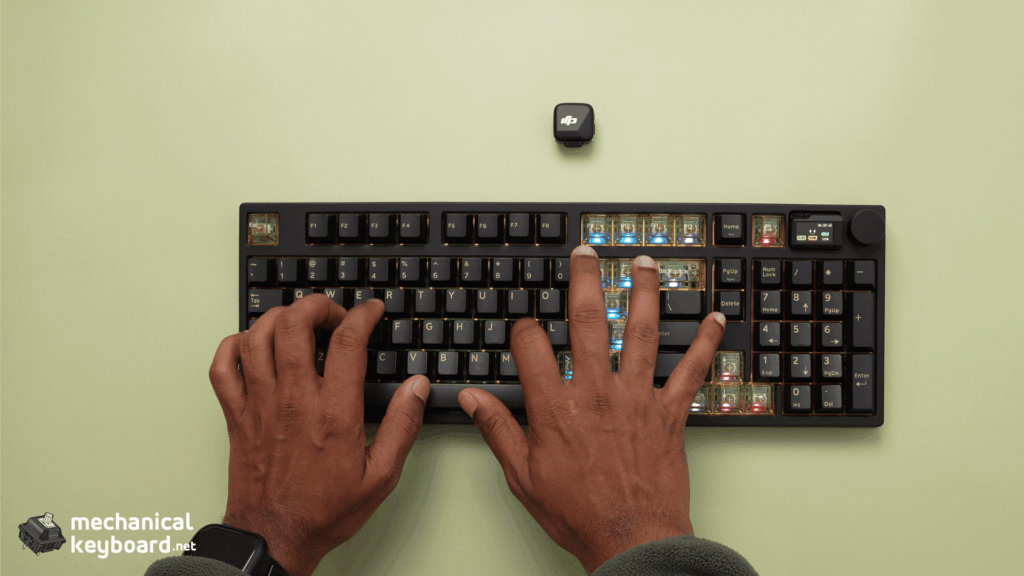
The NJ98 is a better fit if you regularly work with numbers or want a keyboard that combines gaming with productivity.
Its compact full-size layout includes a numpad, and my Black Samurai review unit also came with a detachable magnetic display and additional translucent keycaps.
More importantly, I personally find the NJ98 more satisfying to type on.
Even though both of my review units use Gateron Magnetic Jade Pro switches, the overall typing experience is different.
The NJ98 has a creamier sound, and I prefer the way it feels during typing.
That distinction is about the complete keyboard configurations, not evidence that the switches themselves are inherently different.
You can read my full Keydous NJ98-CP V4 review for a detailed look at that keyboard.
My recommendation: Choose the NJ80 if you want a 75% layout. Choose the NJ98 if you prefer a numpad-equipped keyboard with more features and a creamier stock typing experience.
What I Liked and What Keydous Could Improve
Pros
- Attractive Dark colourway and bright RGB
- Sturdy, premium-feeling plastic construction
- No noticeable flex or case creaking
- Responsive Valorant gaming experience
- Adjustable Rapid Trigger
- Comfortable during longer typing sessions
- Clean stabilizers without distracting rattle
- Smooth keycaps that don’t readily attract fingerprints
- USB-C, 2.4 GHz and Bluetooth all worked in testing
- Useful volume and mute knob
Cons
- Switches feel slightly heavier than I prefer
- Hard bottom-out
- Stock typing sound is a little too muted
- Official web driver felt limited during my setup
- No numpad for users who need one
Is the Keydous NJ80-CP V3 Worth Buying?
I think the NJ80-CP V3 is a strong option for anyone looking for a compact Hall Effect gaming keyboard.
Its biggest strengths are its design, build quality and gaming experience.
The Dark colourway looks great, the green RGB creates an attractive lighting effect, and the overall construction feels sturdy despite being plastic.
Gaming was particularly enjoyable after tweaking Rapid Trigger settings, and the keyboard responded well during Valorant.
It’s also comfortable for everyday typing, with excellent stabilizers and no noticeable issues during my longer typing sessions.
My biggest reservation is the sound and feel.
The switches aren’t quite as smooth as I would personally prefer, the bottom-out is firm, and the stock sound is more muted than I find ideal.
Nevertheless, these complaints don’t overshadow the keyboard’s strengths.
With a listed starting price of $99.99 USD at the time of my research, the NJ80-CP V3 is worth considering for someone who wants a 75% Hall Effect keyboard with competitive gaming features.
As always, check the current price and selected switch configuration before purchasing.
Final Verdict
The Keydous NJ80-CP V3 is a good-looking, well-built and responsive 75% Hall Effect keyboard.
What I enjoyed most was its overall appearance, RGB lighting and gaming performance.
The Dark colourway looks particularly good in an all-black setup, and the plastic case feels sturdy without any noticeable flex or creaking.
The Gateron Magnetic Jade Pro switches provide a comfortable typing experience, although they feel slightly heavier than I’d prefer and have a fairly hard bottom-out.
I also think Keydous could improve the stock sound dampening. The typing sound is pleasant, but the muted finish makes it less satisfying than my NJ98-CP V4.
For gaming, though, I had an excellent experience.
Valorant felt responsive, especially during A/D corner peeking after adjusting Rapid Trigger settings.
If you’re looking for a 75% Hall Effect keyboard for competitive gaming, I’d happily recommend the NJ80-CP V3 based on my experience.
Would I choose it over the NJ98-CP V4?
It depends on the setup.
If I wanted a compact gaming keyboard, I’d choose the NJ80.
If I wanted a numpad, a detachable display and a creamier typing experience, I’d choose the NJ98.
Both keyboards are good in their own ways, and the right choice comes down to what matters most to you.
Frequently Asked Questions
Is the Keydous NJ80-CP V3 good for gaming?
Yes, based on my experience. I tested it in Valorant and found A/D movement particularly responsive after adjusting Rapid Trigger settings. I haven’t independently measured input latency.
Does the Keydous NJ80-CP V3 support Rapid Trigger?
Yes. The NJ80-CP V3 uses Hall Effect magnetic switches and supports adjustable Rapid Trigger. I successfully adjusted the settings through qmk.top/v4 on my review unit.
What software works with the NJ80-CP V3?
I tried the Keydous web driver at keydousnj.rongyuan.tech and qmk.top/v4. The first had limited functionality for my needs, while the second allowed me to change Rapid Trigger settings on my particular unit. Compatibility may vary by firmware and model.
Is the NJ80-CP V3 the same as the older Keydous NJ80?
No. Keydous has released several NJ80 variants over the years. The NJ80-CP V3 HE reviewed here uses Hall Effect magnetic switches, whereas older NJ80-AP models used conventional mechanical switches. Check the full model name before following software or switch compatibility advice.
Does the Keydous NJ80-CP V3 sound thocky?
My configuration produces a deep, relatively muted sound rather than a particularly sharp or clacky one. Personally, I find the sound a little too muted toward the end of each keystroke.
Does the NJ80-CP V3 have wireless connectivity?
Yes. It supports 2.4 GHz wireless and Bluetooth alongside USB-C wired connectivity. All three worked during my testing.
Can you use the Keydous NJ80-CP V3 for typing?
Absolutely. Despite the slightly heavier switch feel and hard bottom-out, I found it comfortable during longer typing sessions, without noticeable fatigue.
Is the Keydous NJ80-CP V3 better than the NJ98-CP V4?
Neither is universally better. Choose the NJ80 if you prefer a compact 75% layout for gaming. Choose the NJ98 if you want a numpad, magnetic display and a creamier typing experience like the one I preferred in my NJ98 review.
What switches does the Keydous NJ80-CP V3 use?
My review unit uses Gateron Magnetic Jade Pro linear Hall Effect switches. Other configurations may be offered, so confirm the switch selection before purchasing.