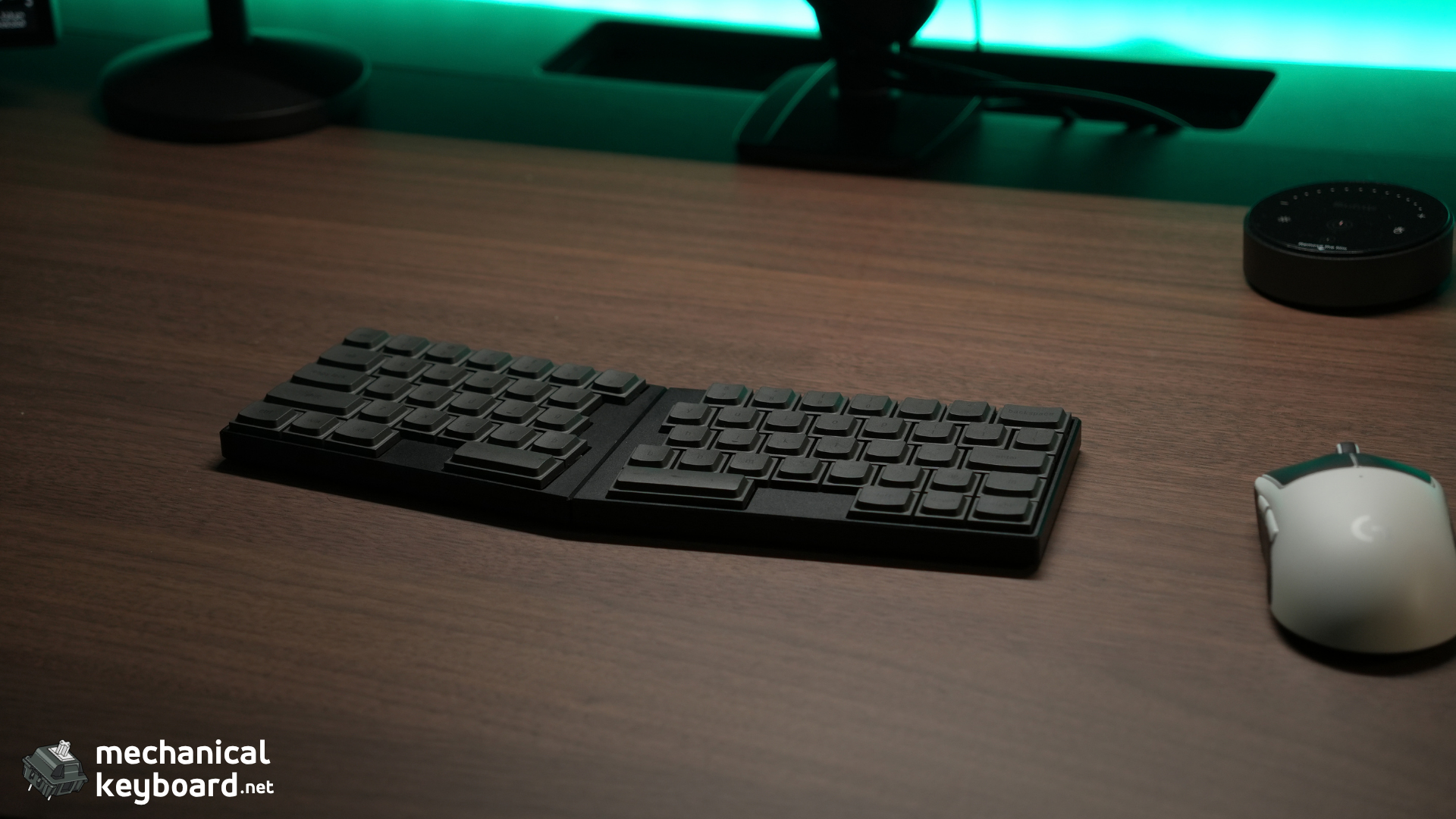
The ElimKeys Elytra is the first split keyboard that made me think a split layout does not have to feel like homework.
- Quick Verdict: Should You Buy the ElimKeys Elytra?
- ElimKeys Elytra Specs at a Glance
- How I Tested the Elytra
- Unboxing and First Impressions
- Design Deep Dive: This Is the Elytra’s Strongest Area
- Is the Elytra a Good First Split Keyboard?
- Typing Experience: The Split Is More Natural Than I Expected
- JZF Mist Silent Linear Switches: Almost Absurdly Quiet
- Low Profile Changes More Than Just the Height
- Bluetooth Connectivity: Flawless in My Normal Use
- Battery Life: At Least a Week in My Real Use
- Vial Software: Useful, but I Have Only Lightly Tested It
- ElimKeys Elytra Quick Start and Light Guide
- The Optional Palm Rest and Tenting Kit Are the Accessories I Wish I Had
- Light Gaming Is Fine, but This Is Not My Competitive Gaming Pick
- ElimKeys Elytra vs Other Split and Low-Profile Options
- Who Should Buy the ElimKeys Elytra?
- Who Should Skip It?
- Verdict: The Split Keyboard That Made Me Want to Use More Split Keyboards
- Where to Buy
- Frequently Asked Questions
I went into this review expecting a serious learning curve. Instead, after a few hours, the unusual shape stopped being the main thing I noticed. What stood out was how freely I could place each half, how premium the CNC aluminum chassis felt, and how absurdly quiet the JZF Mist switches were.
The Elytra is a 63-key, low-profile, fully split mechanical keyboard that can be used as two separate halves or magnetically joined into one compact board. My review unit is the Black version with JZF Mist silent linear switches, and it was provided directly by ElimKeys for testing.
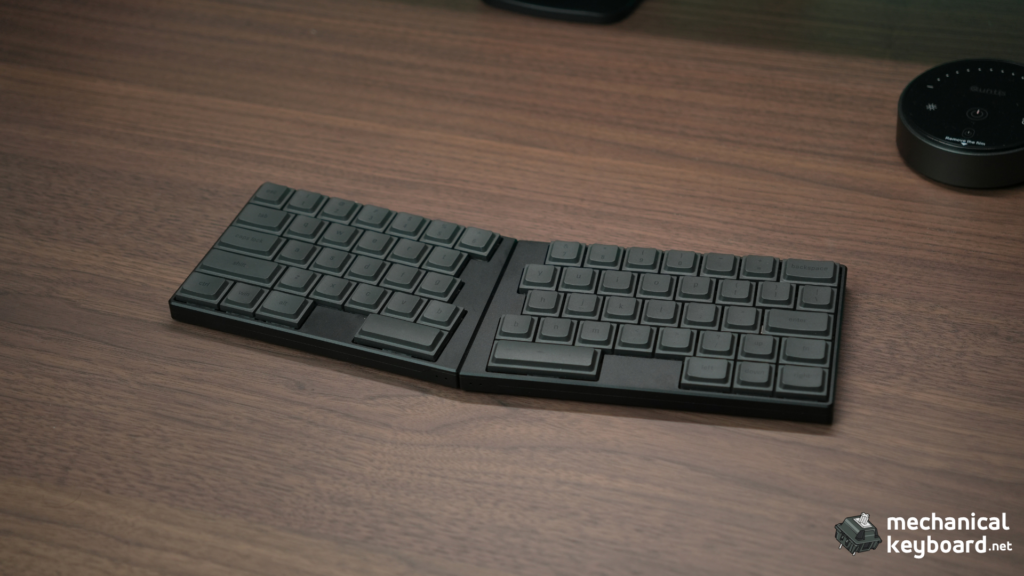
At $249, this is not a cheap keyboard. It does, however, look and feel like a premium product in a way that is difficult to communicate from a specification sheet alone. The machining is excellent, the two halves feel more like pieces of consumer electronics than a typical enthusiast keyboard, and the whole setup is light enough that I have carried it around without feeling like I added another heavy object to my bag.
The big surprise is accessibility. If you have looked at ergonomic boards with column-staggered layouts, thumb clusters, and aggressive layers and thought, “I am not relearning how to type for this,” the Elytra takes a different route. It keeps a familiar row-staggered QWERTY layout, then gives you the main ergonomic advantage of a split board: freedom to position your hands independently.
That does not mean there is no adjustment. The missing dedicated Right Shift is my biggest layout complaint, and the black-on-black legends on my unit can be hard to see in low light. Vial can remap keys, but I have not yet spent enough time customizing the layout to call that problem completely solved.
More Read
Still, after a few weeks of real use for work, writing, browsing, and light gaming, the Elytra has made me want to spend more time with low-profile ergonomic keyboards.
Quick Verdict: Should You Buy the ElimKeys Elytra?
Buy it if: you want to try a split keyboard without abandoning a familiar staggered layout, you value a very quiet typing experience, you move between desks or work from cafes, or you are building a clean minimal setup around a laptop or tablet.
Skip it if: you dislike low-profile switches, do not want a split or ergonomic layout, need a numpad or full function row, want Hall Effect gaming features, or simply cannot justify spending $249 on a keyboard.
The best thing about it: the combination of looks, feel, and uniqueness. The Elytra is genuinely different without being difficult for the sake of being different.
The biggest annoyance: the default layout has no dedicated Right Shift. That is especially noticeable when typing punctuation such as ?, because the compact right side takes some muscle-memory adjustment.
Bottom line: The Elytra’s smartest decision is not making the keyboard more radical than it needs to be. You get a premium aluminum split board, low-profile silent switches, Bluetooth, hot-swap, and Vial customization in a layout that I was comfortable with within hours. It is expensive, but the product feels expensive too.
Score breakdown
| Category | Score | Notes |
|---|---|---|
| Build Quality | 9.5/10 | CNC aluminum, tight fit, strong magnets, no scratches or finish issues on our unit |
| Design & Portability | 9.5/10 | Approx. 440g manufacturer weight, very slim, easy to separate and carry |
| Typing Experience | 9.0/10 | Comfortable split positioning and quick adaptation, with Right Shift as the main layout friction |
| JZF Mist Switches & Sound | 9.3/10 | Extremely quiet, creamy, consistent, slightly firm on impact but cushioned during normal typing |
| Wireless Connectivity | 9.0/10 | Bluetooth has been flawless in our normal use, including wake from longer breaks |
| Battery Experience | 8.7/10 | At least a week between charges in our real use, but we did not run a controlled drain test |
| Software & Customization | 8.0/10 | Vial support is powerful, though the browser version felt a little slow in our limited test |
| Value | 8.5/10 | $249 is expensive, but the materials, finish, sound, and overall execution feel premium |
| Overall | 8.9/10 | One of the most approachable ways I have found to try a premium split keyboard |
ElimKeys Elytra Specs at a Glance
ElimKeys currently sells the Elytra for $249 USD in Black or White, with either JZF Mist Silent Linear or CloudShell White Linear switches. The specifications below are manufacturer-published unless stated otherwise.
| Spec | ElimKeys Elytra |
|---|---|
| Layout | 63-key QWERTY split layout |
| Case | CNC aluminum |
| Weight | Approx. 440g, manufacturer specification |
| Left half dimensions | 153.97 x 101.25 mm |
| Right half dimensions | 173.33 x 101.25 mm |
| Thickness | 11.8 mm excluding keycaps |
| Connectivity | USB-C and Bluetooth |
| Wireless devices | Up to 3 |
| Hot-swap | Yes |
| Software | Vial |
| Tested switches | JZF Mist Silent Linear |
| JZF Mist operating force | 37 ± 10 gf |
| JZF Mist total travel | 2.8 mm |
| JZF Mist rated life | 50 million actuations |
| Other switch option | CloudShell White Linear, 40 ± 10 gf, 2.8 mm travel |
| Battery claim | Up to 4 weeks, manufacturer claim |
| Price at review | $249 USD |
| Tested color | Black |
A note on the published weight: ElimKeys’ current detailed specification block lists the Elytra at approximately 440g, while an FAQ further down the same product page still says 420g. I am using 440g here because it is the figure in the current specification section. I did not independently weigh this unit.
If you are new to compact layouts, our mechanical keyboard sizes guide explains where 60%, 65%, 75%, and other layouts sit. The Elytra is its own 63-key split arrangement, so treating it as a standard 60% board does not tell the whole story.
How I Tested the Elytra
I have used this Black JZF Mist unit for a few weeks as a normal keyboard rather than treating it as a short desk demo.
Most of my time has been spent typing, writing, working, browsing, and doing some light gaming. Bluetooth has been my main connection method. I have only used wired USB-C occasionally, mostly while charging, so this review does not make strong claims about wired latency.
I also tried the browser version of Vial. It worked, but it felt a little slow during my session. I have not yet tested the downloadable Vial app or built a heavily customized layout.
For battery life, this is a real-use observation rather than a stopwatch test. I have comfortably gone at least a week on a charge. I did not run the keyboard from exactly 100% to shutdown while logging hours, so I am not presenting a measured runtime.
For gaming, my testing was light and non-competitive. I did not use latency measurement hardware, and I would not use this review to make claims about esports-level input delay.
Finally, I did not receive the optional palm rest or tenting kit, so those accessories are discussed only from ElimKeys’ documentation and current pricing, not as products I personally tested.
That limitation matters. The best keyboard reviews separate what was actually experienced from what appears on a product page.
Unboxing and First Impressions
My first reaction was basically: seriously, wow.
This was my first proper split keyboard, and the Elytra looks like the kind of object that makes people ask what you are using. In a cafe, it is a conversation starter because it does not immediately look like a normal keyboard. Two thin aluminum halves sit independently on the desk, with enough visual separation that someone unfamiliar with split keyboards may not even know what they are looking at.
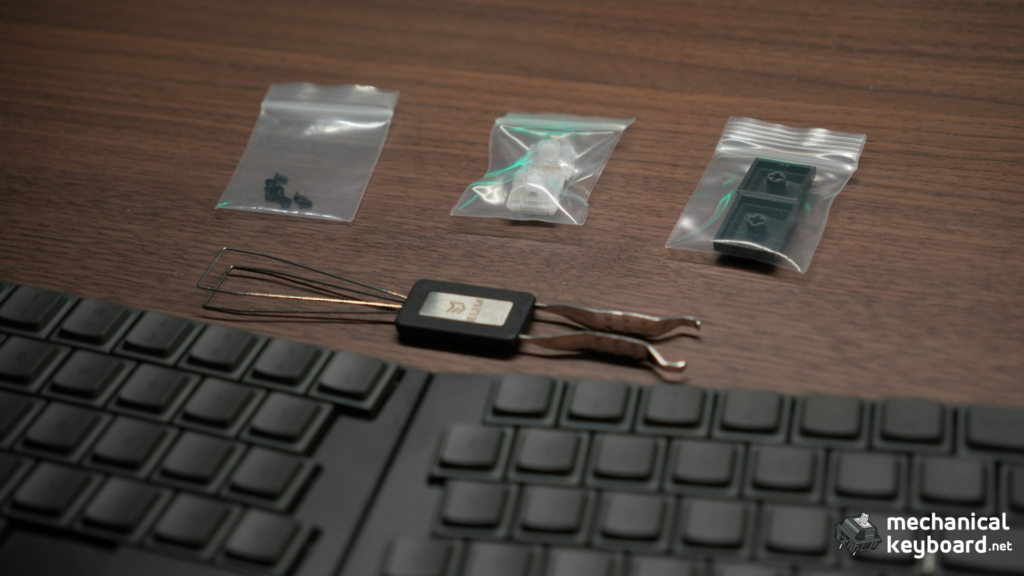
The review unit I received included the keyboard, two extra switches, Mac keycaps, some screws, and a combined keycap and switch puller among the items I noted during unboxing.
Retail buyers should not use my review-unit box as a guaranteed packing list. ElimKeys says the current Elytra now ships in upgraded packaging, and its store page currently lists the keyboard, manual card, USB-C cable, two backup switches, two backup keycaps, and a combined keycap and switch puller.
That distinction is worth making because review units and current retail packages can differ.
The more memorable first impression was the weight. ElimKeys lists the current specification at around 440g for the full keyboard. In hand, that translates to something that feels almost surprisingly light for a CNC aluminum mechanical board. I have had moments carrying it where I barely noticed it was with me.
If portability is one of the reasons you are interested in a compact board, our 60% keyboard guide explains the trade-offs compact layouts normally make. The Elytra’s trick is adding the flexibility of a split layout without turning each half into a bulky ergonomic device.
Design Deep Dive: This Is the Elytra’s Strongest Area
The Black Elytra has a very clean industrial look. The chassis is thin, the edges are tidy, and the aluminum gives the board the kind of premium feel I associate more with high-end consumer electronics than the average prebuilt mechanical keyboard.
That is not just because it is metal. Plenty of keyboards use aluminum. The difference is how cohesive the object feels.
The split halves can be placed wherever you want
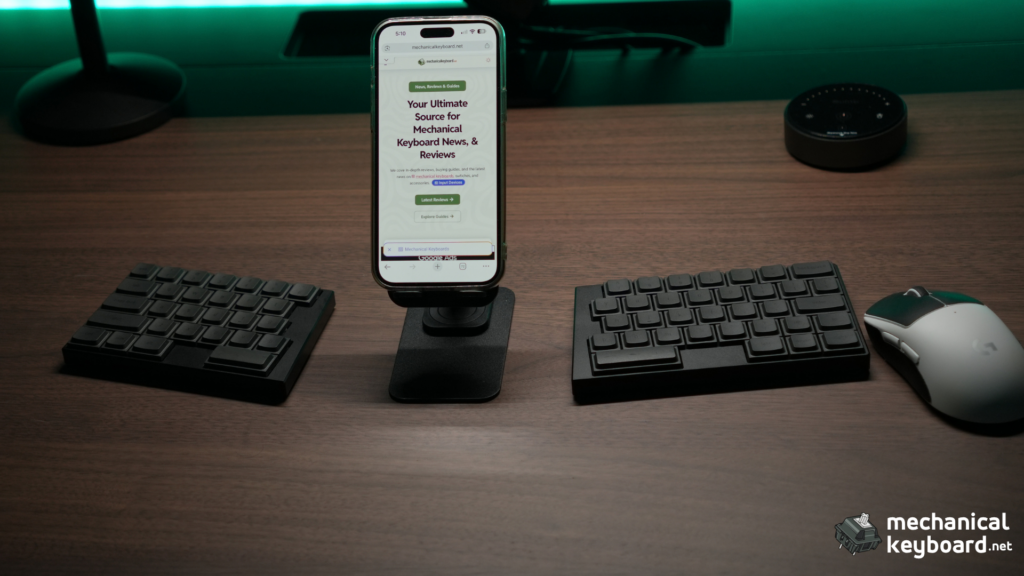
The real point of the design is freedom.
You can keep the halves close together, move them apart to roughly shoulder width, rotate them inward, or place them around something else on your desk. My natural setup usually leaves enough room between the halves to place an iPhone 15 Pro Max in the gap. That is a rough visual reference, not a measured spacing recommendation.
I usually prefer using the Elytra separated. That is when the product makes the most sense to me. Instead of bending both hands toward one fixed rectangle, I can move each half to where my hands naturally want to sit.
This is also why I want to try it with an iPad. My plan is to put the iPad in the center and place one half on each side. I have not tested that setup yet, so treat it as a use case I am interested in rather than a reviewed configuration.
The magnets are strong and satisfying
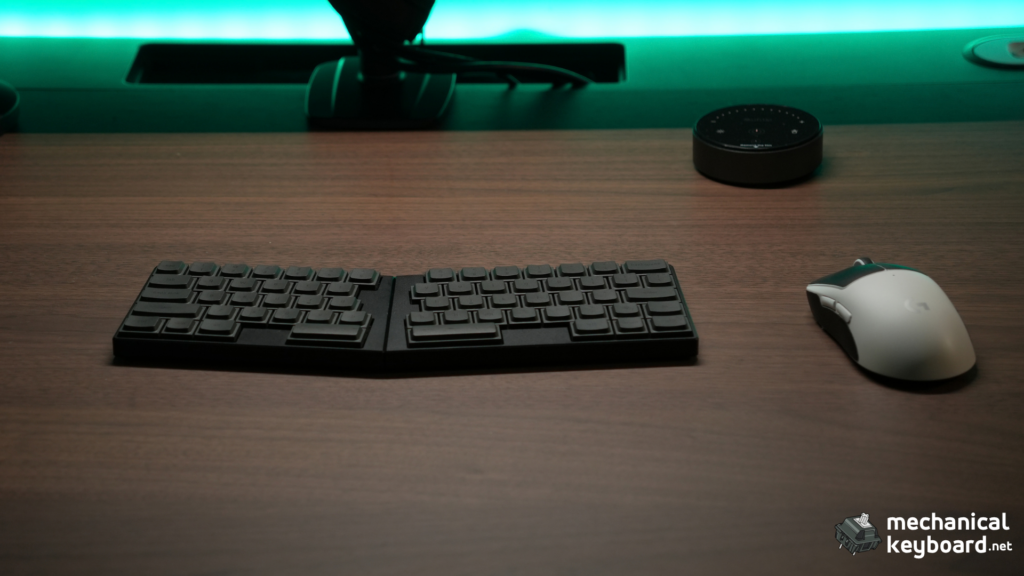
If you do want a conventional single-board shape, the halves snap together magnetically.
The magnets feel strong enough that joining the board is not fiddly. The two pieces pull themselves into position with a small, satisfying snap. Once together, the Elytra forms a subtle V-shaped angle rather than becoming one perfectly straight slab.
I actually like that angle. It keeps some of the ergonomic idea even when the keyboard is joined.
The underside is one of the coolest details
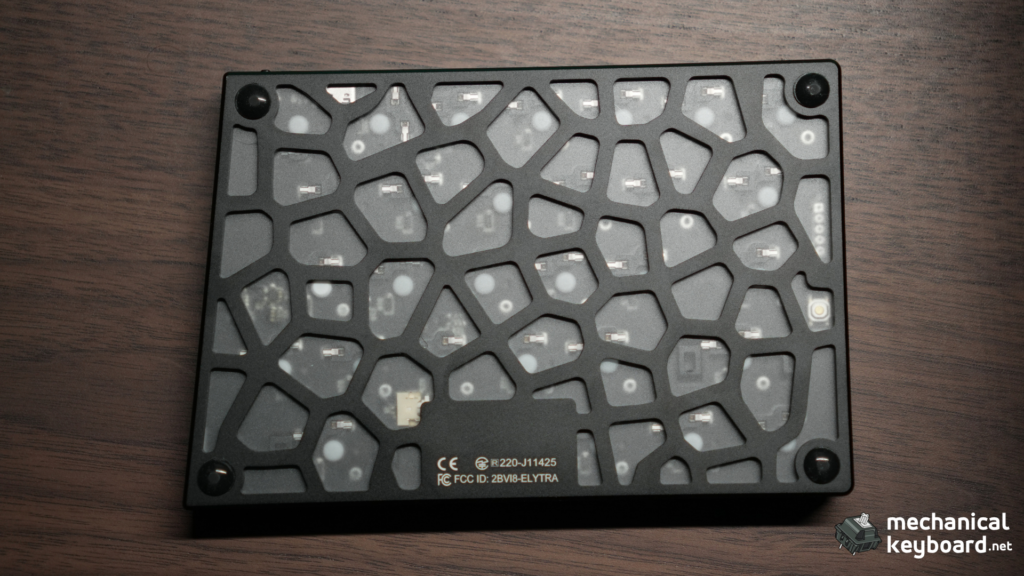
Flip the keyboard over and the visual design becomes more interesting.
The bottom uses a hollow geometric pattern with a translucent layer beneath it, which lets you see into the structure instead of hiding everything behind a flat metal plate. It gives the Elytra an engineered look without adding RGB or decorative screens.
That matters because this is otherwise a very restrained keyboard. There is no RGB light show competing for attention. The visual identity comes from the shape, machining, and underside pattern.
The Black version looks great, but the legends are hard to see
The black-on-black treatment is probably the cleanest-looking Elytra configuration, but it comes with a practical downside.
I touch type, so legend visibility does not hurt me much during normal writing. When I do need to check an unfamiliar key, though, the legends can be difficult to read. I have occasionally turned on a nearby light just to see what is printed.
So far, fingerprints have not been a problem, and I have not picked up visible scratches on the finish.
If you care about experimenting with keycap shapes and profiles, our keycap profiles guide and broader mechanical keyboard keycaps guide are useful background. With low-profile boards, always verify the exact stem and keycap compatibility before buying replacements rather than assuming every MX-style set will fit.
Is the Elytra a Good First Split Keyboard?
For me, yes. This is probably the most important part of the review.
Before using it, I was genuinely unsure whether I would be able to adapt. Split ergonomic keyboards can look intimidating if your entire typing history is built around a normal row-staggered QWERTY board.
Within a few hours, that concern mostly disappeared.
The reason is simple: the Elytra changes the position of your hands more than it changes the logic of typing. The letters are still arranged in the familiar staggered pattern. You are not immediately being asked to learn a columnar layout, a tiny thumb cluster, or several layers just to type a sentence.
That makes it a much gentler entry point into ergonomic keyboards.
If you want to see what the deeper end of compact split layouts looks like, our best 40% keyboards guide includes boards such as the Corne. Those designs can be brilliant, but they demand a different level of adaptation. The Elytra feels much closer to taking a familiar compact keyboard and cutting it in half.
The missing Right Shift is the real learning curve
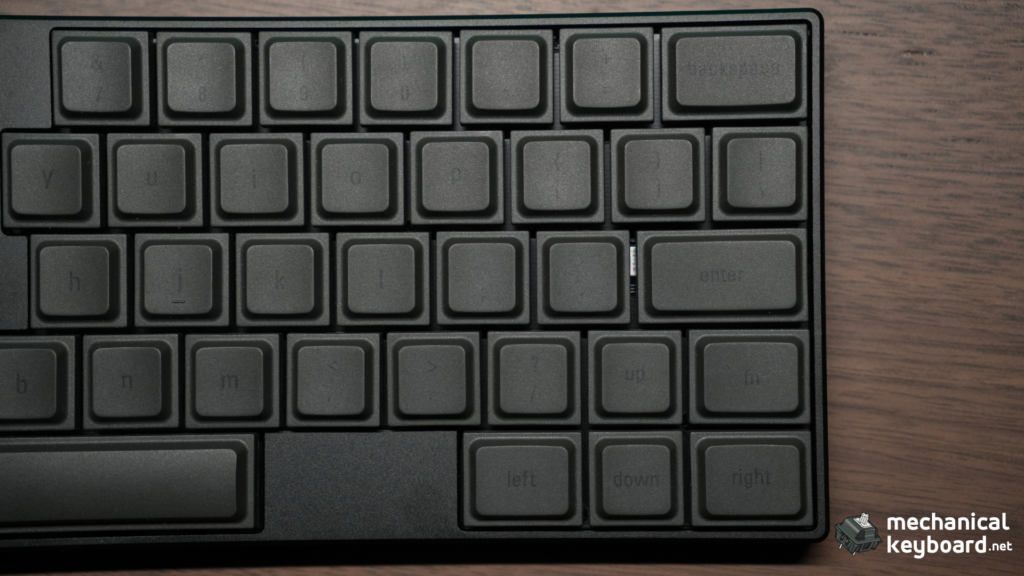
My biggest adjustment was not the split itself. It was the right side of the layout.
I normally rely on Right Shift as part of my typing habits, and the Elytra does not give you a dedicated Right Shift in the default layout. The ? key and nearby Up Arrow placement made punctuation awkward at first.
That is still the one layout decision I would change.
The good news is that Elytra supports Vial, so this is the kind of issue that can be solved through remapping rather than hardware modification. I have not done that remap yet, so I am not going to pretend the problem has disappeared. Once I adapted to the board, it bothered me less, but it remains my clearest criticism of the default keymap.
If compact keyboard layers are new to you, the general logic is similar to what you see on other small boards. Our 60% keyboard shortcuts guide explains why compact keyboards move less-used functions onto layers.
Typing Experience: The Split Is More Natural Than I Expected
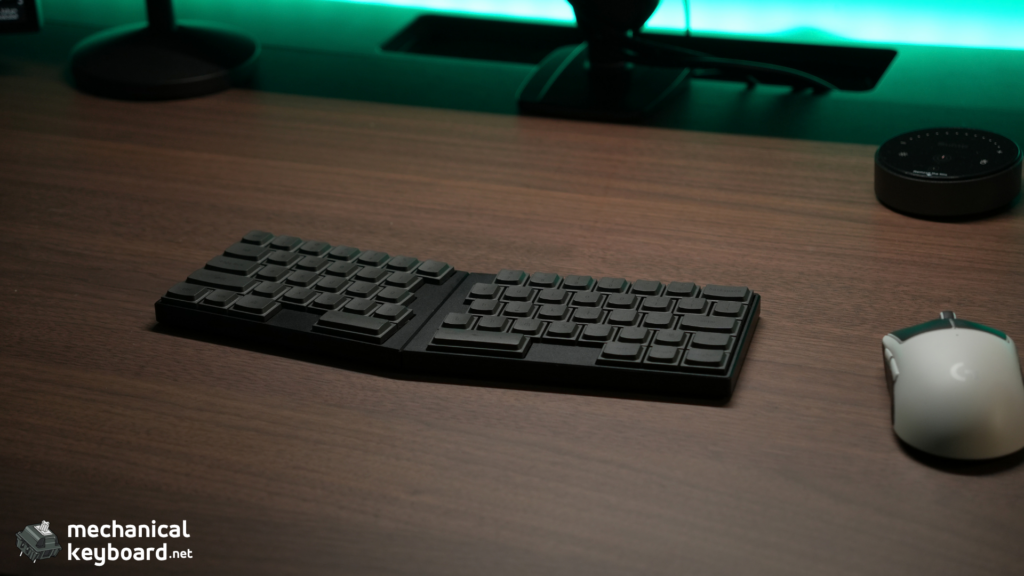
Once the first few hours of adaptation were over, I started to understand why people get attached to split keyboards.
The biggest benefit is not a magic typing-speed increase. I did not run a WPM benchmark for this review, and I am not going to invent one.
It is the ability to stop forcing both arms toward the center of one keyboard.
I usually keep the halves angled slightly inward with a comfortable gap between them. Because each side can move independently, I can change the spacing through the day instead of accepting whatever angle a single-piece case gives me.
The result feels relaxed for writing and normal office work.
I have used the Elytra for writing, browsing, day-to-day work, and general typing. It stopped feeling like “the weird split keyboard I am testing” surprisingly quickly and became something I could simply work on.
That is also why I think this board makes sense for minimalist desks. The two halves take up very little visual space, and because there is no giant central case, you can build the desk around your screen rather than around the keyboard.
JZF Mist Silent Linear Switches: Almost Absurdly Quiet
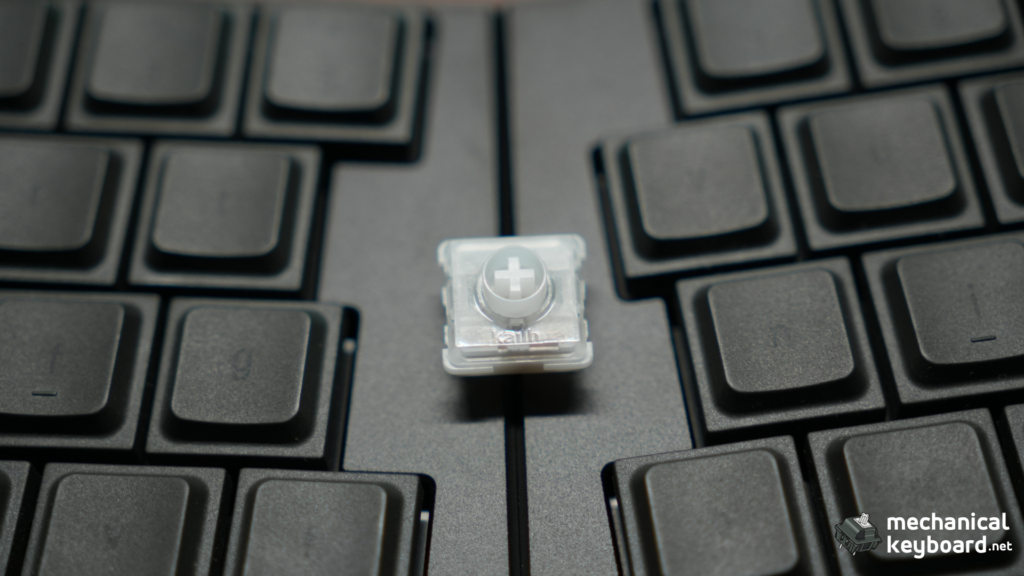
The JZF Mist option is the configuration I would choose again for office use.
ElimKeys lists the switch at 37 ± 10 gf operating force, 2.8 mm total travel, and 50 million actuations. The physical switches in my unit also carry Kailh branding.
On paper, 37g sounds very light. In practice, the switch is light without feeling like every resting finger triggers a key. I still feel like I have to intentionally press to actuate it.
The best way I can describe the feel is this: there is a slightly firm sensation when you focus on an individual press, but during continuous typing the bottom-out feels more cushioned. It becomes creamy rather than harsh.
If you are deciding between switch families more generally, our linear vs tactile vs clicky guide explains why a light linear behaves differently from a tactile or clicky option.
The sound is the headline
These switches are so quiet that you can forget you are listening to a mechanical keyboard.
That sounds exaggerated until you use them.
I also have experience with the CloudShell White option, and the CloudShell is clearly more audible. The JZF Mist takes the Elytra in a different direction. It becomes a board I would comfortably recommend for an office, a shared workspace, late-night typing, or a desk near a microphone.
There is no dramatic thock here. That is not the point. If your idea of the perfect keyboard is something deep and resonant, you are shopping for a different sound profile.
Across my unit, the switches sound consistent. If I put my ear extremely close to the keyboard, I can detect a very slight scratchiness. At normal typing distance, it is not something I notice. I also did not hear an obvious problem from the larger keys compared with the rest of the board.
For another example of a keyboard built around quiet office use, see our Epomaker TH99 PRO review. It is a very different full-height 96% board, but it shows how much switch choice changes whether a mechanical keyboard works in shared spaces.
Low Profile Changes More Than Just the Height
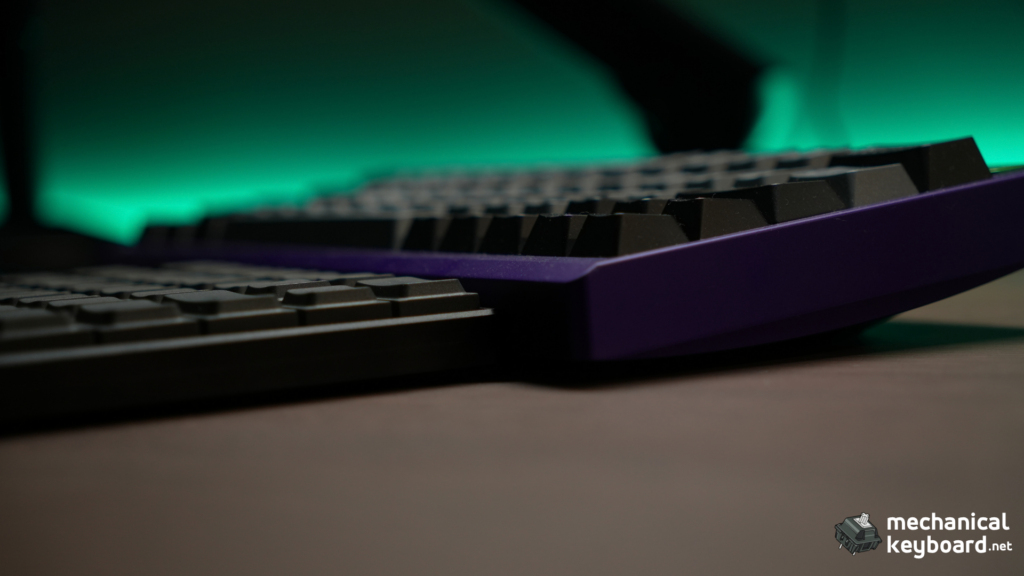
If you already know you dislike low-profile keyboards, the Elytra is not going to convert you by force.
Low-profile switches have shorter total travel than many full-height mechanical switches, and the whole board sits much closer to the desk. That changes the rhythm of typing and the way your fingers approach each row.
For me, the lower height suits the overall design. A tall case would undermine the portability and would probably make the separated halves feel more cumbersome.
The Elytra is also a useful contrast to something like the Epomaker Luma100, which takes low-profile hardware in the opposite direction. The Luma100 gives you a near-full-size 96% layout in a slim aluminum body. The Elytra sacrifices that conventional key count to gain independent hand placement and portability.
So the choice is less “which low-profile keyboard is better?” and more “what problem are you trying to solve?”
If you want a numpad and familiar full-size behavior, the Luma100 makes more sense. If you want your hands separated and your desk layout flexible, the Elytra is the more interesting design.
Bluetooth Connectivity: Flawless in My Normal Use
Bluetooth is where split wireless boards can become annoying very quickly. You are not only connecting a keyboard to a computer. The two keyboard halves also need to stay synchronized with each other.
That has not been a problem in my normal use.
My routine is simple: turn the board on, wait briefly for the two halves to find each other, and it connects to my computer automatically. I do not have to think about which half is doing what.
I have not experienced random disconnects, missed inputs, or obvious lag while writing and working.
Sleep and wake behavior has also been excellent in practice. The Elytra has small indicator lights rather than RGB lighting, and those indicators turn off after connection, so I cannot tell you exactly when the keyboard enters sleep. What I can say is that after leaving it alone for around two hours, I can start typing and it responds as if it never went away. I have not noticed a lost first key or annoying wake delay.
ElimKeys’ current documentation lists firmware v1.4 as the latest release and says that version improved left-half battery life and fixed laggy typing after waking from sleep. I have not checked the firmware version installed on my review unit, so I am not attributing my experience specifically to v1.4.
What about wired mode?
The left half handles normal USB data. The right USB-C port is used for charging in normal operation.
I have not spent enough time using the Elytra as a wired keyboard to give a meaningful wired performance verdict. Most of my cable use has been while charging.
That is why this review does not quote polling-rate or latency figures. If competitive gaming is your priority, measured latency matters more than a sentence saying something “felt fast.”
Battery Life: At Least a Week in My Real Use
ElimKeys advertises up to four weeks on a single charge.
I have not reproduced that claim in a controlled battery test.
What I can say from normal use is that battery life has been solid. I have gone at least a week between charges without feeling like battery management is part of owning the keyboard.
That is the experience that matters more to me for a work board. I do not want a split keyboard where keeping two halves charged becomes another weekly chore.
Each half has its own battery. ElimKeys says the right Peripheral half generally lasts longer than the left Central half. The documentation also says to charge at 5V/1A and specifically advises against a fast charger, recommending a computer USB port.
The board has no RGB, which also makes the wireless focus more sensible. There is less power being spent on lighting a desk when the entire appeal is a clean, minimal portable setup.
Vial Software: Useful, but I Have Only Lightly Tested It
The Elytra supports Vial for key remapping, layers, macros, combos, and Bluetooth profile controls.
That is important because the hardware layout is compact enough that customization can have a real impact. My missing Right Shift complaint is exactly the kind of issue Vial is meant to solve.
I tried the browser version. It connected, but the interface felt a little slow during my use. I have not yet tested the downloadable version, and I have not built a custom layout that I would call final.
So my software verdict is deliberately limited: the functionality is there, but I have not tested it deeply enough to judge every edge case.
ElimKeys’ official guide says browser Vial should be used through a Chromium-based browser such as Chrome or Edge. Connect the left half by USB, open Vial, select Elytra, and changes are stored immediately.
The default configuration uses a base layer and an Fn layer. You can also assign BT0, BT1, and BT2 in Vial to switch between up to three paired devices.
One useful connection setting is USB Priority. By default, plugging in USB makes the keyboard communicate over USB. ElimKeys also documents a Bluetooth Priority mode, where the cable can remain connected for charging while keystrokes continue over Bluetooth.
If you are familiar with VIA from other boards, the broad idea of graphical remapping will feel familiar. Our VIA keyboard guide explains the general appeal of software-configurable layers, although Elytra specifically uses Vial, not VIA.
ElimKeys Elytra Quick Start and Light Guide
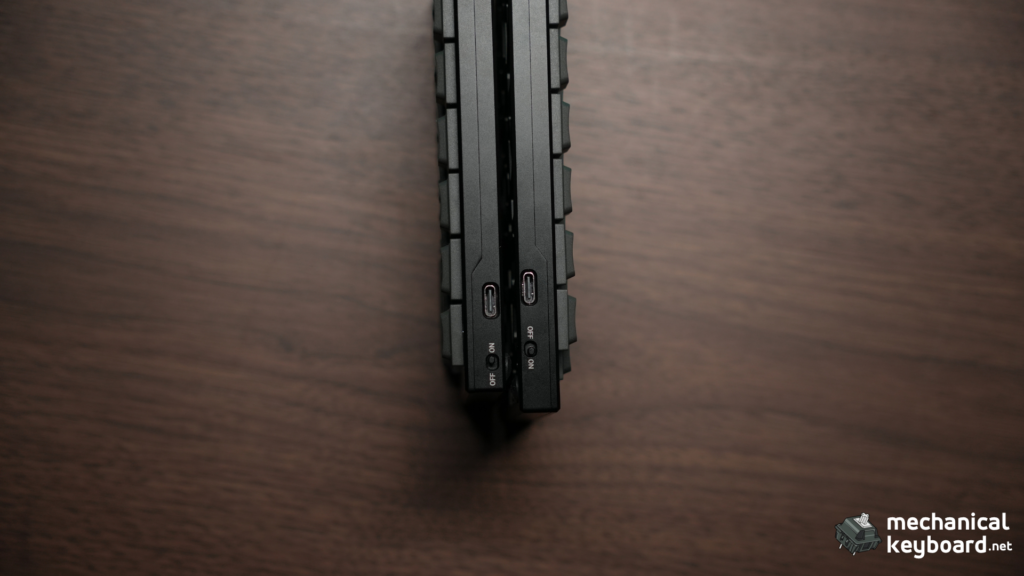
The official documentation is detailed, but these are the parts I would want beside me the first time I used the keyboard.
How to turn the Elytra on and off
The power switch for each half is on the inner edge, close to its USB-C port.
- Power on: slide the switch to the right when facing it.
- Power off: slide the switch to the left.
- The two halves arrive factory-paired.
- If the right half flashes blue on startup, ElimKeys says to give the halves about 10 seconds to sync.
Which USB-C port should you use?
For normal wired keyboard data and Vial, use the left Central half.
The right Peripheral USB-C port is for charging during normal use. Both halves can be charged separately.
What do the lights mean?
Each half has two small indicators.
| Half | Light behavior | Meaning |
|---|---|---|
| Left, outer | Green breathing | Charging |
| Left, outer | Green solid | Fully charged |
| Left, outer | Red flashing | Low battery |
| Left, outer | Blue slow flash | Searching for the right half |
| Left, inner | Blue, green, or red fast flash | Bluetooth pairing mode, color represents profile |
| Left, inner | Brief solid light, then off | Connected to computer |
| Right, inner | Green breathing | Charging |
| Right, inner | Green solid | Fully charged |
| Right, inner | Red flashing | Low battery |
| Right, outer | Blue slow flash | Searching for left half |
| Right, outer | Brief blue solid, then off | Connected to left half |
This also explains something that can look confusing at first: once everything is connected, the lights mostly disappear. That is normal.
How to connect Bluetooth
- Turn on both halves.
- Wait for the halves to connect to each other.
- Open Bluetooth settings on your computer, tablet, or phone.
- Select Elytra.
- Once paired, the connection light briefly goes solid and then turns off.
ElimKeys specifies Bluetooth 5.0 or newer.
Charging warning
ElimKeys’ guide says the keyboard accepts 5V/1A and specifically says not to use a fast charger. Their recommended method is charging from a computer USB port.
I would follow that instruction rather than treating the USB-C connector as permission to plug it into any high-power charger on your desk.
The Optional Palm Rest and Tenting Kit Are the Accessories I Wish I Had
My review sample is the plain keyboard without the optional ergonomic accessories.
That is the one part of the experience I still want to explore.
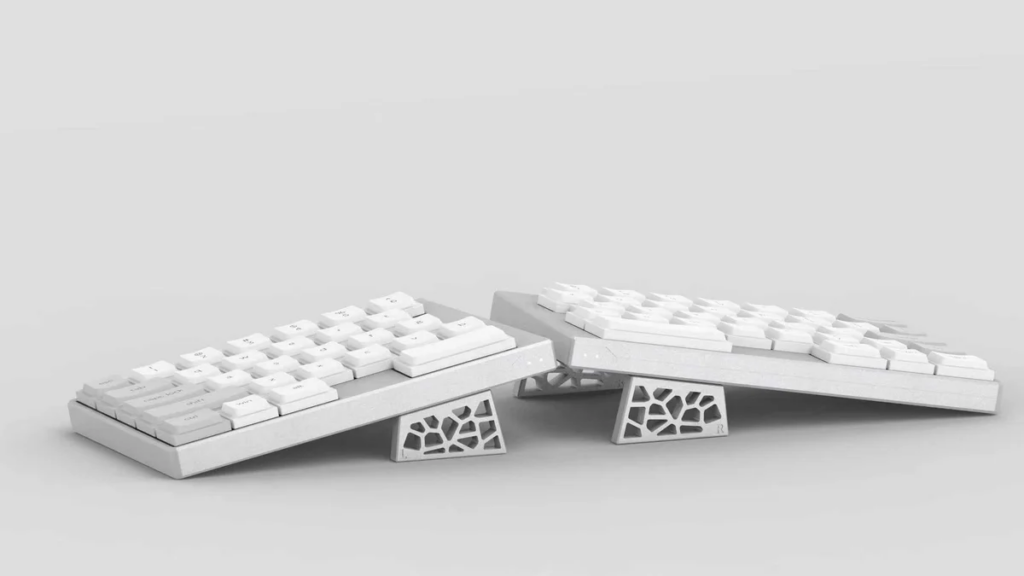
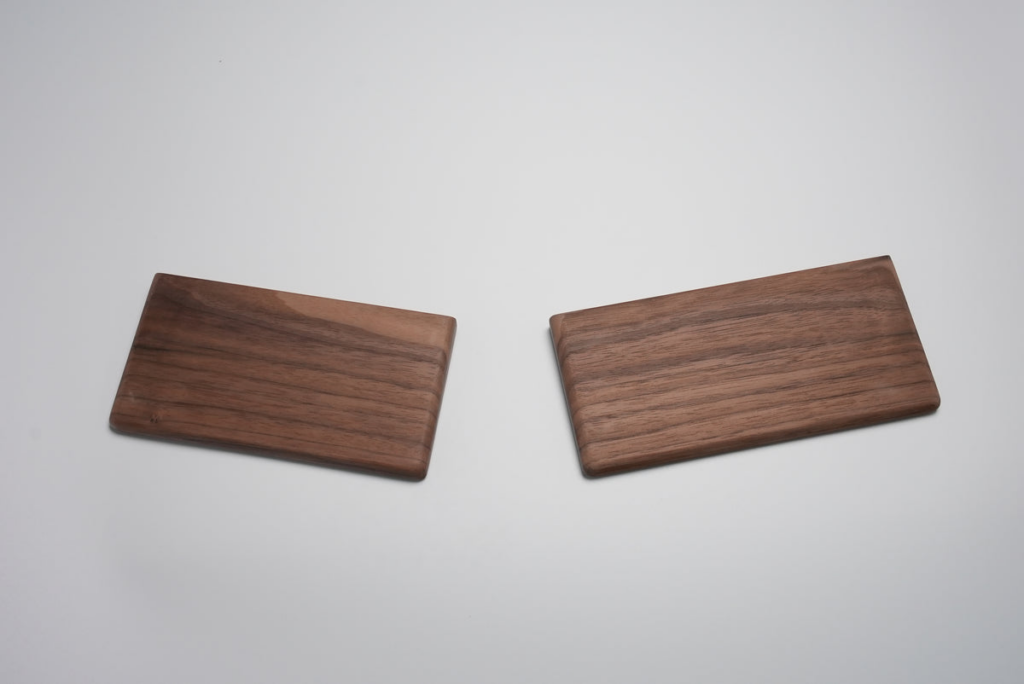
The base Elytra is comfortable because it is thin, but I can imagine the palm rest helping me settle into a more consistent typing angle. I would also like to test the tenting kit because raising the inner edges of a split keyboard changes wrist rotation in a way a flat desk test cannot reproduce.
ElimKeys currently lists:
| Accessory | Current price |
|---|---|
| Elytra Palm Rest | $39 |
| Elytra Tenting Kit | $79 |
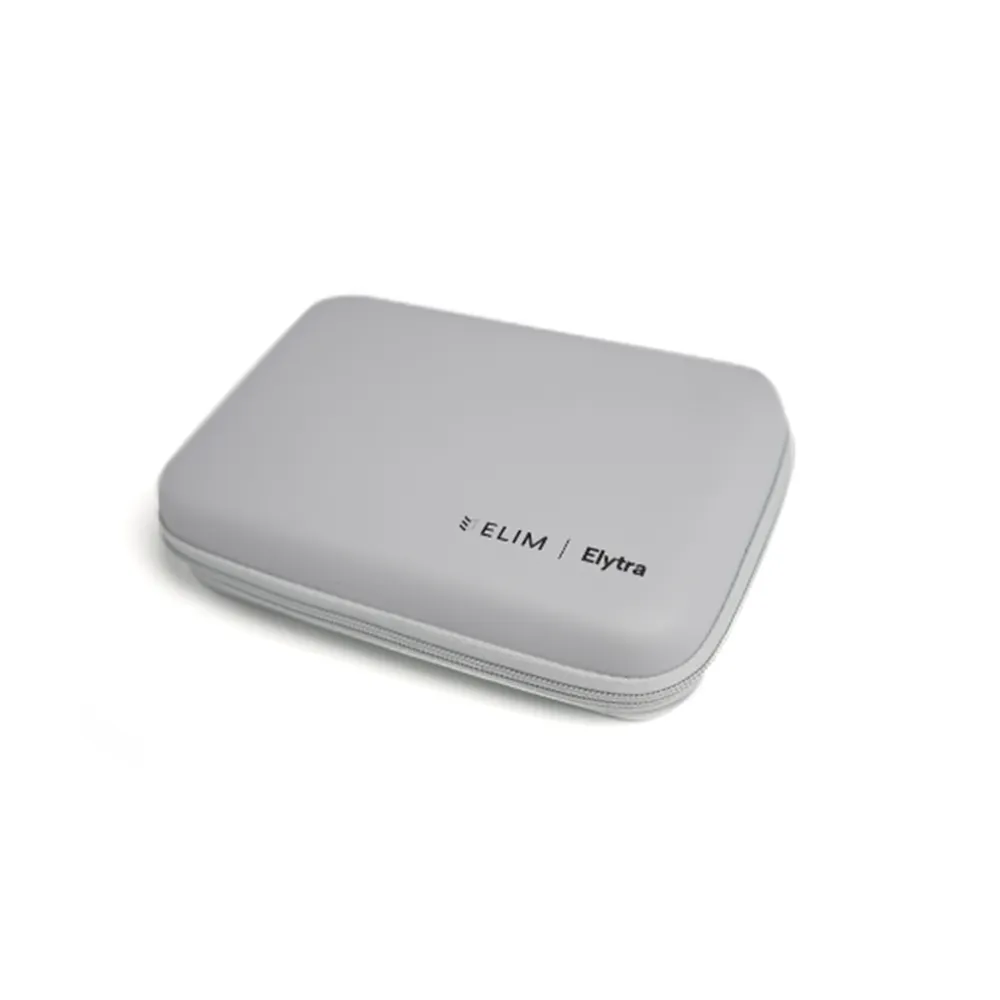
| Portable Keyboard Case | $39 |
According to the official guide, the CNC aluminum tenting kit provides 6° and 10° positions and uses magnetic side walls. The optional palm rests can magnetically attach to the tenting setup.
I have not tested either accessory, so I am not scoring them.
At $249 for the base keyboard, I do wish some form of tenting or wrist support were included. Once you add the $79 tenting kit and $39 palm rest, the total moves into a much more expensive ergonomic setup.
Light Gaming Is Fine, but This Is Not My Competitive Gaming Pick
I have played some games on the Elytra, but nothing competitive enough for a meaningful latency verdict.
For casual and light gaming, it did not bother me. I was not sitting there noticing input delay or thinking about the connection. That is exactly what I want from a general-purpose wireless keyboard.
Competitive gaming is different.
The Elytra does not offer a 2.4GHz gaming dongle, and I did not measure Bluetooth or USB latency. It also uses conventional mechanical switches rather than Hall Effect switches with adjustable actuation and Rapid Trigger.
If your buying decision is primarily about FPS performance, read our explainer on what a Hall Effect keyboard is and our best Hall Effect keyboard guide before spending $249 on an ergonomic work-focused board.
For a much cheaper example of a compact keyboard built specifically around high polling rates and magnetic switches, our AULA WIN68 HE review shows what the gaming-first side of the market prioritizes.
The Elytra is solving a different problem.
ElimKeys Elytra vs Other Split and Low-Profile Options
These are specification and pricing comparisons, not claims that I hands-on tested every competing board beside the Elytra.
| Keyboard | Current price | Layout | Low profile | Wireless | Main reason to consider it |
|---|---|---|---|---|---|
| ElimKeys Elytra | $249 | 63-key row-staggered split | Yes | Bluetooth | Premium, light, approachable split design |
| EPOMAKER Split70 | $115.99 | 71-key split | No | Bluetooth + 2.4GHz | Much cheaper entry to a wireless split layout |
| Dygma Raise 2 | From $369 | Split with 8-key thumb cluster | Mostly full-height | Wireless is an add-on | Deeper ergonomic system with palm pads, optional RF and aggressive tenting |
| Epomaker Luma100 | $119 at our review | 96% single-piece | Yes | Tri-mode | Low-profile aluminum option if you do not want a split layout |
Elytra vs EPOMAKER Split70
The Split70 is the obvious budget contrast.
EPOMAKER currently lists it at $115.99 with 71 keys, Bluetooth, 2.4GHz, USB-C, a 3000mAh battery, and a conventional full-height mechanical layout.
If your question is simply “Can I try a wireless split keyboard for much less money?”, the Split70 is the easier price to swallow.
The Elytra justifies its premium differently. It is much thinner, built around CNC aluminum and low-profile hardware, and its design feels more like a portable premium object than a value-focused desktop board.
Elytra vs Dygma Raise 2
Dygma’s Raise 2 starts at $369, and its wireless option is an additional cost. It is also much heavier at around 1kg according to Dygma.
The Dygma goes deeper on ergonomics and programmability. It has an 8-key thumb cluster, magnetic palm pads, optional integrated tenting up to 60°, and a wireless configuration that adds Bluetooth plus low-latency RF.
The Elytra is the simpler and more portable idea. It does not ask you to build your workflow around thumb keys, and it stays much closer to a familiar compact keyboard.
If you want maximum ergonomic configuration, the Dygma has a broader system. If you want something that can disappear into a minimal desk or bag and still feel familiar within a few hours, the Elytra makes more sense to me.
Elytra vs a normal low-profile keyboard
Not everyone who likes the thin design needs a split.
That is why the Luma100 review is a useful comparison. It gives you a traditional 96% layout, numpad, low-profile switches, and an aluminum case at a much lower price.
The Elytra is not charging $249 merely for being low profile. You are paying for the split construction, independent wireless halves, machining, magnets, custom layout, and the overall ergonomic concept.
Who Should Buy the ElimKeys Elytra?
I would recommend the Elytra most strongly to five types of people.
First-time split keyboard users: This is the big one. If you are curious about ergonomic keyboards but do not want to relearn QWERTY on a column-staggered board, the Elytra is unusually approachable.
Office and shared-space users: The JZF Mist configuration is genuinely quiet. If mechanical keyboard noise is the reason you normally avoid bringing one to work, this switch option changes the equation.
People who care about positioning and ergonomics: The benefit is not a medical claim. It is simply that you can place each half where your hands naturally want it instead of adapting both arms to one fixed rectangle.
People who work from different places: At approximately 440g according to ElimKeys, with a thin aluminum body and no cable required for normal Bluetooth use, it is easy to imagine this moving between home, office, cafe, and travel setups.
Minimal setup enthusiasts: This might be the audience that understands the design fastest. Put a laptop or tablet in the center, place one half on either side, and you have a setup that looks intentional rather than cluttered.
Who Should Skip It?
Skip the Elytra if you already know you dislike low-profile switches. The entire product is built around that thin, short-travel experience.
Skip it if a split or ergonomic layout sounds like an inconvenience rather than something you want to explore.
Skip it if you need a numpad, dedicated function row, or a conventional full-size key layout. Our mechanical keyboard sizes guide will point you toward layouts that preserve those keys.
And if competitive gaming is the main reason you are buying a keyboard, I would prioritize measured latency, high polling rates, and features such as Rapid Trigger instead. Our Hall Effect switch guide goes deeper into that category.
Finally, skip it if $249 already feels unreasonable for a keyboard. I think the Elytra feels premium enough to match its price, but that does not make $249 inexpensive.
Verdict: The Split Keyboard That Made Me Want to Use More Split Keyboards
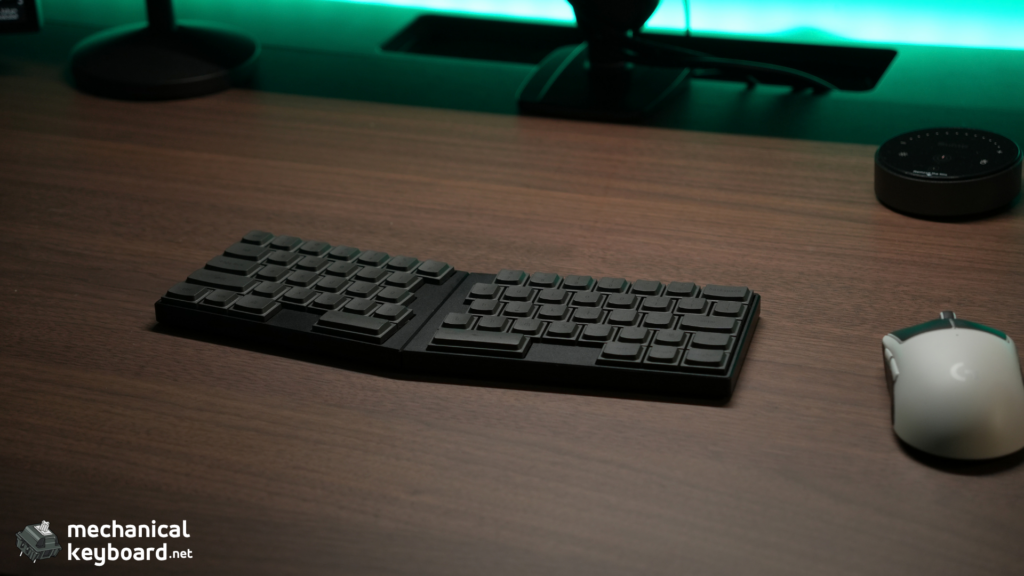
The best compliment I can give the ElimKeys Elytra is that it made the split part stop feeling unusual.
I started this review wondering whether I would adapt at all. A few hours later, I was moving the halves around my desk, finding a comfortable angle, and typing normally. A few weeks later, I was answering questions about this review on the Elytra itself.
That is the product’s real strength.
It looks unusual enough to be interesting, but it does not demand that you become an ergonomic-keyboard expert before you can use it.
The build is excellent. The Black finish is sleek. The magnetic join is satisfying. The hollow geometric underside gives the board a visual identity of its own. Bluetooth has been uneventful in the best possible way. Battery life has been good enough that I do not think about charging every day.
And the JZF Mist switches are the configuration that completes the idea for me. They are light, creamy, and extremely quiet. In a shared office, that matters more than chasing a dramatic sound signature.
There are real compromises. I miss Right Shift. The legends on the Black version are hard to read. I wish I had the palm rest and tenting kit in the box. Vial deserves more testing, and I would not make competitive gaming claims without proper latency measurements.
Then there is the price. $249 is not cheap.
But the Elytra does not feel like a cheap keyboard being sold at a premium because it has the word “ergonomic” attached to it. The material, finish, portability, switch choice, and overall concept all feel premium in hand.
Score: 8.9/10
After using the ElimKeys Elytra for a few weeks, I think more people should give low-profile ergonomic keyboards a shot.
Where to Buy
| Retailer | Configuration | Price checked | Notes |
|---|---|---|---|
| ElimKeys | Black or White, JZF Mist or CloudShell White | $249 USD | Official store, all configurations listed in stock at time of review |
Price checked: September 24, 2026. Prices and stock can change.
Frequently Asked Questions
Is the ElimKeys Elytra worth $249?
For buyers who specifically want a premium low-profile split keyboard, I think it is. The CNC aluminum build, very low weight, independent wireless halves, magnets, hot-swap support, and quiet JZF Mist option all feel premium. It is not a value keyboard, though. If your priority is simply getting a split layout for the lowest possible price, cheaper options exist.
Is the ElimKeys Elytra good for someone new to split keyboards?
Yes, based on my experience. This was my first split keyboard, and I adapted within a few hours. The familiar row-staggered QWERTY layout makes the transition much easier than more radical column-staggered ergonomic boards.
How quiet are the JZF Mist switches?
Extremely quiet. In normal use, the Elytra with JZF Mist switches can sound less like a typical mechanical keyboard than you might expect. I would be comfortable using this configuration in an office or shared workspace. There is a tiny amount of scratchiness if I listen from extremely close range, but it is not something I notice at normal typing distance.
How long does the ElimKeys Elytra battery last?
ElimKeys claims up to four weeks. In my normal use, I have comfortably gone at least a week between charges. I did not conduct a controlled full-drain battery test, so I am not claiming a verified number of hours.
Does the Elytra have 2.4GHz wireless?
No. The current Elytra specification lists USB-C and Bluetooth. If low-latency wireless gaming is a priority, that is an important limitation.
Does the Elytra support Vial?
Yes. Elytra supports Vial for remapping keys, layers, macros, combos, Bluetooth profile controls, and output-mode settings. I tested the web version briefly and found it a little slow. I have not yet tested the downloadable Vial version.
Can you remap a key to Right Shift?
Vial supports full key remapping, so the missing dedicated Right Shift can be addressed by changing the keymap. I have not yet settled on my own Right Shift remap, so I am treating the default layout as reviewed rather than claiming a specific remap is perfect.
Which Elytra USB-C port carries data?
For normal use, the left Central half is the one to connect for wired data and Vial. The right Peripheral USB-C port is used for charging in normal keyboard operation.
What do the blue lights on the Elytra mean?
A slow blue flash on a half generally means it is searching for the other half. On the left half, a fast flashing connection light can also indicate Bluetooth pairing and the active Bluetooth profile. Once the keyboard is connected, the relevant connection indicator briefly goes solid and then turns off.
Can I use the Elytra with an iPad?
ElimKeys supports Bluetooth connections to compatible devices, and the keyboard can pair with up to three devices. I specifically want to use an iPad between the two keyboard halves because the split design suits that layout, but I have not yet tested my iPad setup enough to call it part of this review.
Is the Elytra good for gaming?
It was fine for my light, non-competitive gaming. I did not measure latency, so I would not recommend it specifically as a competitive gaming keyboard based on this review. If you mainly play competitive FPS titles, a wired or low-latency 2.4GHz Hall Effect board may better match your priorities.
Does the Elytra include a palm rest or tenting kit?
Not with the base configuration I tested. ElimKeys sells the palm rest and tenting kit separately. The current tenting kit supports 6° and 10° positions according to the official guide. I have not tested either accessory yet.