Disclosure: Whalebone’s Ed was kind enough to send this stand for review. As always, that doesn’t change what I tell you here.
- What’s Actually on the Stand
- The Stress Test
- Build Quality and What “Metal” Actually Means
- Cork Padding: An Honest Caveat
- USB Cutouts, in Actual Use
- Specs : My Configuration
- Whalebone’s Other Styles (Researched, Not Tested)
- Pricing and Customization
- Is a 3D-Printed Stand Actually Worth It?
- FAQ
- Final Verdict
- Where to Buy
If you’ve got more than two or three keyboards, you already know the problem: they end up stacked in a closet, boxed up, or crowding a shelf where you can’t actually see any of them. Whalebone’s angled stands are built to solve exactly that, and after a few weeks of using one daily, here’s how it’s actually held up.
I carried this stand across the room fully loaded, four keyboards, two of them solid aluminum, and it didn’t flinch. That’s the short version of this review. Here’s the long version.
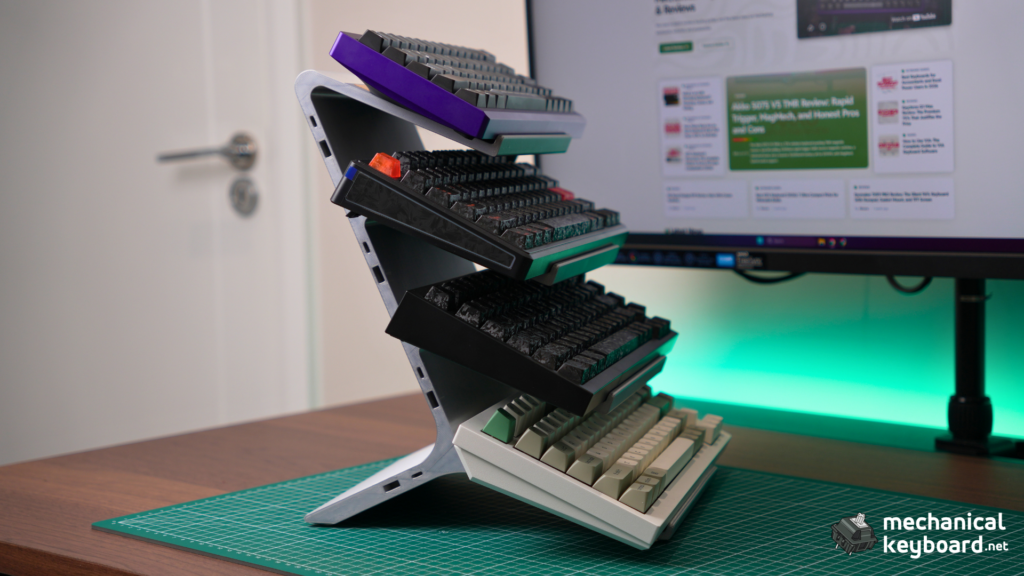
I’ve been using Whalebone’s Angled 4-tier stand for a few weeks now, configured in Silver, 8″ wide, with cork padding and USB cutouts added. This review covers that exact unit hands-on, plus an honest look at Whalebone’s other four stand styles for anyone comparing options before they buy.
What’s Actually on the Stand
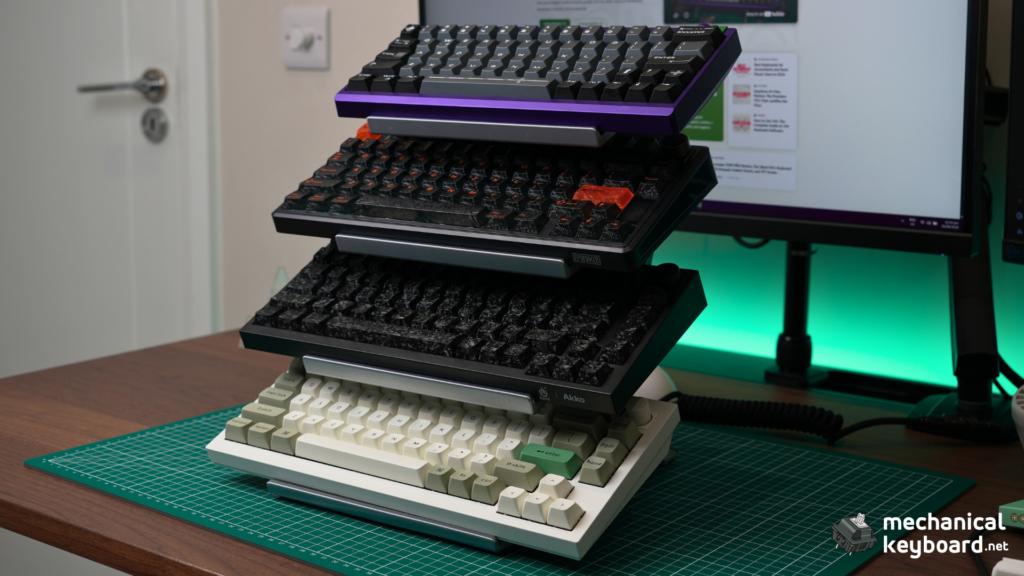
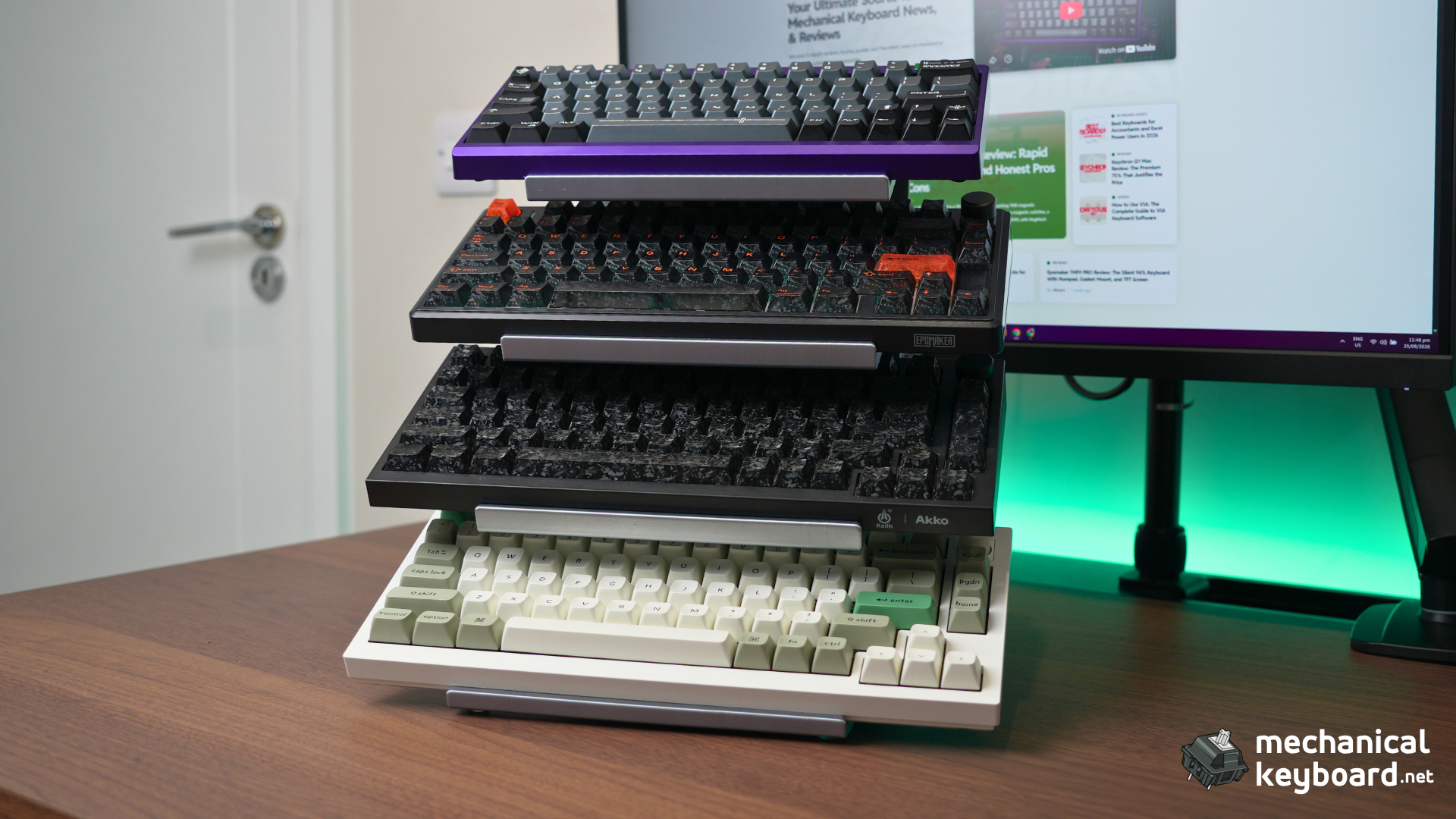
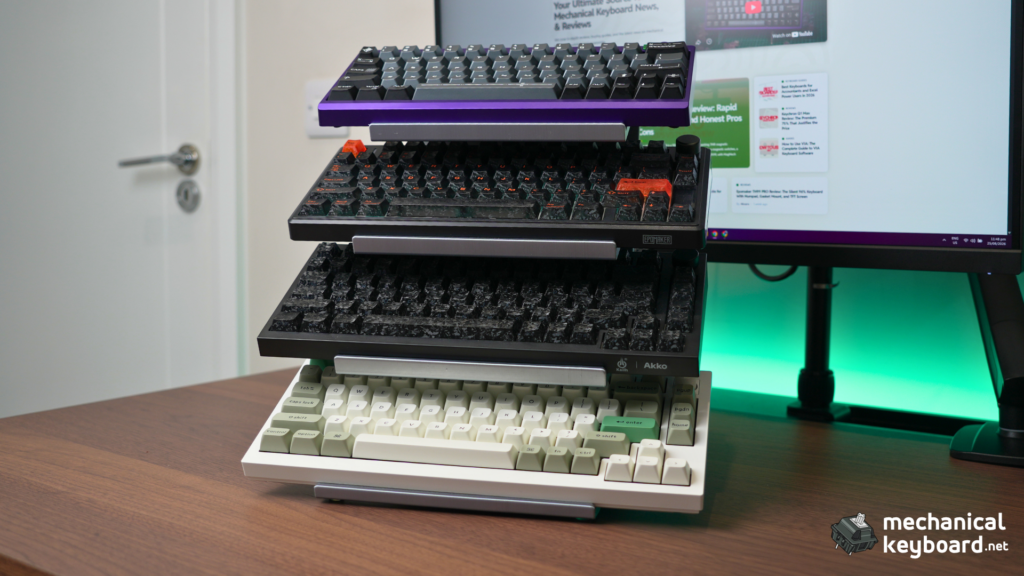
Top to bottom: a Meletrix Zoom64 (fully built, aluminum), an Epomaker TH80, an Akko 5075 V5 TMR, and a Keychron Q1 Max (also fully aluminum). Two of these are solid aluminum boards, which matters for what comes next.
The Stress Test
This is the part that actually convinced me. I picked the whole loaded stand up, four keyboards attached, aluminum boards and all, and carried it across the room to reposition it. No flex in the frame, no shifting keyboards, no creak. For a stand built from 3D-printed PLA+, not steel or solid aluminum, that’s a genuinely impressive amount of confidence to have in it.

One honest issue, though (not really a big deal tho) : one of the rubber feet on the base wasn’t seated properly out of the box. After I set the stand down and picked it back up once, that foot came loose enough that the whole thing sat unevenly and had a slight wobble on my desk. I noticed it immediately, pushed the foot back into place, and it’s been solid ever since. It’s a minor quality-control miss, not a design flaw, but worth knowing: check your feet are properly seated the moment you unbox it.
Build Quality and What “Metal” Actually Means
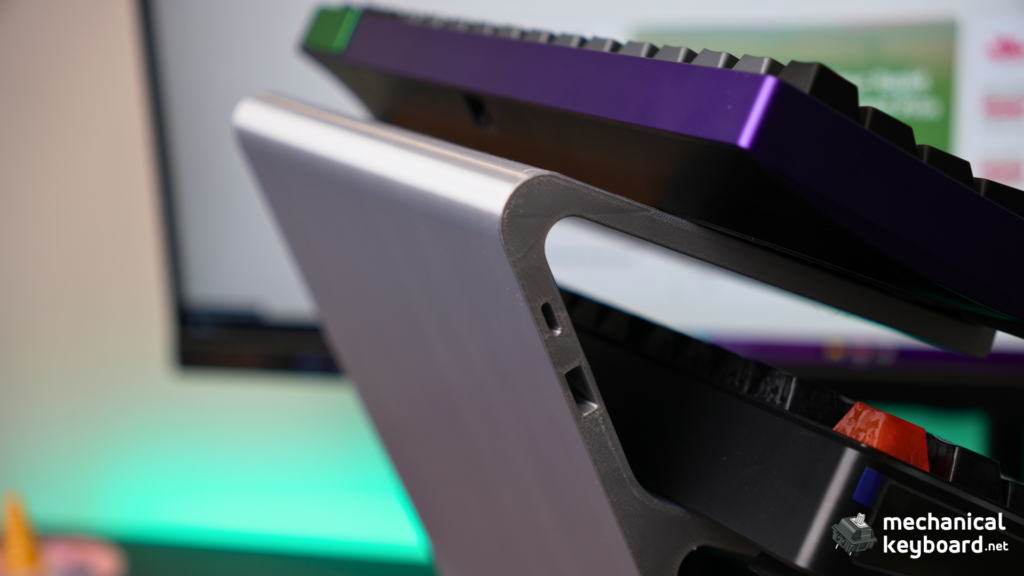
Whalebone’s metal-finish color options, including the Silver on my unit, aren’t solid metal. They’re PLA+ infused with real metal powder, then hand-polished for a brushed metal look and feel. Worth knowing going in so expectations are set correctly: it looks and feels considerably more premium than plain plastic, but it’s still a 3D-printed part, not a machined metal one. The solid-color options use standard high-density PLA+ for a matte finish.
Assembly, if you can call it that: there isn’t any. It arrives pre-assembled, unbox and place it on your desk.
Cork Padding: An Honest Caveat
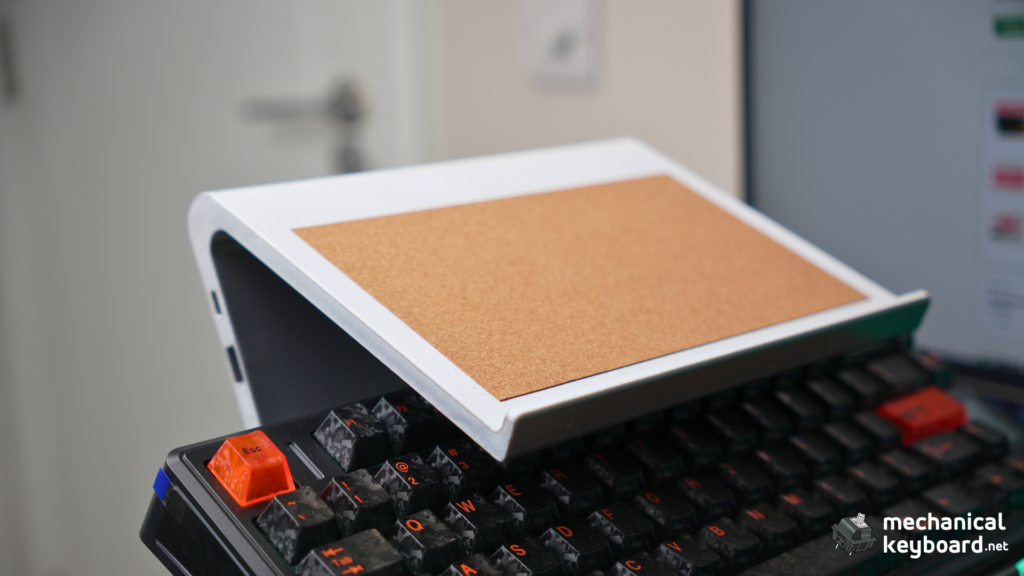
Each shelf on my unit has a cork pad insert. I don’t have a version without cork to directly compare against, so I can’t give you a definitive “it’s X% better” claim. What I can tell you: there’s a visible raised lip around each cork insert, and it clearly adds a layer of grip and cushioning between the keyboard base and the shelf. Combined with the wider 8″ shelf width (Whalebone’s own sizing guide notes wider shelves add more surface contact and stability than the 4″ option), the whole setup felt planted under real weight.
USB Cutouts, in Actual Use
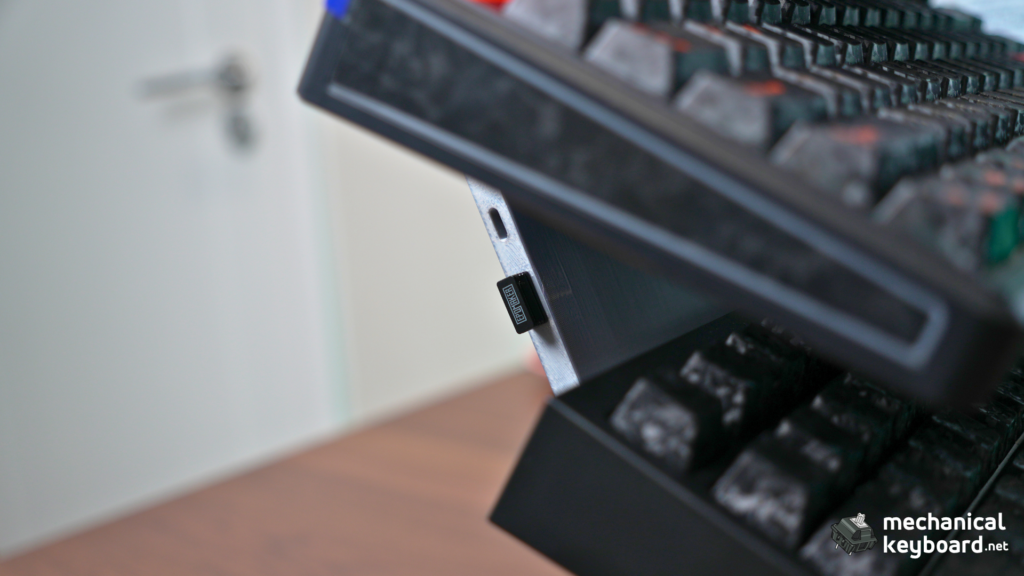
This is a small feature that turned out more useful than I expected. The side of the stand has cutout slots for storing USB dongles, and I’ve had my Epomaker 2.4GHz dongle sitting in one since day one. Small detail, but it means one less loose dongle rattling around a drawer.
Specs : My Configuration
| Spec | Detail |
|---|---|
| Style | Angled |
| Tiers | 4 |
| Width | 8″ |
| Color | Silver (metal-finish PLA+) |
| Add-ons | Cork padding, USB cutouts |
| Dimensions | 8″ W × 10.6″ D × 12.5″ H |
| Weight capacity | 10 lbs per shelf |
| Material | PLA+ (metal powder-infused, hand-polished for metal finishes) |
| Assembly | None required, ships pre-assembled |
Whalebone’s Other Styles (Researched, Not Tested)
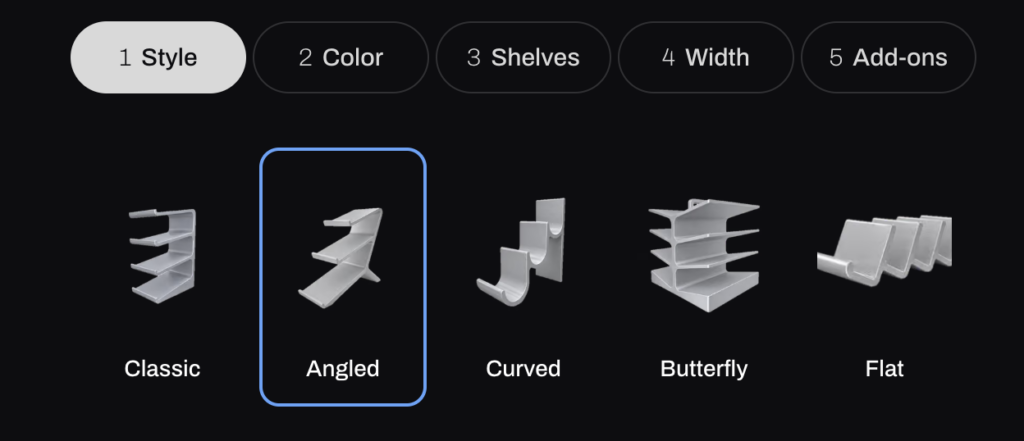
I’ve only tested the Angled 4-tier, but Whalebone makes four other stand shapes worth knowing about if this particular one doesn’t fit your desk or your collection size. Specs below are pulled directly from Whalebone’s own size guide, not hands-on impressions.
Classic – A straight-tiered design rather than the cascading angle of my unit. Available in 3, 4, or 5 tiers. The 4-tier/8″ version measures 8″ × 6.5″ × 9.2″, noticeably shallower front-to-back than the Angled equivalent, since it doesn’t need the extra depth for the cascading lean.
Curved – A softer, rounded silhouette. 2, 3, or 4-tier options. The 4-tier/8″ version is the tallest of the bunch at 12.2″ high, worth checking against shelf or desk clearance before buying.
Butterfly – The collection-scaling option. Available in 4, 6, or 8 tiers, this is the one to look at if you’re well past a handful of keyboards. The 8-tier/8″ version is still a relatively compact 10.4″ tall despite holding double what my 4-tier unit does.
Flat – A genuinely different use case: a low-profile horizontal shelf rather than a display cascade, just 2.8″ tall regardless of tier count. Better thought of as keyboard storage than keyboard display.
Pricing and Customization
Every style runs through the same 3D configurator: pick a style, a color (solid PLA+ options run cheaper, metal-powder finishes are the premium pick), tier count, one of three widths (4″, 8″, or 12″), and optional add-ons like cork padding and USB cutouts. Prices scale with all of the above, my 4-tier Angled configuration with metal color, 8″ width, and both add-ons landed well above the $28 entry price of a basic 3-tier stand.
Every stand carries Whalebone’s lifetime guarantee against manufacturing defects. Custom configurations, which is most of what they sell through the 3D builder, aren’t eligible for the standard 30-day return window unless something arrives defective, worth knowing before you finalize a build.
Is a 3D-Printed Stand Actually Worth It?
Compared to a $15-20 generic acrylic stand off Amazon, Whalebone costs more but gives you a real design choice (five distinct styles versus one fixed shape), color-matching to your desk setup, and a lifetime defect guarantee that generic acrylic simply doesn’t offer. Compared to building your own wooden stand, you’re trading DIY satisfaction and full creative control for a pre-engineered, tested design that arrives ready to use with zero tools required.
For a multi-keyboard collection specifically, especially one that includes aluminum boards, I’d rather pay the premium for something engineered to the 10lb-per-shelf spec than gamble on a $15 acrylic riser rated for who-knows-what.
FAQ
Is a 3D printed keyboard stand durable?
Based on my testing, yes, for its intended use. It held four keyboards including two aluminum boards through a full pickup-and-carry without flexing. It’s PLA+, not metal, so it won’t take the same abuse as a steel stand, but for holding and displaying keyboards on a desk it’s genuinely solid.
Does Whalebone make anything besides the Angled style?
Yes, five styles total: Classic, Angled, Curved, Butterfly, and Flat, each available in multiple tier counts and three shelf widths.
Is it good for aluminum keyboards specifically?
In my testing, yes. Two of the four boards on my unit are solid aluminum (Meletrix Zoom64 and Keychron Q1 Max), and the stand showed no strain or flex under that weight.
What’s the USB cutout for?
Storage for wireless dongles. I’ve been using mine to hold a 2.4GHz dongle so it’s not loose in a drawer.
Final Verdict
Solid build, genuinely useful add-ons in the cork padding and USB cutouts, and it passed the one test that actually matters to me, carrying real weight without complaint. The rubber foot issue knocks it down slightly since it’s the kind of thing that shouldn’t happen on a premium-positioned product, but it was a one-time fix, not a recurring problem. If you’re displaying more than a couple of keyboards and want something that looks intentional rather than improvised, this earns its price.
Where to Buy
This review used a custom configuration built through Whalebone’s 3D stand builder (Angled, 4-tier, 8″ wide, Silver, cork padding, USB cutouts). To build the same setup or your own:
Build Your Own Stand (Configurator) →
Browse Pre-Configured Stands →
Whalebone Homepage →