
A 60 percent keyboard is a compact mechanical keyboard form factor that retains only the alphanumeric cluster, modifier keys, and a handful of essential control keys, with the function row, navigation cluster, and numpad removed entirely. The result is a keyboard that occupies roughly 60% of the footprint of a standard full-size board, typically housing 61 keys on a 60 percent keyboard ANSI layout that prioritises desk efficiency and ergonomic mouse positioning.
- What Exactly Is a 60 Percent Keyboard?
- The 60 Percent Keyboard ANSI Layout: Key Arrangement and Rows
- Why Do People Use 60% Keyboards? The Real Reasons
- 60 Percent Keyboard Pros and Cons
- Real-World Usage Scenarios
- Who Should NOT Buy a 60% Keyboard
- 60 Percent vs 65 Percent Keyboard: The Key Difference
- 60% vs TKL: Which Should You Choose?
- Switch Types and What to Look For in a Compact Mechanical Keyboard
- NKRO and Key Rollover on 60% Keyboards
- Best 60% Keyboards in 2026: Recommended Models by Price
- The Learning Curve: What to Expect
- Final Verdict: Is a 60% Keyboard Right for You?
This guide covers everything you need to know: the exact key layout, how the FN layer works, real-world usage scenarios, a frank breakdown of 60 percent keyboard pros and cons, who should avoid the form factor entirely, and which models are worth your money in 2026.
What Exactly Is a 60 Percent Keyboard?
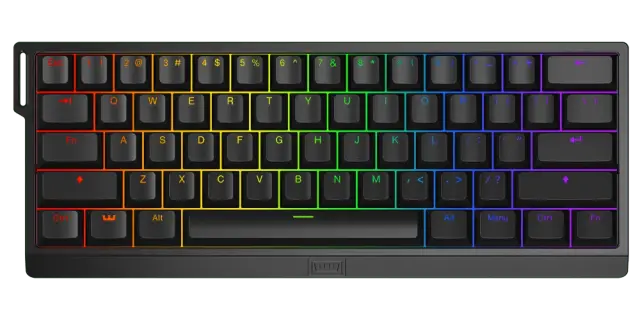
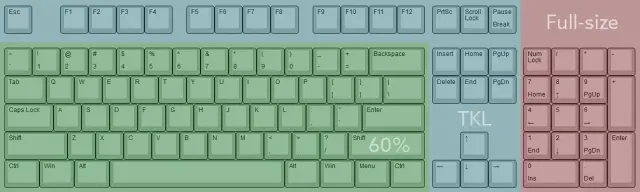
The term “60 percent” refers to the approximate proportion of keys retained relative to a full-size 104-key keyboard. In practice, a 60% keyboard has 61 keys arranged across 5 rows in the standard ANSI configuration. The layout preserves every key needed for typing and most computing tasks, but relocates less-used keys to secondary layers accessed through a dedicated FN (function) key.
The defining characteristic is what is absent:
- No F1-F12 function row
- No navigation keys (Insert, Delete, Home, End, Page Up, Page Down)
- No dedicated arrow keys
- No numpad
Those missing keys are not gone. They are remapped to the FN layer, accessible by holding the FN key in combination with existing keys. For example, FN + WASD typically produces arrow key inputs on most 60% boards.
60% vs Other Keyboard Sizes at a Glance
| Form Factor | Key Count | Has Arrows | Has Numpad | Has F-Row | Relative Size |
| Full Size (100%) | 104 | Yes | Yes | Yes | 100% |
| TKL (80%) | 87 | Yes | No | Yes | ~80% |
| 75% | ~84 | Yes | No | Yes | ~75% |
| 65% | ~68 | Yes | No | No | ~65% |
| 60% | 61 | No (FN layer) | No | No | ~60% |
| 40% | ~40 | No | No | No | ~40% |
For a full breakdown of every keyboard size, see our mechanical keyboard sizes guide.
More Read

The 60 Percent Keyboard ANSI Layout: Key Arrangement and Rows
The standard 60 percent keyboard ANSI layout is built around 5 rows:
- Row 1 (top): Number row, 1 through 0, plus hyphen, equals, and Backspace
- Row 2: QWERTY letter row, Tab through backslash
- Row 3: Home row, Caps Lock through Enter
- Row 4: Bottom letter row, Left Shift through Right Shift
- Row 5 (bottom): Modifier row, Ctrl, Win, Alt, Spacebar, Alt, FN, Ctrl
Because there is no dedicated arrow key cluster and no function row, the layout is denser than it looks. Every row is utilised to maximum efficiency, and the absence of wasted space on the right side of the board is precisely what makes the 60% appealing to high-sensitivity mouse users.
The FN Layer: How It Works
The FN layer is the functional backbone of every 60% keyboard. It is a secondary input mode activated by holding the FN key (typically in the bottom-right modifier cluster) while pressing another key.
Common FN layer mappings on most 60% boards:
| Function | Typical FN Combo |
| Arrow Up | FN + I or FN + W |
| Arrow Down | FN + K or FN + S |
| Arrow Left | FN + J or FN + A |
| Arrow Right | FN + L or FN + D |
| F1-F12 | FN + 1 through FN + = |
| Delete | FN + Backspace |
| Print Screen | FN + P or FN + PrtSc layer |
| Page Up / Down | FN + U / FN + D |
| Brightness / Media | FN + F-row equivalents |
Most modern 60% keyboards ship with software utilities or onboard programming that allow full key remapping. The default FN layer assignments are almost always customisable to suit your specific workflow.
Why Do People Use 60% Keyboards? The Real Reasons
1. Mouse Space and Ergonomics
This is the most frequently cited practical advantage of the compact mechanical keyboard form factor. By eliminating the numpad and navigation cluster, a 60% keyboard positions your mouse significantly closer to your body’s centreline. For users with a standard shoulder-width grip, this reduces lateral arm extension, which directly reduces shoulder and wrist strain over long sessions.
For FPS gamers specifically, the reduced keyboard footprint translates to more horizontal mouse travel space. This is critical at lower DPI settings where sweeping movements cover large physical distances on the mousepad.
2. Portability
A 60% keyboard is substantially lighter and smaller than full-size or TKL boards. Most weigh between 0.6 and 1.0 kg (depending on case material), and their compact profile fits easily into a laptop bag. For users who transport their keyboard between home, office, or LAN events, the size advantage is meaningful.
3. Desk Aesthetics and Minimalism
The compact form factor presents a cleaner desk layout. With fewer visual elements on the desk surface, peripherals feel less cluttered. This is partly why the 60% is heavily represented in desk setup communities: it produces a minimal, uncluttered look that larger boards cannot match.
4. Forced Efficiency
Many experienced typists report that adapting to a 60% keyboard forces them to learn proper touch typing and keyboard shortcuts more thoroughly. Without dedicated arrow keys, navigation becomes keyboard-shortcut-first, which is genuinely faster in many text editors and IDEs once the muscle memory is established.
60 Percent Keyboard Pros and Cons
Before committing to this form factor, it is worth assessing the trade-offs directly.
| Pros | Cons |
| Maximum mouse space on the desk | No dedicated arrow keys (FN layer required) |
| Compact and highly portable | Steep learning curve for new users |
| Clean, minimal desk aesthetic | F1-F12 access requires FN combinations |
| Forces efficient keyboard-shortcut habits | Poor fit for data entry and numpad-heavy work |
| Wide range of high-performance models | Muscle memory conflict when switching layouts |
| Available with Hall Effect switch technology | Not recommended as first mechanical keyboard |
Real-World Usage Scenarios
Understanding when a 60% keyboard genuinely excels and when it creates friction requires looking at specific use cases.
Gaming
The 60% is a strong choice for FPS and MOBA gaming. The reduced footprint allows broader mouse movement on full-sized mousepads, and most gaming scenarios only require WASD, modifier keys, and a small number of surrounding keys. The FN layer is almost never needed mid-game.
This is where the best 60 percent keyboard for gaming really earns its reputation. Boards with Hall Effect switches add Rapid Trigger functionality, which gives players analogue actuation control that conventional keyboards cannot match.
Hall Effect switches are now available in compact boards like the Epomaker HE80. See our Hall Effect keyboard explainer for full technical details.
Programming and Development
This is where the 60% creates genuine trade-offs. Developers who rely heavily on F-key shortcuts (debugging breakpoints, IDE commands), dedicated arrow keys for code navigation, or the numpad for numeric input will encounter friction. The FN layer mitigates this but introduces a muscle memory adaptation period that typically lasts several weeks.
That said, developers in terminal-heavy workflows or those using Vim keybindings often adapt without issue, since their navigation paradigm is already keyboard-shortcut-first.
General Office and Productivity
For data entry, spreadsheet work, or any task requiring frequent numpad input, a 60% keyboard is a poor fit. The absence of a numpad alone disqualifies it for accounting or data-heavy workflows. For standard document editing, email, and browsing, the learning curve is manageable, though the productivity cost during the adaptation period is real.
Content Creation
Photo and video editors who rely on function keys for application shortcuts will find the FN-layer workaround disruptive. The 60% is suitable for content creators only if their software is configured for alphanumeric shortcuts, something increasingly common in modern creative apps.
Who Should NOT Buy a 60% Keyboard
The 60% is widely overpromoted as a universal upgrade. It is not. Avoid a 60% keyboard if any of these apply:
- You do data entry, accounting, or any workflow requiring frequent numpad use
- You use F1-F12 keys as primary application shortcuts (Photoshop, Premiere, most DAWs)
- You are new to mechanical keyboards: the layout adds unnecessary complexity to an already significant hardware change
- You frequently switch between a 60% and a full-size keyboard, as the muscle memory conflict is significant and persistent
- You have accessibility needs that rely on specific navigation keys being immediately available
60 Percent vs 65 Percent Keyboard: The Key Difference
The 60 percent vs 65 percent keyboard comparison comes down to one thing: dedicated arrow keys. The 65% adds arrow keys and typically a small navigation cluster (Delete, Page Up, Page Down) while keeping nearly the same compact footprint. The function row and numpad remain absent on both.
If you want a compact keyboard but are uncomfortable with FN-layer arrow keys, the 65% is almost always the better choice. The size difference is a few centimetres in width, but the usability improvement is significant, particularly for anyone who navigates text frequently.
For a full size-by-size comparison, see our mechanical keyboard sizes guide.
60% vs TKL: Which Should You Choose?
The TKL (tenkeyless) keyboard removes the numpad but retains the full function row, dedicated arrow keys, and navigation cluster. It is the most popular middle-ground form factor and outsells 60% boards significantly in the broader keyboard market.
| Criterion | 60% | TKL |
| Mouse space gained | Maximum | Moderate |
| Key accessibility | FN layer required | All keys direct |
| Portability | High | Moderate |
| Learning curve | Steep | Minimal |
| Gaming suitability | Excellent | Excellent |
| Programming suitability | Moderate | High |
| Best for | FPS gaming, minimalists | Most users |
Read our full TKL keyboard guide for a complete breakdown of the tenkeyless form factor.
Switch Types and What to Look For in a Compact Mechanical Keyboard
A compact mechanical keyboard’s performance is heavily determined by its switch type. The three primary categories are linear, tactile, and clicky, each with distinct characteristics for gaming and typing.
For a full technical breakdown, see our linear vs tactile vs clicky switches guide and our mechanical keyboard switches guide.
Beyond switch type, the 60% form factor is increasingly available with Hall Effect (magnetic) switches, a technology that offers analogue actuation point control, Rapid Trigger functionality, and dramatically longer lifespan than conventional mechanical contacts.
Hall Effect switches represent a genuine performance advantage for competitive gaming. See our Hall Effect keyboard guide for full technical context.
NKRO and Key Rollover on 60% Keyboards
N-Key Rollover (NKRO) refers to a keyboard’s ability to register an unlimited number of simultaneous key presses. Most budget keyboards offer 6KRO (six-key rollover), which is sufficient for most use cases but a limitation in extreme gaming scenarios.
Higher-quality 60% keyboards ship with full NKRO over USB, meaning every key press is registered independently regardless of how many other keys are held simultaneously. For competitive gaming, particularly fighting games or any genre requiring complex multi-key inputs, full NKRO is worth prioritising.
For a complete technical explanation, see our NKRO guide.
Best 60% Keyboards in 2026: Recommended Models by Price
The following recommendations are based on build quality, switch technology, software support, and value at each price tier.
| Model | Price Range | Switch Type | Best For |
| Wooting 60HE | $175-200 | Hall Effect (Lekker) | Competitive gaming |
| Epomaker HE80 | $90-110 | Hall Effect | Gaming on a budget |
| Keychron Q4 | $130-160 | Conventional mechanical | Premium typing feel |
| Razer Huntsman Mini | $80-100 | Optical | Entry-level / first 60% |
Best Overall: Wooting 60HE (approx. $175-200)
The Wooting 60HE is the benchmark 60 percent gaming keyboard. It features Lekker Hall Effect switches with full Rapid Trigger support, configurable actuation from 0.1mm, and one of the most capable keyboard software ecosystems available. It is the keyboard most often recommended in competitive FPS communities: the combination of Rapid Trigger and analogue precision is genuinely performance-enhancing for movement-heavy games.
Best Hall Effect Budget Option: Epomaker HE80 (approx. $90-110)
The Epomaker HE80 brings Hall Effect technology to a more accessible price point. It supports Rapid Trigger, offers solid build quality in an aluminium case, and performs well in both gaming and typing contexts. Its software is less polished than Wooting’s but covers the core functionality most users need.
Best Premium Build: Keychron Q4 (approx. $130-160)
The Keychron Q4 is a gasket-mounted aluminium 60% keyboard with an exceptional typing feel. It uses conventional mechanical switches in a chassis that significantly dampens vibration and improves sound profile. If typing feel and build quality matter more than competitive gaming features, the Q4 is the reference option at its price point.
Best Budget Entry Point: Razer Huntsman Mini (approx. $80-100)
The Razer Huntsman Mini uses optical switches rather than traditional mechanical contacts, offering fast actuation with good consistency. It is widely available, competitively priced, and backed by Razer’s software ecosystem. It is a solid entry point for users new to the 60% form factor who do not want to invest heavily before committing to the layout.
For switch type comparisons across models, see our guide to optical vs mechanical vs magnetic switches.
The Learning Curve: What to Expect
Switching to a 60% keyboard from any larger layout involves a meaningful adaptation period. Based on community experience, the typical timeline looks like this:
| Timeframe | What to Expect |
| Days 1-3 | Frequent FN-layer errors; reaching for missing keys instinctively; slower typing speed |
| Days 4-14 | FN-layer arrow keys becoming familiar; touch typing improving; most common shortcuts learned |
| Weeks 3-4 | Typing speed returning to near-baseline; FN layer largely automatic for primary functions |
| Month 2+ | Full adaptation; potential for faster navigation if keyboard shortcuts are heavily used |
The most significant variable is how frequently you use the keys that have been moved to the FN layer. If you rarely use F-keys or dedicated arrow navigation, adaptation is fast. If those keys are central to your workflow, budget 4 to 6 weeks before making a final judgement.
Final Verdict: Is a 60% Keyboard Right for You?
The 60% keyboard is the right choice for users who prioritise mouse space, desk cleanliness, and portability, and whose workflows do not depend on frequent access to the function row, dedicated arrow keys, or navigation cluster. It excels as a gaming keyboard, holds up as a capable typing board, and delivers on its promises once the learning curve is cleared.
It is the wrong choice for data entry specialists, users who depend on F-key shortcuts, or anyone who regularly switches between keyboard sizes. For those users, a 65% or TKL is almost certainly the more practical option.
The 60% form factor rewards users who commit to it fully. If you are prepared to retrain your muscle memory, it is one of the most efficient compact mechanical keyboard layouts available.
Is a 60% keyboard good for typing?
Yes, with a caveat. A 60% keyboard is perfectly capable for touch typing once you have adapted to the FN layer. The 61-key ANSI layout covers every character and punctuation mark needed for standard typing. The learning curve is real (expect 2 to 4 weeks before reaching your previous typing speed), but long-term the experience is comparable to any full-size board.
Do 60% keyboards work with all computers?
Yes. A 60% keyboard connects via USB (typically USB-C on modern boards) and is recognised as a standard HID keyboard by Windows, macOS, and Linux. No drivers are required for basic input. Software utilities for remapping and FN layer customisation are OS-specific and downloaded separately.
What is the best 60% keyboard for beginners?
For beginners, the Razer Huntsman Mini (approx. $80-100) is a reasonable entry point due to its wide availability, recognisable brand support, and optical switches that require no break-in period. If budget allows, the Epomaker HE80 offers Hall Effect technology at around $90-110, which future-proofs the purchase considerably.
Can you game on a 60% keyboard?
Yes, and the 60% is arguably better than full-size boards for most gaming scenarios. The compact footprint provides more mouse movement space on the desk, which is particularly valuable for FPS gaming at low DPI. The keys used in gaming (WASD, modifiers, number row) are all present without any FN-layer workaround required.
What keys are missing on a 60% keyboard?
A standard 60% keyboard omits the following key groups: the F1-F12 function row, the navigation cluster (Insert, Delete, Home, End, Page Up, Page Down), dedicated arrow keys, and the numpad. All of these are accessible via FN key combinations on the board’s secondary layer, and most boards allow full remapping of FN assignments through companion software.
Is a 60% keyboard good for typing long documents?
It depends on your workflow. For pure prose writing, a 60% is perfectly adequate. For document editing that requires frequent use of Home, End, or arrow keys to navigate within text, the FN layer adds friction. Writers and editors who use keyboard shortcuts extensively (in apps like Word or Google Docs) may prefer a 65% or TKL for direct key access.