Hall effect switches have quickly become one of the most talked-about upgrades in the keyboard hobby, and for good reason. Instead of relying on a metal contact leaf that can wear out or misfire, a hall effect switch uses a small magnet and a sensor to detect exactly how far a key has traveled. That single change unlocks adjustable actuation points, Rapid Trigger, and a level of long-term durability that traditional mechanical switches can’t match. In this guide we break down how hall effect switches work, compare the best options on the market right now, and help you figure out which one actually fits the way you type or play.
- What Are Hall Effect Switches?
- Quick Comparison of the Best Hall Effect Switches
- How We Selected the Best Hall Effect Switches
- Best Hall Effect Switches Reviewed
- 1. Gateron Magnetic Jade – Best Overall Value
- Hall Effect Switches vs Mechanical Switches
- How to Choose the Right Hall Effect Switch
- Are Hall Effect Switches Good for Typing?
- Can You Swap Hall Effect Switches?
- Best Hall Effect Switches for Different Users
- Frequently Asked Questions
- Final Verdict
What Are Hall Effect Switches?
A hall effect switch detects a keystroke using a magnet and a hall sensor built into the PCB, rather than two metal contact leaves touching to complete a circuit. As the stem travels down, the magnet inside it moves closer to the sensor, and the keyboard’s firmware reads that changing magnetic field as a continuous, analog signal instead of a simple on/off click. That’s the core reason hall effect keyboards have exploded in popularity among gamers and enthusiasts alike: they turn a keypress from a binary event into something the keyboard can measure in real time, which opens the door to features that were never possible with contact-based switches.
How Hall Effect Switches Work
Every hall effect switch has a magnet mounted in the stem and a hall sensor on the PCB directly beneath it. As you press the key, the magnet’s distance from the sensor shrinks, and the sensor outputs a voltage that scales with that distance. The keyboard’s controller reads this analog signal continuously, not just at a single trip point, so it always knows precisely how far down the key currently is. Because there’s no physical contact required to register a keystroke, the switch itself has less to wear out over time, and the keyboard’s firmware or software can be configured to trigger an input at whatever depth the user chooses. A newer sensing method called TMR works on a similar principle but uses a different type of sensor, and it’s worth understanding how TMR and hall effect keyboards compare if you’re shopping around.
Hall Effect Switches vs Traditional Mechanical Switches
Traditional mechanical switches rely on two metal leaves that physically touch to close a circuit at a fixed actuation point, typically somewhere around 2mm of travel. That mechanical contact is also the switch’s weak point: over millions of presses, the leaves can oxidize, bend, or develop chatter, which is why mechanical switches carry lifespan ratings in the tens of millions of keystrokes. Hall effect switches sidestep that problem entirely by using a magnet and sensor instead of contact points, which typically pushes rated lifespans well past 100 million keystrokes on many of the switches we cover below. The tradeoff is compatibility: hall effect switches only work on PCBs built with the matching sensors, so you can’t drop one into a standard MX-compatible board and expect it to function.
Why Gamers Prefer Hall Effect Switches
The main draw for gamers is that a hall effect switch’s actuation point isn’t fixed. Because the sensor reads travel distance continuously, keyboards built around these switches can offer Rapid Trigger, a feature that registers a keypress and its release based on tiny changes in direction rather than a preset depth. That means a key can reset the instant you start letting off, instead of waiting to travel all the way back up, which shaves meaningful time off rapid key-tapping in games that reward fast, repeated inputs. Competitive players can also set a shallower actuation point for faster response or a deeper one to reduce accidental presses, something a standard mechanical switch simply can’t do.
Quick Comparison of the Best Hall Effect Switches
Before diving into full reviews, here’s a quick side-by-side look at how the five switches in this guide stack up. We’ll go deeper into feel, sound, and use case for each one below, but this table is a good starting point if you already know roughly what you’re looking for.
| Switch | Feel | Sound | Best For | Compatibility | Price (approx.) |
| Gateron Magnetic Jade | Light, smooth linear | Deep “Mahjong” HIFI tone | All-around typing and gaming | N-pole-down HE boards (Wooting, SteelSeries, Corsair, and others) | Budget-friendly |
| Gateron Magnetic Jade Max | Slightly firmer linear | Deeper, more subdued HIFI tone | RGB builds, enthusiasts who want shine-through housings | N-pole-down HE boards (Wooting, SteelSeries, Corsair, Nuphy, and others) | Mid-range |
| Wuque WS Dash HE | Light, fast linear | Crisp, lighter-pitched | Fast-paced gaming, Rapid Trigger tuning | Select HE boards (Wooting, SteelSeries, Corsair, Rakka); not compatible with Boog75 or Zoom75 HE | Budget-friendly |
| Gateron Dual-Rail Magnetic Jade Mini E | Light, stable linear | Refreshing, closed-bottom HIFI tone | Compact HE boards, wobble-sensitive builds | E-version (north-facing LED) boards such as Boog75; not compatible with the Zoom65 V3 HE module | Budget-friendly |
| Gateron Magnetic Genty Silent | Medium-light linear | Muted top-out, mild bottom-out | Office use, shared spaces, quiet typists | N-pole-down HE boards (Wooting, SteelSeries, Corsair, and others) | Mid-range |
Prices shift often enough that we’ve kept this table qualitative rather than quoting exact figures, since per-switch pricing depends heavily on pack size and where you buy.
How We Selected the Best Hall Effect Switches
Every switch in this roundup was evaluated against manufacturer-published specifications, cross-checked across multiple retailers and, where available, the manufacturer’s own product pages. We prioritized switches that are widely available, well documented, and represent distinct use cases rather than just listing every hall effect switch on the market. Here’s what we weighed for each one.
Gaming Performance
We looked at how each switch handles Rapid Trigger and fast, repeated key taps, since that’s where hall effect switches earn their keep in competitive titles. Lighter initial actuation force and a shorter total travel generally translate to a faster-feeling switch, though the keyboard’s firmware and how aggressively you tune actuation settings matter just as much as the switch itself.
Typing Experience
For typing, we considered spring weight, smoothness, and how forgiving the switch feels during long writing sessions. A switch that’s excellent for gaming isn’t always ideal for typing, and vice versa, so we tried to be upfront about where each one lands.
Sound Profile
Hall effect switches from Gateron in particular lean into a “HIFI” sound signature that’s noticeably different from a typical mechanical linear. We compared reported sound character across reviewer descriptions and product listings to give you a sense of what to expect, while acknowledging that sound is inherently subjective and will vary with your keyboard’s case, plate, and foam.
Build Quality
We checked housing and stem materials, spring type, and factory lubrication, since these directly affect both feel and long-term consistency. Every switch here comes factory pre-lubed, which matters if you don’t plan on lubing switches yourself. If you’re weighing linear against a bump, our best tactile switches roundup covers the mechanical side of that comparison.
Compatibility
Because hall effect switches only work with matching HE PCBs, we noted magnet polarity requirements (N-pole up vs down, or LED-facing orientation) and specific known incompatibilities wherever manufacturers documented them. Boards like the Epomaker HE68 Lite and AULA WIN68 HE are good examples of the compatibility questions we mean, since not every hall effect switch on the market will drop into either one. Always double-check your keyboard’s supported switch list before buying, since even switches from the same brand aren’t always interchangeable.
Best Hall Effect Switches Reviewed
Below are five hall effect switches that represent the current state of the market, ranging from budget-friendly all-rounders to a dedicated silent option. All five are linear switches, which is currently the dominant format in the HE space, though tactile and clicky hall effect switches do exist in smaller numbers.
1. Gateron Magnetic Jade – Best Overall Value
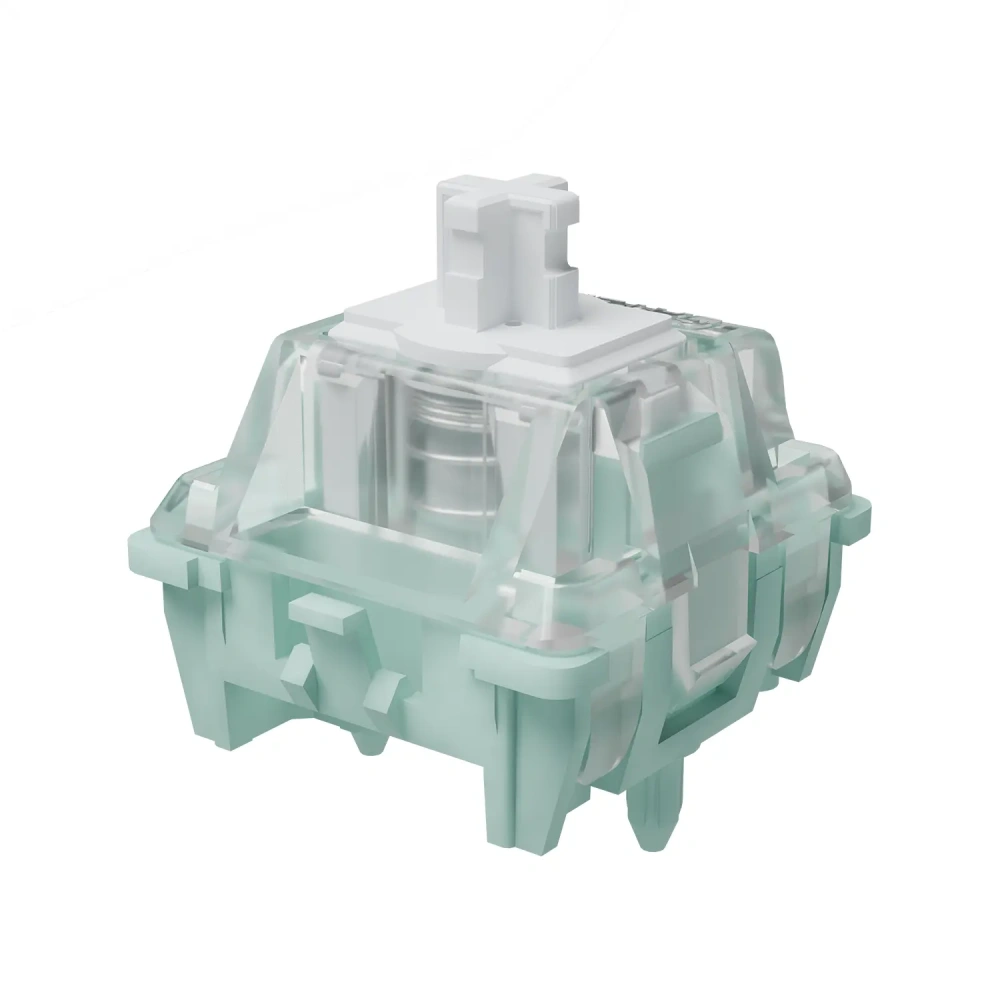
Price: Around $0.80 per switch, sold in packs of 70 or 90
Why it feels this way. The polycarbonate top housing and nylon bottom keep the sound rounded rather than sharp, and Gateron’s factory lube is applied heavily enough that the press stays smooth and scratch-free straight out of the bag. A light 30gf spring keeps repeated taps effortless.
Best for: Anyone building their first hall effect keyboard who wants a dependable, well-rounded linear without paying extra for a premium variant.
Watch out: It requires an N-pole-down HE PCB, so double-check your board’s compatibility list before buying.
Gateron Magnetic Jade Specs
| Spec | Detail |
| Type | Linear |
| Top housing | Polycarbonate |
| Bottom housing | Nylon |
| Stem | POM |
| Actuation | 30±7gf |
| Total travel | 3.5±0.2mm |
| Pre-travel | Freely adjustable via firmware |
| Factory lubed | Yes |
| Lifespan | 100 million keystrokes |
| Polarity | N-pole down |
| Compatibility | Wooting, SteelSeries, Corsair, Nuphy, Varmilo, and other N-pole-down HE boards |
Overview: The Magnetic Jade is Gateron’s original hall effect switch and remains one of the most widely stocked options for anyone building or buying their first HE keyboard. It set the template that most of Gateron’s later magnetic switches, including the ones below, are built on.
Feel: The Magnetic Jade has a light, consistent linear press with none of the scratchiness you sometimes get from unlubed budget switches. Because it’s factory lubed reasonably well out of the box, it doesn’t strictly need additional lubing, though enthusiasts chasing a glassier feel sometimes still follow our guide to lubing keyboard switches and add their own.
Sound: Gateron markets this switch around a “Mahjong-inspired” HIFI sound profile, and reviewers generally describe it as a deeper, rounder tone than a typical budget linear rather than the higher-pitched clack some mechanical switches produce. Actual sound will still depend heavily on your case, plate material, and any foam you’re using.
Gaming Performance: The light 30gf initial force and adjustable pre-travel make this a solid Rapid Trigger switch for fast-paced games, though it doesn’t have the shorter travel or lighter tuning of a dedicated gaming-focused switch like the Wuque WS Dash HE below.
Typing Performance: For everyday typing, the Jade’s light force and smooth travel make it comfortable over long sessions, and it’s a sensible default if you’re not sure yet whether you’ll prioritize gaming or typing on a given board.
Pros:
- Affordable and widely stocked
- Smooth factory lube out of the box
- Distinctive, well-regarded sound signature
- Broad keyboard compatibility within the HE ecosystem
Cons:
- Not the lightest or fastest option for competitive gaming
- Requires an N-pole-down HE PCB, so compatibility needs checking before purchase
Buy From :
2. Gateron Magnetic Jade Max – Best for RGB Builds
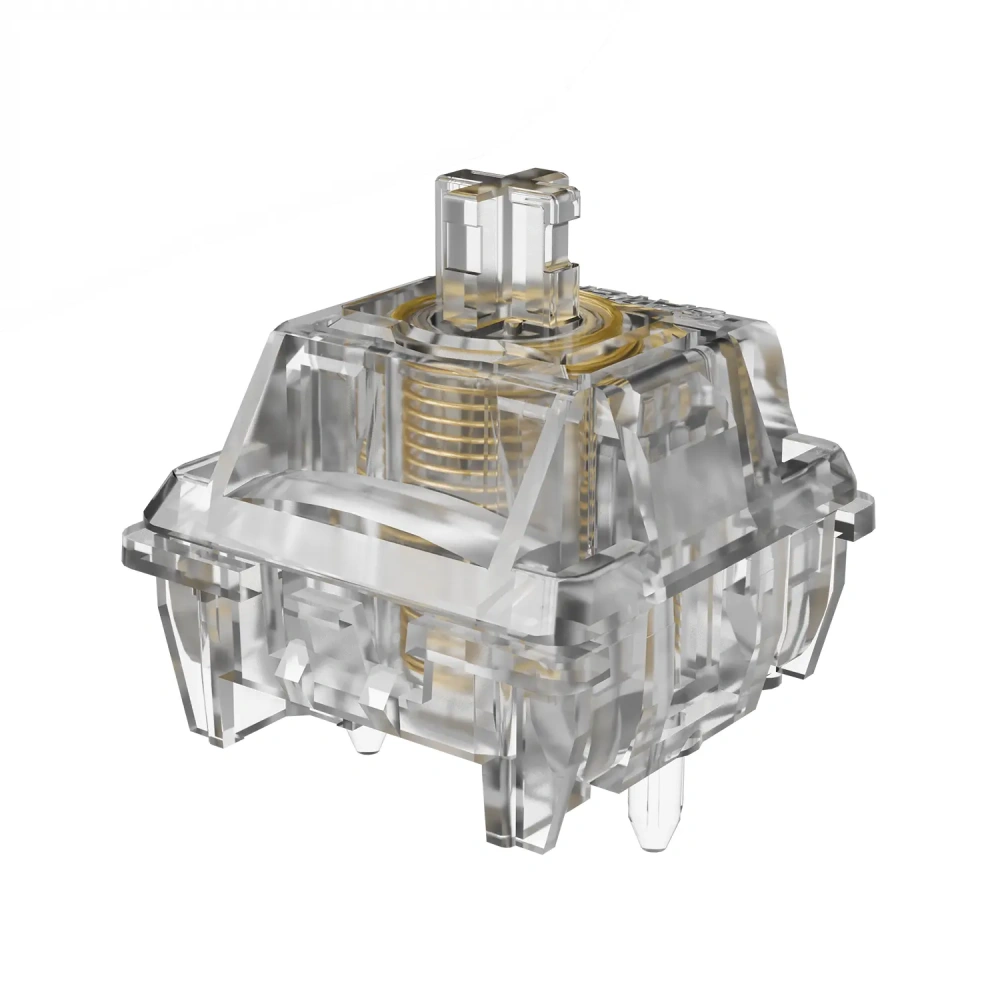
Price: Slightly above the standard Jade; exact per-switch cost varies by retailer and pack size
Why it feels this way. The heavier 36gf spring and dual-rail stem give it a more “planted,” wobble-free press than the base Jade, while the fully transparent PC housing is built specifically to let RGB shine through cleanly.
Best for: Enthusiasts building a show-piece RGB keyboard who also want a noticeably more refined, stable feel than the entry-level Jade.
Watch out: The firmer spring may not suit typists who prefer a very light touch, and it costs more than the standard Jade.
Gateron Magnetic Jade Max Specs
| Spec | Detail |
| Type | Linear |
| Top housing | Polycarbonate (fully transparent) |
| Bottom housing | PA12 (fully transparent) |
| Stem | Polycarbonate, dual-rail |
| Actuation | 36±5gf |
| Total travel | 3.5±0.1mm |
| Spring | Gold-plated, corrosion-resistant |
| Factory lubed | Yes |
| Lifespan | 150 million keystrokes |
| Polarity | N-pole down |
| Compatibility | Wooting, SteelSeries, Corsair, Nuphy, KBDfans, Matrix Lab, and other N-pole-down HE boards |
Overview: The Jade Max is Gateron’s upgraded, more premium take on the original Jade, aimed at enthusiasts who want a fully transparent switch for RGB builds along with a slightly firmer, more refined feel.
Feel: The Jade Max feels a touch firmer than the standard Jade thanks to its heavier spring, which some reviewers describe as giving a more “planted” bottom-out compared to the lighter original. The dual-rail stem structure also helps reduce wobble, which is noticeable if you’re coming from a budget switch with looser tolerances.
Sound: Gateron describes the Jade Max’s tone as deeper and more subdued than the standard Jade’s HIFI signature. The fully transparent housing doesn’t meaningfully change the acoustics on its own, but the PA12 bottom housing does shift the tone slightly compared to the original’s nylon bottom.
Gaming Performance: The higher spring weight makes the Jade Max slightly less twitchy than the base Jade for extremely fast tapping, but the dual-rail stability and higher-rated lifespan make it a strong choice for players who want consistency over thousands of hours of play.
Typing Performance: The firmer spring and reduced wobble make this a comfortable typing switch for people who prefer a bit more resistance than the standard Jade offers, without tipping into heavy-switch territory.
Pros:
- Fully transparent housing, ideal for RGB-heavy builds
- Dual-rail stem reduces wobble
- Higher-rated 150 million keystroke lifespan
- Gold-plated spring resists corrosion
Cons:
- Costs more than the standard Jade
- Firmer spring may not suit typists who prefer very light switches
Buy From :
3. Wuque WS Dash HE – Best for Competitive Gaming
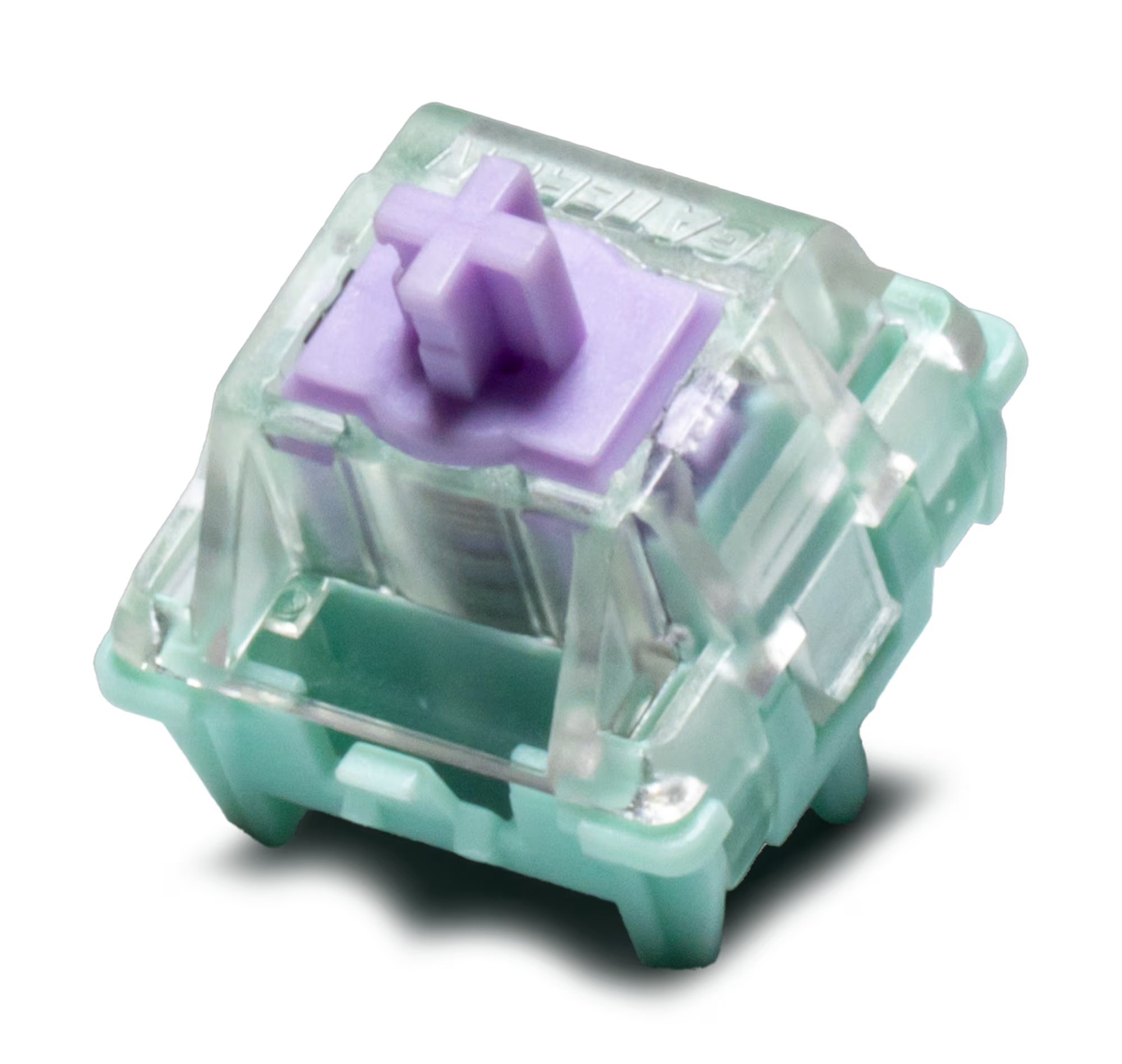
Price: Around $0.85 per switch, sold in packs of 18 to 70
Why it feels this way. A light 30gf preload paired with a 15mm single-stage spring gives it a quicker, snappier feel than the heavier Gateron switches above, which is exactly what it’s tuned for.
Best for: Competitive and FPS-focused gamers who want a light, quick switch tuned for Rapid Trigger performance.
Watch out: It’s explicitly not compatible with the Boog75 or Zoom75 HE, and the light spring can feel a little insubstantial for long typing sessions.
Wuque WS Dash HE Specs
| Spec | Detail |
| Type | Linear |
| Top housing | Polycarbonate |
| Bottom housing | Nylon (PA) |
| Stem | POM |
| Preload | 30±10gf |
| Bottom-out | 50-55gf (varies by retailer listing) |
| Spring | 15mm single-stage |
| Total travel | 3.5±0.2mm |
| Factory lubed | Yes |
| Lifespan | 100 million keystrokes |
| Compatibility | SteelSeries, Wooting, Corsair, Rakka; not compatible with Boog75 or Zoom75 HE |
Overview: The WS Dash HE is Wuque Studio’s magnetic switch, manufactured by Gateron, and it’s built with an emphasis on light spring weight and Rapid Trigger performance rather than acoustic polish.
Feel: Reviewers describe the WS Dash HE as light and quick under the fingers, with a shorter effective feel than switches carrying heavier springs, even though the rated total travel is comparable to the Gateron switches above.
Sound: The WS Dash HE leans toward a crisper, lighter-pitched sound than Gateron’s Mahjong-tuned switches, which tracks with its more gaming-focused design intent rather than a deliberately engineered acoustic profile.
Gaming Performance: This is the switch in our roundup most explicitly built for speed. Its light preload and single-stage spring make it well suited to Rapid Trigger tuning for fast-paced titles, and it’s a popular pick among players optimizing specifically for tap speed.
Typing Performance: The light spring weight that helps it shine in games can feel a little too airy for some typists during long writing sessions, so heavier typists may prefer the Jade Max or Genty Silent instead.
Pros:
- Light, fast-feeling preload well suited to Rapid Trigger
- Factory pre-lubed
- Competitively priced for a Gateron-manufactured switch
- Backed by an established switch brand with hand-lube options available through some retailers
Cons:
- Not compatible with Boog75 or Zoom75 HE boards
- Lighter spring may feel less substantial for extended typing sessions
Buy From: Wuque Studio (official store), Divinikey, Zkeebs
Buy From :
4. Gateron Dual-Rail Magnetic Jade Mini E – Best for Compact Builds
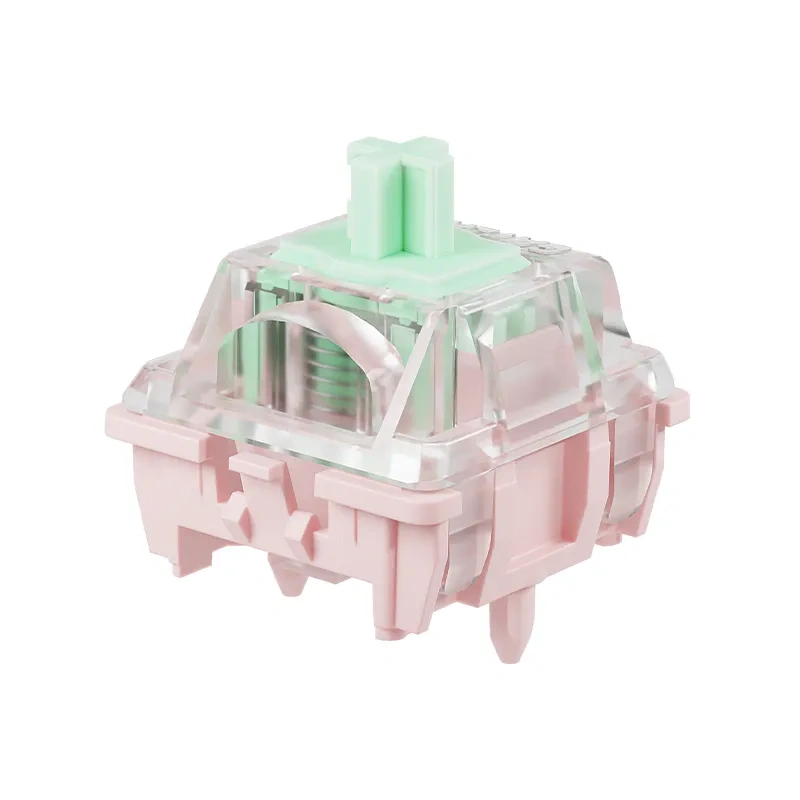
Price: Varies by retailer; typically sold in smaller pack sizes than the standard Jade line
Why it feels this way. The dual-rail stem and closed, back-covered bottom housing cut down on wobble and give it a more contained sound, which matters more in compact boards where stem tolerances tend to be tighter.
Best for: Builders working with compact, boutique hall effect keyboards who want extra stem stability without sacrificing the light, HIFI-tuned Jade feel.
Watch out: This is the strict “E version,” meaning the magnet’s north pole faces the LED. It’s not compatible with the Zoom65 V3 HE module, so confirm your board’s exact requirements first.
Gateron Dual-Rail Magnetic Jade Mini E Specs
| Spec | Detail |
| Type | Linear |
| Structure | Dual-rail, closed/back-covered bottom |
| Actuation | 30±7gf |
| Bottom-out | 50gf |
| Spring | 15mm customized |
| Total travel | 3.5±0.2mm |
| Factory lubed | Yes |
| Lifespan | 150 million keystrokes |
| Polarity | “E version” – north pole faces LED |
| Compatibility | Wuque Studio, Arbiter Studio, Higround, Kzzi, Roccat, Boog75; not compatible with Zoom65 V3 HE module |
Overview: The Dual-Rail Magnetic Jade Mini E is a compact-form variant of the Jade line, built with a closed-bottom design and a dual-rail stem aimed at improving stability in smaller keyboard builds.
Feel: The dual-rail stem noticeably reduces side-to-side wobble compared to a standard single-rail stem, which is especially useful in smaller, more compact keyboard sizes where stem tolerances can be tighter.
Sound: Gateron describes the closed-bottom design as producing a “refreshing” HIFI tone, distinct from the standard Jade’s open-bottom construction. In practice this gives it a slightly more contained, less hollow sound than some of the brand’s earlier magnetic switches.
Gaming Performance: The light 30gf initial force and stable dual-rail stem make this a solid performer for Rapid Trigger gaming, particularly on compact 65 percent or smaller boards where consistent stem alignment matters more.
Typing Performance: It’s a comfortable, light typing switch, though the mini form factor and stricter compatibility list mean it’s best suited to people who already own or plan to buy a matching compact HE board rather than a general-purpose pick.
Pros:
- Dual-rail structure improves stability in compact builds
- High 150 million keystroke lifespan rating
- Distinctive closed-bottom sound profile
- Wide compatibility across several boutique HE keyboard brands
Cons:
- Strict “E version” polarity requirement limits compatibility
- Not compatible with the Zoom65 V3 HE module
- Less widely available than the standard Jade line
Buy From: Meletrix, MaxGaming, Divinikey
Buy From :
5. Gateron Magnetic Genty Silent – Best Silent Option
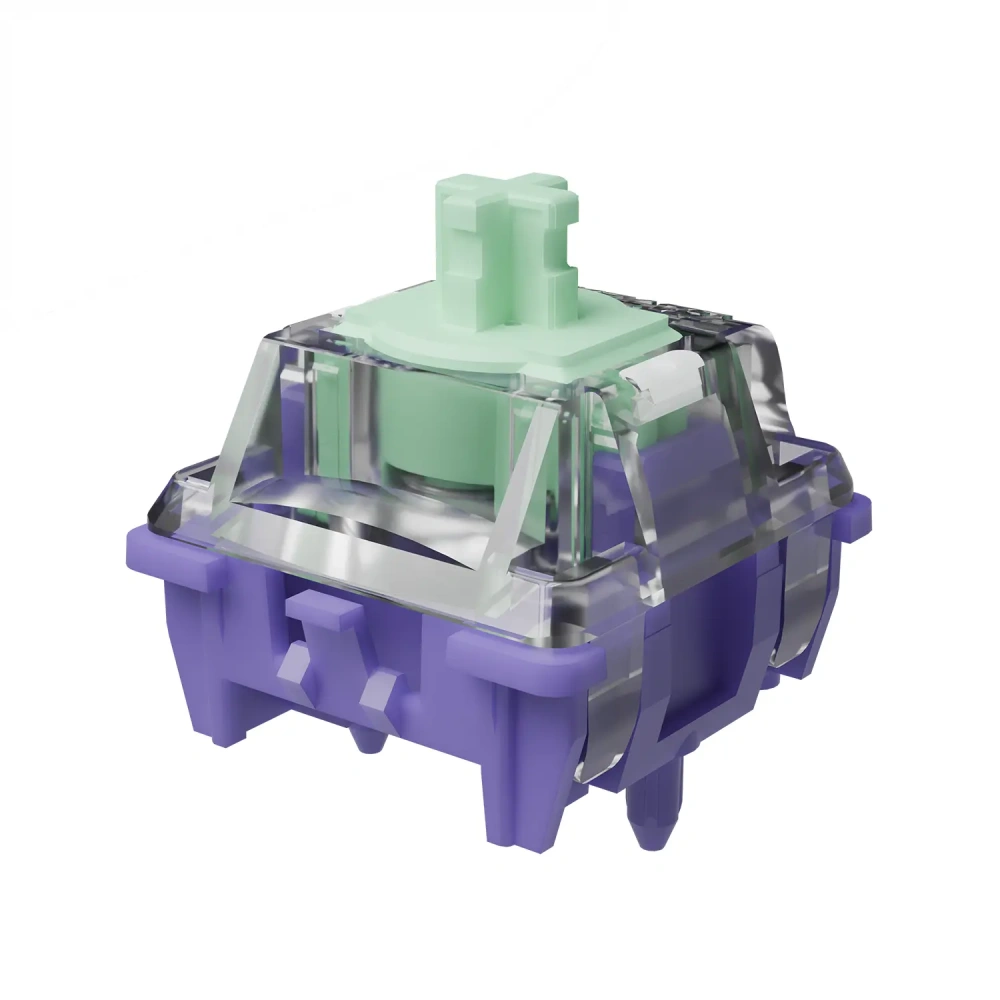
Price: Above the standard Jade; sold in packs of 70 or 90 from most retailers
Why it feels this way. Silicone dampening pads mute the top-out while leaving the bottom-out mostly intact, so it lands as “semi-silent” rather than fully silent. The dual-rail stem keeps it stable, and the 35gf spring gives slightly more resistance than the base Jade.
Best for: Office workers, shared-space typists, or anyone who wants hall effect features like Rapid Trigger without the acoustic footprint of a standard linear.
Watch out: It’s not a fully silent switch since some bottom-out noise remains, and it costs more than the standard Jade.
Gateron Magnetic Genty Silent Specs
| Spec | Detail |
| Type | Linear, semi-silent |
| Top housing | Polycarbonate |
| Bottom housing | Nylon |
| Structure | Dual-rail |
| Actuation | 35±5gf |
| Total travel | 3.7±0.2mm |
| Factory lubed | Yes |
| Lifespan | 100 million keystrokes |
| Polarity | N-pole down |
| Compatibility | Wooting, SteelSeries, Corsair, Nuphy, KBDfans, Matrix Lab, and other N-pole-down HE boards |
Overview: The Genty Silent is Gateron’s first silent switch in its magnetic lineup, using dampening pads to quiet the switch’s top-out while leaving the bottom-out largely intact.
Feel: The dual-rail stem keeps wobble in check, and the slightly heavier 35gf initial force gives it a touch more resistance than the standard Jade. The dampening pads that quiet the top-out do add a small amount of cushioning to the upstroke that silent-switch newcomers sometimes notice at first.
Sound: This is the quietest switch in our roundup by design. Reviewers describe the top-out as effectively muted thanks to the silicone dampening pads, while the bottom-out retains a mild, non-silent thump rather than being fully deadened. That makes it a “semi-silent” switch rather than a true silent switch in the strictest sense.
Gaming Performance: It performs adequately for gaming, but the added dampening and slightly longer 3.7mm travel mean it’s not the fastest-feeling switch here. It’s a reasonable choice if quiet operation matters more to you than shaving off the last fraction of a millisecond.
Typing Performance: For typing in shared spaces, offices, or late-night sessions, this is the standout pick in the lineup. The muted top-out substantially cuts down on the clacky return-stroke noise that can make open-plan offices or thin apartment walls a problem.
Pros:
- Noticeably quieter top-out than any other switch in this guide
- Dual-rail stem for stability
- Factory pre-lubed
- Retains a satisfying, non-mushy bottom-out feel
Cons:
- Slightly longer 3.7mm total travel than the other switches here
- Not a fully silent switch, since bottom-out noise remains
- Costs more than the standard Jade
Buy From: MaxGaming, Gateron (official store), mechkeysshop
Buy From :
Hall Effect Switches vs Mechanical Switches
If you’re deciding between a hall effect keyboard and a traditional mechanical keyboard switch setup, the choice largely comes down to how much you value adjustable actuation and long-term durability versus upgrade flexibility and price.
Performance Comparison
Mechanical switches actuate at a single fixed point, typically around 2mm, regardless of how hard or fast you press. Hall effect switches read travel continuously, which allows features like Rapid Trigger and adjustable actuation points that can genuinely change how a keyboard feels to play fast-paced games on. For typing alone, the practical difference is smaller: a well-tuned mechanical linear and a well-tuned hall effect linear can feel very similar under the fingers.
Durability Comparison
Because hall effect switches don’t rely on physical metal contacts, they avoid the oxidation and contact wear that eventually causes chatter or double inputs in some mechanical switches. That’s reflected in their lifespan ratings, with most switches in this guide rated between 100 and 150 million keystrokes, compared to the 50 to 100 million keystroke range common among quality mechanical switches.
Which One Should You Choose?
If you’re a competitive or fast-paced gamer, or you just want a keyboard that will hold up reliably for years without needing switch replacements, hall effect is the stronger choice. If you enjoy hot-swapping switches frequently, experimenting with a huge variety of tactile and clicky options, or you’re on a tighter budget, a traditional mechanical setup still offers more flexibility and a lower cost of entry, since HE PCBs and switches tend to sit at a higher price point than their mechanical counterparts.
How to Choose the Right Hall Effect Switch
Picking a hall effect switch isn’t just about specs on a page. Here’s what actually matters when you’re narrowing down your options.
Switch Feel
Look at initial actuation force and total travel together, not in isolation. A lighter initial force like the 30gf rating on the standard Jade or the Wuque WS Dash HE will feel quicker and easier to tap repeatedly, while a heavier spring like the Jade Max’s 36gf or the Genty Silent’s 35gf gives more resistance and can reduce accidental presses during heavy typing.
Actuation & Rapid Trigger
This is the feature that sets hall effect switches apart, so check what actuation range your keyboard’s firmware actually supports rather than assuming every HE board handles it the same way. Some boards allow actuation points as shallow as a fraction of a millimeter, while others have narrower adjustable ranges. If Rapid Trigger performance is your priority, pair a light switch like the WS Dash HE with a board that has a wide, well-implemented actuation range.
Sound Profile
If you’re sensitive to noise, whether because you share a space or just prefer a quieter setup, the Genty Silent is the clear standout in this guide thanks to its dampened top-out. Everything else here leans into Gateron’s HIFI-branded sound signature, which is louder and more resonant by design.
Keyboard Compatibility
This is the single most important factor and the one people most often overlook. Hall effect switches are not universally interchangeable, even within the same brand’s own lineup. Magnet polarity (N-pole down versus N-pole facing the LED), physical pin layout, and even specific PCB models can all restrict compatibility, as seen with the Dual-Rail Magnetic Jade Mini E’s incompatibility with the Zoom65 V3 HE module, or the WS Dash HE’s incompatibility with Boog75 and Zoom75 HE. If you’re still deciding on a board before you pick switches, our best hall effect keyboards guide is a good starting point. Always check your specific keyboard’s supported switch list before buying.
Build Quality
Housing material affects both sound and long-term feel. PC top housings, common across all five switches here, tend to produce a slightly higher-pitched, clearer tone than nylon, while nylon or PA12 bottom housings tend to deepen and soften the sound. Factory lubrication quality also varies switch to switch, though all five options reviewed here ship pre-lubed and are usable straight out of the bag.
Budget
Hall effect switches generally cost more per unit than standard mechanical switches, and premium variants like the Jade Max or Genty Silent carry a further price bump over the base Jade. If you’re outfitting a full-size board for the first time, the standard Gateron Magnetic Jade or the Wuque WS Dash HE offer the best entry point without a steep premium.
Are Hall Effect Switches Good for Typing?
Yes, hall effect switches can be excellent for typing, though the experience varies more by spring weight and housing than by the underlying magnetic technology itself. A light, well-lubed hall effect linear like the standard Gateron Magnetic Jade feels comparable to a good mechanical linear for everyday typing, while the adjustable actuation point can actually be tuned to reduce accidental keypresses during fast typing if your keyboard’s software supports it.
Best Hall Effect Switches for Typists
For most typists, the Gateron Magnetic Jade Max is a strong pick thanks to its firmer 36gf spring and reduced stem wobble, which many typists find gives a more deliberate, controlled feel than lighter gaming-tuned switches. If quiet operation matters more than raw feel, the Gateron Magnetic Genty Silent is the better choice, since its dampened top-out meaningfully cuts down on the noise that builds up over a long writing session. Typists who prefer a very light touch may still gravitate toward the standard Jade or the WS Dash HE, since a lighter spring reduces finger fatigue over thousands of keystrokes, even if it wasn’t primarily designed with typing in mind.
Can You Swap Hall Effect Switches?
In most cases, yes, as long as the replacement switch matches your board’s specific PCB requirements. Many hall effect keyboards use a hot-swap socket design similar to mechanical boards, letting you pull switches out and replace them without soldering. The catch is that hall effect switches aren’t interchangeable across brands or even across a single brand’s product line the way MX-style mechanical switches often are.
Compatibility Considerations
Before swapping, confirm your PCB’s magnet polarity requirement, since a switch built for N-pole down will not function correctly, or at all, on a board expecting the magnet’s north pole to face the LED, and vice versa. Pin layout also matters: most of the switches in this guide use a standard configuration, but boutique or compact boards sometimes have narrower compatibility lists, as seen with the Dual-Rail Magnetic Jade Mini E’s specific “E version” requirement. When in doubt, check the exact switch models your keyboard manufacturer lists as supported rather than assuming any hall effect switch will work.
Best Hall Effect Switches for Different Users
Best for Competitive Gaming
The Wuque WS Dash HE’s light preload and Rapid Trigger tuning make it the top pick for players who want the fastest possible response to repeated key taps.
Best for FPS Games
The Gateron Dual-Rail Magnetic Jade Mini E’s stable dual-rail stem and light 30gf force suit fast strafing and rapid-fire inputs well, particularly on compact competitive-focused boards.
Best for Typing
The Gateron Magnetic Jade Max’s firmer spring and reduced wobble give it the most controlled, deliberate feel for long typing sessions.
Best Silent Hall Effect Switch
The Gateron Magnetic Genty Silent is the clear choice here, with its dampened top-out cutting down noticeably on return-stroke noise.
Best Overall Value
The standard Gateron Magnetic Jade remains the best starting point for most people, combining a light, smooth feel, a distinctive sound, and broad compatibility at a lower price than the premium variants.
Frequently Asked Questions
What Are Hall Effect Switches?
Hall effect switches use a magnet in the stem and a hall sensor on the PCB to detect keystrokes, rather than physical metal contacts. This lets the keyboard read travel distance continuously, enabling features like adjustable actuation points and Rapid Trigger that aren’t possible on standard mechanical switches.
Are Hall Effect Switches Linear?
Most hall effect switches on the market today, including all five covered in this guide, are linear. Tactile and clicky hall effect switches do exist, but they’re currently a much smaller share of the market compared to linear options. If you’re not sure which feel you prefer, our breakdown of linear vs tactile vs clicky switches covers the differences in more depth.
Are Hall Effect Switches Worth It?
For gamers who want Rapid Trigger or adjustable actuation, yes, the performance benefits are real and noticeable. For typists who mainly want a great-feeling switch without needing those features, they’re a solid but optional upgrade, since a good mechanical linear can feel just as satisfying for everyday typing.
Can Hall Effect Switches Be Used for Typing?
Yes. Switches like the Gateron Magnetic Jade Max and Genty Silent are well suited to typing thanks to their firmer springs and reduced stem wobble, though lighter options like the standard Jade or WS Dash HE also work fine for typists who prefer a softer touch.
Which Hall Effect Switch Is the Quietest?
The Gateron Magnetic Genty Silent is the quietest switch in this guide, using dampening pads to mute the top-out noise while keeping a mild bottom-out feel.
Can You Swap Hall Effect Switches?
Yes, in most hot-swap hall effect keyboards, but only with switches that match your board’s specific magnet polarity and pin layout requirements. Not all hall effect switches are interchangeable, even within the same brand.
Are Hall Effect Switches Hot-Swappable?
Many hall effect keyboards do use hot-swap sockets, letting you remove and replace switches without soldering. Always confirm your specific board supports hot-swapping before assuming it does.
Which Hall Effect Switch Is Best for Gaming?
The Wuque WS Dash HE is the strongest pick for competitive, fast-paced gaming thanks to its light preload and Rapid Trigger-friendly tuning, though the Dual-Rail Magnetic Jade Mini E is also a strong option for FPS-focused compact builds.
Final Verdict
After comparing specifications, build quality, and reported feel and sound across all five switches, a few clear recommendations stand out. For most people building their first hall effect keyboard, the Gateron Magnetic Jade is the best overall pick thanks to its balance of price, feel, and broad compatibility. Gamers chasing the fastest possible Rapid Trigger performance should look at the Wuque WS Dash HE, while typists who want a more deliberate, controlled feel will likely prefer the Gateron Magnetic Jade Max. Anyone who needs a quieter setup for shared spaces should go straight to the Gateron Magnetic Genty Silent, and builders working with compact boutique boards should consider the Gateron Dual-Rail Magnetic Jade Mini E for its added stem stability.
Whichever switch you land on, double-check your keyboard’s exact compatibility requirements first. Hall effect technology has moved fast, and the specifics, from magnet polarity to PCB support, vary enough between boards that it’s worth confirming before you buy.