

Gateron Mechanical Yellow vs Optical Yellow: which one should you get? While both are linear switches with a smooth feel, they are made for different kinds of keyboards and different kinds of users. Mechanical Yellow is the more versatile choice for typing and general use, while Optical Yellow is lighter, faster, and better suited for gaming on compatible optical boards.
- The Short Answer
- Quick Comparison Table
- Gateron Mechanical Yellow vs Optical Yellow : How They Work Differently
- Actuation Force and Travel Distance
- Gaming Performance
- Typing Performance
- Sound Profile
- How to Lube Both Switches
- Keyboard Compatibility – The Most Important Difference
- Durability and Lifespan
- Price and Value
- Gateron Yellow Variants Worth Knowing
- Which Should You Buy?
- Frequently Asked Questions
Gateron Mechanical Yellow and Gateron Optical Yellow are two different switches that share a name but very little else. The G Pro 3.0 Mechanical Yellow ships factory lubed, actuates at 2.0mm with 50g of force, and works in any MX-compatible keyboard. The Optical Yellow (KS-15) uses infrared actuation, actuates at 1.0mm with 35g of force, and only works in optical hotswap boards. If you are deciding between them, the right choice depends mostly on whether you care more about typing comfort or gaming speed.
Quick answer: Gateron G Pro 3.0 Yellow (50g / 2.0mm, factory lubed) works in any MX keyboard and is better for typing. Gateron Optical Yellow KS-15 (35g / 1.0mm) is faster for gaming but only works in optical-specific boards. They are not interchangeable.
The Short Answer
Gateron G Pro 3.0 Yellow is the better all-rounder for most keyboard users. It ships factory lubed, is rated for up to 100 million keystrokes, and is compatible with far more keyboards than the optical version. For a full breakdown of how it sits in the wider switch landscape, see our Complete Guide to Mechanical Keyboard Switches.
Gateron Optical Yellow (KS-15) is the better choice for gaming-focused users who already own an optical-compatible board. It is lighter, faster, and has a shorter actuation point but it is significantly more restrictive in terms of keyboard compatibility. If you want to understand why optical is faster at a hardware level, our Optical vs Mechanical vs Magnetic Switches guide covers the full technical breakdown.
Quick Comparison Table
| Spec | Gateron G Pro 3.0 Yellow (Mechanical) | Gateron Optical Yellow (KS-15) |
|---|---|---|
| Switch type | Mechanical (contact-based) | Optical (infrared) |
| Actuation force | 50g | 35g |
| Actuation distance | 2.0mm | 1.0mm |
| Total travel | 4.0mm | 3.2mm |
| Stem material | POM | POM |
| Top housing | PC (transparent) | PC (transparent) |
| Bottom housing | Nylon (white) | Nylon |
| Pins | 3-pin (MX) | 1-pin (optical only) |
| Pre-lubed (stock) | Yes (factory lubed) | No |
| Lifespan | Up to 100 million keystrokes | ~80 million keystrokes |
| Input latency | ~6 – 8ms (with debounce) | ~2 – 3ms (no debounce) |
| Price per switch | ~$0.35 – $0.45 | ~$0.35 – $0.45 |
| Keyboard compatibility | Any MX board | Optical boards only |
| Official product page | Gateron G Pro 3.0 Yellow | Gateron KS-15 Optical Yellow |
Gateron Mechanical Yellow vs Optical Yellow : How They Work Differently
The biggest difference between these two switches is not the color or the name it is the mechanism that registers each keystroke.
How Gateron G Pro 3.0 Yellow Works
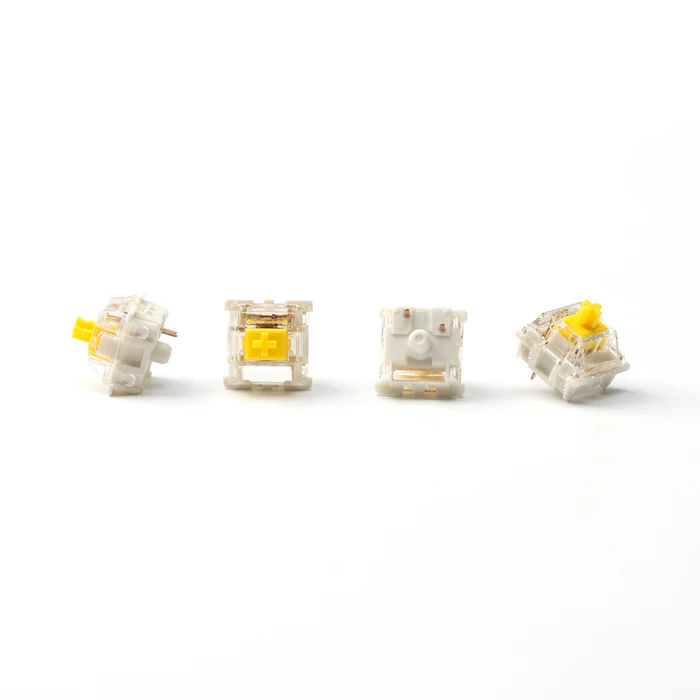
The Gateron G Pro 3.0 Yellow works like every standard MX switch. When you press the key, a metal spring pushes the stem downward until two metal contacts inside the housing close, completing an electrical circuit and registering the input. Because metal contacts bounce slightly on contact, keyboard firmware applies a short debounce delay (typically 5 – 10ms) to filter out false inputs. This applies to all mechanical switches. As we explain in our mechanical keyboard switches guide, this debounce delay is one of the key differences between mechanical and optical designs.
How Gateron Optical Yellow (KS-15) Works
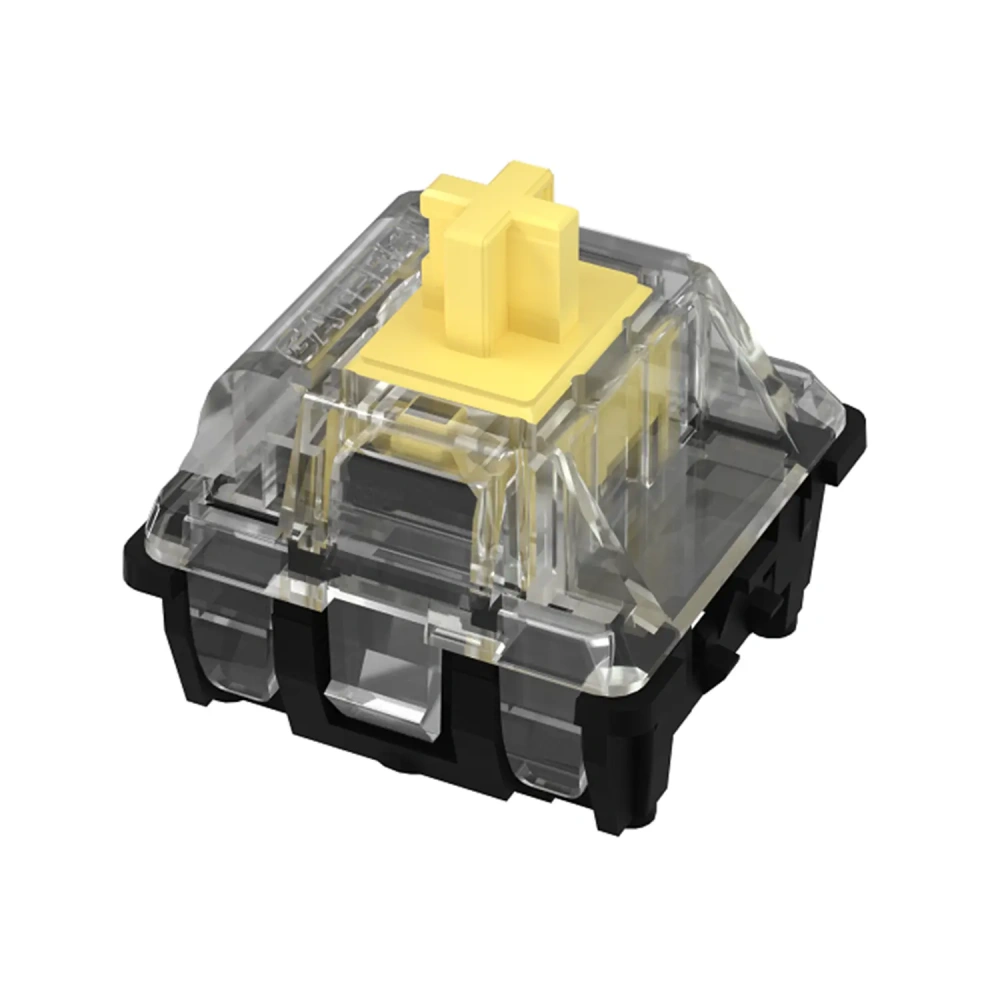
The Gateron Optical Yellow KS-15 has no metal contacts at all. A small hole at the base of the switch allows an infrared beam to pass through the PCB. When you press the key, the switch stem drops far enough to interrupt that beam at the 1.0mm mark, and the keystroke registers instantly. No bouncing contacts means no debounce delay which is where the speed advantage comes from. It also means there are no metal parts to wear out at the actuation point. For a deeper comparison of how optical stacks up against mechanical and Hall Effect technology, see our full optical vs mechanical vs magnetic switches comparison.
Actuation Force and Travel Distance
Gateron G Pro 3.0 Yellow uses a 50g actuation force with 2.0mm pre-travel. That puts it at a comfortable midpoint in the linear range light enough to feel smooth and fast, but firm enough that resting fingers will not accidentally register keypresses.
Gateron Optical Yellow KS-15 is significantly lighter at 35g with only 1.0mm pre-travel half the travel distance of the mechanical version. The switch registers almost immediately on contact, which makes it extremely fast but also more sensitive. If you type with heavy fingers or tend to rest your hands on the board, expect more misfires than you would get with the G Pro 3.0 Yellow.
Total travel also differs: G Pro 3.0 bottoms out at 4.0mm, giving a fuller, more traditional linear feel. Optical KS-15 tops out at 3.2mm, so keypresses feel shorter and snappier. These differences make the two switches feel like distinct products rather than slight variations of the same idea. Both are linear switches for a comparison of linear versus tactile and clicky designs, see our guide on linear vs tactile vs clicky switches.
Gaming Performance
For competitive gaming fast-paced FPS, battle royale, rhythm games the Optical Yellow has a clear hardware advantage.
- Shorter actuation (1.0mm vs 2.0mm): The keystroke registers in roughly half the travel distance. Spamming, double-tapping, and rapid directional changes all feel more responsive.
- Lower latency (~2-3ms vs ~6-8ms): No debounce delay means the switch registers faster at the hardware level. Our optical vs mechanical comparison shows real-world latency data confirming this difference.
- Lighter spring (35g): Less resistance means faster key repetition for rapid multi-tap sequences in game.
One caveat worth noting: optical yellows are so light that many users experience an adjustment period when switching from heavier switches. Misfire rates tend to spike briefly until your muscle memory adapts to the 35g actuation weight. If raw speed matters above all else, also consider whether a Hall Effect keyboard might suit you better they offer adjustable actuation on top of the speed benefits.
Typing Performance
For typing, coding, and long writing sessions, the G Pro 3.0 Yellow is the better choice by a comfortable margin.
The 50g actuation force gives your fingers enough resistance to move across the board without triggering accidental keypresses. The 2.0mm actuation point means each keystroke feels deliberate. Because the G Pro 3.0 ships factory lubed, it is also noticeably smoother out of the box than the base KS-9 Yellow you get that refined linear feel without any additional modding required. The spring weight is uniform throughout the press, which gives Gateron Yellows their most praised characteristic as a budget typing switch.
Optical Yellow is usable for typing, but the 35g / 1.0mm profile makes it punishing over long sessions. You have to hover carefully to avoid accidental inputs, and that constant vigilance adds fatigue quickly. For most typing-first users, the G Pro 3.0 Yellow is the correct pick without question. For sound-focused buyers who want their switch to thock deeply, check our best thocky switches roundup to see how yellows compare to more premium options.
Sound Profile
Both are linear switches, so neither produces a click or tactile bump. The sound difference comes from travel distance, spring weight, and how each switch bottoms out.
G Pro 3.0 Yellow generally produces a fuller, deeper sound especially in a well-built board with case foam and a quality plate. Because it comes factory lubed, the sound is already more refined than an unlubed base KS-9 right out of the box. Additional hand lubing and filming takes it further. For more switch picks in this sound category, see our best deep sounding switches guide.
Optical Yellow (KS-15) has a lighter, sharper sound profile. The shorter travel and lighter spring produce a quicker, snappier keystroke noise. It can sound slightly hollow compared to the mechanical version, particularly in thinner cases without foam dampening. If a rich typing sound is important to you, the G Pro 3.0 Yellow wins this category clearly.
How to Lube Both Switches
The G Pro 3.0 Yellow ships factory lubed, which means it is ready to use out of the box with a smoother feel than unlubed switches. If you want to go further, you can still open and hand-lube it many enthusiasts find that a light additional coat of Krytox 205g0 or Tribosys 3203 takes the smoothness to the next level. As mentioned in our switch guide, lubing is one of the most cost-effective ways to improve any linear switch, but with the G Pro 3.0 you are already starting from a better baseline.
For Optical Yellow (KS-15), the process is identical to lubing any mechanical switch open the housing, apply lube to the stem legs, stem rails, and bottom housing, reassemble. The infrared sensor is on the keyboard PCB not inside the switch housing so lubing has zero effect on the optical actuation mechanism. Since the KS-15 does not ship pre-lubed, a light application of Krytox 205g0 or Tribosys 3203 is recommended if you want a smoother, quieter feel. Use a slightly lighter coat than you would on a heavier switch to preserve the snappy, fast character of the optical yellow.
Keyboard Compatibility – The Most Important Difference
This is where most buyers make an expensive mistake, and it is worth being very clear about.
Gateron G Pro 3.0 Yellow uses a standard 3-pin MX design and works in any keyboard with MX-compatible sockets 3-pin hotswap boards, 5-pin boards (with pin clipping), and solder PCBs. If your keyboard says “MX hotswap compatible,” the G Pro 3.0 Yellow will fit and work.
Gateron Optical Yellow (KS-15) uses a completely different physical and electrical system. It has only a single pin and requires an infrared transmitter and receiver on the PCB to function. It physically cannot be installed in a standard MX hotswap board. The switch body may look similar, but the technology underneath is incompatible.
Keyboards confirmed compatible with Gateron Optical Yellow (KS-15):
- Skyloong SK61 (optical version)
- Skyloong SK64 (optical version)
- GamaKay MK61
- Skyloong GK75 (optical hotswap version)
- X-bow Nature Knight
- Any board specifically listed as “1-pin optical hotswap”
Also important: Gateron optical switches are not cross-compatible with Razer optical switches. Each brand uses a proprietary optical system. If you have a Razer optical keyboard, Gateron optical switches will not work in it.
Durability and Lifespan
Unlike the older base KS-9 Yellow which was rated at 50 million keystrokes, the Gateron G Pro 3.0 Yellow is rated at up to 100 million keystrokes matching or exceeding the optical yellow on durability. This removes one of the traditional arguments for choosing optical over mechanical in this lineup.
Optical Yellow (KS-15) is rated at approximately 80 million keystrokes. Its contactless infrared design still avoids metal contact wear as a failure mode, but the long-term durability advantage that older optical switches held over base mechanical yellows no longer applies when comparing to the G Pro 3.0 specifically.
In practical terms, both are long-lasting enough that most users will replace or upgrade their keyboard setup well before either switch reaches its rated limit at normal usage volumes.
Price and Value
At the G Pro 3.0 tier, the two switches land at a very similar price point both in the $0.35 – $0.45 per switch range. This is an important change from the older base KS-9 comparison, where the mechanical yellow was significantly cheaper. With the G Pro 3.0 as the comparison point, price is essentially a draw between the two options.
The real cost difference comes from the keyboard rather than the switch. MX-compatible boards are available at almost every price point, from budget options under $30 to high-end custom builds. Optical boards have a narrower selection, particularly at the budget end. So if you are starting from scratch, building around the G Pro 3.0 Yellow gives you far more keyboard flexibility for the same switch cost.
If you already own an optical-compatible board and gaming is your priority, the KS-15 Optical Yellow remains a strong value pick. If you are choosing a switch for a new build, the G Pro 3.0 Yellow offers equal price, better compatibility, factory lubing, and a longer rated lifespan.
Gateron Yellow Variants Worth Knowing
The “Gateron Yellow” label now covers a whole family of switches. Here is a quick breakdown of the most common versions you will encounter:
| Variant | Type | Notable Difference |
|---|---|---|
| Gateron Yellow (KS-9) | Mechanical | Base budget pick, unlubed, 50M lifespan |
| Gateron G Pro Yellow | Mechanical | Smoother housing, improved consistency |
| Gateron G Pro 2.0 Yellow | Mechanical | Updated mold, better build quality |
| Gateron G Pro 3.0 Yellow | Mechanical | Factory lubed, POM stem, 100M lifespan current top pick |
| Gateron Optical Yellow (KS-15) | Optical | 35g / 1.0mm, optical boards only, ~80M lifespan |
| Gateron CAP Yellow V2 | Mechanical | Dampened, quieter, soft bottom-out feel |
| Gateron Milky Yellow Pro | Mechanical | Milky nylon housing, deeper thock, budget thocky pick |
The Milky Yellow variant is worth noting if sound is a priority it regularly appears in our best thocky switches list as a standout budget pick for deep sound. For the smoothest and most refined out-of-the-box experience at a competitive price, the G Pro 3.0 is the mechanical yellow to buy in 2026.
Which Should You Buy?
Choose Gateron Optical Yellow (KS-15) if:
- You already own or plan to buy an optical-compatible keyboard.
- Competitive gaming is your primary use case.
- You want the shortest possible actuation point and fastest hardware response.
- You do not mind adjusting to a very light, sensitive feel.
Choose Gateron G Pro 3.0 Yellow if:
- You own or plan to buy a standard MX hotswap or solder keyboard.
- You type more than you game.
- You want maximum compatibility and modding flexibility.
- You want factory lubing, a 100 million keystroke lifespan, and a firmer, more forgiving linear feel without paying a premium.
Neither switch is objectively better. They solve different problems. The Optical Yellow is a speed-focused gaming switch that happens to share a name with one of the most beloved budget typing switches ever made. Going in knowing the difference and knowing the G Pro 3.0’s specs have closed the gap on lifespan and come with factory lubing means you will buy the right one on the first try.
If you are still deciding on the right keyboard to put your switches into, our complete switches guide covers everything from compatibility to build decisions in one place.
Frequently Asked Questions
What is the difference between Gateron Mechanical Yellow and Optical Yellow?
Gateron G Pro 3.0 Yellow uses metal contacts, ships factory lubed, actuates at 2.0mm with 50g of force, and works in any MX-compatible keyboard with a 100 million keystroke lifespan. Optical Yellow (KS-15) uses infrared actuation, actuates at 1.0mm with 35g of force, is rated for ~80 million keystrokes, and only works in optical hotswap keyboards.
Is Gateron Optical Yellow good for gaming?
Yes. It has a 1.0mm actuation point, 35g actuation force, and no debounce delay, making it one of the fastest budget linear gaming switches available. For even more gaming performance with adjustable actuation, see our breakdown of Hall Effect keyboards.
Can I use Gateron Optical Yellow in any keyboard?
No. It only works in keyboards with 1-pin optical hotswap sockets such as the Skyloong SK61, SK64, GamaKay MK61, and the optical version of the Skyloong GK75. It is not compatible with standard MX boards.
Is Gateron G Pro 3.0 Yellow good for typing?
Yes. It ships factory lubed, has a comfortable 50g actuation force, a smooth and uniform spring profile, a 2.0mm actuation point, and a 100 million keystroke lifespan. It is one of the best out-of-the-box budget linear typing switches available.
Can you lube Gateron Optical Yellow switches?
Yes. They can be lubed exactly like mechanical switches using Krytox 205g0 or Tribosys 3203. The infrared sensor is on the keyboard PCB, not inside the switch housing, so lubing the stem and rails does not affect optical actuation at all. Note that unlike the G Pro 3.0 Yellow, the KS-15 does not come factory lubed.
What keyboards are compatible with Gateron Optical Yellow?
Compatible boards include the Skyloong SK61, SK64, GamaKay MK61, and the Skyloong GK75 optical hotswap version. Any board specifically listed as “1-pin optical hotswap” should work. Standard MX boards, including most popular hotswap keyboards, are not compatible.
How long do Gateron Optical Yellow switches last?
The KS-15 Optical Yellow is rated at approximately 80 million keystrokes. The Gateron G Pro 3.0 Yellow is rated at up to 100 million keystrokes so the mechanical version actually has the edge on rated lifespan at this tier.
What is the actuation force of Gateron Optical Yellow?
35g with a 1.0mm actuation distance one of the lightest and fastest options in Gateron’s linear lineup and significantly lighter than the G Pro 3.0 Yellow’s 50g actuation force.