The Redragon ARTEMIS K719 Pro is the kind of keyboard that makes its intentions obvious the moment you take it out of the box. The Graffiti Edition is loud visually, compact for a board with a numpad, and packed with the sort of extras that are usually used to make a product page look busy: a TFT screen, control knob, tri-mode wireless, hot-swap sockets, RGB, custom software, and a multi-layer sound-dampening stack.
- Quick Verdict: TL;DR
- Redragon K719 Pro Specs at a Glance
- Unboxing and First Impressions
- Design Deep Dive
- Internal Build and Sound Dampening
- Hi-Fi Switches and Typing Experience
- Redragon K719 Pro Sound Test and Stabilizers
- Battery
- Redragon K719 Pro Software
- Connectivity and Wireless Performance
- Pros and Cons
- Is the K719 Pro Screen Actually Useful?
- Verdict
- Where to Buy
- FAQs
The more important question is whether any of that translates into a keyboard that is actually good to type on.
After using the Graffiti Edition hands-on, the answer is mostly yes. The stock Hi-Fi linear switches feel heavy but smooth, the board has a deep and satisfying sound profile, and all three connection modes worked without problems during testing. The software is basic and the screen is more of a novelty than a must-have feature, but the core typing experience is good enough that the K719 Pro does not have to rely on its looks alone.
Redragon currently lists the Graffiti Edition at $84.99 USD on its official store.
Quick Verdict: TL;DR
Score: 8/10
The Redragon K719 Pro is a fun, feature-packed 96% mechanical keyboard with a strong stock typing experience. It also lands in the same budget range as many boards in our best mechanical keyboards under $100 guide. Its Hi-Fi linear switches are smooth and on the heavier side, the bottom-out feels firm without becoming harsh, and the overall sound is deep with a clacky edge. The Graffiti Edition also looks much more distinctive than a typical black gaming keyboard.
More Read

The compromises are easy to spot. The plastic case has a little flex, the spacebar sounds hollower than the rest of the board, the software is functional rather than polished, and the display is more entertaining than genuinely useful.
Who should buy it: Anyone who wants a compact keyboard with a numpad, bold styling, smooth heavier linear switches, tri-mode connectivity, hot-swap support, and plenty of built-in features.
Who should skip it: Anyone looking for a premium metal case, highly polished software, very light switches, or a display that adds serious day-to-day functionality.
Disclosure: Redragon provided the K719 Pro Graffiti Edition used for this review.
How I tested the Redragon K719 Pro
I used the Graffiti Edition for normal typing and general desktop use. I checked wired, 2.4 GHz, and Bluetooth connectivity, tested the stock switches and larger stabilized keys, used the screen and knob, changed RGB settings, tried key remapping, and uploaded custom screen content through Redragon’s software.
Battery endurance was not tested, macros were not tested, and I did not perform instrumented latency testing. I also did not open the case, so the internal damping stack described later is based on Redragon’s official product information rather than a teardown of this unit.
Redragon K719 Pro Specs at a Glance
The table below uses Redragon’s official specifications for the ARTEMIS K719 PRO Graffiti Edition.
| Specification | Redragon K719 Pro |
|---|---|
| Layout | 95-key, 96% |
| Connectivity | USB-C wired, 2.4 GHz wireless, Bluetooth 3.0/5.0 |
| Switches | Redragon Linear Hi-Fi Custom Switch |
| Hot-swap support | 3-pin and 5-pin switches, according to Redragon |
| Keycaps | PBT |
| Battery | 4000mAh, manufacturer specification |
| Weight | 1.15 kg, manufacturer specification |
| Dimensions | 15.51 x 5.67 x 1.54 inches, manufacturer specification |
| RGB | 16.8 million colours, 18 preset modes, 10 music-sync modes |
| Software | Lighting, key remapping, screen customization, macros |
| Current official price | $84.99 USD at time of research |
Redragon’s own page gives two different numeric screen sizes in different sections, so I am deliberately not publishing a screen measurement here.
Unboxing and First Impressions

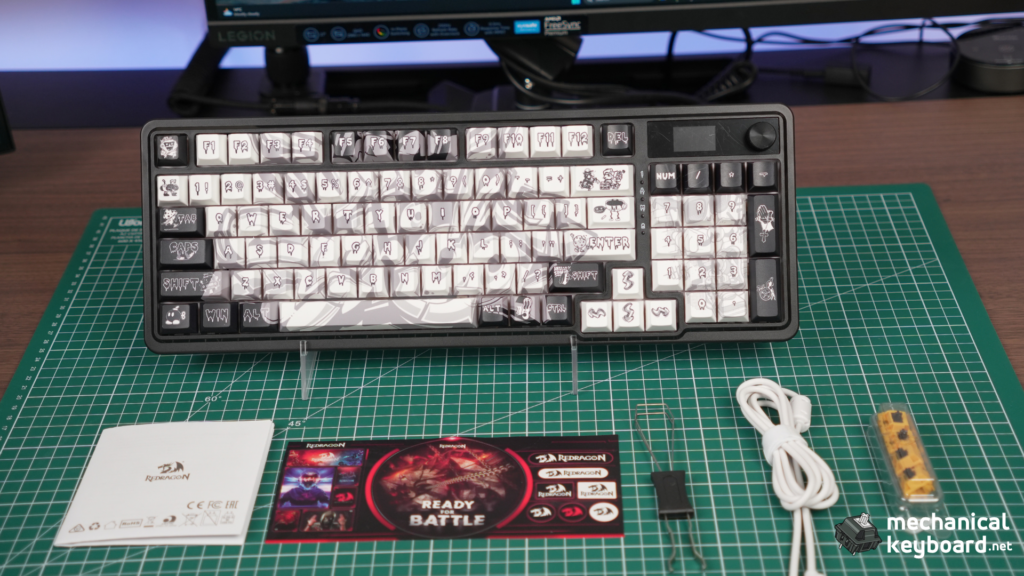
The Graffiti Edition comes with the keyboard, a detachable USB-C cable, 2.4 GHz nano receiver, combined keycap and switch puller, four spare switches, a sticker sheet, and the manual.
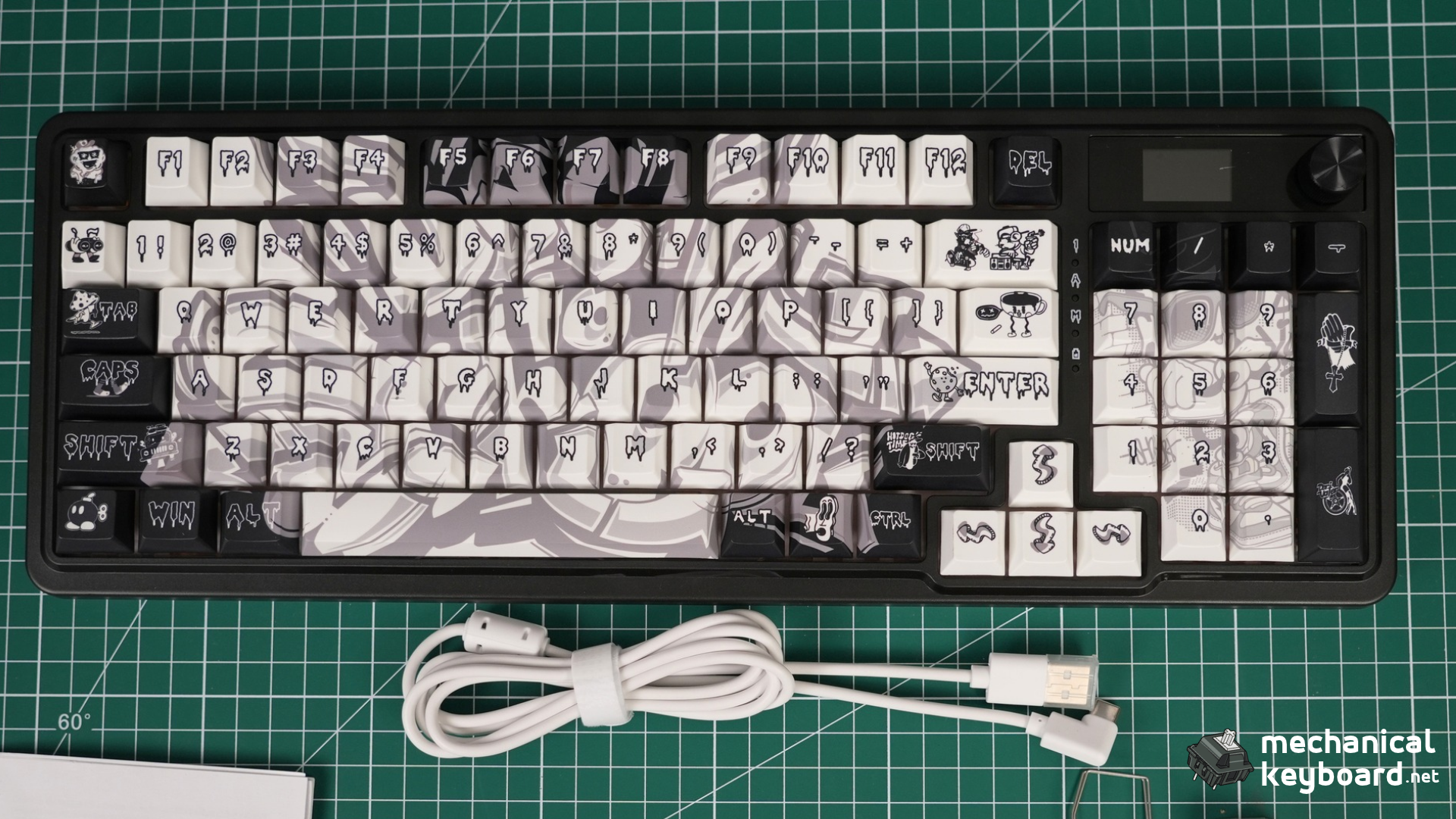
The design is the first thing you notice. Redragon could have treated the Graffiti Edition as a standard keyboard with themed keycaps, but the artwork extends beyond the keycap set and across the case itself. The underside continues the same visual treatment, which makes the variant feel more considered than a quick colour swap.
My first impression was simple: it is a fun-looking keyboard packed with features.
The weight feels average for a keyboard of this size. It does not immediately give the dense, rigid impression you get from a heavy metal board, but it also does not feel unusually light or flimsy when sitting on the desk.
Design Deep Dive
Graffiti design and PBT keycaps
Whether you like the artwork will be personal, but there is no mistaking this version for the standard K719 Pro. The case is black with high-contrast graffiti-style graphics, while the keycaps use a mix of white, grey, black, orange, red, blue, and yellow accents.
The keycap artwork looks fine in person. I would not describe the printing as a reason to buy the board on its own, but the complete package works visually.
Redragon lists the stock keycaps as PBT. I did not perform a destructive material test, so that material designation is taken from the official specification.
Plastic chassis with slight flex
The case is plastic, and there is a small amount of flex if you gently twist the keyboard. Pressing firmly around the centre of the alpha area also produces a little movement from the plate.
That movement is subtle rather than dramatic. In normal typing, the keyboard does not feel unstable, but this is not a board I would describe as especially rigid or premium in construction.
The feet offer two height settings and grip the desk well. There is also a dedicated storage slot for the wireless receiver, which is the kind of practical detail that matters more over time than another lighting effect. Our Redragon EISA K768 review covers another recent Redragon board for comparison.
96% layout keeps the numpad
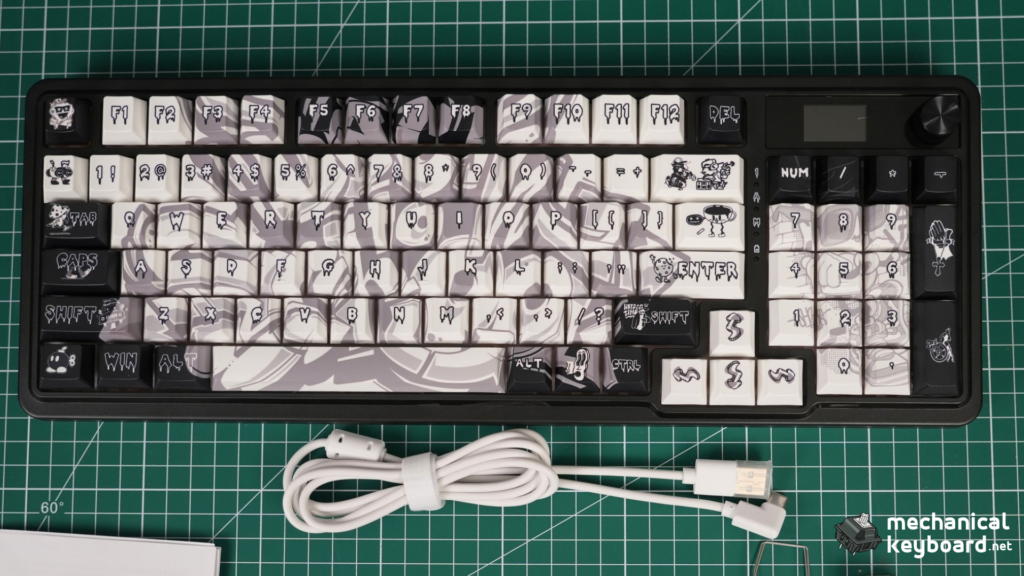
The Redragon K719 Pro uses a 95-key layout that Redragon markets as a compact take on a full-size keyboard. In practice, it gives you the numpad without leaving the large gaps you would normally see on a traditional full-size board.
I did not have any notable problems adapting to the layout. There were no recurring accidental key presses during normal use, and the compressed arrangement did not become an annoyance.
If you need a numpad but do not want a full-size keyboard taking over the desk, this is one of the K719 Pro’s more practical advantages. For more context on compact numpad boards, see our Epomaker TH99 PRO review, Epomaker Luma100 review, and MechLands Blade 101 review.
Screen and knob
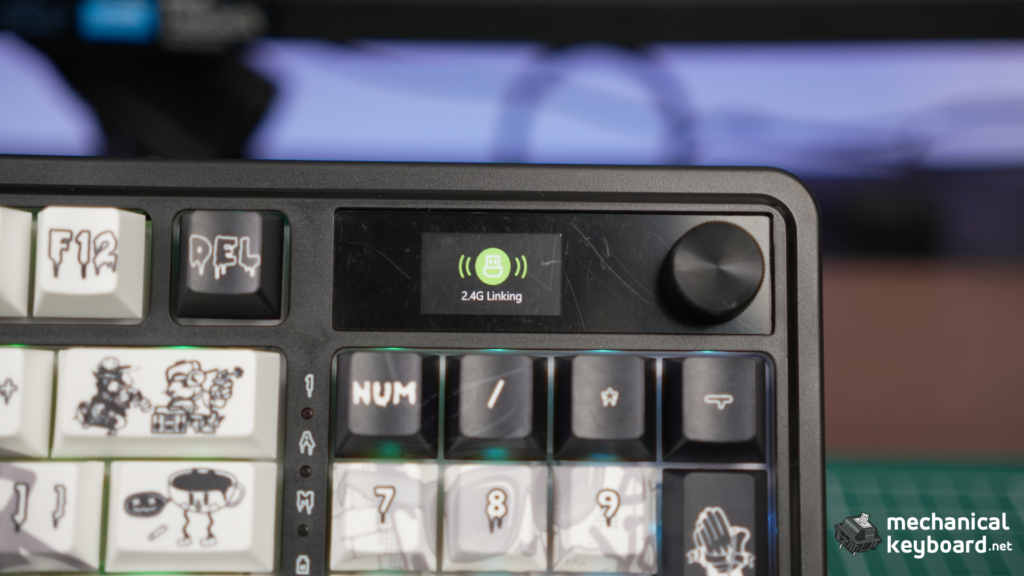
The screen is bright enough and easy to read. You can upload custom images and GIFs through the Redragon software, and the upload process was straightforward.
The actual usefulness is limited. I see the display more as a novelty feature than something that materially improves daily keyboard use. It looks good, it gives the board extra personality, and custom GIF support is fun, but the functionality is basic.
The control knob is more useful. Rotation handles volume, and pressing it controls play and pause. It worked accurately during testing and did not show any noticeable delay or strange behaviour. For another screen-and-knob implementation, see our Aula F75 Max review.
RGB lighting
The RGB is bright and looked even across the board. It can also be controlled directly from the keyboard, so you do not need to open the software every time you want to change a basic lighting setting.
Redragon lists 18 preset lighting modes and 10 music-sync modes, with additional customization available through its software.
Internal Build and Sound Dampening
I did not open this keyboard, so this section separates what I could feel from the outside from what Redragon claims is inside the case.
Redragon says the K719 Pro uses five sound-dampening elements:
- 3.5mm PO foam
- IXPE switch foam
- PET sound pad
- bottom socket foam
- silicone bottom pad
The company also lists a silicone gasket as part of the mounting system.
From the outside, pressing firmly into the centre of the board produces a small amount of plate movement. That is consistent with a softer mounted design, but I am not treating it as proof of the exact internal construction because I did not disassemble the unit.
What I can say from listening to the keyboard is that it does not sound excessively hollow across the main typing area. The spacebar is the obvious exception, which I will get to in the sound section.
Hi-Fi Switches and Typing Experience
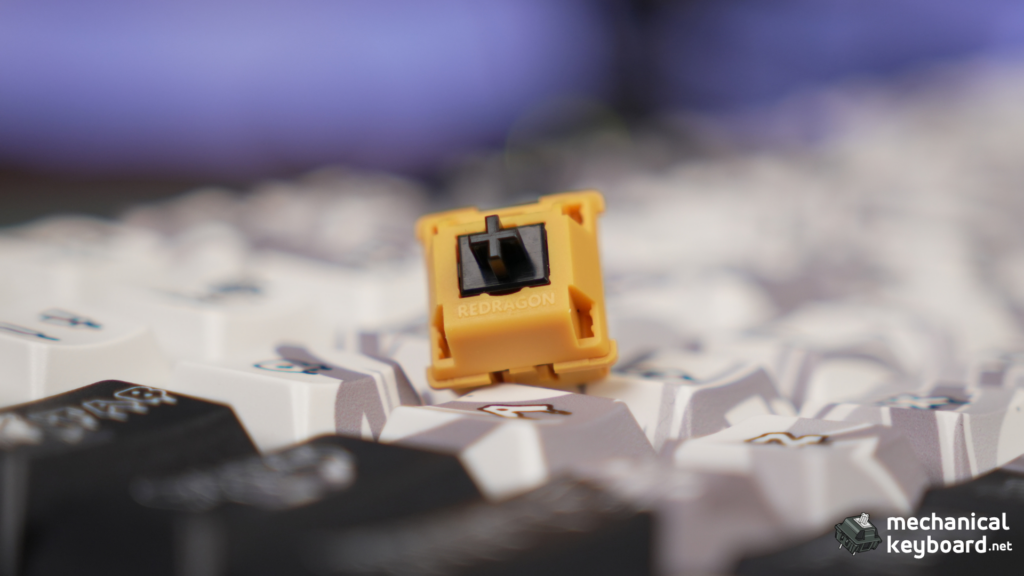
The stock switches are one of the stronger parts of the Redragon K719 Pro.
Redragon calls them Linear Hi-Fi Custom Switches and describes them as thick-lubed linear switches. If you are newer to switch terminology, our mechanical keyboard switch guide and linear vs tactile vs clicky switch comparison explain the differences. The spare switches included with this Graffiti Edition have a yellow-orange housing, black stem, and Redragon branding on the top housing.
In actual use, they feel heavy and smooth.
There was no notable scratchiness through the keypress. The bottom-out is on the firmer side, but it does not cross into feeling harsh. If you normally prefer very light linears, these may feel heavier than what you are used to. For me, the weight worked well with the overall character of the board.
The return feels consistent across the keys I tried, and the board remained pleasant for longer typing rather than becoming tiring quickly.
I would not call the typing feel radically different from every other modern prebuilt mechanical keyboard, but that is not really a criticism. The K719 Pro gets the basics right. The stock switches are smooth, stable enough for everyday use, and do not immediately make you think about replacing them.
Redragon K719 Pro Sound Test and Stabilizers
The overall sound is best described as deep and thocky with a clacky edge.
That sounds contradictory if you treat keyboard sound labels as strict categories, but it matches how the board actually comes across. The main alphanumeric keys have a deeper tone than a thin or sharp gaming keyboard, while there is still enough top-end attack to keep the sound from becoming overly muted.
The sound is also fairly consistent across the main key area.
The spacebar stands out because it sounds noticeably hollower than the regular keys. It is not disastrous, but it breaks the otherwise cohesive sound profile.
Enter and Backspace did not show much obvious rattle or ticking during testing. The spacebar also had the most noticeable wobble among the larger keys I checked.
Redragon heavily markets the five-layer damping stack as part of the keyboard’s sound design. I cannot verify how much each internal layer contributes without opening the board, so the safest conclusion is straightforward: the K719 Pro sounds good in stock form, but the spacebar is the weak point.
Battery
Redragon lists a 4000mAh battery for the ARTEMIS K719 PRO.
I did not run a full battery endurance test for this review, so I am not going to estimate a runtime from capacity alone. RGB brightness, screen usage, connection mode, sleep settings, and daily usage patterns can all affect wireless runtime.
If battery endurance is one of your main buying criteria, treat the 4000mAh figure as a capacity specification rather than a verified usage-time result from this review.
Redragon K719 Pro Software
The Redragon software is functional, but it is not one of the reasons I would buy this keyboard.
The interface is basic. Key remapping worked properly, and uploading a custom image or GIF to the keyboard display was easy enough. I did not run into a firmware update prompt during testing.
Redragon also advertises macro support through the software, but I did not test macros, so I cannot comment on how well that part works.
The simplest summary is that the software does what it needs to do. It gives you access to remapping, lighting, display customization, and the extra functions Redragon advertises. It just does not feel especially polished or advanced.
That matters less here because basic RGB controls are available directly from the keyboard. You can ignore the software most of the time once the board is set up the way you want it.
Connectivity and Wireless Performance
The K719 Pro supports USB-C wired, 2.4 GHz wireless, and Bluetooth connectivity.
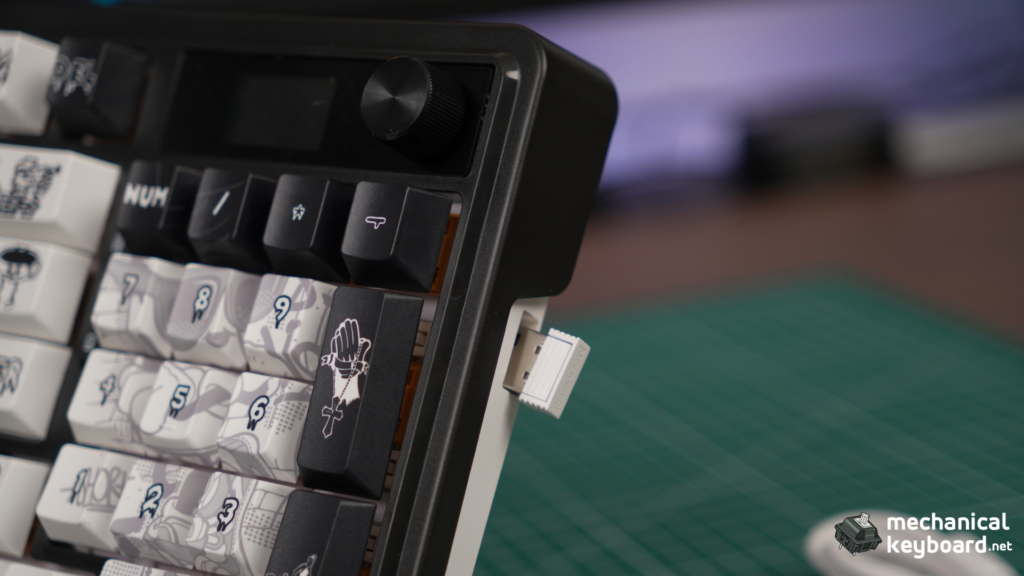
All three modes worked without issues in my testing.
The 2.4 GHz connection was stable, with no dropouts or obvious lag during normal use. Bluetooth also paired and worked without notable disconnects. Moving between wired, 2.4 GHz, and Bluetooth was straightforward.
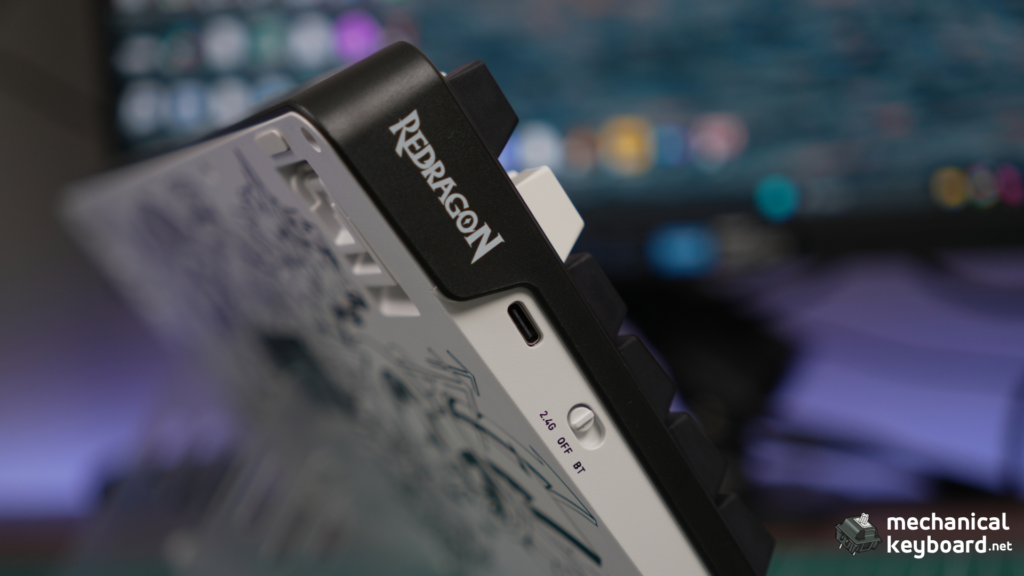
I did not use an instrumented latency setup, so this is not a numerical gaming-latency test. The correct conclusion is limited to what I actually observed: normal wireless use was stable and I did not notice a connection problem that would stop me from using the board wirelessly.
Pros and Cons
What I liked
- Distinctive Graffiti Edition design
- Smooth, heavy stock linear switches
- Deep and satisfying stock sound
- Firm bottom-out without feeling harsh
- Reliable wired, 2.4 GHz, and Bluetooth connectivity in testing
- Useful volume and play-pause knob
- Bright, even RGB with onboard control
- Easy custom image and GIF upload
- 96% layout keeps the numpad without the footprint of a traditional full-size board
- Hot-swap support gives you room to change switches later. If you plan to experiment with switch tuning, our switch lubing guide covers the process.
What could be better
- Plastic chassis has slight flex
- Spacebar sounds hollower than the rest of the board
- Spacebar also had the most noticeable wobble among the larger keys tested
- Screen is mostly a novelty rather than an essential feature
- Software feels basic and not especially polished
- Heavier stock switches may not suit people who strongly prefer light linears
Is the K719 Pro Screen Actually Useful?
Not really, at least not in the sense of changing how I use the keyboard.
The screen is bright, readable, and easy to customize through the software. Custom GIFs are fun, and the display contributes to the personality of the Graffiti Edition.
But after the novelty wears off, the knob is the more useful feature. Volume control and play-pause access are things I use naturally. The screen is something I look at.
That does not make it a bad feature. At this price, it is a nice extra. I just would not make the display the main reason to buy the K719 Pro.
Verdict
The Redragon K719 Pro gets the important parts right.
The Graffiti Edition looks distinctive, the stock Hi-Fi switches are smooth and satisfying, the sound profile is deeper than I expected from a plastic prebuilt, and the 96% layout makes sense for anyone who wants to keep a numpad without going back to a large full-size keyboard. If the numpad is central to your work, our best keyboards for accountants and Excel users guide goes deeper on that use case.
Its strongest score is not for the screen or the software. It is for how much it manages to include without ruining the core typing experience.
The plastic case and basic software keep it from feeling premium. The spacebar is also less refined acoustically than the rest of the board. Still, at Redragon’s official price of $84.99, the overall package makes sense if you want bold styling, tri-mode wireless, hot-swap support, RGB, a knob, and a good stock switch experience in one keyboard.
Buy it if: you want a compact numpad keyboard with a distinctive design, heavier smooth linears, good stock sound, and a lot of features for the price.
Skip it if: you want a metal case, very light switches, highly polished software, or a display that provides more than basic information and customization.
Where to Buy
| Retailer | Price | Notes |
|---|---|---|
| Redragon official store | $84.99 USD at time of research | Official Graffiti Edition product page. Re-check stock and price before publishing. |
Official product page: Redragon ARTEMIS K719 PRO Graffiti Keyboard
FAQs
Is the Redragon K719 Pro hot-swappable?
Yes. Redragon lists the K719 Pro as hot-swappable and says the sockets support both 3-pin and 5-pin mechanical switches.
What switches does the Redragon K719 Pro use?
The Graffiti Edition tested here came with Redragon Linear Hi-Fi Custom Switches. They felt heavy and smooth in use, with a firm but not harsh bottom-out.
Is the Redragon K719 Pro wireless?
Yes. It supports 2.4 GHz wireless and Bluetooth, along with USB-C wired connectivity. All three modes worked without issues during my testing.
Can you upload GIFs to the Redragon K719 Pro screen?
Yes. Custom images and GIFs can be uploaded through Redragon’s software. The upload process was easy during testing.
Does the Redragon K719 Pro have software?
Yes. Redragon provides software for key remapping, lighting, screen customization, and macros. I tested remapping and screen customization, but not macros.
How does the Redragon K719 Pro sound?
The stock board has a deep, thocky sound with a clacky edge. The main keys sound fairly consistent, although the spacebar is noticeably hollower.
What layout is the Redragon K719 Pro?
It uses a 95-key 96% layout. You keep the numpad while reducing the empty space found on a traditional full-size keyboard.
Is the Redragon K719 Pro Graffiti Edition worth considering?
Yes, if you like the design and want a compact numpad keyboard with smooth heavier linears, good stock sound, tri-mode connectivity, hot-swap support, RGB, and a screen. The main trade-offs are the plastic build, basic software, and limited practical use for the display.