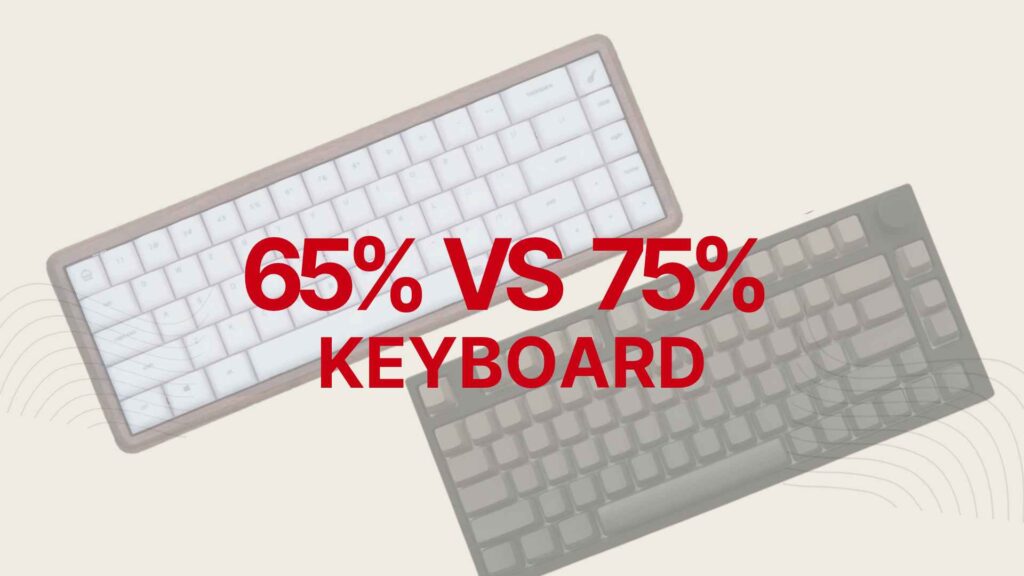
The most important difference is simple: a 75% keyboard retains a dedicated F1–F12 row, whereas a conventional 65% keyboard does not. Both normally keep arrow keys and omit the numpad.
- 65% vs 75% keyboard comparison
- See the layouts side by side
- What is a 65% keyboard?
- What is a 75% keyboard?
- Which keys do you lose going from 75% to 65%?
- Try it: function keys on 65% vs 75%
- Does a 65% keyboard actually save more desk space?
- 65% vs 75% for gaming: CS2, Valorant and MMOs
- Which layout works better for work and typing?
- Keycaps, ISO/ANSI, programming and ergonomics
- What Reddit owners say after living with 65% and 75%
- What I learned from reviewing both layouts
- How do 60%, 65%, 75% and TKL compare?
- Which one should you actually buy?
- Questions people ask before switching layouts
65% vs 75%: the quick verdict
Choose 65% if you rarely use function keys and want a clean, compact layout. Choose 75% if you regularly use F-key shortcuts or want the familiar key access of a larger board in a smaller body. Neither layout is inherently faster for gaming.
This comparison draws on my published reviews of the Null Design Co NULL65 and Keydous NJ80-CP V3, layout research and owner discussions on Reddit. The two boards were not newly subjected to a controlled head-to-head test for this guide.
65% vs 75% keyboard comparison
Both formats provide the core typing keys. What changes is how much direct access you have to less frequently used functions and how the surrounding keys are arranged.
| Feature | 65% keyboard | 75% keyboard |
|---|---|---|
| Typical key count | About 67–68 | About 80–84 |
| F1–F12 row | Via Fn or remapping | Dedicated physical keys |
| Arrow keys | Usually dedicated | Usually dedicated |
| Number row | Yes | Yes |
| Dedicated numpad | No | No |
| Home, End, PgUp, PgDn | Model dependent, often layered | More often dedicated, but varies |
| Depth | Usually shallower | Usually deeper due to F-row |
| Width | Model dependent | Model dependent |
| Main trade-off | Learn layers | Keep extra keys, use more space |
| Good starting point for | Minimalists and layer users | All-purpose use and F-key users |
A percentage describes a family of layouts, not an exact fraction of a full-size keyboard’s dimensions. ANSI, ISO, knobs, bezel size and navigation arrangements create exceptions.
See the layouts side by side
Both illustrations retain a number row and arrows. The 75% version adds the highlighted dedicated function row. This is an educational diagram, not a technical blueprint of either photographed keyboard.
More Read
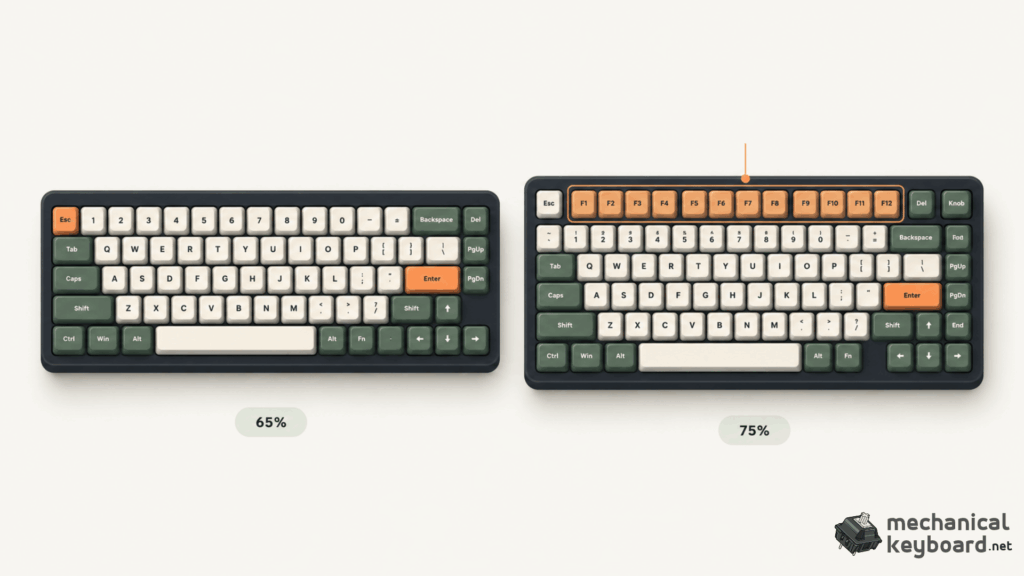
What changes between 65% and 75%?The dedicated F1–F12 row is highlighted in orange on the 75% illustration. The drawings are explanatory, not measured specifications or exact keymaps of our review units.
In practical terms, a 65% doesn’t sacrifice the arrow keys as a typical 60% does. Instead, it mainly removes dedicated access to F1–F12. The 75% keeps those keys while compressing the spacing you’d find on a standard tenkeyless keyboard.
What is a 65% keyboard?
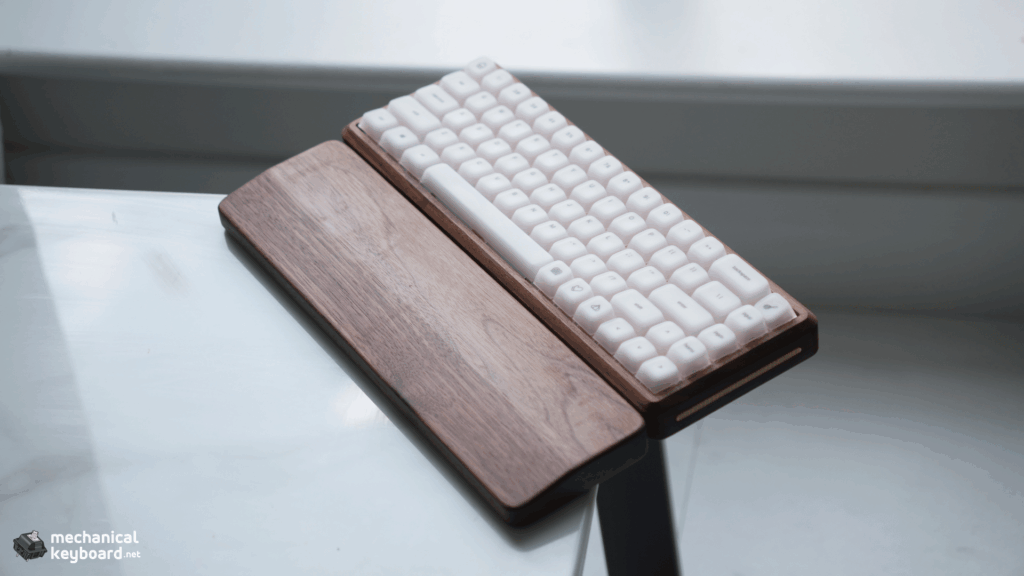
A conventional 65% keyboard retains the alphanumeric block, number row, modifiers and dedicated arrow keys. A narrow cluster on the right often includes keys such as Delete, Page Up or Page Down. It removes the physical function row and number pad.
That makes it a useful middle ground between a minimal 60% board and more feature-rich compact layouts. You keep the arrows that many people miss on 60%, but you usually need a second layer for F-keys and some navigation commands.
What you’ll like
- Clean, compact appearance with more desk mat visible.
- Dedicated arrow keys without going up to 75%.
- Often reduced front-to-back depth.
- Fewer physical switches to buy or maintain in a custom build.
What might bother you
Using F1–F12 through an Fn layer can interrupt work if those keys are part of your regular shortcuts. Some 65% keyboards also compress the right Shift and move or omit familiar navigation keys. Always inspect the exact keyboard map before buying.
What is a 75% keyboard?
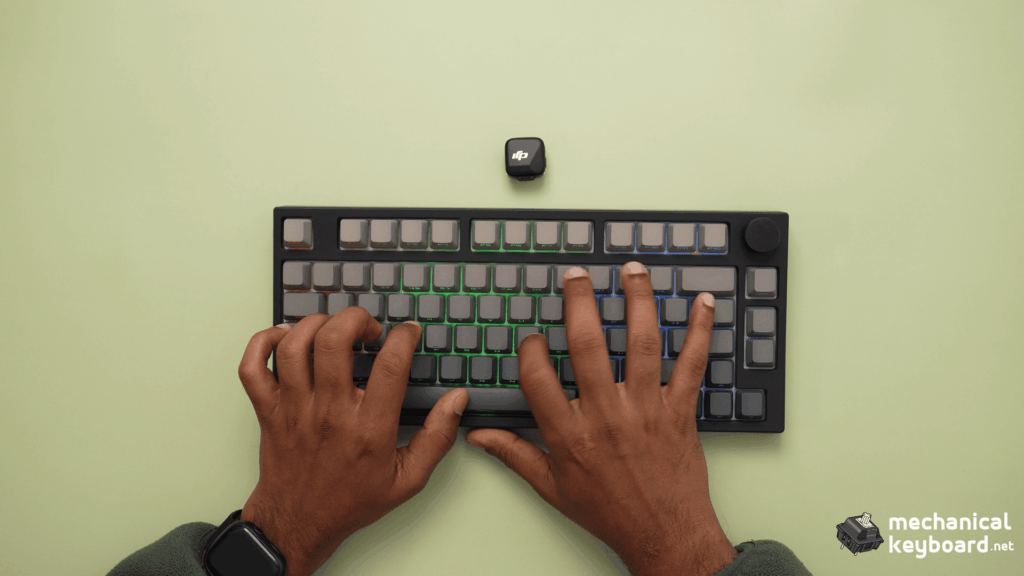
A 75% keyboard usually includes the F1–F12 row, dedicated arrow keys and more navigation keys in a tightly packed layout. It is broadly similar in capability to a tenkeyless (TKL) keyboard, but the gaps between key groups are compressed.
Some 75% boards use a fully compact grid. Others are described as exploded 75%, with small gaps around the arrow cluster or navigation column. Neither arrangement is universally superior. Spacing may improve visual separation, while a tighter layout may look cleaner.
Why people gravitate toward 75%
It’s an easy transition from larger keyboards. You keep the function row for app shortcuts, quick commands and game bindings, but give up the numpad and much of the empty space of a traditional full-size case. Some models also include rotary knobs, which are optional product features rather than defining 75% traits.
Which keys do you lose going from 75% to 65%?
The defining loss is the dedicated F-row. Many models also move some navigation commands onto secondary layers, but there is no universal list because manufacturers choose different layouts.
| Key or command | Typical 65% | Typical 75% |
|---|---|---|
| F1–F12 | Fn layer | Direct keys |
| Esc | Direct | Direct |
| Arrow cluster | Direct | Direct |
| Home / End | Varies | Varies |
| Page Up / Page Down | Varies | Often direct |
| Print Screen / Insert | Often layered | Varies |
| Numpad | Not present | Not present |
That variation is why a top-down photo or official keymap is more useful than only the advertised percentage. On a compatible keyboard, VIA or firmware remapping can place frequently used commands on a more convenient layer.
Important: Fn is often handled inside the keyboard’s firmware and is not directly detected by ordinary browser tools. Shortcut combinations vary by model, so generic diagrams should not be presented as a verified map for every 65% keyboard.
Try it: function keys on 65% vs 75%
Most people only discover whether they need the function row after they buy a compact board. This simple explorer makes the trade-off more tangible. Choose a command, then switch between layouts to see how it is normally accessed.
Keyboard Shortcut Explorer
Compare typical 65% and 75% key access. This is an illustration of layout differences, not a test of your connected keyboard.
Notice that arrow keys are dedicated on both conventional layouts. The extra effort on a typical 65% mainly comes from function keys and navigation commands that a particular board has moved to layers. With programmable layers, you may be able to make those commands easier to reach.
Does a 65% keyboard actually save more desk space?
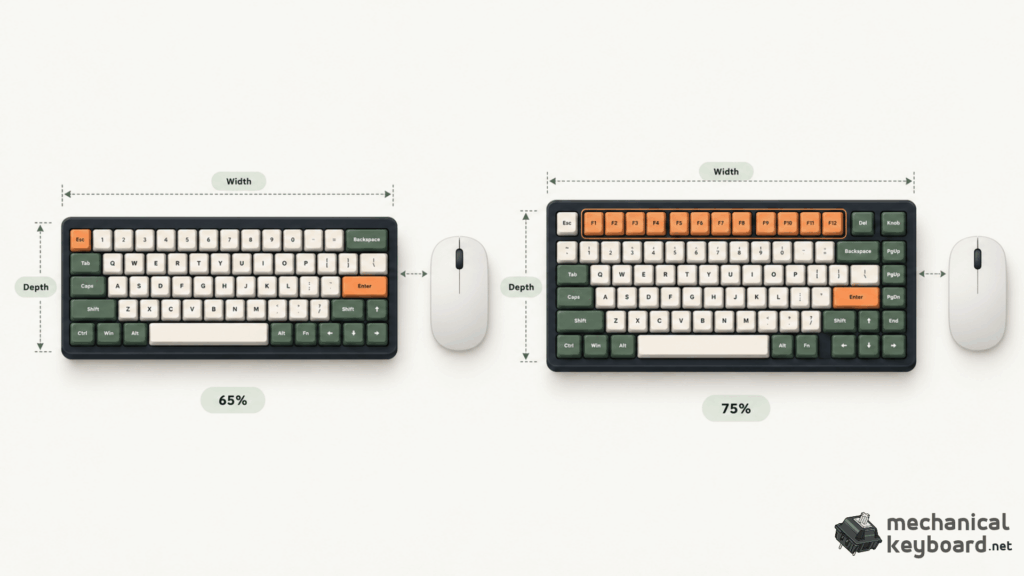
Width and depth are different questions Schematic comparison: width determines horizontal space beside a mouse; depth affects front-to-back space on a desk. These are not actual dimensions or a to-scale comparison of the NULL65 and NJ80-CP V3.
Usually, but not always in the direction you expect. Removing the F-row normally shortens the keyboard front to back. For a right-handed gamer, however, width usually matters more for horizontal mouse clearance.
Two keyboards with different layout percentages can be close in width if both have similar arrow and navigation clusters. Bezel thickness, decorative casework and knob positions can further change their actual dimensions.


Null Design Co publishes 324 × 115 × 25 mm for the NULL65 case. For the NJ80-CP V3, Keydous’s international page lists 380 × 138 × 40 mm, while another official listing has reported different dimensions. Without a reliable measurement of the exact review unit, I won’t publish a precise footprint saving between these two keyboards.
Why this matters: These photos were taken in different setups and are not at matching scale. The images illustrate the products, not a measurable size comparison. Check the actual width and depth for any two boards you are considering.
Which measurement should you prioritise?
For a small desk with little depth, a shallower 65% can create room for your wrist rest, notebook or other accessories. For FPS gaming, compare keyboard width and the resulting space available for mouse travel. For travel, compare actual case dimensions and weight, not the advertised percentage.
65% vs 75% for gaming: CS2, Valorant and MMOs
Layout changes physical key access and positioning. It does not inherently change keyboard input latency, actuation speed, debounce behaviour or gaming responsiveness.
For CS2 and Valorant
Both layouts retain WASD, modifiers, Spacebar and number keys. If you use a low mouse sensitivity, a physically narrower case can make it easier to position the keyboard and mouse. But because 65% and 75% widths may be similar, look at real measurements before assuming you’ll gain mouse space.
In my original NULL65 review, I reported that the 65% layout caused no meaningful inconvenience during my gaming use. In my NJ80-CP V3 review, I enjoyed the keyboard in Valorant, particularly the response I felt after configuring Rapid Trigger. Those observations concern the particular boards and their switch configurations, not a controlled performance comparison between 65% and 75%.
What about Hall Effect and Rapid Trigger?
Hall Effect switches detect movement magnetically, and some keyboards use that information for adjustable actuation and Rapid Trigger. Those features can appear on several keyboard sizes. A 75% keyboard isn’t automatically faster because it has an F-row, and a 65% board isn’t slower because it omits it.
For MMO, RPG and strategy games
If a game uses F1–F12 for abilities or shortcuts, dedicated access on a 75% may be more convenient. A 65% can still work with alternate bindings and programmable layers, but consider whether holding an Fn combination during active gameplay would feel awkward.
Gaming verdict
Decide based on actual case width, your personal keybinds and model-specific features. Layout percentage alone is not a performance benchmark.
Which layout works better for work and typing?
Typing and writing
For writing emails, long documents or articles, both formats retain the standard alphabetic block and main modifiers. A 65% doesn’t automatically reduce typing speed. Switch feel, keycap profile, case height and the exact right Shift arrangement may be more noticeable.
Programming
Some development environments use function keys for debugging and stepping through code. A 75% keeps those keys directly accessible. On the other hand, developers who rely on command palettes, custom mappings or Vim-style navigation may find a 65% comfortable. The sensible question is how often your actual editor requires F-keys.
Office work and spreadsheets
75% often makes a smoother transition from a full-size keyboard because you retain the F-row and usually more navigation keys. But both formats remove the numpad. If you enter numbers for much of your working day, consider a separate numpad or an 1800-compact / 96% layout instead.
Video editing and creative software
Tools such as DaVinci Resolve and Adobe Premiere Pro offer extensive shortcuts. A 75% provides more direct physical bindings; a programmable 65% offers the option of custom layers. Neither will be universally superior because editing workflows differ significantly.
Mac and portability
Both sizes can work with macOS, but check modifier legends, remapping support and how the keyboard handles media functions versus F1–F12. A 65% may travel more easily if it is genuinely smaller, but a dense metal 65% can still weigh more than a plastic 75%.
Keycaps, ISO/ANSI, programming and ergonomics
Are 65% and 75% keycaps interchangeable?
Sometimes, but layout percentage alone doesn’t guarantee compatibility. Many compact ANSI layouts use a 1.75u right Shift rather than the 2.75u size common on standard full-size layouts. Bottom-row modifiers and navigation columns may also need special keycap sizes.
For sculpted profiles such as Cherry or OEM, you also need the correct row shapes, not just the correct widths. Always compare the keyboard’s physical diagram with the contents of the keycap kit.
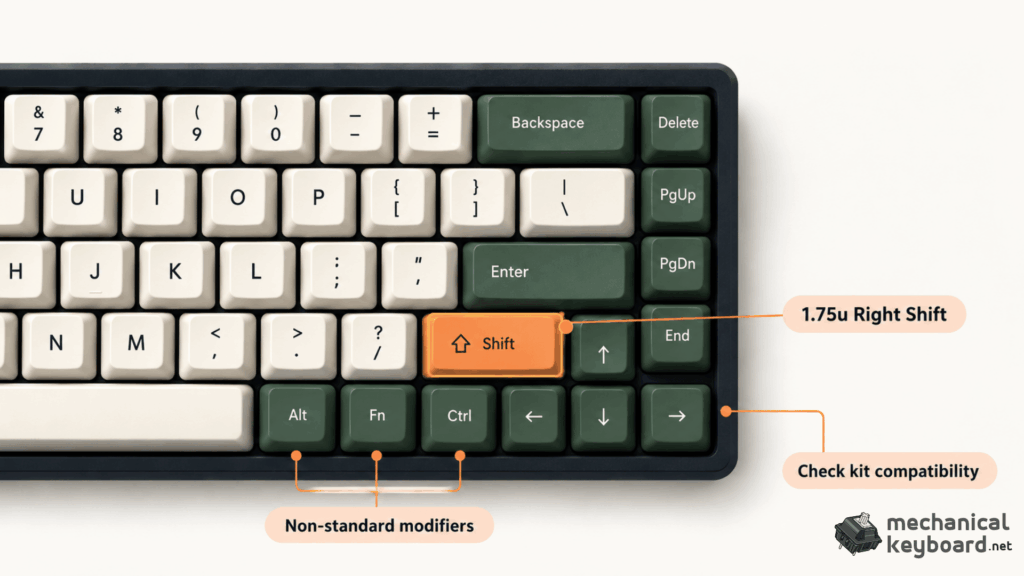
Check the keycap kit, not just the keyboard percentage
Illustrative close-up showing why compact keyboard modifier layouts need checking. Verify the exact right Shift width and bottom-row sizes against your keyboard and the keycap kit: this artwork is not a dimensionally accurate compatibility template.
ANSI vs ISO
ANSI and ISO describe physical key arrangements independently of keyboard percentage. ISO commonly uses a tall Enter key and shorter left Shift with an additional key, while ANSI commonly uses a wide horizontal Enter. You can find 65% and 75% keyboards in either style, but not every model is offered in both.
Does the smaller keyboard cost less?
Not necessarily. A 65% may use fewer switches and keycaps, which can save component costs on a custom build. The complete keyboard’s price depends much more on its case, electronics, mounting, materials and brand. A premium wooden 65% can cost considerably more than a budget plastic 75%.
Are smaller keyboards more ergonomic?
Not inherently. Keyboard height, tilt, desk setup, wrist position and how comfortably you reach your most-used commands matter more. A smaller board that forces frequent awkward combinations may be less pleasant than a slightly larger board with accessible keys.
What does VIA or QMK change?
Compatible firmware can let you remap keys and create layers. I personally used VIA on my NULL65 and found it worked well. I did not flash custom QMK firmware for that review, so I don’t present QMK flashing as a personally tested part of the experience. Our VIA setup guide walks through remapping and layers in detail.
What Reddit owners say after living with 65% and 75%
Owner discussions are especially useful here because some drawbacks only become apparent after a few weeks. The comments don’t establish a scientific consensus, but they reveal recurring points of disagreement that ordinary specification charts miss.
“75%. Not that much bigger than a 65, but pretty much the same functionality as a TKL.”
Individual r/MechanicalKeyboards reply, May 2022 · Original discussion
Paraphrased owner view:
- Some enthusiasts think the 65% looks cleaner and reveals more of their desk mat .
- Requiring an extra Fn combination can make familiar shortcuts feel less natural.
r/MechanicalKeyboards, May 2022 · Original discussion
What keeps appearing in these discussions?
Function keys: Some users hardly touch them and adapt quickly to a layer. Others switch back to 75% because regular F-key use adds friction. Desk space: compactness means different things to different people. A shorter board helps with depth, but not necessarily mouse width. Aesthetics: many enthusiasts legitimately prefer the simpler proportions of 65% or the visual balance of an exploded 75%.
Personal workflows: an owner might favour 65% for a gaming setup and 75% for their work computer. Some prefer a separate numpad rather than permanently adding a numpad to the main keyboard. These are valid preferences, not universal recommendations.
How we use Reddit: these observations help identify real buyer questions, but we don’t claim a majority preference, invent statistics or treat community opinions as performance tests. Read the source thread to judge the experiences in context.
What I learned from reviewing both layouts
These are real keyboards I’ve used, but they are very different products. That makes them good examples of how layouts feel, not a scientifically controlled 65%-versus-75% performance test.
NULL65: when 65% feels natural
My NULL65 review unit uses a walnut case, frosted polycarbonate plate, Huano Sakura linear switches and Epomaker AegisSil silicone keycaps. I used it over several weeks and reported no meaningful problems caused by the missing physical function row in my everyday work or gaming sessions. Its design, smooth typing and sound impressed me most.
The model supports VIA remapping, which I personally tested. Its construction and switches explain much of the experience, and should not be mistaken for traits every 65% shares.
Read the full NULL65 review →
NJ80-CP V3: more keys, still compact
My NJ80-CP V3 has an 80-key 75% layout, rotary knob, Gateron Magnetic Jade Pro switches and Hall Effect gaming features. In Valorant, the adjustable Rapid Trigger settings felt responsive after configuration. For general use, having dedicated function keys and additional controls is convenient.
I also found the switch bottom-out firmer and the typing sound less satisfying than some other keyboards I had tested. Those findings belong to that specific configuration, not the 75% layout in general.
Read the full NJ80-CP V3 review →
How do 60%, 65%, 75% and TKL compare?
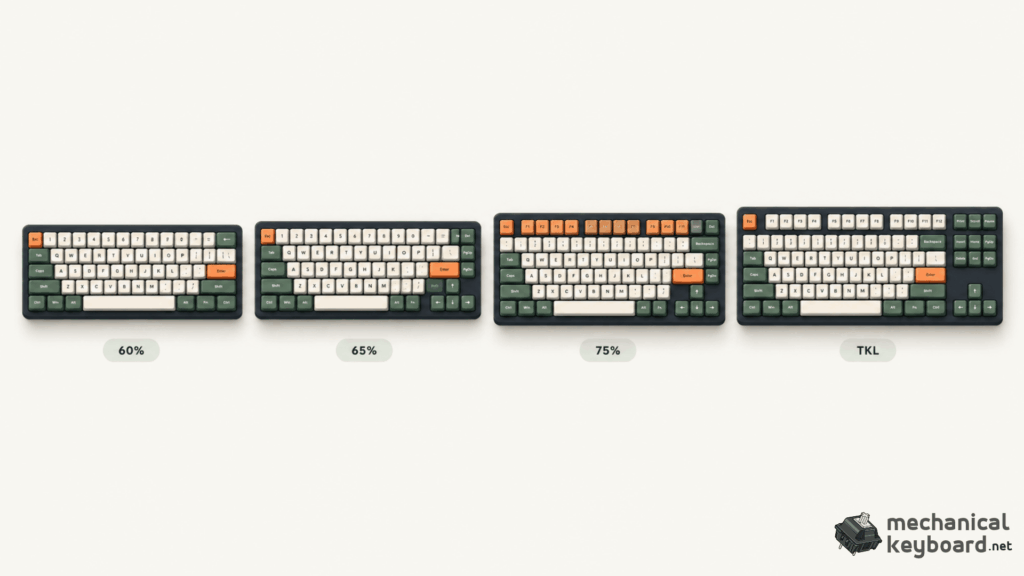
From compact 60% to familiar TKL
Stylised layout categories. Exact number of keys, physical spacing, ISO/ANSI variants and knob placement depend on the model.
65% and 75% make more sense when you see their neighbours. A conventional 60% sacrifices dedicated arrows as well as the F-row, while a traditional tenkeyless (TKL) retains the F-row and gives its navigation and arrow clusters more breathing room.
60%
Small typing block, usually no separate arrows
65%
Adds dedicated arrows, still no F-row
75%
Keeps the function row in a compressed layout
TKL
More separation for navigation and arrows
Which one should you actually buy?
Choose 65% if…
- You seldom need the F-row.
- You like compact, clean setups.
- You want arrows, but less depth.
- You enjoy custom layers.
- Your shortlist’s actual dimensions suit your desk.
Choose 75% if…
- You use F-keys frequently.
- You want more dedicated shortcuts.
- You split time between work and gaming.
- You want a smooth transition from TKL.
- You’d rather not think about Fn layers.
Quick layout decision helper
Select the statements that sound like you. Your recommendation updates automatically as you choose.
We’ll suggest a starting point based on your everyday shortcut habits.
This is a preference guide, not a scientific assessment. Compare actual keyboard dimensions and keymaps before buying.
My recommendation: If you’re unsure and want one general-purpose compact keyboard, start by looking at 75%. If you already know you don’t rely on the function row, don’t rule out 65%. The best choice is the layout that keeps your essential keys convenient, not the smallest percentage on the box.
Want to explore more keyboard layouts? Our complete mechanical keyboard sizes guide compares 60%, 65%, 75%, TKL and full-size keyboards, helping you understand the differences before choosing your next keyboard.
Questions people ask before switching layouts
Is 65% or 75% better for gaming?
Neither layout is inherently better for gaming. A 65% keyboard offers a compact footprint, while a 75% provides dedicated function keys for additional in-game shortcuts. For FPS games like CS2 and Valorant, both layouts work well. Gaming performance depends more on the keyboard’s switches, responsiveness and configuration than its size.
Is a 65% keyboard faster than a 75%?
No. Keyboard size does not determine input latency, actuation speed or responsiveness. A 65% keyboard isn’t automatically faster than a 75%. Factors such as switch technology, firmware, polling rate and keyboard configuration influence performance.
Does a 65% keyboard have arrow keys?
Yes. Most 65% mechanical keyboards retain dedicated arrow keys, unlike conventional 60% keyboards. This makes 65% a popular choice for users who want a compact layout without sacrificing convenient navigation.
Does a 75% keyboard have a numpad?
No. A standard 75% keyboard does not include a dedicated number pad. It retains the function row, arrow keys and several navigation keys. If you need a numpad, consider a 96%, 1800-compact or full-size keyboard.
Can you use F1–F12 on a 65% keyboard?
Yes. Most 65% keyboards provide access to F1–F12 through an Fn layer. For example, Fn + 1 may activate F1, depending on the model. Some keyboards also support custom key mappings through VIA, QMK or manufacturer software.
Is a 75% keyboard good for programming?
Yes. A 75% keyboard is an excellent choice for programming because it retains dedicated function keys and arrow keys while occupying less space than a full-size keyboard. However, developers who prefer programmable layers and custom shortcuts may find a 65% equally comfortable.
Are 65% keyboards easier to customise than 75% keyboards?
Not necessarily. Customisation depends on the specific keyboard’s PCB, firmware, hot-swap support, switch compatibility and keycap layout. Both 65% and 75% keyboards can offer extensive customisation, including switch replacement, keycap changes and programmable layers.
Are 65% and 75% keyboards the same width?
Sometimes. Many 65% and 75% keyboards have similar widths because both retain the main typing area and dedicated arrow keys. The biggest dimensional difference is often depth, as 75% keyboards include an additional function row. Actual measurements vary by model and case design.
Is a 75% keyboard the same as a TKL keyboard?
No. A 75% keyboard and a tenkeyless (TKL) keyboard both typically include function keys and arrow keys. However, a 75% keyboard compresses the spacing between key groups, while a traditional TKL uses a more familiar layout with separated navigation and arrow clusters.
Does a 65% keyboard improve ergonomics?
Not automatically. A smaller keyboard may help reduce desk clutter and improve mouse positioning, but ergonomics also depends on keyboard height, typing angle, wrist position and how comfortably you access frequently used keys.
Is a 65% or 75% keyboard better for Mac?
Both layouts can work well with macOS. A 75% keyboard offers convenient access to dedicated function keys, while a 65% provides a more compact setup. Check macOS compatibility, Command and Option key mapping, function-key behaviour and available keycaps before purchasing.
How long does it take to get used to a 65% keyboard?
It depends on your previous keyboard and shortcut habits. Users who rarely use function keys may adjust quickly, while those who regularly rely on F1–F12 or dedicated navigation keys may need more practice. Programmable layers can make the transition easier.