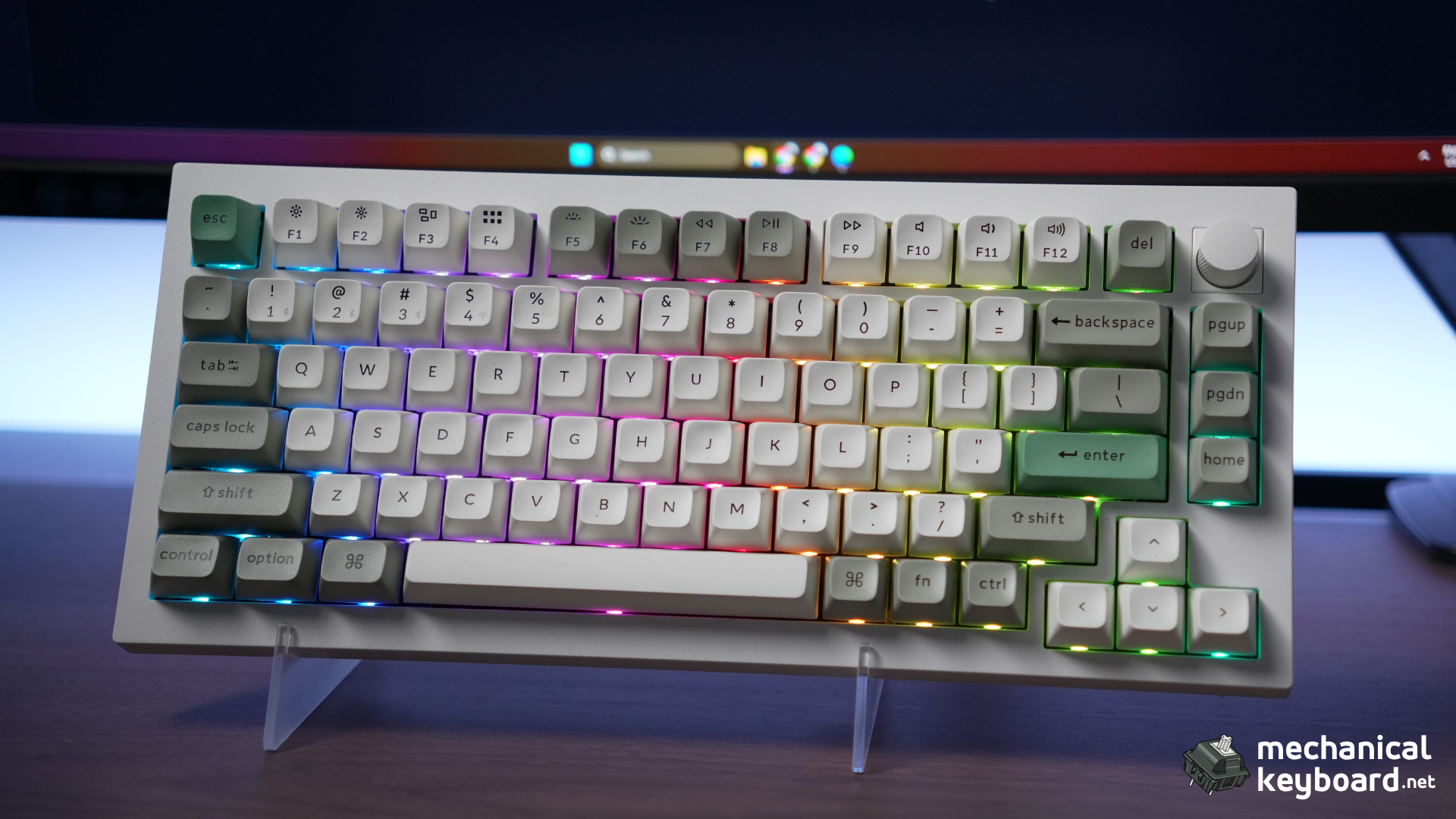
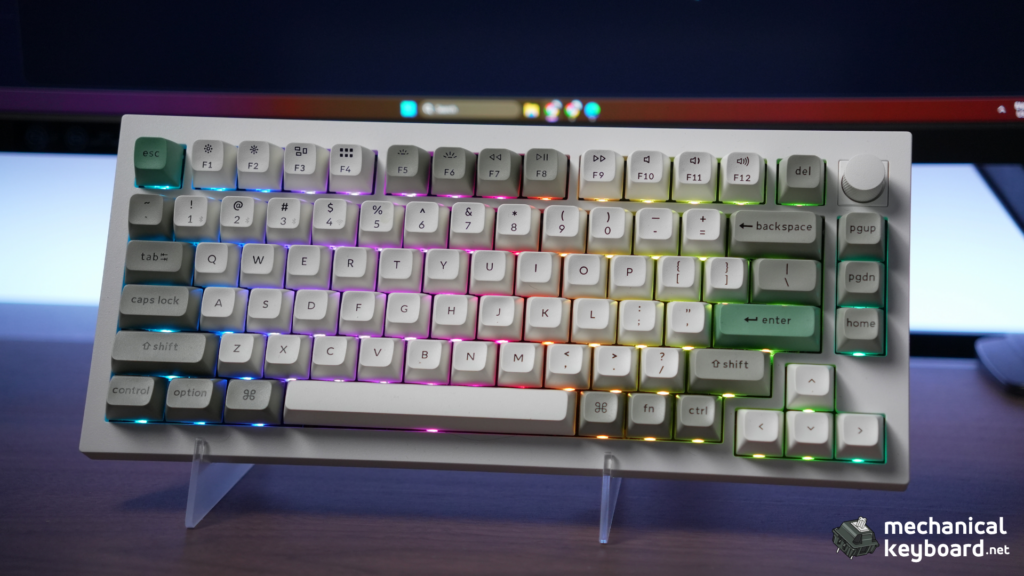
The Keychron Q1 Max is a 75% mechanical keyboard with a full CNC aluminum case, double gasket mount, tri-mode wireless, and full QMK/VIA support. Fully assembled with the knob it lists at $209 (barebone $189), and it is the most complete 75% wireless keyboard you can buy at this price.
- Specs at a glance
- What $209 actually buys
- Unboxing and first impressions
- Build quality and ergonomics
- Layout and keycaps
- Gateron Jupiter Banana: the tactile deep dive
- Typing experience and the stabilizer lottery
- Software: QMK and VIA, done right
- Connectivity and battery
- Q1 Max vs Lemokey P1 Pro
- The Q-series family: which Keychron is yours?
- Mods worth doing
- Setting the record straight
- Verdict
- Where to buy
Score: 9/10 (premium scale)
- Should you buy it? If you are coming from plastic budget boards and want the aluminum, gasket-mounted, QMK-class experience without building a custom, yes. If budget is tight, the Lemokey P1 Pro at $129 delivers most of the experience.
- Best for: Daily-driver professionals who want one board for everything. Mac users who want zero compatibility fighting. Writers and programmers who type all day and want the tactile confirmation of the Jupiter Banana switches.
- Skip if: You need adjustable feet (there are none), you want shine-through keycaps (the KSA caps are solid), or you play competitive FPS wirelessly (Bluetooth is 90Hz; use 2.4GHz or wired).
Specs at a glance
| Spec | Detail |
| Layout | 75% (83 keys) |
| Case | Full CNC 6063 aluminum (Shell White / Carbon Black / Silver Grey) |
| Mount | Double gasket (plate gaskets plus silicone pads between case halves) |
| Plate | Flexible PC (polycarbonate) |
| Switches | Gateron Jupiter Banana (tactile, factory lubed) |
| Keycaps | Double-shot PBT, KSA profile (not shine-through) |
| Hot-swap | Yes (3-pin and 5-pin MX) |
| Connectivity | USB-C / 2.4GHz (1000Hz) / Bluetooth 5.1 (90Hz, 3 devices) |
| Battery | 4,000mAh (up to 180h backlight off / ~100h RGB lowest, per Keychron) |
| Software | QMK plus VIA (full) |
| Stabilizers | Screw-in, pre-lubed |
| Extras | Rotary knob, Mac/Windows toggle, 3-layer foam stack |
| Weight | ~1.7kg (1724g measured) |
| Price | $209 (assembled, knob) / $189 (barebone) |
What $209 actually buys
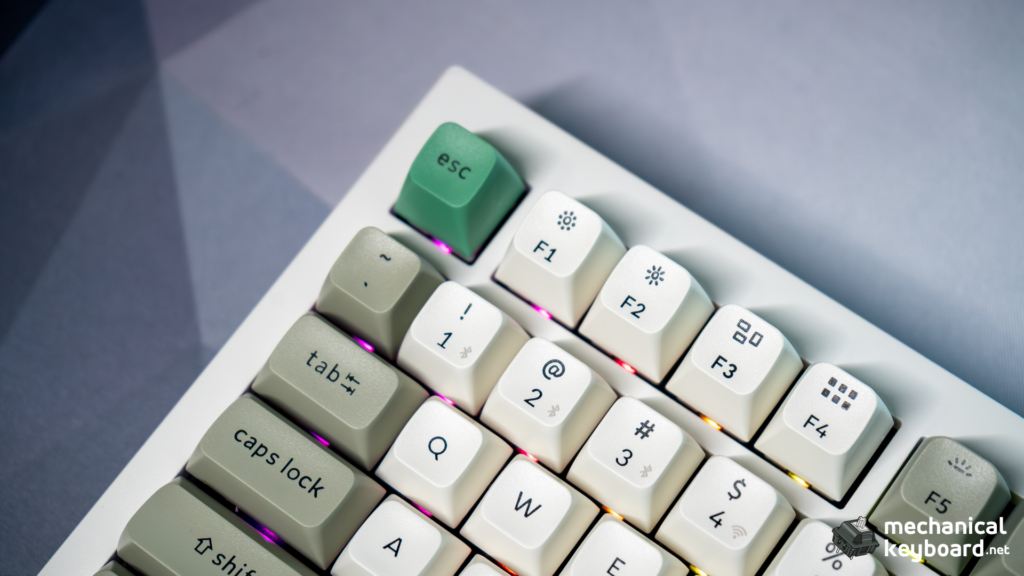
Most of the keyboards we review sit between $50 and $100, plastic cases with decent value. The Q1 Max is a different animal, and it is worth being explicit about where the money goes.
The aluminum case. A full CNC-machined 6063 aluminum body weighs about 1.7kg, two to three times the plastic boards in our stable. The weight is not decoration. It kills case resonance, keeps the board planted, and changes the sound character entirely.
The double gasket. The Q1 Max uses gaskets on the plate and silicone pads between the top and bottom case halves. Budget gasket boards use gaskets in one plane only. The double approach absorbs more energy, which is why the Q1 Max types softer than any budget board we have tested.
QMK and VIA. Real QMK/VIA support is the line between “gaming keyboard with software” and “custom-class keyboard.” Budget boards typically use proprietary software; the Q1 Max exposes the full firmware. This is the feature that makes it feel like a custom board without the group-buy wait.
Used a couple of thousand hours a year over several years, the aluminum case will outlast a plastic board by a wide margin, and hot-swap sockets mean the switches and keycaps can be changed forever. That is how most owners justify the price to themselves, and it holds up.
Unboxing and first impressions
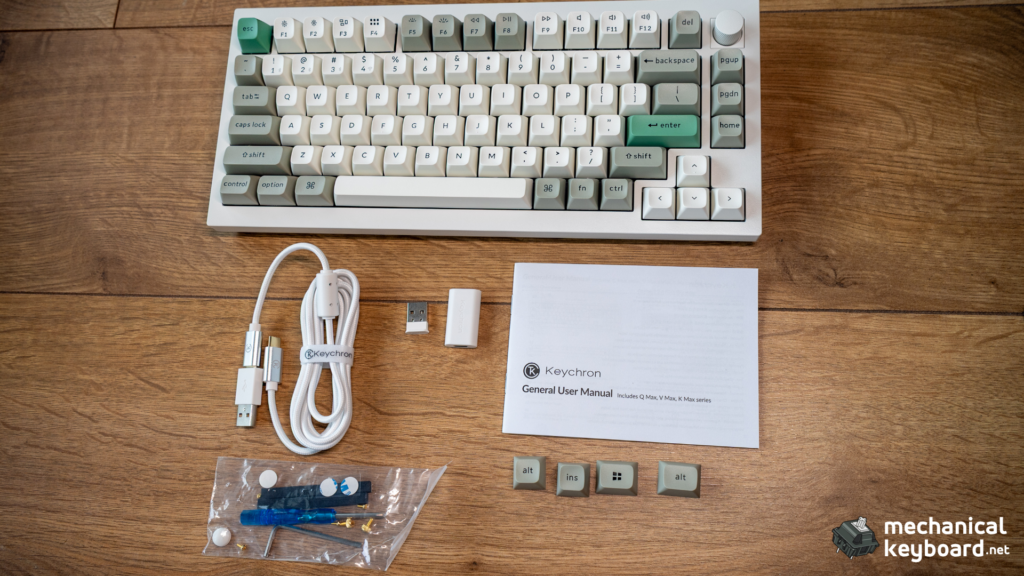
The Q1 Max arrives with a braided USB-C cable, keycap and switch pullers, a screwdriver, spare screws, a Mac/Windows keycap set, and the manual, everything wrapped in a foam sleeve. Lifting it out is the moment: the case is cold to the hand in a way plastic never is, and the frame resists twisting completely.
The knob turns with a satisfying detent. The KSA keycaps are tall and sculpted, noticeably higher than the OEM caps on our budget boards. The Shell White finish is a matte, slightly warm white that photographs well and hides fingerprints. RGB is south-facing, so the legends do not glow through the solid caps, but the underglow is even and subtle.
Build quality and ergonomics
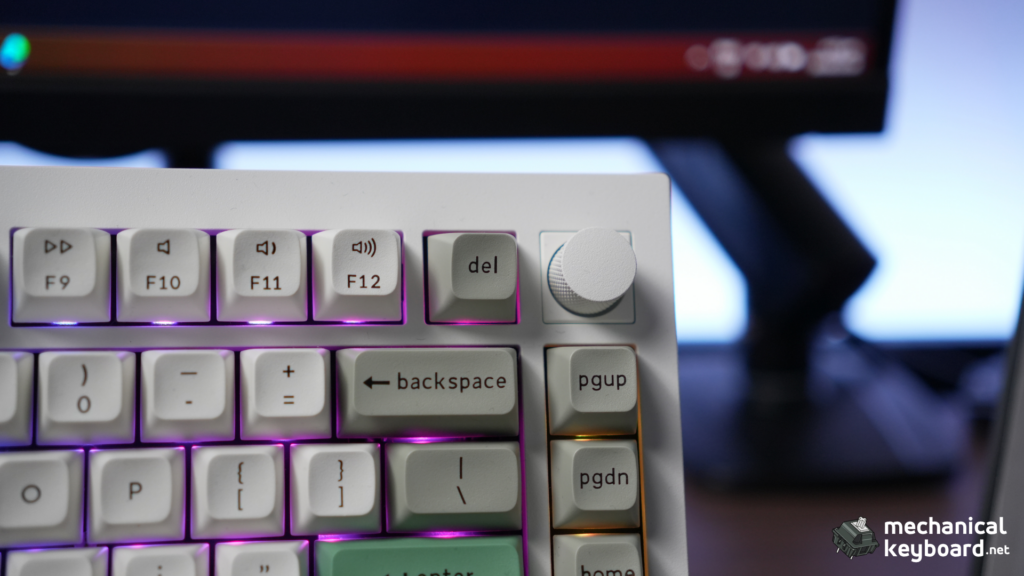
The case. Press down hard on the centre with both thumbs and nothing moves. That rigidity is what you pay for, and it shows up in the sound: none of the hollow resonance a plastic shell lets through. The edges are chamfered, the anodizing is even, and the bottom carries a tasteful logo plate. This is the single biggest reason to upgrade from a plastic board.
Double gasket mount. Most gasket boards suspend the plate on silicone strips and stop there. The Max adds silicone pads between the case halves, so you get the soft landing of a gasket board plus the rigidity of the aluminum containing it. Against the firmer budget gasket boards in our stable, the Q1 Max absorbs the bottom-out in a way that makes long sessions genuinely less tiring.
The no-feet problem. Here is the honest caveat: the Q1 Max has no adjustable feet. The typing angle is fixed at 5.2 degrees, set by the case, and the front height is substantial (about 2cm to the top of the case). For most people on a standard desk that is fine, and we used it flat for weeks and found it comfortable, but if you like a steeper angle, plan on a wrist rest. This is the board’s most-cited ergonomic weakness, and it is worth knowing before you buy.
The knob. A genuine quality-of-life feature: volume by default, press to mute, fully remappable in VIA, with a crisp detent and no wobble.
Layout and keycaps
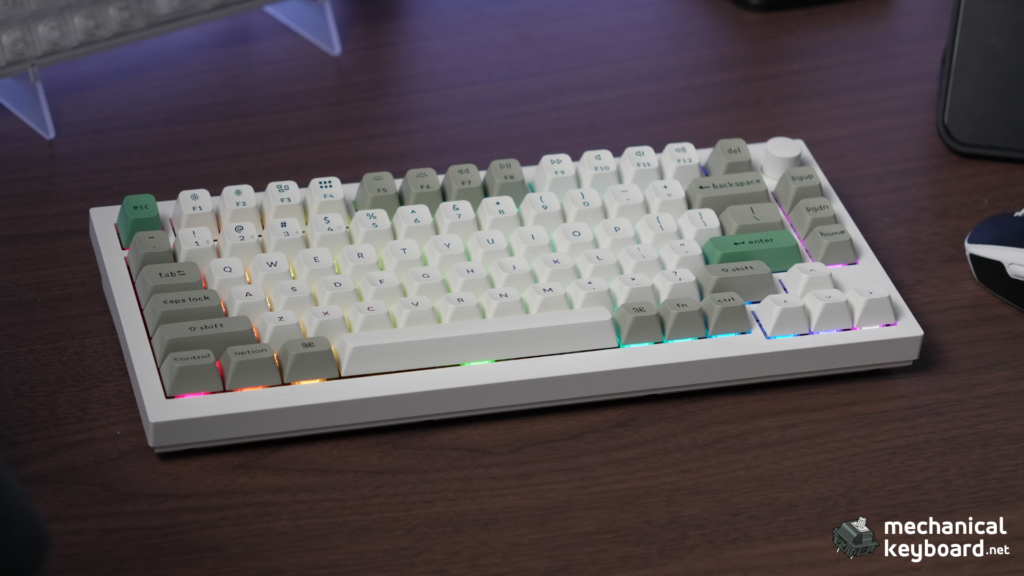
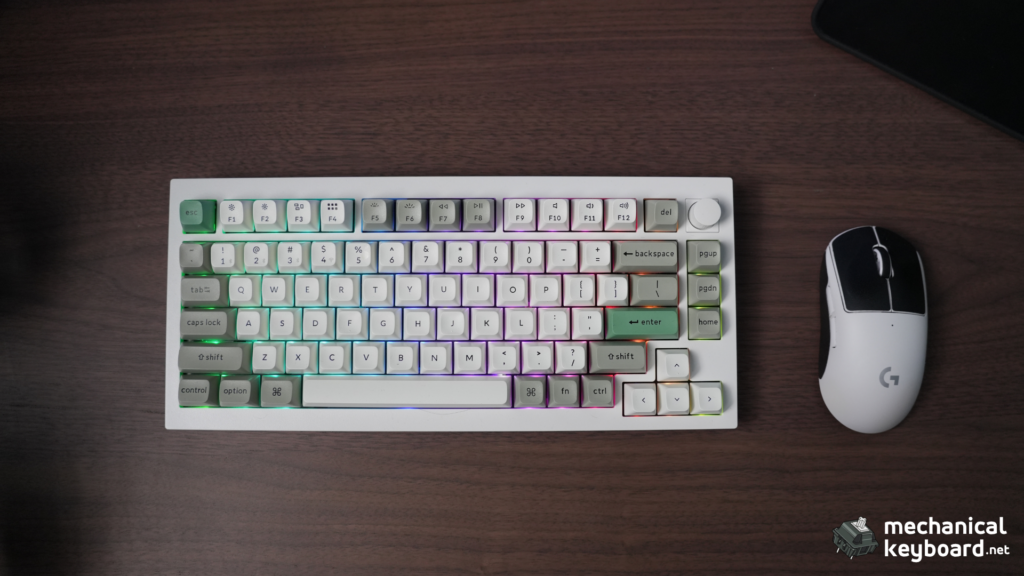
The 75% layout keeps the function row and arrows that 65% boards lose, in a footprint barely wider than a TKL is tall. Coming from full-size, the condensed nav cluster (Home, End, Page Up, Page Down) takes about a day to adjust to; everything else is where you expect it.
The KSA keycaps are the most polarizing thing about this board. Two things to know: they are not shine-through (the RGB glows around them, not through them), and they are tall, noticeably higher than OEM. Combined with the fixed angle and front height, the board is chunky. Some people love the deep dish; a real chunk of the community swaps to Cherry or OEM profile. The legend quality is excellent and double-shot PBT will not shine over years of use. The good news: standard MX stems mean any keycap set in the world fits.
Gateron Jupiter Banana: the tactile deep dive
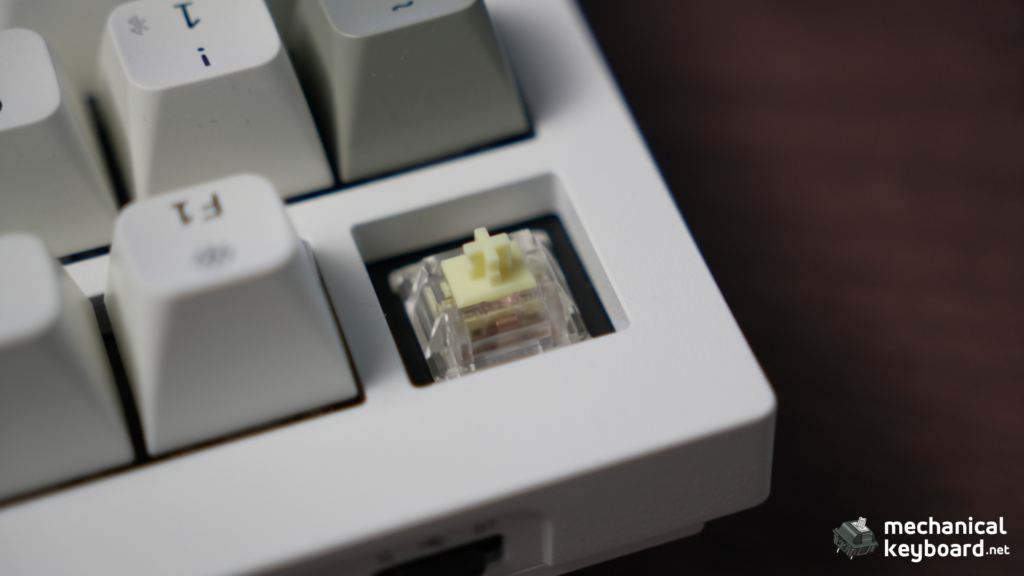
This is our first tactile switch review, and the Jupiter Banana is a genuinely interesting one.
What it is. A tactile switch with an early bump: factory lubed, 5-pin, POM stem, PC top housing, nylon bottom housing, two-stage steel spring, and an LED diffuser. It ships in the Q1 Max and most of the Q/V Max lineup.
If you buy the Q1 Max fully assembled, the Jupiter family gives you three options. Gateron Jupiter Red is the linear pick, smooth and quiet with no bump, best for gaming and light typists. Gateron Jupiter Brown is a lighter, subtler tactile, closer to a traditional brown for anyone who finds the Banana too aggressive. The Jupiter Banana reviewed here is the sharpest and most tactile of the three. All three share the same housing, LED diffuser, and two-stage spring, so the choice is purely about feel.
The force-curve question (contested, not settled)
This is where the spec sheets disagree, and we want to be straight about it.
Gateron’s own listing and most retailers (KBD.news, KeebFinder, MechanicalKeyboards.com) describe the Banana as 59g actuation at 2.0mm with a 69g bottom-out at 3.4mm, the normal tactile pattern, heavier toward the bottom.
Independent testing at KeebWorks measured something different: a peak tactile force of 59g at ~0.5mm (very early), a listed actuation of 59g at 2mm, and a bottom-out of only 53g, lighter than the peak. They also recorded an actual actuation force of about 35.6g, well outside the quoted 59g plus/minus 10g on the spec sheet. In other words, some testers report a “snap then release” profile where the peak happens near the top of the press and the bottom-out is lighter than the peak.
So which is it? We could not fully settle this without our own force-curve rig, and we will not pretend otherwise. What we can say from typing on the unit: the bump is unmistakably early and sharp, the switch does not feel as heavy as a 59g bottom-out would suggest, and it reads as a medium-weight tactile in practice. The 69g bottom-out figure on some spec sheets does not match how the switch feels. One number that does check out: the real actuation threshold sits around 35 to 36g, not the 59g on the box. That 59g is the tactile peak, not the force needed to trigger the key. Treat the “inverted curve” framing as what some testers report, not a settled spec.
| Spec | Value |
| Type | Tactile (early bump) |
| Peak tactile force | 59g at ~0.5mm |
| Actuation (real, measured) | ~35 to 36g |
| Bottom-out | ~53g (contested; some sheets list 69g) |
| Total travel | 3.4mm |
| Housing | PC top / nylon bottom, POM stem |
| Lube | Factory |
| Pins | 5-pin (retail listings) |
How it feels and sounds
The bump is sharp and early, a Holy-Panda-like “P-shape” rather than the rounder “D-shape” of a Boba U4T, and far crisper than a Cherry MX Brown. It gives clear tactile confirmation without a full bottom-out, which means fewer missed keystrokes and less fatigue over a long day. The two-stage spring returns strong and snappy. Smoothness is good on-centre with minor scratch at very slow presses; the factory lube is consistent and the switches are usable out of the box.
Sound-wise, the Banana is clacky and poppy with a bright, marbly character on the aluminum case. It is not a deep thock switch and it is not silent. Call it office-acceptable, but not quiet.
The 5-way comparison
| Switch | Type | Peak force | Bottom-out | Travel | Lube | Price |
| Jupiter Banana | Tactile, early bump | 59g @ 0.5mm | ~53g | 3.4mm | Factory | ~$0.25 to $0.45 |
| Cherry MX Brown | Tactile (subtle) | ~55g mid | ~55g | 4.0mm | Factory | ~$0.40 |
| Gateron Brown | Tactile (subtle) | ~50 to 55g | ~50 to 60g | 4.0mm | Varies | ~$0.25 |
| Boba U4T 62g | Tactile, round | 62g | 62g | 3.2mm | Light | ~$0.65 |
| Baby Kangaroo V2 | Tactile, early bump | 59g @ 0.5mm | ~67g | 3.4mm | Factory | ~$0.55 to $0.60 |
| K Pro Banana | Tactile, light | ~57g | 57g | 3.5mm | Factory | ~$0.25 |
- vs Cherry MX Brown: No contest. The Brown’s bump is so subtle it feels linear at speed. The Banana’s early bump is unmistakable, better lubed, and shorter in travel. This is the upgrade story that matters for most people coming from a Brown board.
- vs Boba U4T: The Banana costs about half, is factory lubed, and has a sharper, pointier bump. The U4T is deeper-sounding and rounder. The Banana is the value pick; the U4T is for purists.
- vs Baby Kangaroo V2: The near-twin, same 59g peak, same early bump, same travel. The Kangaroo has a heavier bottom-out and costs roughly double. The Banana is the value version of the same idea.
Jupiter Banana vs K Pro Banana: not the same switch
This is a real trap. The Keychron K Pro Banana (found in Q1 Pro boards) sounds like it should be the same switch. It is not. It is lighter, 3-pin, with a less defined bump. The Jupiter Banana is heavier, sharper, 5-pin, with the LED diffuser. If you are comparing Q1 Pro vs Q1 Max, the switches alone are a real difference.
The chatter debate
There are reports of key chatter and double-clicks on boards with Jupiter Bananas, mostly in the Q/V Max lineup. The important nuance from the longest community threads, and echoed in KeebWorks’ testing, is that the diagnosis points at the hot-swap sockets, not the switch: switches moved to other boards perform fine, and faulty sockets stay faulty with any switch. Reseating usually fixes it. We saw no chatter on our unit.
Typing experience and the stabilizer lottery
The Q1 Max types like a premium board should: the double gasket absorbs the landing, the Bananas give crisp confirmation at the top of the stroke, and the aluminum keeps it tight and controlled. Our Monkeytype results held at 108 to 112 WPM on English 1k over a week, in line with our baseline, and the early bump actually helped accuracy by reducing the tendency to type before the key registers.
Now the honest part. The Q1 Max ships with screw-in, pre-lubed stabilizers, which is the right hardware, but the community’s single biggest complaint is the stabilizer lottery. Some units ship perfectly tuned; others rattle on the spacebar and backspace out of the box. Ours were good, no rattle and no ping, but the reports are widespread enough that you should treat the stabilizers as the one component you may need to fix. The upside: screw-in stabs are easy to re-lube, and a $15 aftermarket set transforms the board worst case.
Software: QMK and VIA, done right
Full QMK and VIA put the Q1 Max in a different class from proprietary-software boards. VIA lets you remap any key, build layers, program macros, and configure the knob in a browser tool with no flashing required. We tested it on macOS, Windows, and Linux and it worked identically across all three, which is the point of VIA. A physical Mac/Windows toggle swaps modifier positions, and both keycap sets are in the box.
One honest note: the stock firmware is effectively “VIA-only,” and deep QMK changes (custom keycodes) need a reflash. But VIA covers roughly 95% of what people actually want, namely remaps, layers, macros, and knob, so for most users it is everything they need.
Connectivity and battery
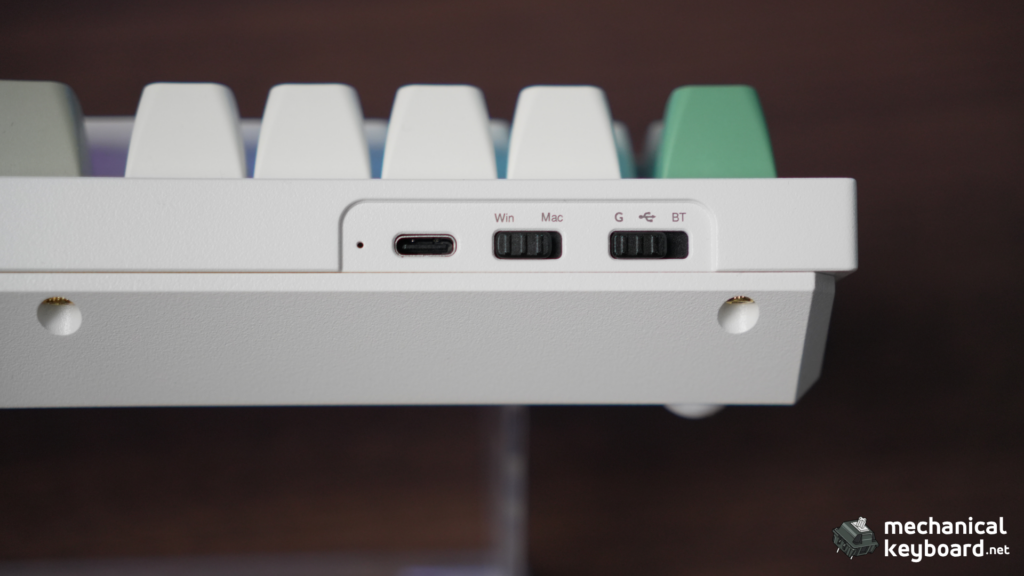
Three ways to connect: USB-C wired (1000Hz, zero latency), 2.4GHz via a dongle stored in a magnetic compartment (1000Hz, and the reason to buy the Max over the Bluetooth-only Q1 Pro), and Bluetooth 5.1 (90Hz, up to 3 devices). The 90Hz Bluetooth is the caveat the marketing glosses over: it is fine for typing and productivity but not for gaming. The 2.4GHz link has been rock solid in our testing, with no drops and no perceptible latency.
Battery reality. Keychron rates the 4,000mAh cell at up to 180 hours (backlight off) and about 100 hours on RGB at the lowest brightness. Here is what we measured:
- 2.4GHz, RGB on: roughly a week of daily use. RGB is the battery killer.
- 2.4GHz, RGB off: 14 full workdays still showed over 40%, projecting to five or six weeks.
- Bluetooth, RGB off: the longest mode, consistent with the multi-week claims.
The 180-hour figure is achievable only in the most favorable conditions. That is not a flaw specific to the Q1 Max, since every wireless RGB board behaves this way, but it is the difference between marketing and reality, and we measured it.
Q1 Max vs Lemokey P1 Pro
The Lemokey P1 Pro is the Q1 Max’s toughest competition, and it comes from Keychron’s own gaming-focused sub-brand, same factory, $129 fully built (about $80 less).
| Q1 Max | Lemokey P1 Pro | |
| Price | $209 | $129 |
| Case | CNC aluminum | CNC aluminum |
| Mount | Double gasket (softer) | Gasket (firmer) |
| Battery | 4,000mAh | 4,000mAh (rated ~200h vs 180h) |
| Connectivity | 2.4GHz + BT + USB-C | 2.4GHz + BT + USB-C |
| Software | QMK/VIA | QMK/VIA |
| Knob | Yes | Yes |
| Keycaps | KSA profile PBT | PBT |
| Community sound verdict | Softer, deeper | Brighter, firmer |
The honest answer: the P1 Pro delivers most of the Q1 Max experience for less. Both use a 4,000mAh cell, and the P1 Pro is rated for more hours because it draws less power. The Q1 Max wins on the double gasket (softer typing), the sound engineering, and the KSA caps. The P1 Pro wins on price. If the price is a stretch, buy the P1 Pro and we would not blame you. If you want the softest, best-sounding 75% Keychron makes, the Q1 Max is the flagship for a reason.
The Q-series family: which Keychron is yours?
| Board | Price | Connectivity | Battery | Verdict |
| Q1 (v1/v2) | ~$119 | Wired only | None | The original |
| Q1 Pro | ~$169 | BT + USB-C | 4,000mAh | Bluetooth only, no 2.4GHz |
| Q1 Max | $209 | 2.4GHz + BT + USB-C | 4,000mAh | The balanced flagship |
| Q1 HE | ~$209 | Wired only | None | Magnetic HE switches, gaming |
| Q1 Ultra 8K (2026) | ~$229 | 2.4GHz + BT + USB-C | 4,000mAh, 660h rated | Newer flagship, efficient ZMK |
The newer Q1 Ultra 8K threatens the Max’s flagship status with ZMK firmware rated for 660 hours from the same 4,000mAh cell (independent testing found the claim roughly accurate). If battery life is your priority and you can stretch the budget, look at it. For everyone else, the Max remains the balanced pick: 2.4GHz, QMK/VIA, knob, aluminum.
Mods worth doing
The Q1 Max is a modder’s board but does not need much:
- Re-lube or swap the stabilizers if you lose the lottery. This is the single most impactful fix.
- Swap the KSA keycaps if the height bothers you; any Cherry/OEM set fits and drops the profile.
- Tape mod for a deeper sound: a layer of masking tape on the PCB back is a 10-minute job.
- Leave the foam stack alone. The board is already well-damped; removing foam usually makes it worse.
Setting the record straight
Most Q1 Max reviews are from launch (early 2024), on press samples, and repeat a couple of verifiable errors worth flagging:
- It is a 75% board, not a TKL. Trusted Reviews described it as “a TKL (tenkeyless) board.” It is 75%.
- The battery is officially rated at 180 hours, not 200. XDA’s review cites “up to 200 hours,” above Keychron’s own 180h figure.
We verified the specs in this review against the unit and multiple sources.
Verdict
The Keychron Q1 Max is the best 75% wireless keyboard we have tested, and the first board in our stable that feels genuinely premium rather than merely good value. The aluminum case, the double gasket, the Jupiter Banana tactility, and the QMK/VIA software combine into a daily driver that is easy to recommend. It is not perfect. The fixed angle, the stabilizer lottery, and the 90Hz Bluetooth are real caveats. But those are things you can work around, and none of them exist in the budget tier.
- Buy it if: you type all day, you want mechanical on Mac without fighting, or you are upgrading from a budget board and want the aluminum, QMK-class experience.
- Skip it if: budget is the priority (Lemokey P1 Pro at $129), you need Bluetooth gaming (use 2.4GHz or go wired), or you need adjustable feet.
Where to buy
| Source | Price | Notes |
| Keychron.com | $209 (knob) / $189 (barebone) | Official, full warranty |
| Amazon | ~$209 | Prime shipping, easier returns |
Keychron runs sales regularly, especially around holidays, and the Q1 Max has dipped below MSRP during promotions. If you are not in a hurry, wait for a sale.
Is the Keychron Q1 Max worth it?
Yes, for its intended buyer. The aluminum case, double gasket, QMK/VIA, and 2.4GHz wireless justify the price for daily-driver professionals. If price is the concern, the Lemokey P1 Pro at $129 delivers most of the experience.
Q1 Max vs Q1 Pro: which should I buy?
The Max. The 2.4GHz connection alone is worth the difference, and the Max has improved gaskets and foam. The Pro is Bluetooth only.
Are the Jupiter Banana switches good for typing?
Excellent. The early bump gives clear tactile confirmation without bottoming out, which reduces fatigue over long sessions.
Are the Jupiter Banana switches good for gaming?
Good for accuracy-based games (MMOs, MOBAs, strategy). For competitive FPS, lighter linears are the usual choice.
What is the Gateron Jupiter Banana actuation force?
The box lists 59g, but that figure is the tactile peak. Independent testing puts the real actuation threshold around 35 to 36g, so the switch is lighter to trigger than the spec suggests.
Jupiter Banana vs Boba U4T: which is better?
The Banana costs about half, comes factory lubed, and has a sharper, pointier bump. The Boba U4T is deeper-sounding and rounder and benefits from hand-lubing. The Banana is the value pick; the U4T is for purists.
Jupiter Banana vs Baby Kangaroo V2: what is the difference?
They are near-twins, with the same 59g peak, early bump, and 3.4mm travel. The Baby Kangaroo has a heavier bottom-out and costs roughly double. The Banana is the value version of the same idea.
How do I fix stabilizer rattle on the Q1 Max?
Re-lube the stock screw-in stabilizers, or swap in a $15 aftermarket set. Both are straightforward because the stabs are screw-in, and it is the single most impactful mod if you drew a bad unit.
Why won’t VIA detect my Q1 Max?
Connect the keyboard in wired mode, use a Chromium-based browser (Chrome, Edge, or Opera), and load the Q1 Max JSON from Keychron if the board is not recognized automatically.
How do I factory reset the Keychron Q1 Max?
Hold Esc while powering the keyboard on (or plugging it in) to clear the onboard settings and return to default firmware behavior.
Does the Q1 Max drain the battery fast with RGB on?
Yes. RGB is the main draw. Expect roughly a week per charge with RGB on over 2.4GHz, versus five to six weeks with RGB off.
Are the Jupiter Banana switches quiet?
No. They are clacky and poppy, bright and crisp. Office-acceptable on this board, but not silent.
Do Jupiter Banana switches chatter?
Reports exist, but the community and independent testers point at the hot-swap sockets rather than the switch. Reseating fixes most cases. We saw no chatter on our unit.
Jupiter Banana vs K Pro Banana: what is the difference?
Not the same switch. The Jupiter is heavier, sharper, factory lubed, 5-pin, with an LED diffuser. The K Pro is lighter, 3-pin, with a less defined bump.
Is the Q1 Max good for Mac?
Yes. Mac/Windows toggle, dual keycap sets, and VIA all work perfectly on macOS.
Does the Q1 Max have adjustable feet?
No. The angle is fixed at 5.2 degrees. Factor in a wrist rest if you need a steeper angle.
How long does the Q1 Max battery last?
Roughly a week with RGB on 2.4GHz, five to six weeks with RGB off, longer on Bluetooth. The 180-hour figure only holds in ideal conditions.
Can the Q1 Max work with Linux?
Yes. QMK/VIA work natively and the 2.4GHz dongle is plug and play. We tested it.