
The Epomaker Galaxy 100 Lite review has been a long time coming. Epomaker has carved out a strong reputation for producing well-built, feature-rich boards at competitive prices, and the Galaxy 100 Lite is their attempt to bring an aluminium, gasket-mount, full-size-function board to a wider audience. Paired with the brand’s own Wisteria linear switches, this is a board that promises a premium typing experience without the premium price tag.
- Key Takeaways – Who Should and Should Not Buy the Galaxy 100 Lite
- Build Quality, Design and Layout
- Typing Feel and Sound With Wisteria Linear Switches
- Connectivity, Battery Life and NKRO
- Software, QMK, VIA and Customisation
- Gaming Performance
- Office Work, Typing and Daily Use
- Keycaps, RGB and Aesthetics
- Specifications
- Epomaker Galaxy 100 Lite vs Alternatives
- Pricing, Availability and Value
- Pros and Cons
- Verdict – Is the Epomaker Galaxy 100 Lite Worth It?
- FAQ
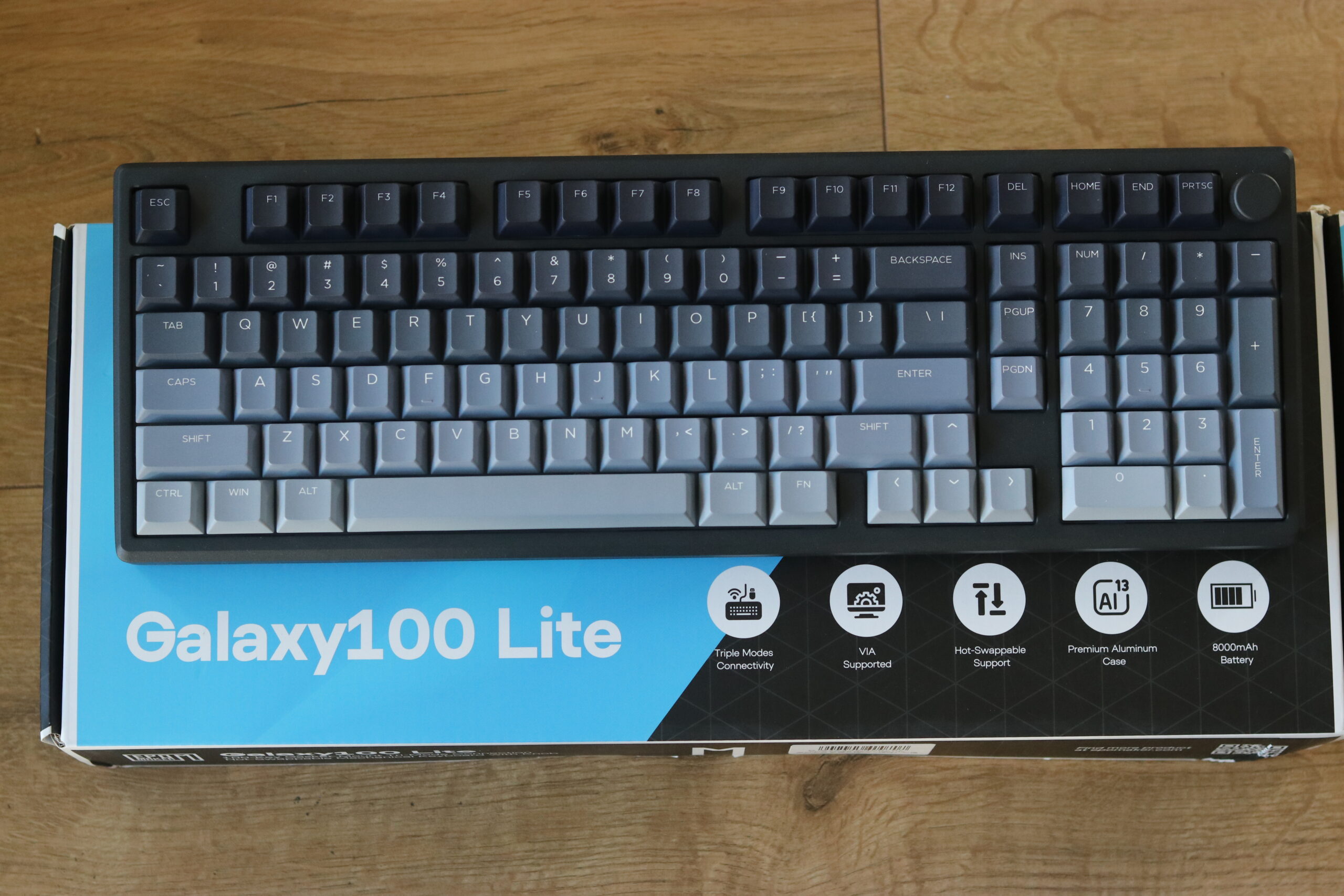
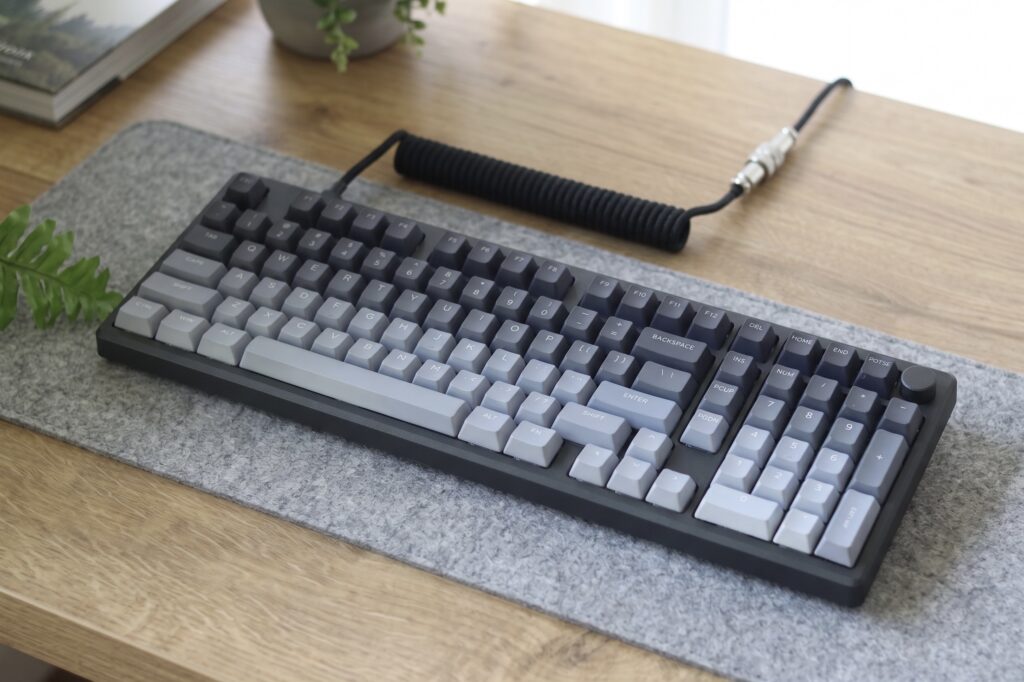
The Galaxy 100 Lite sits in the 96 layout category, sometimes referred to as a 1800 layout mechanical keyboard. It keeps the numpad and arrow cluster from a standard full-size board, but compresses the spacing to significantly reduce the overall footprint. If you want a keyboard that does everything a full-size board does but takes up less desk space, the 96 layout is one of the most practical form factors available. Our mechanical keyboard sizes guide covers where the 96 layout sits relative to every other option.
I tested the Epomaker Galaxy 100 Lite as a daily driver for both gaming and office work over several weeks. In this review I cover everything from build quality and typing feel to software, connectivity, and how it stacks up against the Mechlands Blade 101, Mechlands Vibe 108, AULA F75 Max, and Epomaker HE80.
Key Takeaways – Who Should and Should Not Buy the Galaxy 100 Lite
Buy it if you:
- Want a full size mechanical keyboard with knob but in a more compact, desk-friendly footprint
- Prefer pre-lubed linear switches with a deep, smooth sound profile out of the box
- Need a tri mode mechanical keyboard full size setup with wired, 2.4 GHz, and Bluetooth connectivity
- Value an aluminium build at a mid-range price point
- Want QMK and VIA support for full key remapping and macro customisation
- Are after a hot-swappable board that lets you try different switches without soldering
Skip it if you:
- Travel frequently and need a lightweight, portable board – the aluminium case adds real weight
- Are a competitive esports player who needs the absolute highest wireless polling rates – the Galaxy 100 Lite is solid but not a dedicated esports weapon
- Are on a very tight budget and do not specifically need an aluminium chassis
- Strongly prefer a tenkeyless or smaller layout – if a numpad is not useful to you, consider our breakdown of what a tenkeyless keyboard offers instead
Build Quality, Design and Layout
The first thing you notice when you lift the Epomaker Galaxy 100 Lite out of the box is the weight. This is a proper aluminium mechanical keyboard, and it has the heft to prove it. The top case and base are both CNC aluminium, giving the board a solid, premium feel that is noticeably different from the polycarbonate or plastic shells you find on budget boards in this price range.
The finish is clean. Edges are chamfered, the surface has a smooth anodised coating, and there is no flex anywhere on the board when you press down on the corners. The volume knob sits in the upper right corner and feels satisfyingly clicky when rotated, with no wobble or loose feel. By default it controls system volume, but it is remappable in VIA to control media playback, scrolling, brightness, or any function you choose.
The 96 Layout – Full Function in a Tighter Footprint
The 96 layout mechanical keyboard, also commonly called a 1800 layout, is one of the most underrated form factors in the mechanical keyboard world. It retains the full numpad, the dedicated arrow cluster, and the navigation keys like Home, End, Page Up and Page Down, but removes the dead space between those clusters. The result is a keyboard that is noticeably narrower than a standard full-size board while still offering everything a full-size board can do.

Compared to a standard full-size layout, the Galaxy 100 Lite is roughly 3 to 4 cm narrower. Compared to a tenkeyless, it adds a full numpad without becoming dramatically wider. If you work with spreadsheets, financial data, or any task where the numpad earns its place, the 96 layout is a genuinely compelling compromise. It is also a much better fit for a gaming desk where mouse clearance matters. For context on how this compares to smaller form factors like the 60 percent, our 60 percent keyboard guide covers that end of the size spectrum.
The keycaps on the Galaxy 100 Lite are double-shot PBT in a standard Cherry profile. The legends are clean and well-aligned, and the texture has the slightly grainy feel that PBT is known for. They are not the most exciting caps visually, but they are durable, resistant to shine, and a solid foundation for anyone who wants to swap in a custom set later.

Typing Feel and Sound With Wisteria Linear Switches
This is the section most people come to a review for, and the Epomaker Wisteria linear switches do not disappoint. Epomaker designed the Wisteria switches in-house, and they sit in a slightly unusual position in the linear market – positioned as a premium factory-lubed option that does not require any post-purchase work to sound and feel good.
Epomaker Wisteria Linear Switch Specs and Feel
The Wisteria linear switches have a 45g actuation force, a 2.0 mm actuation point, and a 4.0 mm total travel. They come factory lubed with what feels like a light application of Krytox-style lubricant – enough to eliminate most of the stock scratchiness without making the switches feel overly dampened or slowed down. Stock out of the bag, the smoothness level is genuinely impressive and compares well to switches that cost significantly more.
The stem and housing combination produces a sound profile I would describe as medium-deep with a slight clack on the downstroke. It is not the thunderous thock you get from something like Gateron Ink Blacks in a brass plate build, but it sits in a comfortable middle ground that works well in the gasket-mounted aluminium chassis. If you are specifically chasing the deepest possible sound, our best deep sounding switches guide covers the switches that get you there.
Are Wisteria Linear Switches Loud?
This is a common question, and the short answer is: not particularly. The Wisteria linear switches produce a smooth, medium-volume sound that is quieter than most clicky switches and most unlubed linears. They are not silent switches – they will still be audible in a quiet room – but in a typical office or home environment they are unlikely to cause friction with colleagues or family members. The gasket mount and the foam layer inside the Galaxy 100 Lite absorb a significant amount of the downstroke noise, which helps considerably.
Epomaker Wisteria Linear vs Marble White
Epomaker also produces the Marble White linear, which is the other main in-house switch option frequently compared to the Wisteria. The Marble White tends to be slightly lighter in actuation feel and has a crisper, higher-pitched sound profile. The Wisteria linear is the deeper, slightly heavier option of the two – making it the better pick for users who want a more substantial feel and a warmer acoustic profile. For most typing and gaming use cases, I prefer the Wisteria, but users who want a lighter, snappier feel might lean towards the Marble White.
Gasket Mount and Acoustic Stack
The gasket mount full size keyboard design is the single biggest contributor to how good the Galaxy 100 Lite sounds. The PCB and plate assembly is suspended on silicone gaskets rather than screwed directly to the case, which gives the board a springy, cushioned bottom-out feel and dramatically reduces the harsh, metallic ping that plagues many aluminium keyboards. Combined with the foam layer between the PCB and the bottom case, the result is a controlled, deep typing experience that punches significantly above its price class.
For a broader understanding of switch types and how they affect typing feel, our linear vs tactile vs clicky switches guide is a useful reference, and our mechanical keyboard switches guide covers the full landscape of what is available.

Connectivity, Battery Life and NKRO
The Epomaker Galaxy 100 Lite is a fully wireless-capable board with three connection modes: wired USB-C, 2.4 GHz via a USB dongle, and Bluetooth. This makes it one of the more flexible full-size options in its price range – most competitors at this level either skip wireless entirely or offer Bluetooth only.
Wired vs 2.4 GHz vs Bluetooth
For gaming, wired USB-C is always the recommended mode. It delivers the lowest and most consistent latency, and there is no battery to manage. The 2.4 GHz mode is a strong second option for gaming – the wireless latency is low enough that most users will not notice any difference in casual to mid-level competitive play. Bluetooth is best suited for office use, productivity, and connecting to secondary devices like tablets or phones where low latency is less critical.
The battery capacity on the Galaxy 100 Lite is rated at approximately 8000 mAh, which is generous for a full-size board. With RGB off, you can expect several weeks of use between charges in Bluetooth mode. With RGB on at full brightness, battery life drops considerably – expect several days rather than weeks. The 2.4 GHz mode sits between the two in terms of power draw.
Does the Epomaker Galaxy 100 Lite Have NKRO?
Yes – the Galaxy 100 Lite supports N-Key Rollover (NKRO) in wired mode, meaning every simultaneous keypress is registered regardless of how many keys are held down at once. In wireless modes it defaults to 6KRO (six-key rollover), which is sufficient for the vast majority of gaming and typing scenarios. Our NKRO explainer covers why rollover matters and when you are likely to notice the difference.
Software, QMK, VIA and Customisation
This is an area where the Epomaker Galaxy 100 Lite does well for its price class. The board supports both QMK firmware and VIA configuration, which means you have access to some of the most powerful and community-supported keyboard customisation tools available.
Does the Epomaker Galaxy 100 Lite Support QMK?
Yes, the Galaxy 100 Lite supports QMK in wired mode. This gives you full access to QMK’s feature set – custom layers, tap-hold keys, combos, macros, and per-key RGB control. QMK is a more technical route that requires compiling firmware, so it is best suited to users who are comfortable working in a command line environment or using the QMK Configurator web tool.
Does the Epomaker Galaxy 100 Lite Support VIA?
Yes, VIA is supported in wired mode and is the recommended starting point for most users. VIA runs in-browser at usevia.app, requires no firmware flashing for VIA-compatible keyboards, and lets you visually remap every key, create layers, and change the knob behaviour – all in real time with changes saved to onboard memory. The knob can be remapped to control volume, media playback, scrolling, timeline scrubbing in video editors, or any custom input you choose.
One known quirk worth mentioning: some users report that VIA does not detect the Galaxy 100 Lite automatically and requires manually loading the JSON definition file from Epomaker’s GitHub repository. This is a minor inconvenience rather than a serious issue, but it is worth knowing before you sit down expecting an instant plug-and-configure experience.
Epomaker also provides their own driver software for RGB customisation and basic remapping outside of VIA. It is functional but less powerful than VIA and QMK for advanced users. For a comparison with Hall Effect boards that use different firmware and actuation customisation systems, see our Epomaker HE80 review and our Hall Effect keyboard guide.
Gaming Performance
Is the Epomaker Galaxy 100 Lite Good for Gaming?
For most gaming use cases, yes – the Epomaker Galaxy 100 Lite is a very capable gaming keyboard. The Wisteria linear switches provide the smooth, bump-free travel that gaming benefits from, and the 45g actuation force sits in a comfortable middle ground between the ultra-light switches preferred by some FPS players and the heavier options that suit typing-heavy MMO and MOBA players.
In wired mode, input latency is comparable to other wired mechanical keyboards in this price range. In 2.4 GHz mode, the latency is low enough for casual and ranked competitive play across most game genres – FPS, MOBA, battle royale, and MMO. Where the Galaxy 100 Lite does not compete is at the very top end of esports performance, where Hall Effect boards with adjustable actuation, Rapid Trigger functionality, and polling rates of 4000 Hz or 8000 Hz provide a measurable edge. If that level of performance is a priority, our Epomaker HE80 review covers a Hall Effect board from the same brand, and our Hall Effect keyboard explainer covers what makes that technology different.
Are Epomaker Wisteria Switches Good for Gaming?
Yes, the Epomaker Wisteria switches are well suited to gaming. The smooth linear travel, 45g actuation force, and 2.0 mm actuation point make them a natural fit for WASD movement, ability inputs, and rapid key sequences. They are not the lightest linear option available – users who specifically prefer a very light 35g to 40g gaming switch may want to consider alternatives – but for the majority of gaming scenarios the Wisteria delivers a reliable, fatigue-resistant performance. The factory lube means they are game-ready straight out of the box with no prep work required.
Office Work, Typing and Daily Use
Is the Epomaker Galaxy 100 Lite Good for Typing and Office Use?
For daily typing and office work, the Galaxy 100 Lite is one of the stronger options at its price point. The gasket mount provides a cushioned, slightly bouncy feel on each keystroke that reduces finger fatigue during long writing or coding sessions. The Wisteria linears are smooth enough that extended typing sessions feel effortless rather than grinding, and the 45g actuation keeps things from feeling too heavy for long-form work.
The 96 layout is particularly useful for productivity tasks. If you regularly work with spreadsheets, data entry, accounting software, or numeric input of any kind, having the full numpad available without the wide footprint of a standard full-size board is a meaningful advantage. You get the best of both worlds – numpad when you need it, more mouse clearance than a full-size board provides.
Is the Epomaker Galaxy 100 Lite Noisy?
In an open plan office, the Galaxy 100 Lite sits in the acceptable range for noise. It is quieter than a clicky switch board and quieter than most unlubed linears, but it is not a silent keyboard. The Wisteria switches produce an audible sound that people nearby will hear. If you are in a very quiet shared office environment, it would be worth considering whether silent switches or a board with more aggressive dampening is a better fit. For most home office and moderately busy shared spaces, however, the Galaxy 100 Lite is unlikely to cause complaints.
For those new to the mechanical keyboard world, our mechanical keyboard basics guide covers the fundamentals of what separates mechanical boards from membrane alternatives, and our keycaps guide covers the material and profile differences that affect typing feel.
Keycaps, RGB and Aesthetics
The stock keycaps are double-shot PBT in Cherry profile, which is a solid choice for a board in this price range. PBT is more durable than ABS, resists the greasy shine that develops on ABS caps after heavy use, and generally has a slightly more textured, premium feel underhand. The Cherry profile is widely regarded as comfortable for long typing sessions and is compatible with an enormous range of aftermarket keycap sets.
Can You Use Custom Keycaps on the Epomaker Galaxy 100 Lite?
Yes, the Galaxy 100 Lite uses a standard MX-compatible switch footprint, so any MX-compatible keycap set will work. The 96 layout does have some non-standard key sizes in the modifier row and the compressed clusters, so you will want to check that your chosen keycap set includes the necessary keys for a 96 or 1800 layout before purchasing. Most high-quality enthusiast keycap sets include a compatibility kit for compact and 1800 layouts. Our keycaps guide covers profiles, materials, and what to look for when buying aftermarket caps.
RGB Lighting
The Galaxy 100 Lite uses south-facing RGB LEDs. With the stock double-shot PBT keycaps, the RGB shines through the legends rather than around the keycap edges, which gives a cleaner, more legible look than some budget boards with poor legend alignment. The lighting is not as dramatic as shine-through keycaps would allow, but it is tasteful and functional. The RGB effects are customisable through both the onboard software and VIA. The overall aesthetic of the board leans clean and professional rather than aggressively gaming-oriented, which suits both desk setups and office environments.

Specifications
| Specification | Detail |
|---|---|
| Layout | 96 percent / 1800 compact full size |
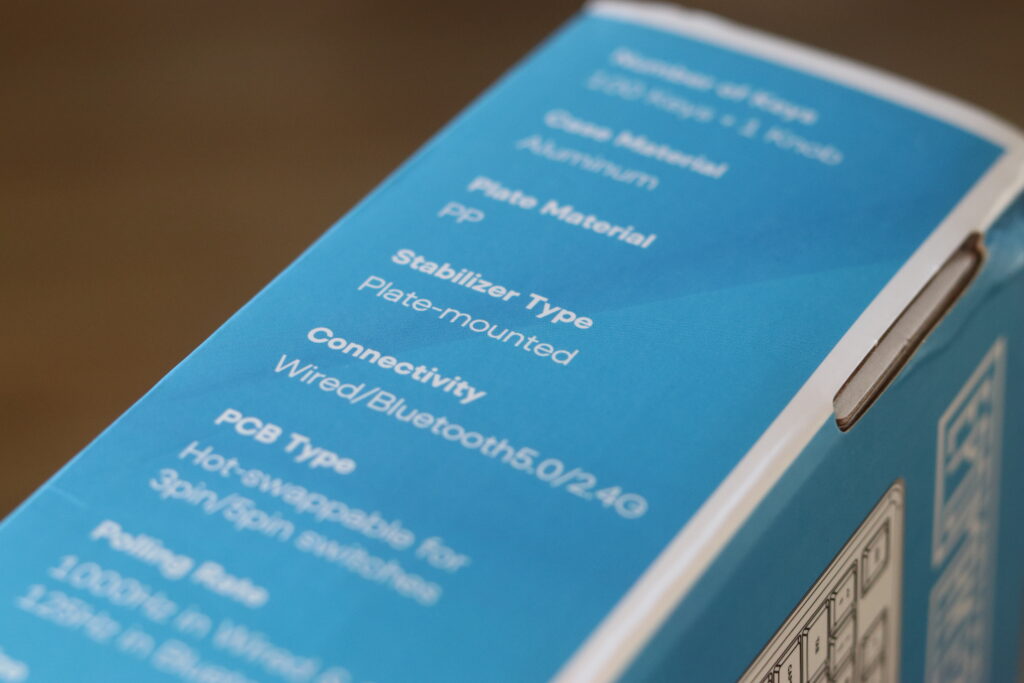
| Number of Keys | 100 keys + 1 rotary knob |
| Case Material | CNC aluminium (top and bottom) |
| Mounting Style | Gasket mount |
| Switch Type | Epomaker Wisteria Linear (MX-compatible, hot-swappable) |
| Switch Actuation Force | 45g |
| Switch Travel | 2.0 mm actuation / 4.0 mm total |
| Hot Swap | Yes – 5-pin MX compatible |
| Connectivity | Wired USB-C, 2.4 GHz wireless, Bluetooth 5.0 |
| Battery Capacity | Approximately 8000 mAh |
| RGB | South-facing per-key RGB |
| NKRO | Yes (wired) / 6KRO (wireless) |
| Polling Rate | 1000 Hz wired, varies by wireless mode |
| Firmware | QMK and VIA supported (wired mode) |
| Keycaps | Double-shot PBT, Cherry profile |
| Approximate Weight | Approximately 1.5 kg (due to aluminium construction) |
| Software | Epomaker driver software + VIA compatible |
Epomaker Galaxy 100 Lite vs Alternatives
How does the Epomaker Galaxy 100 Lite stack up against the most commonly compared boards? Here is a direct comparison across the key specifications that matter most at purchase time.
| Feature | Galaxy 100 Lite | Mechlands Blade 101 | Mechlands Vibe 108 | AULA F75 Max | Epomaker HE80 |
|---|---|---|---|---|---|
| Layout | 96 / 1800 | 96 / 1800 | Full size 108 | 75 percent | 80 percent TKL-ish |
| Case Material | Aluminium | Aluminium | Polycarbonate / ABS | Aluminium alloy | Aluminium |
| Mounting Style | Gasket | Gasket | Gasket | Gasket | Gasket |
| Switch Type | Mechanical linear | Mechanical linear / tactile | Mechanical linear / tactile | Mechanical linear / tactile | Hall Effect magnetic |
| Hot Swap | Yes | Yes | Yes | Yes | Yes |
| Wireless Modes | USB-C, 2.4 GHz, BT | USB-C, 2.4 GHz, BT | USB-C, 2.4 GHz, BT | USB-C, 2.4 GHz, BT | USB-C, 2.4 GHz, BT |
| Battery | ~8000 mAh | ~4000 mAh | ~4000 mAh | ~4000 mAh | ~3000 mAh |
| Knob | Yes | Yes | No | Yes | No |
| QMK / VIA | Yes | Yes | Limited | Limited | Proprietary |
| Target User | Typing and hybrid use | Gaming and hybrid use | Full size productivity | Compact gaming | Competitive gaming |
Epomaker Galaxy 100 Lite vs Mechlands Blade 101
The Mechlands Blade 101 is the closest direct competitor to the Galaxy 100 Lite. Both are aluminium, gasket-mount, 96-layout boards with tri-mode connectivity and a volume knob. The Blade 101 leans slightly more aggressive in its aesthetic and gaming positioning, while the Galaxy 100 Lite feels more neutral and office-friendly. Switch feel and sound profile are the main deciding factor between the two – try both switch options if you can before committing.
Epomaker Galaxy 100 Lite vs Mechlands Vibe 108
The Mechlands Vibe 108 is a full-size 108-key board, which means it has the standard wide layout with full spacing between the clusters. If you do not need the compact footprint of the 96 layout and prefer a more traditional keyboard experience, the Vibe 108 is worth considering. The Galaxy 100 Lite wins on desk space efficiency; the Vibe 108 wins on familiar key placement and slightly easier keycap compatibility.
Epomaker Galaxy 100 Lite vs AULA F75 Max
The AULA F75 Max drops down to a 75 percent layout, which means no numpad and a more compact form factor. The F75 Max is the better choice if portability and a smaller desk footprint are the priority. The Galaxy 100 Lite is the better choice if you need the numpad and the 96 layout’s full productivity capabilities. Both boards are aluminium with gasket mounts and tri-mode connectivity – the layout choice is the primary differentiator.
Epomaker Galaxy 100 Lite vs Epomaker HE80
This comparison is about technology more than anything else. The Epomaker HE80 uses Hall Effect magnetic switches with adjustable actuation and Rapid Trigger support, which makes it one of the most capable gaming keyboards at its price. The Galaxy 100 Lite uses conventional mechanical switches with a fixed actuation point. For competitive gaming where Rapid Trigger is a meaningful advantage, the HE80 wins. For typing, daily productivity, and hybrid use where the full 96 layout is valuable, the Galaxy 100 Lite is the more practical board. Our optical vs mechanical vs magnetic switches guide explains the technology differences in detail.
Pricing, Availability and Value
The Epomaker Galaxy 100 Lite is priced in the mid-range bracket for aluminium mechanical keyboards, typically sitting between $100 and $140 USD depending on the switch configuration and sale timing. For a gasket-mount aluminium board with tri-mode connectivity, hot-swap support, QMK and VIA compatibility, and a volume knob, this represents strong value – comparable features in other brands regularly cost $150 to $200 or more.
If you are looking to buy the Epomaker Galaxy 100 Lite in the UK or Europe, availability can be slightly variable. The Epomaker official store ships internationally and is the most reliable source for all switch variants. The Galaxy 100 Lite is also available on Amazon in several regions, though the selection of switch and colour variants may be more limited than the official store. Checking the Epomaker site for coupon codes before purchasing is worth doing – they regularly run discount campaigns, particularly around product launches and seasonal sales.
At its typical street price, the Epomaker Galaxy 100 Lite competes directly with the Mechlands Blade 101 and AULA F75 Max. Against keyboards without aluminium construction or gasket mounting at the same price, it consistently offers more for the money.
Pros and Cons
Pros
- Solid aluminium build with a clean, professional finish and satisfying weight
- Gasket mount delivers a cushioned, deep-sounding typing experience that punches above its price
- Wisteria linear switches are smooth, factory-lubed, and ready to use out of the box
- 96 layout with volume knob – full function keyboard in a tighter footprint, with a genuinely useful knob
- Tri-mode connectivity with a large battery and practical wireless performance
- QMK and VIA support for full layer, macro, and key remapping customisation
- Hot-swappable – easy to try different switches without any tools or soldering
- Double-shot PBT keycaps with solid legends and a durable feel
Cons
- Weight – the aluminium build makes this a heavy board, not suited to travel or frequent movement
- Wireless polling rate – solid for most gaming but does not compete with Hall Effect boards at the esports level
- VIA setup quirk – some users need to manually load the JSON definition file for VIA to detect the board
- RGB legibility – south-facing LEDs and non-shine-through caps limit the RGB drama compared to boards designed around lighting
- 96 layout keycap compatibility – some aftermarket sets require a compatibility kit to cover the non-standard key sizes

Verdict – Is the Epomaker Galaxy 100 Lite Worth It?
Yes – for the right buyer, the Epomaker Galaxy 100 Lite is genuinely worth it. It delivers an aluminium, gasket-mount, full-function keyboard with excellent typing feel, practical wireless connectivity, and serious firmware customisation in a price bracket where most boards make compromises on at least two or three of those features.
The Wisteria linear switches are the highlight for most users. They are smooth, well-lubed, and suited to both gaming and long typing sessions without any post-purchase work. The 96 layout with volume knob is a smart choice for anyone who values the numpad but does not want to commit to the full footprint of a standard full-size board.
If you are a competitive esports player who specifically needs Rapid Trigger or very high wireless polling, the Epomaker HE80 or another Hall Effect board is the better choice. If you travel frequently or need something lightweight, a 75 percent like the AULA F75 Max or a 65 percent board will serve you better. But for anyone who wants a premium daily driver that handles typing, productivity, and gaming with equal competence – the Epomaker Galaxy 100 Lite earns a strong recommendation.
FAQ
Is the Epomaker Galaxy 100 Lite good for gaming?
Yes, for most gaming scenarios. The Wisteria linear switches provide smooth, bump-free travel that suits FPS, MOBA, and MMO gaming well. In wired mode the latency is excellent, and the 2.4 GHz wireless mode is low-latency enough for casual to mid-level competitive play. It is not a dedicated esports board – Hall Effect options with Rapid Trigger are better for the highest competitive level – but for the vast majority of gamers it performs very well.
Is the Epomaker Galaxy 100 Lite good for typing?
Yes, it is one of the stronger typing options at its price. The gasket mount provides a cushioned, comfortable feel on each keystroke, the Wisteria linears are smooth and fatigue-free for long sessions, and the 96 layout keeps everything you need accessible including the numpad for data entry and navigation keys for editing.
Is the Epomaker Galaxy 100 Lite noisy?
It is not a silent keyboard, but it is quieter than clicky switches and most unlubed linears. The Wisteria switches produce a medium-volume, smooth sound that is acceptable in most office and home environments. The gasket mount and internal foam help absorb some of the sound. For very quiet shared offices, a board with silent switches would be a better fit.
Is the Epomaker Galaxy 100 Lite worth it?
For users who want an aluminium, gasket-mount, full-function 96 layout keyboard with tri-mode wireless, hot-swap support, QMK and VIA compatibility, and pre-lubed linear switches, yes – it represents excellent value at its price point. If those features do not matter to you, a simpler board at a lower price may be sufficient.
Is the Epomaker Galaxy 100 Lite hot swappable?
Yes. The Galaxy 100 Lite has a hot-swap PCB compatible with 5-pin MX switches. You can swap switches without any soldering using a standard switch puller.
Does the Epomaker Galaxy 100 Lite have NKRO?
Yes, in wired mode it supports full N-Key Rollover, meaning every simultaneous keypress is registered. In wireless modes it uses 6KRO, which is sufficient for virtually all gaming and typing scenarios.
Does the Epomaker Galaxy 100 Lite support QMK?
Yes, QMK is supported in wired mode. This gives access to custom layers, tap-hold keys, combos, macros, and full per-key RGB control. QMK requires a bit more technical setup than VIA but offers the deepest level of customisation.
Does the Epomaker Galaxy 100 Lite support VIA?
Yes, VIA is supported in wired mode. It is the recommended starting point for most users – you can remap keys, create layers, set up macros, and change the knob behaviour visually in a browser without flashing firmware. Some users need to manually load the JSON definition file from Epomaker’s GitHub for VIA to detect the board.
Are Epomaker Wisteria switches good for gaming?
Yes. The Wisteria linear switches have a 45g actuation force, 2.0 mm actuation point, and smooth factory-lubed travel that suits gaming well. They are not the lightest linear option, but they provide reliable, consistent performance across FPS, MOBA, and MMO game types with no tactile bump to interrupt rapid key presses.
Are Wisteria linear switches loud?
Not particularly. They are quieter than clicky switches and most unlubed linears. The sound profile is smooth and medium-volume. In a typical office or home environment they are unlikely to be disruptive. They are not silent switches, so in a very quiet environment they will still be audible.
Can you use custom keycaps on the Epomaker Galaxy 100 Lite?
Yes – the board uses a standard MX-compatible footprint, so any MX-compatible keycap set works. The 96 layout has some non-standard key sizes in the modifier and cluster rows, so check that your chosen set includes a compatibility kit for 1800 or 96 layouts before purchasing.
How heavy is the Epomaker Galaxy 100 Lite?
The Galaxy 100 Lite weighs approximately 1.5 kg, which is substantial due to the CNC aluminium construction. This gives it a premium, stable feel on the desk but makes it less practical for travel or frequent transportation compared to plastic or polycarbonate boards.