Quick answer: Keyboard debounce time is a short filtering interval used to prevent the tiny electrical fluctuations inside contact-based switches from turning one physical press into multiple inputs. There is no universal best setting. In QMK firmware, the default is 5 milliseconds (ms). For a conventional mechanical keyboard that works normally, leaving the manufacturer’s default alone is usually the best starting point. Lower settings may expose switch chatter; higher settings may reject some intended rapid presses or affect responsiveness, depending on how debouncing is implemented.
- What is keyboard debounce time?
- Why does switch bounce happen?
- What is the best debounce time for a keyboard?
- Does lower debounce time make a keyboard faster?
- What debounce time is best for gaming?
- Is a 0 ms debounce setting safe?
- How to change keyboard debounce time
- How to test whether a debounce setting works
- Keyboard debounce vs key repeat delay: they are not the same
- Frequently asked questions
- Final verdict
What is keyboard debounce time?
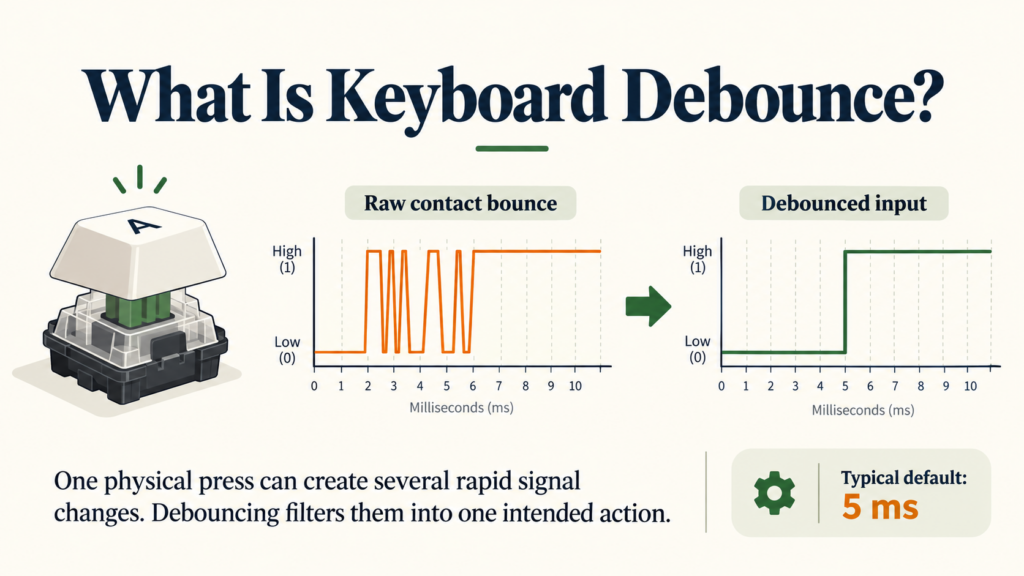
Pressing a conventional mechanical keyboard switch closes an electrical contact. It sounds simple, but the switch’s metal contacts can briefly touch, separate and touch again before settling. That short-lived fluctuation is called contact bounce.
From the keyboard controller’s perspective, one press can initially resemble multiple transitions:
OFF → ON → OFF → ON → ON (stable)
Without filtering, the controller might mistake those transitions for separate actions. Keyboard debouncing is the firmware or hardware process of turning that noisy electrical activity into one intended press or release.
Debounce time is the duration used by the filtering method, usually expressed in milliseconds. For perspective, 5 ms is five-thousandths of a second. The exact meaning depends on the algorithm: some methods wait for a signal to stay stable, while others accept the first change immediately and reject subsequent changes for a short period.
More Read

Suggested visual: Original three-line illustration with a keypress, noisy raw contact signal and cleaned debounced signal. This would explain the concept better than a stock keyboard photo.
Why does switch bounce happen?
Mechanical switch contacts are physical components. When the contacts meet or separate, their movement is not always a perfect single transition. A small amount of bouncing is normal and does not, by itself, mean that a switch is defective.
The important distinction is between normal contact bounce, which firmware should filter, and keyboard chatter, where an unwanted extra keypress actually reaches your computer. Worn contacts, contamination, a problematic debounce configuration or a firmware issue can all contribute to chatter symptoms.
If your keyboard already types extra letters, follow our keyboard double-typing troubleshooting guide for switch isolation, testing and repair steps. This article focuses on how the debounce setting itself works.
What is the best debounce time for a keyboard?
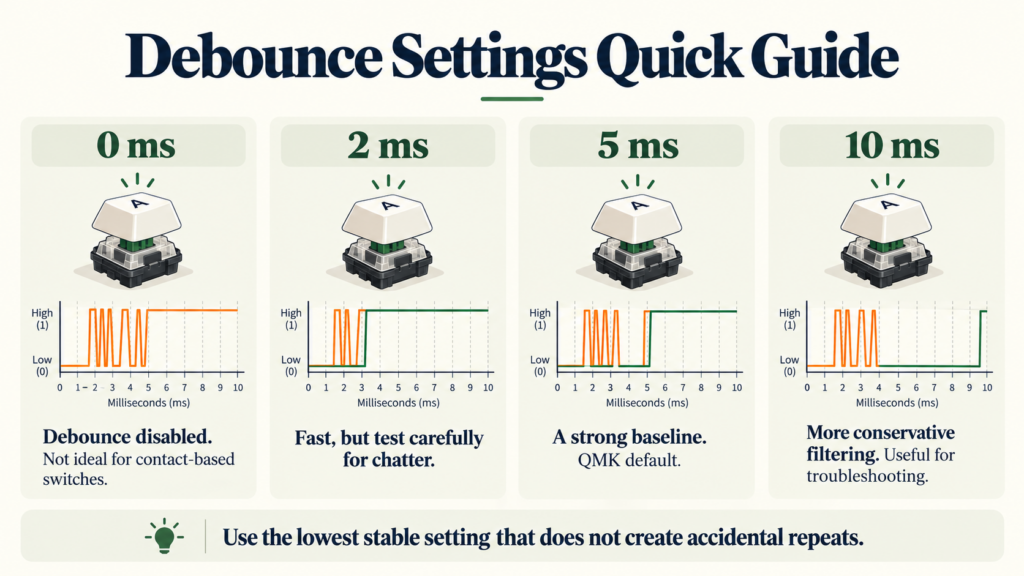
Start with the default and change it only when there is a reason. For QMK, the documented default is 5 ms. Other keyboard makers may use different firmware, different defaults or fixed settings that users cannot change.
| Debounce setting | What it means | Practical guidance |
|---|---|---|
| 0 ms | Disables QMK’s debounce feature | Not a sensible default for ordinary contact-based mechanical switches; bounce may pass through |
| 1–2 ms | Short filtering window | Potentially usable with stable hardware and suitable firmware, but retest carefully for chatter |
| 5 ms | QMK’s documented default | A useful baseline for many conventional QMK mechanical keyboards |
| 10 ms | Longer filtering window | Possible troubleshooting experiment on supported keyboards if a short setting allows extra triggers |
| 15 ms or more | More conservative filtering | Only use for a specific reason; it may affect intended fast input and should not hide faulty hardware |
These are interpretations, not universal rankings. A value on its own does not tell you how quickly the keyboard responds. The debounce algorithm, switch condition and overall firmware matter just as much.
Does lower debounce time make a keyboard faster?
Sometimes, but not automatically.
Two common approaches help explain why:
Deferred debounce: wait until the signal settles
A deferred algorithm waits until it has seen no further switch changes for the configured interval before reporting the new state. For example, a 5 ms window may be used to confirm that the input has stabilised before the firmware sends the event. This approach is more resistant to noisy electrical contacts.
Eager debounce: report first, then ignore bounces
An eager algorithm reports the initial state change immediately, then ignores further changes for the configured debounce interval. In that case, a 5 ms debounce setting does not mean the first press is deliberately held back for 5 ms. The trade-off is that eager debouncing is less noise-resistant in the way QMK defines its algorithms.
QMK also provides per-key, per-row and whole-keyboard implementations, and an asymmetric method that treats press and release differently. This is why claims such as “10 ms debounce always adds 10 ms of input lag” are too simplistic.
Official technical reference: QMK contact bounce and debounce algorithms.
What debounce time is best for gaming?
For gaming, accurate inputs matter more than the smallest setting shown in a configuration menu. A low debounce interval is not useful if a single tap occasionally becomes two actions.
Competitive FPS players may focus on responsiveness when strafing or tapping keys rapidly. However, debounce is only one part of the input path. The keyboard’s scanning, firmware processing, USB reporting, connection mode, operating system and the game itself also affect when an action is observed.
Our practical recommendation is to:
- Keep the manufacturer’s default while inputs are clean.
- If adjustable and there is a clear reason to optimise, lower the setting one available step at a time.
- Test ordinary typing and deliberate fast double-taps separately.
- Restore the previous setting immediately if unwanted duplicate presses appear.
- If chatter affects one switch repeatedly, investigate the switch rather than relying on extreme firmware changes.
Do not confuse debounce time with polling rate. A 1,000 Hz USB polling interval is nominally 1 ms, but that figure cannot tell you the debounce algorithm or total end-to-end latency. See our keyboard polling rate guide.
Is a 0 ms debounce setting safe?
With conventional contact-based mechanical switches, 0 ms removes the protection that QMK’s debouncing normally provides. Depending on the switch and firmware, electrical bouncing can then reach the keyboard’s input processing as additional transitions. It is not a general recommendation for faster gaming.
Hall Effect and optical keyboards are different. Hall Effect switches measure a changing magnetic field, and optical switches sense interruption or reflection of light rather than closing the same kind of metal electrical contact. They do not have conventional metal-contact bounce at the trigger, so they may not need the same contact-debounce interval.
That does not mean every contactless keyboard has zero total latency or needs no signal conditioning. Sensor processing, thresholds, hysteresis, firmware, scanning and reporting still matter. Some Hall Effect models can also generate unwanted inputs if actuation or Rapid Trigger settings are too sensitive. Read our Hall Effect keyboard explainer for how magnetic sensing works.
How to change keyboard debounce time
First, check whether the keyboard actually supports adjustment. Many consumer boards have a fixed firmware implementation, and an app that offers key remapping does not necessarily expose debounce controls.
Option 1: Use your keyboard manufacturer’s software
If your keyboard’s official driver includes a Debounce, Debounce Delay or similar option, note its current value before changing anything. Make small adjustments, apply the setting, then repeat the same typing and double-tap tests. Use the instructions for your exact model rather than a generic screenshot from another brand.
Option 2: Configure debounce in QMK firmware
If you build supported QMK firmware yourself, the documented default can be overridden in your keyboard’s configuration. One example in a config.h file is:
#define DEBOUNCE 10
That line selects a 10 ms debounce interval for the relevant QMK configuration. A supported firmware can also specify the debounce algorithm in rules.mk, for example:
DEBOUNCE_TYPE = sym_defer_g
Important: These are firmware-build settings, not universal commands to paste into Windows, macOS or VIA. The keyboard needs to support QMK firmware and the change must be built and flashed through the appropriate process. Incorrect firmware can disable a keyboard, so verify the exact PCB and revision, keep a backup and follow QMK’s flashing documentation.
Can you change debounce time in VIA?
Usually not through standard VIA remapping controls. VIA compatibility means that a keyboard can expose certain runtime configuration features, but it does not guarantee a debounce slider. If your particular keyboard firmware exposes a dedicated adjustment, follow the vendor’s documentation. Otherwise, changing debounce may require modifying firmware at build time or may be unavailable.
How to test whether a debounce setting works
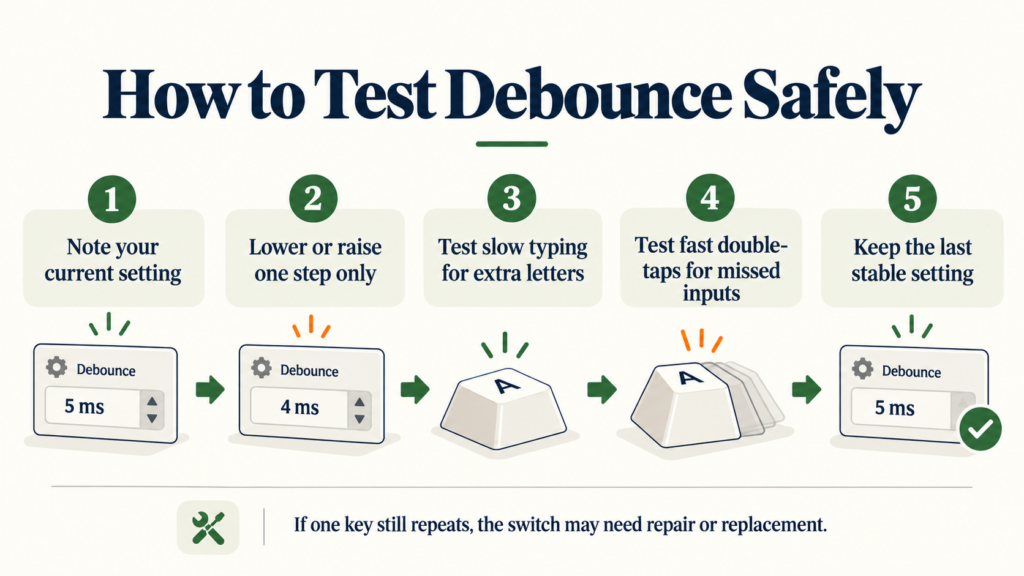
An effective test checks both false double inputs and missed legitimate repeated inputs.
- Record the original debounce value and connection mode.
- Open a text editor and tap one key slowly, releasing fully between presses.
- Repeat 30 to 50 times while watching for extra characters.
- Test short deliberate double-taps and common game controls to see whether legitimate repeated presses still register.
- Repeat using a few other keys, then change one setting and run the same test again.
- Return to the last stable setting if duplicate letters or missed presses occur.
Online keyboard event tools can flag suspicious repeats, but they cannot measure raw electrical switch bounce or directly read a keyboard’s configured debounce duration. They see keyboard events delivered by your computer and browser. For detailed symptoms and switch swapping, use the double-typing guide.
Keyboard debounce vs key repeat delay: they are not the same
Debounce time handles brief switch-signal fluctuations around a press or release. Operating-system key repeat delay determines how long you must hold a key before the computer starts producing repeated characters. Raising a Windows key-repeat delay does not repair a switch that electrically chatters after one short press.
Similarly, Rapid Trigger on a magnetic keyboard concerns when an actuation or release is detected as a key moves. It is not simply a renamed mechanical debounce option.
Frequently asked questions
Is 5 ms debounce good for gaming?
Yes, it is a reasonable reference point on many contact-based QMK keyboards because 5 ms is QMK’s default. But a suitable setting depends on the switch, firmware algorithm and whether the keyboard produces clean inputs.
Is 2 ms debounce better than 5 ms?
Not necessarily. A shorter interval can leave less time to filter contact bounce. Its responsiveness benefit also depends on whether your firmware uses eager or deferred debouncing. Test before keeping a lower value.
Does increasing debounce time fix double typing?
Sometimes it can suppress unwanted transitions, if your firmware supports adjustment. But it cannot repair worn contacts or a damaged PCB. Repeated problems on one key warrant hardware diagnosis.
Can I use 0 ms debounce on a mechanical keyboard?
QMK allows disabling the debounce feature by setting it to 0, but doing so on a conventional metal-contact mechanical keyboard may allow unwanted bounces. It is not a safe default optimisation.
Do Hall Effect keyboards need debounce?
Hall Effect sensing does not have conventional electrical contact bounce at its actuation point. However, a keyboard still uses firmware and signal-processing logic, so “no mechanical contact debounce” should not be confused with “zero input latency.”
How can I check my current debounce setting?
Look in the manufacturer’s supported driver or firmware documentation. On custom QMK builds, inspect the debounce configuration and algorithm. A browser test cannot reliably reveal the firmware’s underlying debounce setting.
Final verdict
Debounce time is a reliability setting, not a score to chase. For a working contact-based mechanical keyboard, keep the default unless you have a specific reason to adjust it. If you can configure it, choose the lowest setting that consistently recognises intentional presses without allowing accidental duplicates. Remember that implementation matters: 5 ms in an eager algorithm is not the same input-timing behaviour as 5 ms in a deferred one.