A 40% keyboard looks like someone took a bolt-cutter to a regular keyboard. It removes the number row entirely and often the dedicated symbol row, collapsing a full-size layout down to roughly 40 to 52 keys. The missing keys are not gone. They live on layers, accessed by holding a thumb key much like the Fn key on a laptop.
- Quick answer: the best 40% keyboards
- What is a 40% keyboard?
- The adaptation curve: what to expect
- Should you buy a 40% or a 60%?
- #1 Best prebuilt: Keychron Q9
- #2 Best budget: Epomaker TH40
- #3 Best ortho kit: Kprepublic BM40
- #4 Best ortho DIY: YMDK YMD40 V2
- #5 Best split: Corne CRKBD
- #6 Best columnar prebuilt: Keyboardio Atreus
- #7 Best portable: Vortex Core Plus
- Prebuilt vs DIY kit vs split: which path should you take?
- Frequently Asked Questions
- Final Verdict
This guide covers seven 40% keyboards across four categories: prebuilt, ortholinear, DIY kit, and split. If you are new to 40% boards, start with the explanations of layers and the adaptation timeline before jumping to the product picks. If you already understand the philosophy, jump ahead to the recommendations.
For a broader view of how 40% fits into the keyboard size family, our mechanical keyboard sizes guide covers the full range from full-size to 40%.
Quick answer: the best 40% keyboards
| Best for | Pick | Score | Type | Keys | Price |
|---|---|---|---|---|---|
| Best prebuilt | Keychron Q9 | 8.8/10 | Staggered | 51-52 | ~$139-170 |
| Best budget | Epomaker TH40 | 8.5/10 | Staggered | 44 | ~$70-80 |
| Best ortho kit | Kprepublic BM40 | 8.4/10 | Ortholinear | 48 | ~$30-80 |
| Best ortho DIY | YMDK YMD40 V2 | 7.8/10 | Ortholinear | 48 | ~$80 |
| Best split | Corne CRKBD | 8.4/10 | Columnar split | 42 | ~$40-150 |
| Best columnar prebuilt | Keyboardio Atreus | 8.3/10 | Columnar | 44 | ~$200 |
| Best portable | Vortex Core Plus | 7.8/10 | Staggered LP | 50 | ~$90-110 |
Prices vary by configuration (kit vs fully assembled, case material, switch choice). All prices verified against current retailer listings as of July 2026.
What is a 40% keyboard?
A 40% keyboard is defined by key count rather than exact physical size. Most 40% boards carry 40 to 52 keys. For reference, a full-size keyboard has 104 keys and a TKL has 87. A 40% collapses the layout down to roughly three rows of alphas plus a bottom row of modifiers and space, often with a split spacebar that doubles as a layer shifter.
Physically, a 40% sits around 230 to 250 mm wide. That is about half the footprint of a full-size and noticeably smaller than a 60%. It fits in a jacket pocket or the slimmest laptop sleeve, and it keeps the mouse within easy reach of the home row.
More Read

Staggered vs ortholinear vs columnar-staggered
The category splits into three layout types.
Staggered preserves the familiar row offset of traditional keyboards. The Keychron Q9 and Vortex Core Plus are examples. The advantage is that alpha keys sit exactly where a touch typist expects them, so the learning curve is mostly about layers, not retraining finger positions.
Ortholinear drops the stagger entirely. Every key sits on a perfect grid. The Planck and Kprepublic BM40 are the canonical examples at 4 rows by 12 columns. The grid is cleaner to reason about when programming layers, but muscle memory does not transfer cleanly from a staggered board.
Columnar-staggered offsets each column vertically to match finger length. Pinkies are shorter, middle fingers are longer. The Corne, Atreus, and most ergonomic split keyboards use this layout. It is ergonomically the most defensible option.
The adaptation curve: what to expect
The question “why would anyone use a 40%?” has a one-word answer: layers. Every non-alpha keystroke becomes a chord. Numbers, symbols, arrows, function keys. Nothing is where your hands expect it at first.
Community consensus from years of Reddit threads, Deskthority, and GeekHack forum posts points to a consistent timeline.
Day 1 to 3. Typing speed collapses. A 90 WPM typist becomes a 25 WPM typist. Symbol entry feels impossible. Every number requires conscious thought. This is normal and expected.
Week 1. Alphas stabilize. Speed climbs back to roughly 50 percent of prior throughput. The layer system starts to click for numbers. Symbols still require looking at a cheat sheet.
Week 2. Speed returns to roughly 70 to 80 percent of baseline on prose. Symbol entry is deliberate but accurate. The biggest remaining friction is context-switching to a normal keyboard.
Week 3 to 4. Baseline WPM restored for alphas and common symbols. The layer system becomes invisible. Speed on a 40% may actually exceed previous speed because finger travel is shorter.
Practical advice: go cold-turkey if possible. Print a cheat sheet of the layer map and tape it to the monitor for the first week. Spend 10 minutes a day on a typing test. Start with a minimal layer map and expand only after the baseline is fluent.
Should you buy a 40% or a 60%?
| Choose a 60% if… | Choose a 40% if… |
|---|---|
| You need a number row for work or data entry | You rarely type numbers |
| You want minimal adaptation time (hours, not weeks) | You are willing to invest 2 to 4 weeks in learning layers |
| You share your keyboard with others | You want the smallest possible footprint |
| You game heavily and need F-key access | You code or write prose and want home-row efficiency |
| This is your first compact keyboard | You already know you want layers and minimalism |
#1 Best prebuilt: Keychron Q9
Verdict: The most credible turn-key staggered 40% available. Full QMK and VIA support, aluminum case, gasket mount, and hot-swap switches make it the safest recommendation for anyone serious about trying 40%.
8.8/10
Build
Excellent
Typing
Very Good
Value
Good
Programmability
Excellent
| Pros | Cons |
|---|---|
| CNC aluminum case with gasket mount | Wired only, no wireless option |
| Full QMK and VIA support out of the box | Barebones only (no switches or keycaps included) |
| Hot-swap 5-pin switch sockets | |
| South-facing RGB |
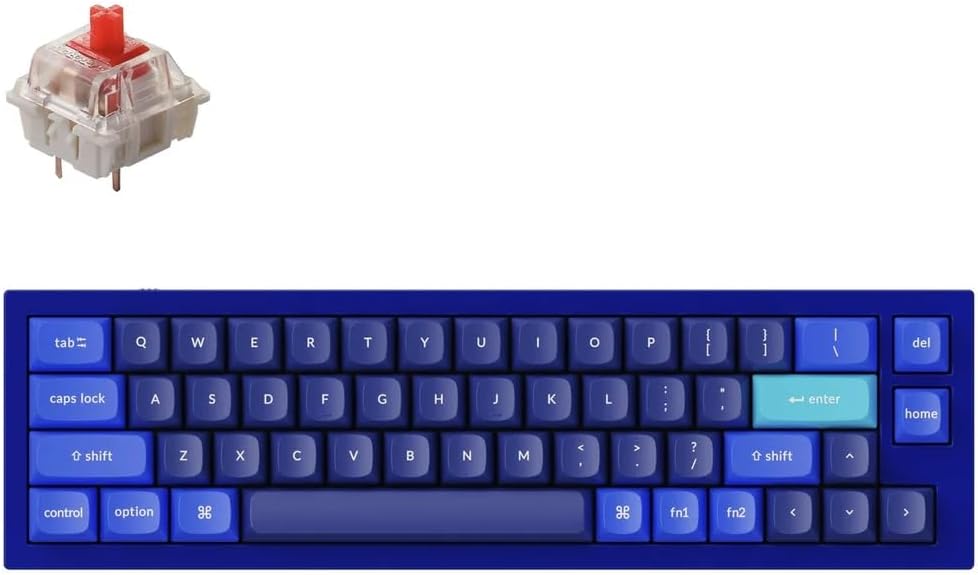
The Keychron Q9 is what I recommend to anyone who wants to try 40% without building a kit. The 51-52 key layout with a staggered form factor keeps the adaptation curve as gentle as 40% gets. The CNC aluminum case feels premium, the gasket mount absorbs typing vibration, and VIA compatibility means you can remap every key in a browser without compiling firmware. The hot-swap sockets accept any 5-pin MX-style switch, so you can experiment with different switch types as your layer fluency improves.
Keychron lists the Q9 at roughly $139 barebones. It ships without switches or keycaps, so factor in another $30 to $60 depending on your switch and keycap choices.
Best for: Anyone who wants a premium prebuilt 40% with full programmability and no soldering required.
#2 Best budget: Epomaker TH40
Verdict: The affordable gateway to 40%. Tri-mode wireless, gasket mount, and VIA-compatible firmware at roughly half the price of the Q9.
8.5/10
Build
Good
Typing
Good
Value
Excellent
Programmability
Very Good
| Pros | Cons |
|---|---|
| Tri-mode wireless (Bluetooth, 2.4GHz, USB-C) | Plastic ABS case, not aluminum |
| Gasket mount with sound-dampening foam | Split spacebar limits keycap compatibility |
| VIA-compatible firmware on V2 revision | |
| 3,000 mAh battery lasts weeks |
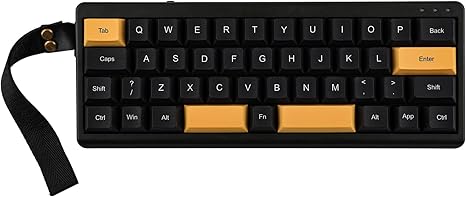
The Epomaker TH40 is the right answer for “I want to try 40% without spending real money.” At roughly $70 to $80 (and often on sale closer to $68), it costs less than most keycap sets. The tri-mode wireless is rare at this price point and makes the TH40 genuinely portable. The gasket mount and foam dampening produce a typing feel that punches above the price.
The split spacebar is worth noting. It is common on 40% boards because the right half can double as a layer key. But it means standard spacebar keycaps will not fit. The board ships with a set that covers the split layout.
Best for: First-time 40% buyers who want wireless and a low entry price.
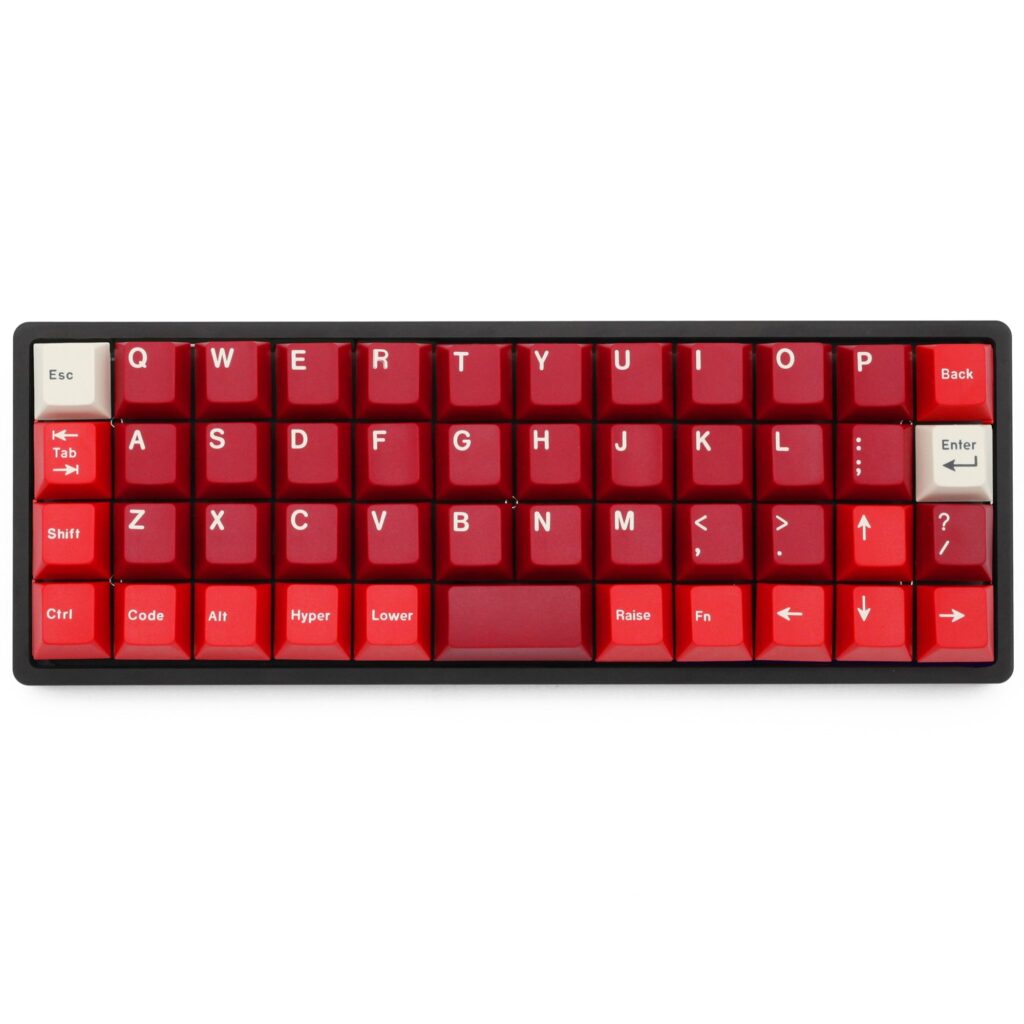
#3 Best ortho kit: Kprepublic BM40
Verdict: The most accessible ortholinear 40% option in 2026. With the Drop storefront closure, the BM40 is now the primary source for a Planck-compatible 4×12 ortholinear build.
8.4/10
Build
Good
Typing
Very Good
Value
Excellent
Programmability
Excellent
| Pros | Cons |
|---|---|
| Planck-compatible 4×12 ortholinear layout at a fraction of the price | DIY assembly required |
| Widely available on AliExpress from multiple vendors | Case options are basic compared to aftermarket Planck cases |
| Full QMK and VIA support | |
| Hot-swap PCB option available |
With Drop’s storefront closure in March 2026 following the Corsair acquisition, the original Planck is no longer available as a new retail product. The BM40 from Kprepublic fills the same role. It uses the same 4×12 ortholinear grid with QMK and VIA support, fits most Planck-compatible cases, and costs roughly $20 to $40 for the PCB or $50 to $80 for a full kit with case and plate.
For anyone who wants the Planck layout in 2026, the BM40 is the practical answer. Used Plancks are occasionally available on r/mechmarket, but the BM40 is the reliable new option.
Best for: Enthusiasts who want the canonical ortholinear 40% layout and are comfortable sourcing parts from AliExpress.
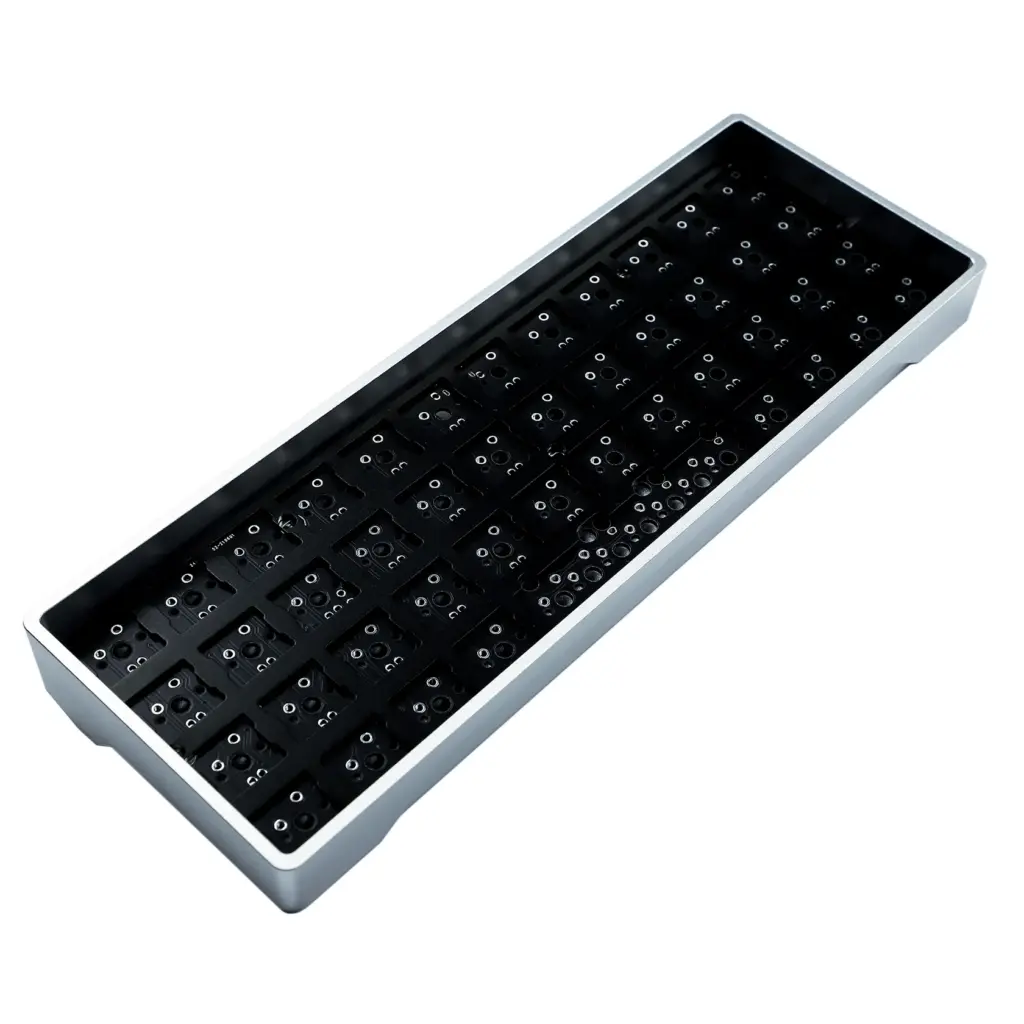
#4 Best ortho DIY: YMDK YMD40 V2
Verdict: A well-regarded 4×12 ortholinear DIY kit at a competitive price. Often thought of as a budget Planck alternative
7.8/10
Build
Fair
Typing
Good
Value
Very Good
Programmability
Excellent
| Pros | Cons |
|---|---|
| QMK compatible with full programmability | The base aluminum kit runs roughly $80, not $35-60 |
| Hot-swap support on most versions | Assembly required |
| USB-C connectivity | |
| Plate supports three layout configurations |
The YMDK YMD40 V2 is an ortholinear 4×12 kit, similar to the Planck and BM40. YMDK describes it as using the same LAYOUT_ortho_4x12 grid in the official QMK configurator. The plate does support multiple layout options, which may be why some sources describe it as staggered-capable, but the primary configuration is ortholinear.
The base aluminum kit runs roughly $80 from YMDK’s own store and AliExpress. Switches and keycaps are sold separately.
Best for: Hobbyists who want to build a QMK-programmable ortholinear 40% at a mid-range price.
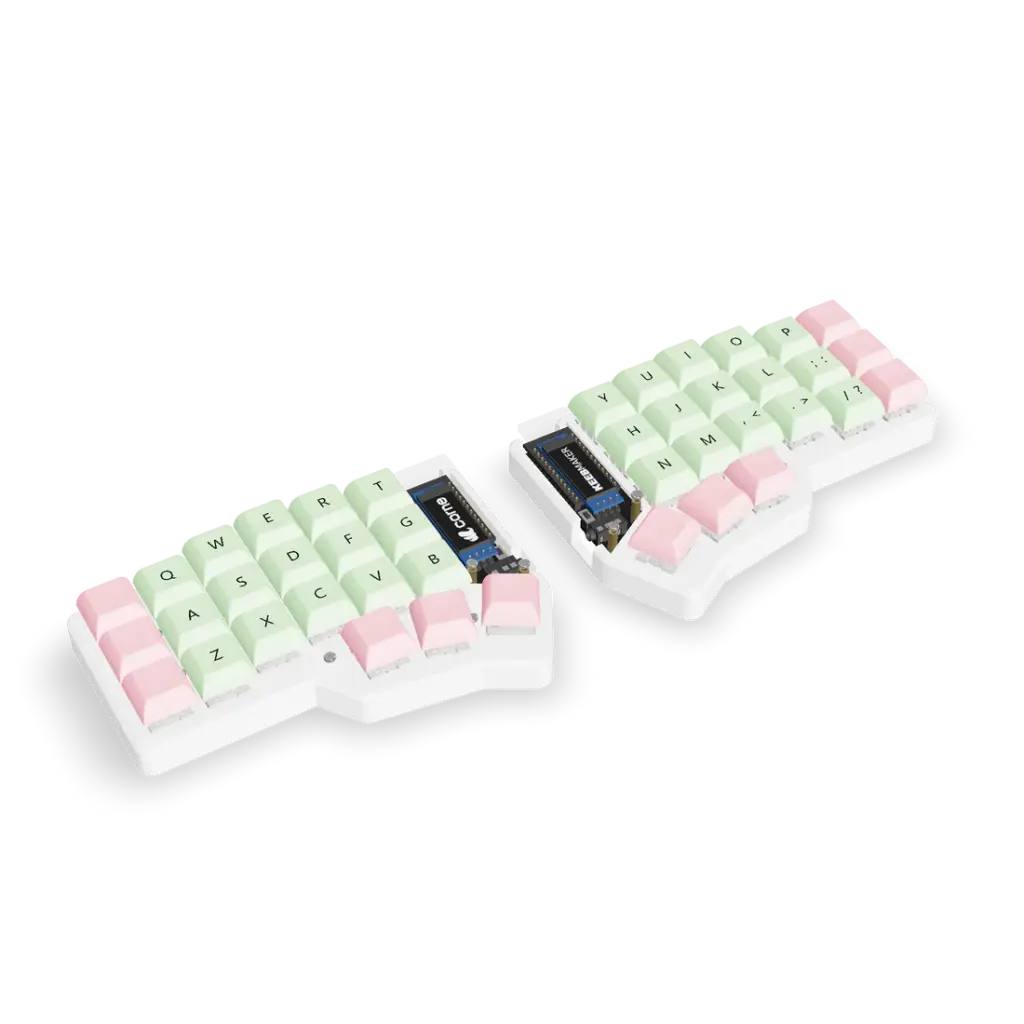
#5 Best split: Corne CRKBD
Verdict: The most popular split 40% keyboard. The Corne has a huge ecosystem of cases, plates, and firmware options, making it the default recommendation for anyone going split.
8.4/10
Build
Good
Typing
Excellent
Value
Excellent
Programmability
Excellent
| Pros | Cons |
|---|---|
| Columnar-staggered layout is ergonomically excellent | Requires soldering or buying a pre-built from a third-party vendor |
| Massive community with endless build guides | Split design means two halves to carry |
| Wide range of case styles (acrylic, 3D-printed, metal) | 42 keys means even fewer keys than a standard 40% |
| Supports both QMK and ZMK (wireless with nice!nano) |
The Corne CRKBD (also called the CRKBD) is the most popular split 40% in the mechanical keyboard community. Designed by foostan, the 3x6x3 columnar-staggered layout places 42 keys across two halves with three thumb keys each. The ergonomics are excellent. Wrist strain that builds up on a standard staggered board is noticeably reduced.
The ecosystem is the Corne’s biggest strength. Dozens of vendors sell PCB kits, cases, and pre-built units. Build guides are everywhere. The open-source design means you can order PCBs from JLCPCB, though note that the minimum order is 5 units plus assembly service. Some builders have reported getting 5 bare PCBs plus plates for roughly $31 total, which works out to roughly $6 to $10 per unit within a batch. For a single board, buying from a dedicated vendor is more cost-effective.
Best for: Anyone who wants split ergonomics with a columnar-staggered 40% layout and is comfortable with DIY assembly.
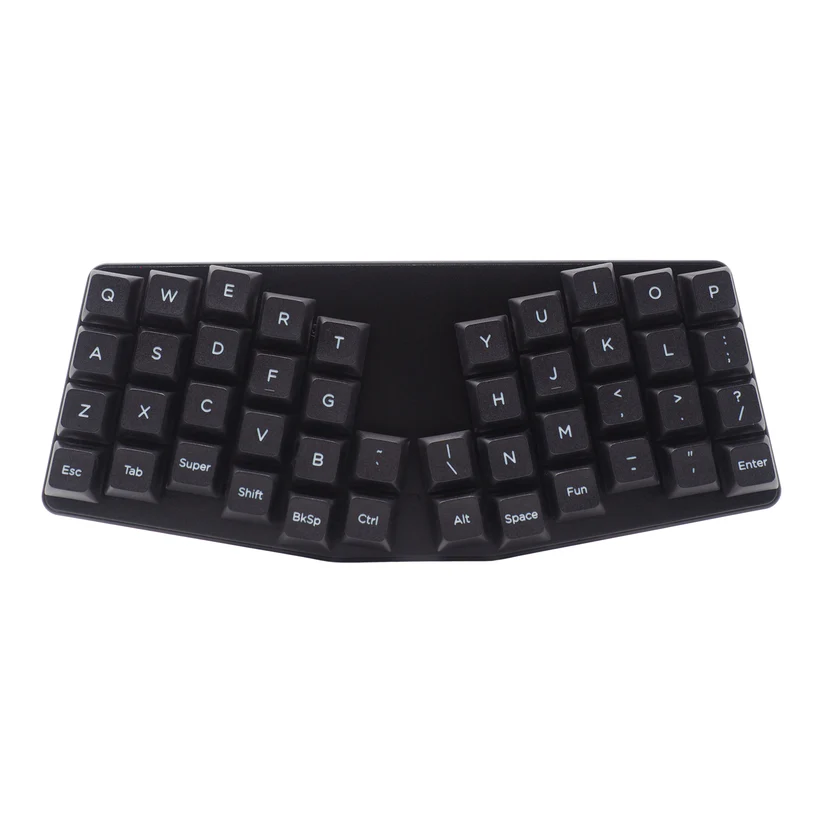
#6 Best columnar prebuilt: Keyboardio Atreus
Verdict: A 44-key columnar-staggered board that ships fully assembled with hot-swap switches and VIA support. The best unibody columnar option for non-DIY buyers.
8.3/10
Build
Very Good
Typing
Excellent
Value
Good
Programmability
Very Good
| Pros | Cons |
|---|---|
| Columnar-staggered layout ships fully assembled | Expensive at roughly $200 |
| Hot-swap Kailh MX sockets | Firmware is Kaleidoscope by default (QMK available as option) |
| Aluminum plate, XDA PBT keycaps | |
| Compact at 44 keys |
The Atreus, designed by Phil Hagelberg and commercialized by Keyboardio, is a 44-key columnar-staggered board that bridges the gap between unibody and split ergonomics. The aggressive column stagger and thumb keys are designed to keep every key within one key of the home row.
It ships fully assembled with hot-swap Kailh MX sockets and XDA profile PBT keycaps. You do not need to solder anything. The firmware runs Kaleidoscope with the Chrysalis GUI by default, with full QMK support available as a firmware option. For anyone who wants columnar-stagger ergonomics without building a kit, this is the best choice.
Best for: Users who want columnar-stagger ergonomics in a pre-built package with no soldering required.
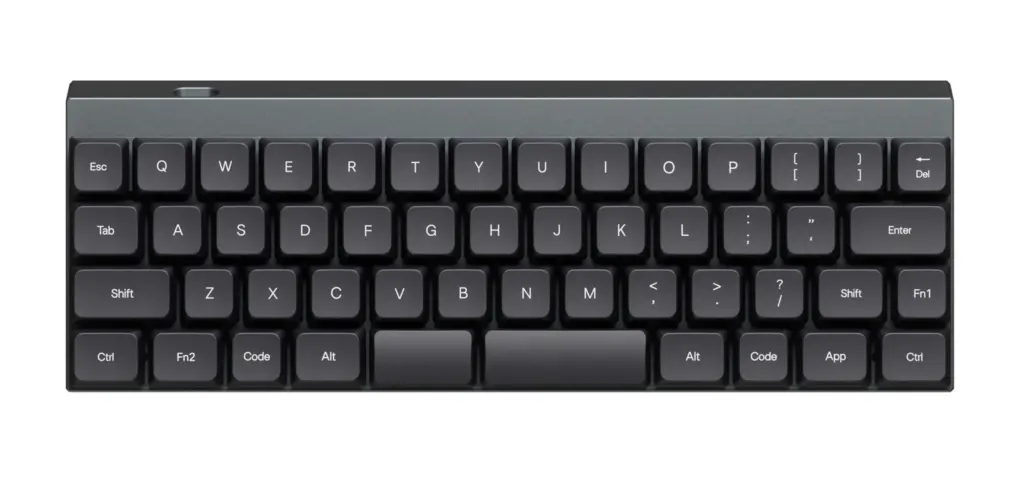
#7 Best portable: Vortex Core Plus
Verdict: The successor to the original Vortex Core. The Core Plus ships with 50 keys, low-profile Gateron switches, wireless support, and VIA compatibility in an even more portable package.
7.8/10
Build
Good
Typing
Good
Value
Good
Programmability
Very Good
| Pros | Cons |
|---|---|
| 50-key layout with low-profile Gateron switches | Less community support than QMK-native boards |
| VIA 3.0 support for key remapping | Low-profile switches limit switch-swapping options |
| Wireless with long battery life | |
| Very small and light for true pocket portability |
The Vortex Core Plus is the fully shipping successor to the original Core, with pre-orders that opened in December 2024 and retail units shipping since early 2025. The 50-key layout, low-profile Gateron switches, built-in wireless, and VIA 3.0 support make it a genuine upgrade over the original in every respect.
The original Vortex Core (47 keys, Cherry MX, proprietary firmware) introduced a generation of enthusiasts to 40% keyboards, but it is effectively end-of-life. Look for the Core Plus instead. It is currently available through VortexGear’s store and select retailers.
Best for: Anyone who wants the lightest, most portable 40% with modern VIA programmability.
Prebuilt vs DIY kit vs split: which path should you take?
| Prebuilt | DIY kit | Split |
|---|---|---|
| Ready to use out of the box | Requires soldering and assembly | Requires soldering + two halves to connect |
| Keychron Q9, Epomaker TH40, Keyboardio Atreus, Vortex Core Plus | Kprepublic BM40, YMDK YMD40 V2 | Corne CRKBD |
| Best for first-time 40% buyers | Best for hobbyists who want full control | Best for ergonomics-focused users |
| Least learning curve for assembly | Moderate assembly learning curve | Highest assembly and firmware learning curve |
Frequently Asked Questions
What is a 40% keyboard?
A 40% keyboard removes the number row and often the symbol row, leaving roughly 40 to 52 keys. Missing keys are accessed through layers.
Are 40% keyboards good for typing?
Yes, once you adapt. Proficient 40% users report faster typing because fingers never leave the home row. The adaptation period takes 2 to 4 weeks.
Are 40% keyboards good for gaming?
It depends on the game. Games that rely on the number row or F-keys (MMOs, MOBAs) are difficult on a 40%. Games that use WASD and a few nearby keys (Valorant, CS2) work well with careful layer planning.
Is a 40% keyboard harder to learn than a 60%?
Significantly harder. A 60% keeps the number row and basic navigation. A 40% requires layers for numbers, symbols, arrows, and function keys. Expect 2 to 4 weeks of reduced speed.
What is the difference between ortholinear and staggered?
Ortholinear arranges keys on a perfect grid. Staggered uses the traditional row offset. Ortho is cleaner for programming layers but harder to learn. Staggered transfers muscle memory better.
Can I use a 40% keyboard for programming?
Yes. Many programmers prefer 40% because symbols and brackets can be placed directly under the home row on a layer, reducing finger travel for code-heavy work.
What keycaps do I need for a 40% keyboard?
Most 40% boards use 1u keys for every position, including modifiers. Standard keycap sets do not include enough 1u caps. You need a keycap set with a dedicated 40% or ortho kit. Uniform profiles like DSA or XDA are the safest choice.
What is the best 40% keyboard for beginners?
The Keychron Q9 is the best option for beginners who want a premium experience. The Epomaker TH40 is the best budget option. Both are pre-built with staggered layouts and VIA support.
Final Verdict
The Keychron Q9 is the best 40% keyboard for most people. It combines a premium aluminum build, gasket mount, full QMK/VIA support, and hot-swap switches in a package that works out of the box. It is the safest recommendation for anyone serious about trying the format.
The Epomaker TH40 is the best budget entry point at roughly $70 to $80 with tri-mode wireless. For ortholinear fans, the Kprepublic BM40 fills the role that the Planck used to, with the Drop storefront closed after the Corsair acquisition. The Corne CRKBD is the default choice for split ergonomics. And the Keyboardio Atreus is the best pre-built columnar option for anyone who wants ergonomics without DIY assembly.
The 40% format is not for everyone. It requires patience, a willingness to learn layers, and acceptance that the first week will be slow. But for typists, programmers, and minimalists who make the investment, the payoff is a keyboard that fits in a jacket pocket and keeps every key within one key of the home row.