
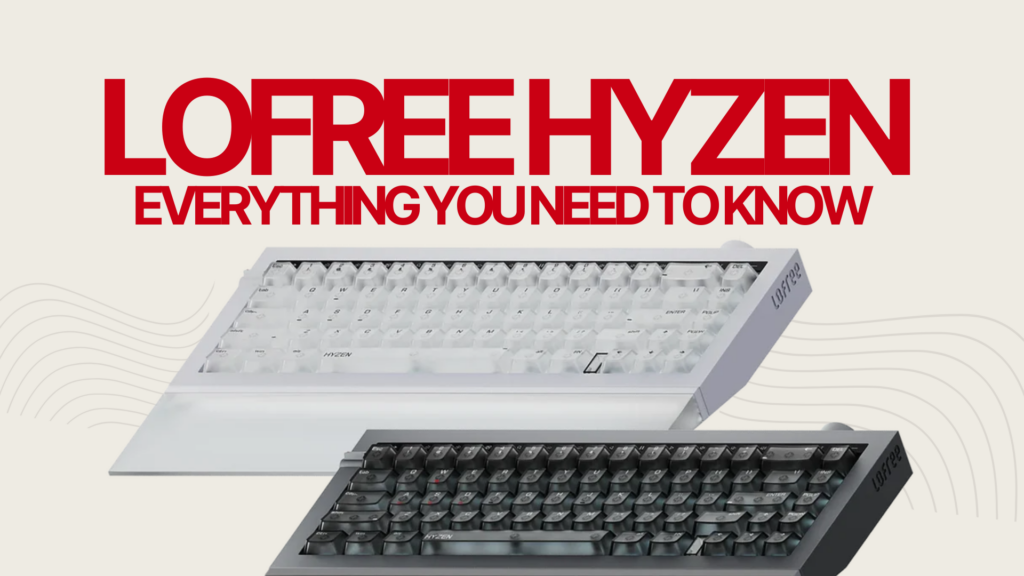
Most magnetic keyboards feel hollow. They prioritise speed and actuation flexibility, but sacrifice the tactile and acoustic qualities that make typing on a proper mechanical keyboard so satisfying. The Lofree Hyzen is the world’s first mechanical magnetic keyboard, and it is attempting to solve that problem directly. Unlike standard Hall Effect gaming boards that trade mechanical feel for magnetic precision, the Hyzen uses a proprietary Nexus switch that combines TMR magnetic sensing with a real mechanical leaf structure. The result, at least on paper, is a keyboard that offers 0.01mm Rapid Trigger sensitivity alongside the tactile and acoustic character that Hall Effect boards have historically struggled to match.
- What Is the Lofree Hyzen? (TL;DR)
- The Nexus Switch: Lofree’s Core Innovation
- Full Lofree Hyzen Specifications
- Design and Build Quality
- Gaming Performance: What the Specs Mean in Practice
- Sound and Typing Experience
- Lofree Hub Software
- Lofree Hyzen Price and All Kickstarter Tiers
- Lofree Hyzen vs The Competition
- Kickstarter Risks: What Backers Should Know
- Verdict: Should You Back the Lofree Hyzen?
- FAQ: Lofree Hyzen Keyboard
The campaign launched on Kickstarter on April 23, 2026, attracting significant attention across the keyboard enthusiast and competitive gaming communities. With a first batch shipping target of July 2026, backers are looking at a relatively short wait by crowdfunding standards. The keyboard comes in two configurations: a wired version and a tri-mode wireless variant, both built around the same 65% CNC aluminium chassis and the same Nexus switch system.
This article covers everything you need to make an informed decision: the switch technology, full specifications, Kickstarter pricing tiers, competitive comparisons, and an honest assessment of the risks involved in backing a first-generation product.
What Is the Lofree Hyzen? (TL;DR)
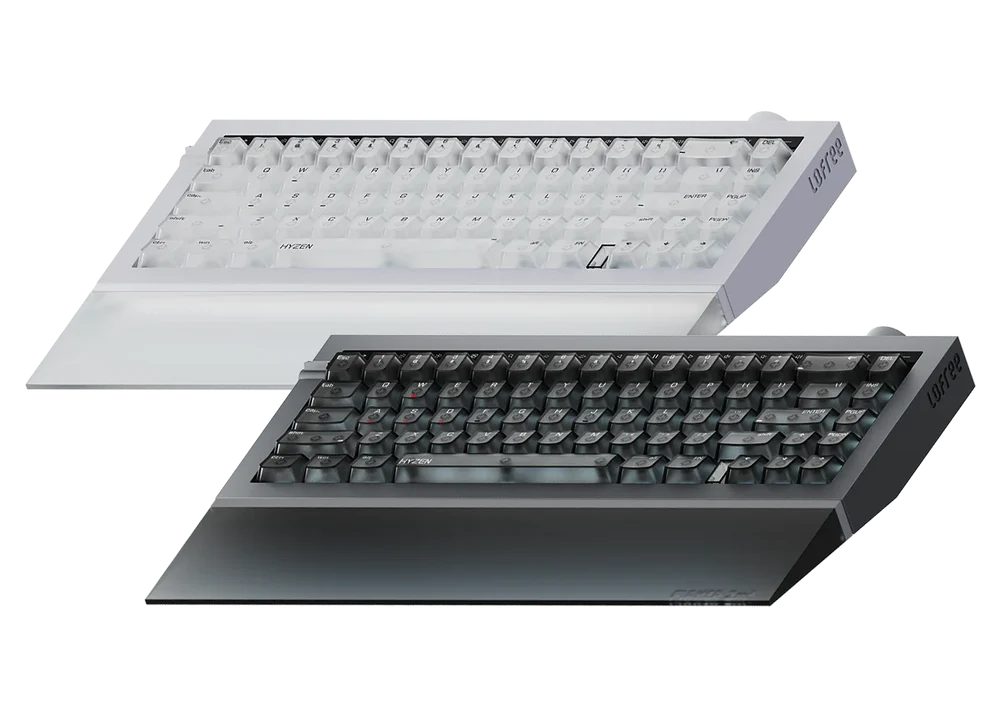
The Lofree Hyzen is a 65% layout mechanical magnetic keyboard built around the brand’s proprietary Nexus switch. It is available in two versions: a wired-only model and a tri-mode version supporting USB-C, 2.4GHz wireless, and Bluetooth. Both share the same core switch architecture, which combines TMR (Tunnel MagnetoResistance) magnetic sensing with a physical mechanical leaf structure. Lofree claims this enables 0.01mm Rapid Trigger sensitivity and 8,000Hz polling in wired mode.
The Tri-Mode version carries a 10,000mAh battery, making it one of the most generously specced wireless gaming keyboards available. The chassis is CNC aluminium on both versions, with a PCB gasket mount, FR4 fiberglass plate, IXPE foam dampening, and transparent PC keycaps. Hot-swap support covers both the proprietary magnetic Nexus switches and standard 5-pin mechanical switches. The keyboard is aimed at gamers who also care about how their board sounds and feels during long typing sessions. To understand where it sits in the size spectrum, our guide to the keyboard sizes landscape explains how a 65% compares to other form factors.
The Nexus Switch: Lofree’s Core Innovation
How Standard Hall Effect Switches Work
To understand what makes the Nexus switch different, you first need to understand what a Hall Effect keyboard actually does. Standard Hall Effect switches use a magnet embedded in the switch stem and a Hall Effect sensor on the PCB beneath it. As you press the key, the magnet moves closer to the sensor. The sensor continuously measures the change in magnetic field strength and translates that into a precise position reading, all without any physical contact between components.
More Read
This contactless architecture is what enables adjustable actuation points. Instead of a fixed actuation depth, you can set your keys to trigger anywhere in the travel range. Combined with Rapid Trigger, which resets the actuation point dynamically as the key travels, this gives competitive players a measurable edge in movement control and re-press speed. Wooting popularised this approach and it has since been adopted across a growing range of gaming keyboards. For a broader look at how optical, mechanical, and magnetic switches compare architecturally, the differences are worth understanding before committing to any one technology.
What TMR Adds to the Equation
TMR stands for Tunnel MagnetoResistance. It is a different magnetic sensing technology to the Hall Effect sensors found in most gaming keyboards, and Lofree claims it offers meaningfully higher sensitivity. While many Hall Effect gaming boards advertise Rapid Trigger sensitivity in the range of 0.1mm, Lofree’s published spec for the Nexus switch is 0.01mm, a tenfold improvement on paper.
TMR sensors work by measuring resistance changes across a thin magnetic tunnel junction, rather than measuring field strength the way Hall Effect sensors do. The result, according to Lofree, is greater positional resolution and improved resistance to temperature-related drift and electromagnetic interference. It is worth stating clearly that the 0.01mm figure is a manufacturer specification claim. Independent third-party verification of that figure at the time of writing is limited, and whether most users would perceive a practical difference between 0.01mm and 0.1mm sensitivity in real gameplay warrants honest treatment rather than uncritical acceptance.
Why the Mechanical Leaf Structure Matters
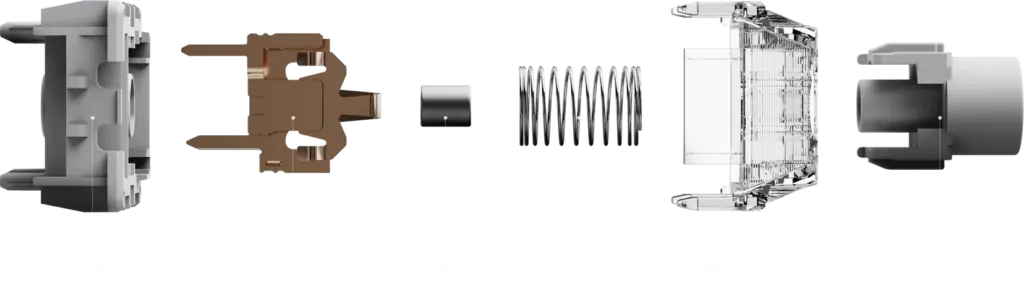
The mechanical leaf is where the Nexus switch genuinely differentiates itself from every other magnetic gaming switch on the market. In a traditional mechanical keyboard switch, a metal leaf spring contributes significantly to the tactile bump and the sound. When the stem depresses and releases the leaf, it generates both the physical feedback and the characteristic acoustic snap that mechanical keyboard enthusiasts value.
Most Hall Effect switches abandon this architecture entirely. They use a magnet and a smooth spring, which is why they typically feel and sound different from traditional mechanicals, smoother and quieter in a way that many enthusiasts describe as sterile. The Nexus switch retains a real metal leaf alongside the TMR sensing system. The leaf is tuned to work with the POM stem and the spring, creating a switch that provides mechanical tactile feedback and acoustic character without relying on physical contact for actuation detection. The TMR sensor handles position reading; the leaf handles feel and sound.
The switch is co-engineered with Kailh, one of the most experienced switch manufacturers in the industry. Hot-swap support is broad: the Hyzen accepts both the proprietary magnetic Nexus switches and standard 5-pin mechanical switches, which is a practical advantage over many Hall Effect boards that lock you into their magnetic switch ecosystem. If you want to drop in a set of your favourite tactile or linear switches for a typing session, the Hyzen supports that. This is not just a convenience feature. It meaningfully changes the long-term value proposition of the board.
Full Lofree Hyzen Specifications
| Spec | Hyzen Wired | Hyzen Tri-Mode |
|---|---|---|
| Switch | Nexus (TMR + mechanical leaf) | Nexus (TMR + mechanical leaf) |
| Rapid Trigger | 0.01mm (claimed) | 0.01mm (claimed) |
| Polling Rate | 8,000Hz wired | 8,000Hz wired and 2.4GHz / 125Hz Bluetooth |
| Connectivity | USB-C wired only | USB-C / 2.4GHz / Bluetooth |
| Battery | None | 10,000mAh |
| Layout | 65% with F-key window | 65% with F-key window |
| Case | CNC aluminium alloy | CNC aluminium alloy |
| Mount | PCB gasket | PCB gasket |
| Plate | FR4 fiberglass | FR4 fiberglass |
| Keycaps | Transparent PC | Transparent PC |
| Sound Dampening | Multi-layer foam + IXPE | Multi-layer foam + IXPE |
| Hot-swap | Magnetic + 5-pin mechanical | Magnetic + 5-pin mechanical |
| NKRO | Yes | Yes |
| RGB | Per-key RGB | Per-key RGB |
| Software | Lofree Hub (web-based) | Lofree Hub (web-based) |
| Compatibility | Mac / iOS / Android / Windows | Mac / iOS / Android / Windows |
| MSRP | $279 | $299 |
The standout specs are the 8,000Hz polling rate on both wired and 2.4GHz wireless, since most competing wireless gaming keyboards top out at 1,000Hz on 2.4GHz, and the 10,000mAh battery on the Tri-Mode, which is exceptional for a 65% form factor. Full N-Key Rollover across all modes is confirmed, ensuring every simultaneous keypress registers regardless of how many keys are held. The Bluetooth mode caps at 125Hz, which makes it suitable for productivity use but not recommended for competitive gaming.
Design and Build Quality
The Hyzen uses a CNC aluminium alloy chassis on both versions, giving the board a rigid, premium-feeling foundation. The 65% layout is a natural fit for gaming desks where mouse clearance matters, though it does mean losing the function row. Lofree addresses this with an F-key window, a secondary input mode that maps function keys to the number row. If the 65% trade-offs concern you, our guide to what a 60% keyboard offers explains the compact size spectrum in more detail.
The transparent PC keycaps are a deliberate aesthetic choice, designed to maximise RGB light diffusion. They will not appeal to everyone, but they serve the board’s gaming-forward identity well. For anyone planning to use aftermarket keycap sets, the transparent caps swap easily and the MX-compatible footprint means compatibility with a wide range of options. Our mechanical keyboard keycaps guide covers profiles and materials worth considering for the Hyzen’s footprint.
The PCB gasket mount and FR4 fiberglass plate combine with the multi-layer foam and IXPE dampening to give the board a structured, moderately cushioned feel. Based on reviewer observations from the reference video, the stabilisers are well-tuned out of the box with no noticeable rattle, the finish is clean and uniform, and there is no significant flex in the aluminium shell. The overall impression is a keyboard built to a higher physical standard than many Kickstarter campaigns have delivered at launch.
Gaming Performance: What the Specs Mean in Practice
The 8,000Hz polling rate means the keyboard is reporting its position to the system 8,000 times per second. At 8,000Hz wired, the Hyzen sits at the top of the performance bracket alongside boards like the Keychron Q5 HE 8K series. Notably, Lofree claims the same 8,000Hz polling on 2.4GHz wireless, which very few keyboards currently match. This is a significant spec if it holds up in independent testing.
The 0.01mm Rapid Trigger claim is the headline figure and it deserves balanced treatment. In theory, a tighter Rapid Trigger threshold means the key resets after an even shorter upward movement, enabling faster counter-strafes and tighter movement windows in FPS titles. In practice, whether a human player can consistently exploit the difference between 0.01mm and 0.1mm sensitivity is debatable. The technical ceiling is genuinely higher; the practical advantage will depend on the player, the game, and the sensitivity setting they actually use. Reviewer observations from the video note that the board feels fast and responsive in gameplay, but broad independent latency benchmarking is still limited at this stage.
Bluetooth mode drops to 125Hz, which is standard for wireless keyboards in power-saving mode. This makes Bluetooth appropriate for office and productivity use but not for competitive gaming.
Six Advanced Gaming Input Functions
DKS (Dynamic Keystroke) lets you assign up to four different actions to a single key across four actuation depth positions. Press gently and it fires one command; press harder and it fires another. In a game like an MMO or MOBA, this lets a single key cover multiple ability tiers depending on how firmly you press it.
MT (Mod Tap) differentiates between a tap and a hold on the same key. A quick tap sends one input; holding the key sends a different one. This is particularly useful for remapping modifier keys or adding secondary functions to frequently used keys without adding complexity to your layout.
TGL (Toggle) lets a single keypress activate or deactivate a state rather than requiring a held press. Useful for crouch-locking, sprint-toggling, or walk modes in games where held inputs cause fatigue over long sessions.
RS (Rapid Successive Priority) determines which key takes priority when multiple keys are pressed in very rapid succession. In fast mechanical gaming, this affects how the system handles near-simultaneous inputs that fall within ambiguous timing windows. Configuring RS correctly can clean up input noise in high-speed play.
SOCD (Simultaneous Opposing Cardinal Directions) defines what happens when you press left and right, or up and down, simultaneously. Different games and tournaments have different rules around SOCD resolution. The Hyzen allows you to configure SOCD behaviour per profile, which matters for players who compete across multiple titles with different rule sets.
HT (Hyper Tap) allows rapid repeated inputs from a single held keypress by detecting small oscillations in key movement. Instead of physically re-pressing a key at speed, slight pressure variations trigger repeated signals automatically. This is particularly relevant for games where rapid repeated inputs, such as bunny hopping, would otherwise require extreme manual speed.
Sound and Typing Experience
This is the area where the Nexus switch’s mechanical leaf makes its clearest argument. Most Hall Effect gaming boards produce a sound profile that enthusiasts describe as hollow or plasticky: functional, but lacking the depth that draws people to mechanical keyboards in the first place. The Hyzen, based on reviewer observations from the reference video, produces a noticeably different character: moderate depth with a controlled clack rather than the thin, high-pitched sound common to many magnetic switch designs.
The FR4 fiberglass plate contributes a stiffer, slightly crisper sound compared to polycarbonate or aluminium plates. The gasket mount softens the bottom-out impact and reduces the harsh reverb that aluminium cases can introduce. Combined with the multi-layer foam stack, the result is a board that reviewer impressions describe as controlled and pleasant rather than aggressive. It is not the deepest-sounding board you will encounter. For that, our best deep sounding switches guide covers the mechanical options that chase that profile. But it sits meaningfully above what most Hall Effect boards currently offer.
It is worth being honest that the sound impressions available at time of writing come from a limited set of reviewer sources and campaign materials. Broader consensus on the typing experience will only emerge after units reach backers. What can be said with reasonable confidence is that the switch architecture gives the Hyzen a stronger foundation for a satisfying acoustic profile than a standard Hall Effect board would provide.
Lofree Hub Software
The Hyzen is configured through Lofree Hub, a web-based software platform. From the Hub you can adjust actuation points per key, set Rapid Trigger sensitivity, configure dead zones, create macros, remap keys, set up the six advanced gaming functions, and control RGB effects. Profile switching is supported, allowing you to maintain separate configurations for gaming and productivity use.
The web-based approach has a clear advantage: no installation required, cross-platform support, and no driver conflicts. It works on Mac, Windows, iOS, and Android, which makes the Hyzen genuinely multi-device friendly. The trade-off is that it requires an internet connection for configuration changes and may feel less responsive than a native desktop application for users accustomed to tools like Wooting’s Wootility or VIA. Whether the web-based approach is a dealbreaker depends entirely on your workflow. For most users it will be a non-issue.
Lofree Hyzen Price and All Kickstarter Tiers
The Hyzen launched with a tiered Kickstarter pricing structure that offers progressively smaller discounts as the campaign progresses. Early backers secured the best prices; later campaign tiers still offer meaningful savings over the post-campaign retail price. Here is the full pricing breakdown as of the campaign launch on April 23, 2026.
| Tier | Version | Price | Savings vs MSRP | Availability |
|---|---|---|---|---|
| VIP Reserve (pre-launch) | Wired | ~$169 | ~39% off $279 | Closed |
| VIP Reserve (pre-launch) | Tri-Mode | ~$189 | ~37% off $299 | Closed |
| 24-Hour Launch Special | Wired | $179 | 36% off | Closed |
| 24-Hour Launch Special | Tri-Mode | $199 | 33% off | Closed |
| Super Early Bird | Wired | $189 | 32% off | Active, limited units |
| Super Early Bird | Tri-Mode | $209 | 30% off | Active, limited units |
| KS Special | Wired | $199 | 29% off | Later campaign tier |
| KS Special | Tri-Mode | $219 | 27% off | Later campaign tier |
| MSRP (post-campaign) | Wired | $279 | None | Retail |
| MSRP (post-campaign) | Tri-Mode | $299 | None | Retail |
For most backers, the Tri-Mode version at Super Early Bird pricing ($209) represents the strongest value. The $20 premium over the Wired version is a very low price for 2.4GHz wireless, 8,000Hz wireless polling, and a 10,000mAh battery. The Wired version at $189 makes sense if you exclusively game at a fixed desk and never need to move the keyboard. The Super Early Bird tier is quantity-limited: once those units are allocated, pricing steps up to the KS Special tier.
Shipping costs are charged separately and will vary by region. UK and European backers should factor in additional shipping and potential import duties on top of the pledge amount. An optional magnetic wrist rest was referenced in campaign materials as an add-on for buyers who want a more complete desk setup. The VIP Reserve and 24-Hour Launch Special tiers were exclusively available to pre-launch registrants and first-day backers respectively. If you are reading this after launch day, the Super Early Bird or KS Special tiers are the relevant options to check on the live campaign page.
Lofree Hyzen vs The Competition
The magnetic gaming keyboard market has grown rapidly over the past two years, but the Hyzen’s mechanical leaf hybrid architecture genuinely sets it apart from every other current option. That said, there are strong established alternatives that backers should evaluate honestly before committing.
| Feature | Lofree Hyzen | Keychron Q5 HE | Wooting 60HE+ | SteelSeries Apex Pro Mini Gen 3 |
|---|---|---|---|---|
| Switch Type | TMR + mechanical leaf (Nexus) | Hall Effect (Lekker) | Hall Effect (Lekker) | Adjustable mechanical (OmniPoint 2.0) |
| Rapid Trigger | 0.01mm (claimed) | 0.1mm | 0.1mm | 0.1mm |
| Wireless | Yes (2.4GHz + BT) | No | No | Yes (2.4GHz) |
| Polling Rate | 8,000Hz wired and 2.4GHz | 8,000Hz wired | 1,000Hz wired | 8,000Hz wired |
| Layout | 65% | 96% / full | 60% | 60% |
| Mechanical Feel | Yes, leaf hybrid | No | No | Partial |
| Hot-swap | Magnetic + 5-pin MX | Magnetic only | Magnetic only | No |
| Battery | 10,000mAh (Tri-Mode) | None | None | ~40 hours |
| Price | $189 to $279 | $199+ | $199 | $149 to $179 |
| Availability | Kickstarter (Jul 2026) | Available now | Available now | Available now |
Lofree Hyzen vs Wooting 60HE+
The Wooting 60HE+ is the established benchmark for Hall Effect gaming keyboards. Its Lekker switches, Wootility software, and Rapid Trigger implementation are the most mature in the category, with years of firmware updates, community testing, and proven competitive use behind them. The Wooting ecosystem is trusted. Its limitation is that it is wired-only, and its Rapid Trigger resolution sits at 0.1mm rather than the Hyzen’s claimed 0.01mm.
If you already own a Wooting 60HE+ and are satisfied with it, the case for switching is primarily about wireless flexibility and the improved typing and sound experience the Nexus switch might offer. If you do not own one and are deciding between the two, the Hyzen’s wireless support and mechanical feel architecture are meaningful differentiators, provided its performance claims hold up post-launch.
Lofree Hyzen vs Keychron Q5 HE
The Keychron Q5 HE 8K series operates in a different layout category: it is a 96% or full-size board, making it a better fit for users who need a numpad and more physical key space. The Q5 HE also uses Hall Effect Lekker switches at 0.1mm Rapid Trigger resolution and is wired-only. Its community maturity and in-market availability are strong arguments in its favour.
The Hyzen is the better pick for users who specifically want a compact form factor, wireless gaming performance, and the mechanical feel that Hall Effect boards currently cannot provide. The two boards are not really direct competitors: the layout difference alone separates their target users significantly.
Lofree Hyzen vs SteelSeries Apex Pro Mini Gen 3
The SteelSeries Apex Pro Mini Gen 3 is the mainstream gaming market’s answer to adjustable actuation keyboards, and at $149 to $179 it sits notably below the Hyzen’s Kickstarter pricing. The OmniPoint 2.0 switches offer adjustable actuation and good gaming performance, but they are not true Hall Effect or TMR. The Hyzen justifies its price premium through the combination of TMR sensing, the mechanical leaf architecture, 8,000Hz wireless polling, and a 10,000mAh battery.
For a buyer who primarily games and is not particularly invested in typing feel, the Apex Pro Mini Gen 3 is a solid, available alternative at a lower price. For a buyer who wants the full package, wireless, mechanical character, and competitive-grade actuation precision, the Hyzen makes a compelling case at Super Early Bird pricing.
Kickstarter Risks: What Backers Should Know
The Nexus switch is a first-generation product. The concept is credible: combining TMR sensing with a mechanical leaf is a logical engineering solution to a real problem, and the Kailh co-engineering partnership adds technical credibility. But no switch architecture is battle-tested until it has been in users’ hands across a range of conditions, temperatures, usage intensities, and time periods. The 0.01mm Rapid Trigger claim in particular should be treated as a published target until broader independent testing confirms it. Early-adopter risk here is real.
The Hyzen is Lofree’s first magnetic keyboard. Lofree has an established reputation in the keyboard market: the Flow and other products have been well received. But the Hall Effect and TMR magnetic gaming keyboard segment is technically distinct from their existing product lines. A brand’s reputation in one category does not automatically transfer to a new one with different engineering demands. That said, the Kailh partnership and the evident depth of the campaign’s technical documentation suggest this is not a surface-level effort.
Production and shipping carry standard crowdfunding risk. Lofree has cited a first batch shipping target of July 2026, approximately three months from the April 2026 launch. Campaign materials suggest tooling and switch production are advanced, not just conceptual, which is a positive indicator. Even so, supply chain delays, quality control issues at scale, and logistics complications are normal Kickstarter risks regardless of preparation level. Backing at Super Early Bird or KS Special pricing rather than holding out reduces financial exposure if delays occur.
Verdict: Should You Back the Lofree Hyzen?
The Lofree Hyzen is the most technically ambitious keyboard campaign of 2026 so far, and the core engineering premise, TMR sensing plus a mechanical leaf in a single hot-swappable switch, is genuinely new. If it delivers on its specifications, it fills a gap that every Hall Effect keyboard on the market currently leaves open: the gap between competitive gaming performance and the feel and sound of a keyboard you actually enjoy using for work.
Back it if:
- You want mechanical tactile feedback and magnetic actuation precision from the same switch
- Wireless high-performance gaming matters to you, the 8,000Hz 2.4GHz spec is class-leading if it holds up
- You split time between competitive gaming and longer typing sessions and have been forced to compromise on one or the other
- You are comfortable with first-generation products and the associated risk
- The Super Early Bird or KS Special pricing represents acceptable value given the specification set
Skip it or wait if:
- Your budget is limited and a proven, available option like the Wooting 60HE+ meets your needs
- You need a full-size or tenkeyless layout, the 65% format is not for everyone
- You only trust products with established post-launch track records and wide independent review coverage
- You already own a Wooting 60HE+ and are genuinely happy with it
- You want offline desktop configuration software rather than a web-based tool
The Kickstarter campaign is live now. The Super Early Bird tier is quantity-limited. If you are in the target audience, checking the campaign page before that tier closes is worth doing sooner rather than later.
FAQ: Lofree Hyzen Keyboard
What is the Lofree Hyzen keyboard?
The Lofree Hyzen is a 65% mechanical magnetic keyboard that launched on Kickstarter on April 23, 2026. It is built around the brand’s proprietary Nexus switch, which combines TMR magnetic sensing with a real mechanical leaf structure. Available in wired and tri-mode wireless versions, the Hyzen targets gamers and typists who want competitive-grade actuation precision alongside the tactile and acoustic qualities of a traditional mechanical keyboard.
What is a mechanical magnetic keyboard?
A mechanical magnetic keyboard combines magnetic switch sensing technology, either Hall Effect or TMR, with physical mechanical switch components like a metal leaf spring. Standard Hall Effect keyboards use magnetic sensing but abandon the mechanical leaf, which changes the feel and sound. A mechanical magnetic keyboard like the Hyzen retains the leaf for tactile feedback and sound character while using magnetic sensing for precise, contactless actuation detection and Rapid Trigger functionality.
What is the difference between TMR and Hall Effect keyboard switches?
Both TMR and Hall Effect are magnetic sensing technologies that detect switch position without physical contact. Hall Effect sensors measure changes in magnetic field strength. TMR sensors measure resistance changes across a magnetic tunnel junction, which manufacturers claim offers higher sensitivity and better resistance to temperature drift. Lofree claims TMR enables 0.01mm Rapid Trigger sensitivity on the Nexus switch, compared to the 0.1mm figure common on Hall Effect boards. TMR is newer to the keyboard market and less independently tested at scale.
What is Rapid Trigger on a keyboard?
Rapid Trigger is a feature on magnetic keyboards that dynamically resets the actuation point as you release a key, rather than requiring the key to return to a fixed reset position. This means a key can re-actuate after only a fraction of a millimetre of upward travel, enabling faster counter-strafes and re-presses in competitive games. The smaller the Rapid Trigger threshold, the faster the key can reset. The Hyzen claims a 0.01mm threshold, which is ten times finer than most Hall Effect boards.
What is the Lofree Hyzen price on Kickstarter?
The Lofree Hyzen is priced from $189 (Wired) and $209 (Tri-Mode) at Super Early Bird Kickstarter pricing. KS Special tiers are $199 and $219 respectively. Post-campaign retail pricing is $279 for the Wired version and $299 for the Tri-Mode version. The earliest VIP Reserve and 24-Hour Launch Special tiers, priced from approximately $169, are now closed.
When does the Lofree Hyzen ship?
Lofree has stated a first batch shipping target of July 2026 for Kickstarter backers. The campaign launched on April 23, 2026, making this approximately a three-month window from funding to fulfilment. This is a relatively short timeline for a crowdfunded keyboard and suggests the product was at or near production-ready stage before launch. As with all Kickstarter campaigns, shipping timelines can shift due to manufacturing or logistics factors.
Is Lofree a good keyboard brand?
Lofree has a positive reputation in the mechanical keyboard community, particularly for premium lifestyle-oriented boards like the Lofree Flow. Their products are generally well-built and receive solid reviews. The Hyzen represents their entry into the magnetic gaming keyboard segment, which is technically distinct from their existing lineup. The Kailh co-engineering partnership on the Nexus switch adds credibility, but this is still Lofree’s first product of this type.
Is Lofree Hyzen better than Wooting 60HE+?
The Wooting 60HE+ is a proven, widely trusted Hall Effect gaming keyboard with a mature software ecosystem. The Lofree Hyzen offers wireless support, a claimed 0.01mm Rapid Trigger threshold versus 0.1mm on the Wooting, and a mechanical leaf switch design that produces better typing feel and sound. Whether the Hyzen is better depends on your priorities: if proven reliability matters most, the Wooting is the safer choice. If wireless performance and typing character are priorities, the Hyzen makes a compelling case when it ships.
Does the Lofree Hyzen work for both gaming and typing?
Yes, and this dual-use capability is the Hyzen’s core selling point. The TMR sensing and Rapid Trigger system handle competitive gaming demands, while the mechanical leaf structure in the Nexus switch provides the tactile feedback and sound character that makes extended typing sessions more satisfying. Most Hall Effect keyboards sacrifice typing feel for gaming precision. The Hyzen attempts to deliver both in a single switch architecture, backed by a gasket mount and multi-layer foam acoustic stack.
What is SOCD on a keyboard?
SOCD stands for Simultaneous Opposing Cardinal Directions. It refers to pressing two opposing directional keys, such as left and right, at exactly the same time. How the keyboard resolves that input can affect gameplay significantly, particularly in fighting games and movement-heavy FPS titles. The Lofree Hyzen allows users to configure SOCD resolution behaviour per profile via the Lofree Hub software, which matters for players who compete across multiple titles with different SOCD rules.
Is the Lofree Hyzen worth backing on Kickstarter?
At Super Early Bird pricing ($189 wired / $209 Tri-Mode), the Hyzen represents reasonable value if the core technology delivers as specified. The switch architecture is genuinely novel, the 8,000Hz wireless polling claim is class-leading if verified, and the 10,000mAh battery is exceptional for this form factor. The main risks are the first-generation switch, Lofree’s first entry into this keyboard segment, and standard Kickstarter delivery uncertainty. Backers who are comfortable with those risks and prioritise the full specification set will find it worth backing.
What switches does the Lofree Hyzen use?
The Lofree Hyzen uses the proprietary Nexus switch, co-engineered with Kailh. The Nexus combines TMR magnetic sensing with a real mechanical metal leaf structure, the first switch of its kind to combine both technologies. This gives it contactless magnetic actuation detection for Rapid Trigger functionality alongside the tactile and acoustic character of a traditional mechanical switch. The Hyzen’s hot-swap PCB also accepts standard 5-pin mechanical switches if users want to swap in conventional switches.