A keycap profile is the height and shape of a keycap set, not its material or color. The five most common profiles, from shortest to tallest, are: Cherry (~9.4mm, sculpted, fast), XDA (~9.1mm, uniform, wide flat tops), OEM (~11.9mm, sculpted, the default on most pre-built keyboards), MT3 (~13-16.5mm depending on row, sculpted, deeply dished), and SA (~13.5-16.5mm, sculpted, tall and rounded). Profile changes typing feel, sound, and finger reach far more than most people expect, and it’s a completely separate choice from keycap material (ABS vs PBT) or legend style.
What “Profile” Actually Means
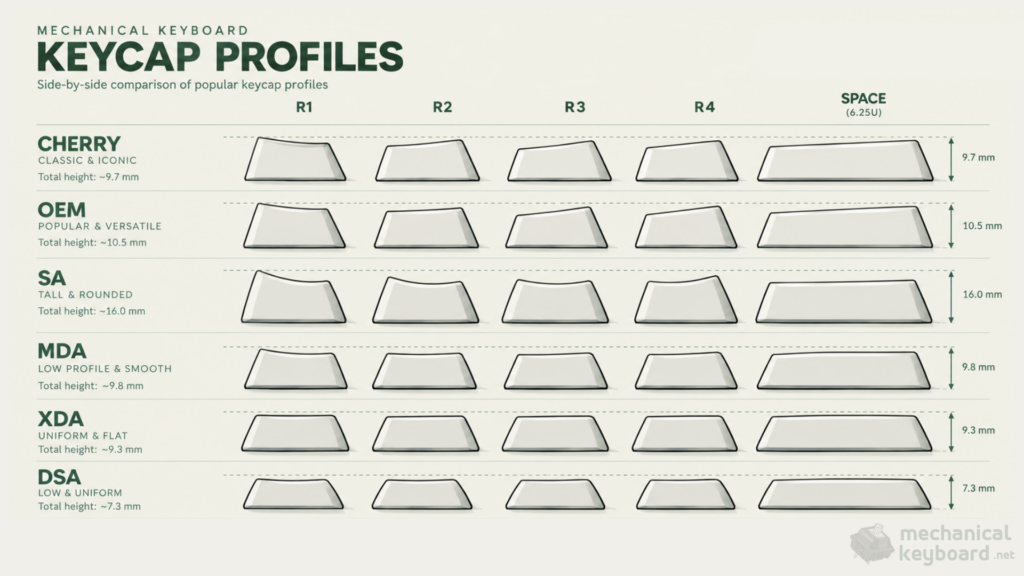
Three things define a keycap profile:
- Height – how tall the keycap sits above the switch, typically 3mm (ultra-low) to 18mm (tall sculpted) depending on row
- Sculpt – whether each row (R1 through R4/R5) has a different height and tilt to match natural finger curve, or whether every row is identical (“uniform”)
- Top surface – flat, concave/dished (spherical), or cylindrical (saddle-shaped)
Everything else, material, legend method (dye-sub vs double-shot), colorway, is a separate decision. You can get Cherry profile in ABS or PBT, dye-sub or double-shot legends, that’s personal taste layered on top of the profile choice, not the profile itself. Profile also has nothing to do with switch compatibility: every standard profile covered here uses the same Cherry MX cross-shaped stem, so you can put any profile on any MX-compatible keyboard.
Comparison Table
| Profile | Height (approx.) | Sculpt | Top Shape | Best For |
|---|---|---|---|---|
| Cherry | ~9.4mm | Sculpted | Angled | Speed typing, gaming, most popular enthusiast choice |
| XDA | ~9.1mm | Uniform | Flat-ish, wide | Ortholinear boards, modern minimal look |
| OEM | ~11.9mm | Sculpted | Angled | Default on most pre-built keyboards, familiar feel |
| MT3 | ~13-16.5mm* | Sculpted | Deeply dished/spherical | Retro aesthetic, strong finger guidance |
| SA | ~13.5-16.5mm* | Sculpted | Spherical, rounded | Retro look, tallest common typing |
*Height ranges for SA and MT3 vary meaningfully by source and by row (the number row and function row sit taller than the home row on any sculpted profile). Treat these as approximate, not exact, figures, and check the specific set you’re buying if precise clearance or case-height fit matters.
Cherry Profile
Named after Cherry Corp (Germany), Cherry profile dates back to the late 1980s and remains the most widely available enthusiast profile today. At roughly 9.4mm tall, it’s sculpted (each row has a slightly different height and angle) but noticeably lower than OEM, about 2.5mm shorter by most measurements.
Feel: Quick travel and minimal finger lift between rows, which is why it’s popular with fast typists and competitive gamers. Sound: Shorter internal cavity means less resonance, the sound leans toward the switch itself rather than the cap adding much low-end. One real compatibility catch: on keyboards with north-facing switches, Cherry profile’s lower wall can physically interfere with the switch housing before the key fully bottoms out. This creates a mushy feel and can alter the sound, it’s not a universal problem (plenty of Cherry sets are fine), but it’s worth checking if your board uses north-facing switches, or sticking to OEM, XDA, or MDA, which don’t have this interference issue. Best for: Anyone who wants a sculpted (finger-guided) profile without the extra height of OEM or SA. It’s also the profile most custom keycap sets are made in, so availability and colorway choice are excellent.
OEM Profile
OEM is the profile you’ve almost certainly typed on already, it’s the default on the vast majority of pre-built keyboards, mechanical or membrane. At roughly 11.9mm, it’s taller than Cherry but shares a similar sculpted, angled-top design.
Feel: Familiar to nearly everyone, since it’s the industry default. A reasonable middle ground between low-profile speed and tall-profile finger guidance. Sound: More resonance than Cherry thanks to the taller cavity, but more restrained than SA or MT3. Often described as a “balanced” sound. Best for: Anyone who doesn’t want to think about it, if you’ve never chosen a keycap set before, this is what you already know.
SA Profile
SA is tall, deeply sculpted, and spherical-topped, giving it a distinctive retro look that traces back to typewriter-era keycap design. Height figures vary by source, roughly 13.5mm on the shorter end up to 16.5mm or more on the tallest rows, with some measurements putting the top row (R1) as high as 18mm.
Feel: The tallest common typing experience among these five. Some typists find the height and sculpt genuinely comfortable for long sessions; others find it fatiguing or awkward, particularly people with smaller hands or those used to low-profile boards. It’s a profile with real, polarizing opinions rather than universal praise. Sound: Generally the most resonant of the five, taller caps with more internal volume tend to produce a deeper, more pronounced low-mid “thock.” That said, profile is one input among several, switch choice, case material, and foam all shape the final sound too, so SA doesn’t guarantee a deep sound on its own, it’s one of the tallest levers you can pull, not the only one. Best for: Retro aesthetics, colorway-focused builds (SA’s tall sculpt makes novelty and shine-through colorways pop), and typists who’ve tried it and genuinely like the height.
XDA Profile
XDA is uniform (every row is the same height and shape) rather than sculpted, with a flat-ish, wider spherical top than the lower-profile DSA. At roughly 9.1mm, it’s low without being extreme.
Feel: No row-to-row height difference means no “guided” feel the way sculpted profiles offer, some people find this calmer and more predictable, others feel like every row starts from zero. It’s a common pick for ortholinear and columnar keyboard layouts, where a sculpted profile designed around a standard staggered layout doesn’t make as much sense. Sound: Uniform height keeps sound relatively consistent across the whole board, since every key strikes the switch at the same angle. Best for: Ortholinear/40% boards, modern minimalist aesthetics, and budget-to-mid PBT sets, XDA is common and generally affordable compared to sculpted premium profiles.
MT3 Profile
Created by keycap designer Matt3o (hence the name) and popularized through Drop’s keycap sets, MT3 is a modern take on deep sculpting with strongly dished, spherical tops and sharper corners than SA. Height sits in a similar tall range to SA, sources put it anywhere from 13mm to 16.5mm depending on row and measurement method.
Feel: Distinctive, deeply concave tops that some typists find give excellent finger guidance, a positive landing zone that’s hard to miss even without looking. The sculpt is more aggressive than SA’s, which some prefer and others find takes longer to adjust to. Sound: Similar resonance potential to SA, tall and dished caps add low-end character, though the actual result still depends heavily on the board and switch underneath, often described as ranging from mellow to thocky rather than uniformly deep. Best for: Enthusiasts who want SA-style height and drama with a different aesthetic and sculpt angle, often paired with striking colorway sets since the deep dish shows off novelty legends well.
Beyond the Big Five: Other Profiles Worth Knowing
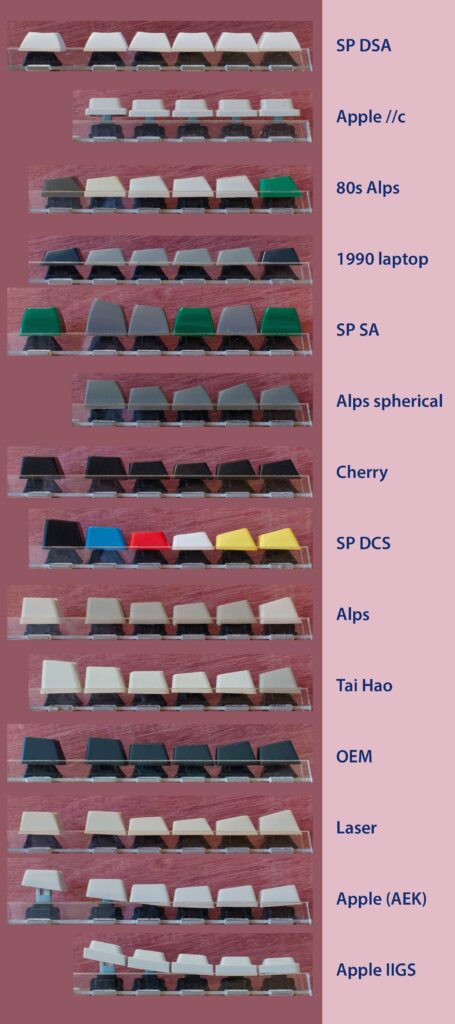
If you’re browsing keycap sets, you’ll run into a few other names regularly. Here’s the short version of each, so the jargon stops being a wall:
| Profile | Height (approx.) | Notes |
|---|---|---|
| DSA | ~7.6mm | Uniform, low-profile, concave tops, one of the shortest common profiles |
| KAT | ~13.5mm | Sculpted, angled, concave, often described as a shorter/smoother SA |
| KAM | Similar to KAT | Uniform version of KAT, every row the same shape |
| G20 | ~7.6mm | Low-profile, angled tops, uniform rows |
| MBK | ~3.2mm | Ultra-low profile, scooped tops, used on genuinely low-profile boards |
| Tai-Hao | ~14.9mm | A taller take on OEM’s shape |
| ASA | Roughly OEM height +2mm | Sits between OEM and SA in height |
| MDA (also called MG or MITO) | Between Cherry and SA | Sculpted, spherical top, positioned as a “best of both worlds” middle ground, gaining popularity, and interference-free on north-facing switches |
Profile vs. Material: Don’t Confuse the Two
A common mix-up: profile and material are independent choices. Profile is geometry (height, sculpt, top shape). Material is what the keycap is made from, almost always ABS or PBT, which affects weight, texture, and how the sound ages over time (PBT resists shine and tends to sound more muted; ABS can get shinier and slightly sharper-sounding with heavy use). You can buy Cherry profile in double-shot PBT or dye-sub ABS, the profile name tells you nothing about the material, and vice versa. If you want the full breakdown of materials and legend types, see our keycap fundamentals guide.
How Profile Affects Sound
Profile shapes sound through three mechanisms: the internal volume of the cap (more air space, more resonance), the stem length inside the cap, and how the cap sits relative to the plate and case. Taller caps with more internal volume, SA and MT3 in particular, tend to produce more low-mid “thock.” Shorter profiles like Cherry and DSA put more emphasis on the switch’s own click/clack rather than adding cap resonance, which tends to read as a higher-pitched sound.
Worth being precise here: profile is one input into sound, not the only one. The exact same switch can sound noticeably different across two keycap sets, since the cap functions as a resonant chamber sitting on top of the spring, but switch choice, case material, plate material, and foam all shape the final result too. A tall profile leans the sound deeper; it doesn’t guarantee a deep sound on its own. If you’re chasing a specific sound signature, our guide to the deepest, thockiest switches covers the switch side of that equation, and profile is one of several levers alongside it, not a standalone fix.
Which Profile Should You Pick?
First enthusiast build, no strong preference yet: Cherry. Widely available, in ABS or PBT, in nearly any colorway.
You want what feels “normal”: OEM. It’s what most pre-built keyboards already ship with, so there’s no adjustment period.
Retro aesthetic or a striking colorway/novelty set: SA or MT3. Their height and dished tops make colorways and legends stand out.
Ortholinear or 40% keyboard: XDA, KAT, or another uniform profile. Sculpted profiles assume a specific row layout that doesn’t map cleanly onto ortho boards.
You want the deepest, most resonant sound: SA or MT3, paired with a switch that already leans thocky, like the picks in our thocky switches guide.
You’re building for speed (gaming or fast typing) and want minimal finger travel: Cherry, OEM, or a low uniform profile like XDA.
FAQ
What is the best keycap profile?
There isn’t a single best profile, it depends on what you value. Cherry is the most popular all-around enthusiast choice for its balance of height, sculpt, and availability. OEM is the most familiar since it’s the industry default. SA and MT3 win on retro aesthetics and sound depth. XDA and other uniform profiles suit ortholinear layouts and minimalist looks.
Does keycap profile affect switch compatibility?
No. All the profiles covered here use the standard Cherry MX cross-shaped stem, so any profile fits any MX-compatible keyboard. Profile is purely about height, sculpt, and shape, not electrical or mechanical compatibility with your switches.
Is SA or MT3 taller?
They’re in a similar tall range, and sources disagree on exact figures for both, generally somewhere between 13mm and 16.5mm+ depending on the row and how the manufacturer measures it. The more useful difference between them is sculpt style: SA has a rounder, more classic spherical dish, while MT3 has a deeper dish with sharper corners.
What’s the difference between Cherry profile and OEM profile?
Cherry is about 2.5mm shorter than OEM, with a slightly different sculpt angle. Cherry tends to feel faster and lower-effort for quick typing and gaming, while OEM is the more “default” feeling profile most people are already used to from stock keyboards.
Do I need a sculpted profile, or is uniform fine?
Sculpted profiles (Cherry, OEM, SA, MT3) guide your fingers row-to-row via height differences, which many typists on a standard staggered keyboard prefer. Uniform profiles (XDA, DSA, KAT/KAM) work well on any layout but are especially suited to ortholinear or columnar boards, where a sculpt designed for a staggered layout doesn’t make sense.
Does Cherry profile work with north-facing switches?
Not always cleanly. Cherry profile’s lower wall can physically interfere with the switch housing on some north-facing switch setups, which can create a mushy feel or altered sound before the key fully bottoms out. If your keyboard uses north-facing switches, check compatibility first, or consider OEM, XDA, or MDA, none of which have this interference issue.
What keycap profile do pre-built keyboards usually come with?
OEM is the most common stock profile across mainstream and budget pre-built keyboards. Some enthusiast-oriented pre-builts ship with Cherry profile instead.