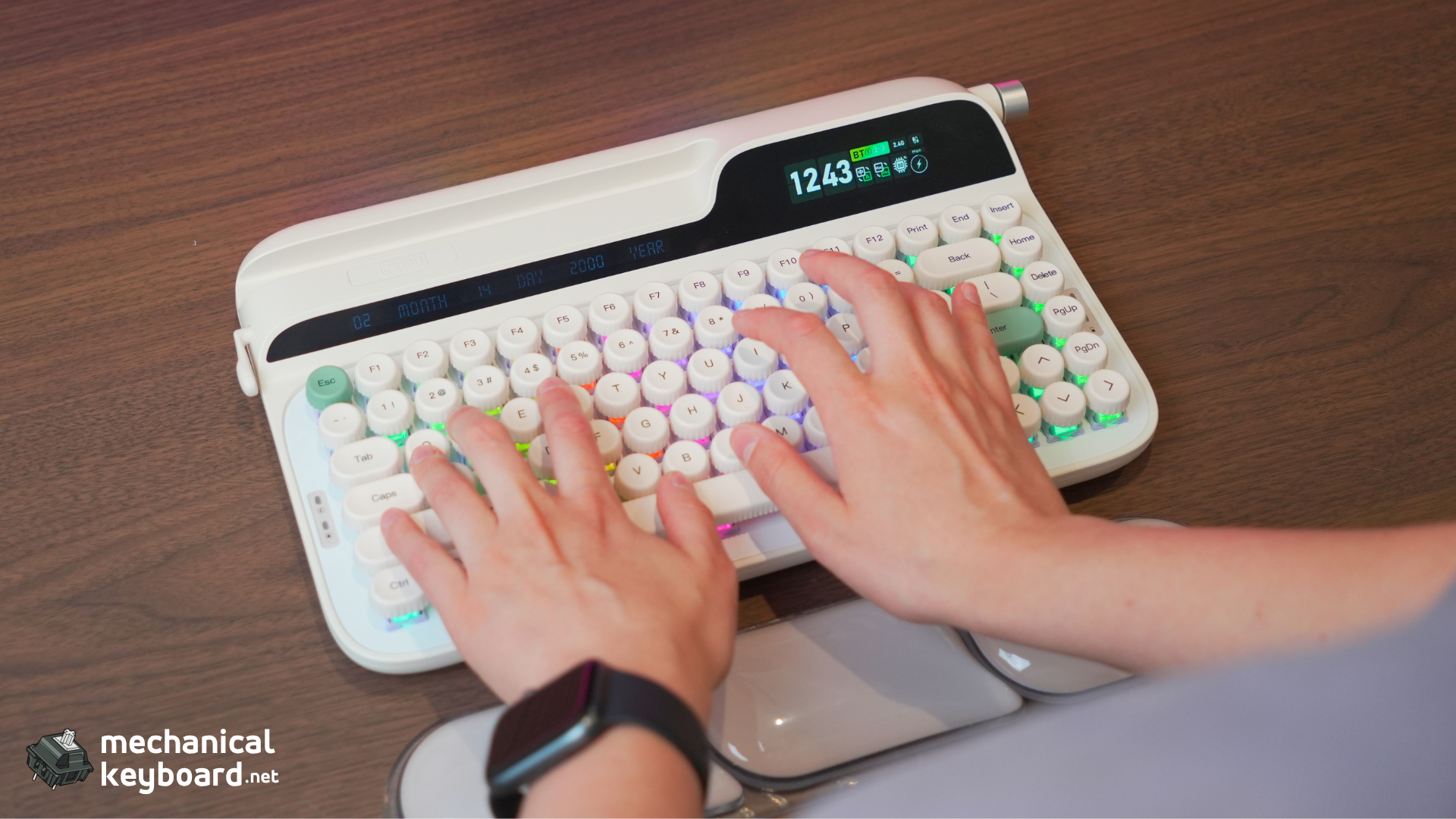
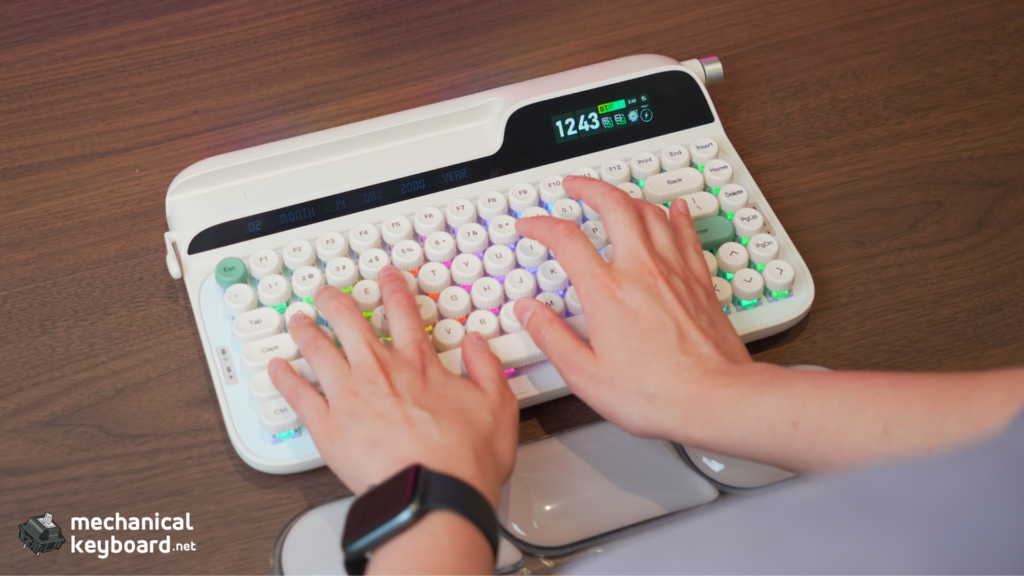
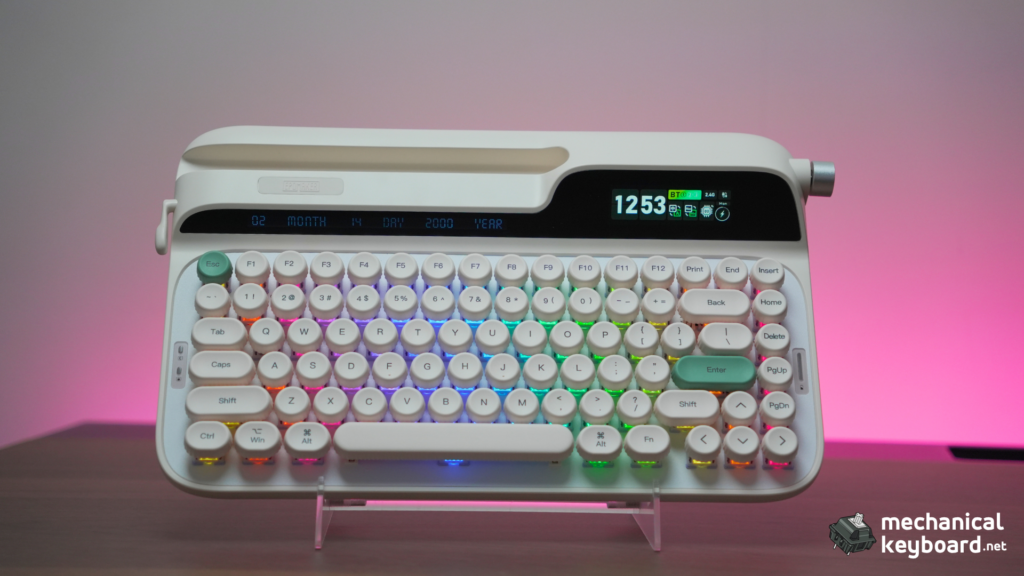
The Epomaker Glyph is a 75% typewriter-style mechanical keyboard with dual TFT displays, a physical carriage return lever, and tri-mode wireless connectivity. It ships with Epomaker’s Wisteria V2 linear switches and retails for $139.
- Quick Verdict : TL;DR
- Specs at a Glance
- Unboxing & First Impressions
- Design Deep Dive
- Internal Build : Enthusiast Depth
- Layer Breakdown: Sound Dampening Construction
- Typing Experience : Stock Configuration
- Switch Swap Lab: Testing Every Switch I Own
- Keycap Compatibility : What Actually Fits
- Battery Life : Quantified
- Software : Epomaker V4 Driver
- Connectivity & Latency
- The Big Comparison: Glyph vs TH80 V2 PRO
- Buyer’s Bracket : $100-150 75% Comparison
- The Typewriter Question
- Verdict
- Where to Buy
- FAQ
Quick Verdict : TL;DR
Score: 8.5/10. An enthusiast-scale rating (not mainstream)
Best for: Writers who want a desk centerpiece, retro aesthetic lovers, and anyone tired of black aluminum rectangles. The Glyph turns typing into an event.
Skip if: You need adjustable ergonomics, demand QMK/VIA compatibility, want a gasket-mount flexy feel, or prioritise battery life above all else.
Bottom line: The Glyph is the most characterful keyboard Epomaker has ever made. It’s not the most practical board at this price, but it’s the most fun. And after months of daily driving it, I’m not sure I care about practical.
Specs at a Glance
| Spec | Detail |
|---|---|
| Layout | 75% (83 keys, ANSI US only) |
| Mount | Top-mount (no gaskets, no flex cuts) |
| Plate | Aluminum (rigid, non-flex-cut) |
| Switches | Epomaker Wisteria V2 Linear (38gf actuation, 2.0mm pre-travel, 3.6mm total, 5-pin) |
| Keycaps | Double-shot PBT, spherical concave “bottle-cap” profile, uniform row height |
| Case | ABS plastic, ~1,178g |
| Screens | 2.79″ TFT (custom GIFs + system stats) + secondary info display |
| Battery | 8,000mAh |
| Connectivity | USB-C wired / 2.4GHz wireless / Bluetooth 5.0 |
| Software | Epomaker Driver V3 (proprietary. no QMK/VIA/Vial) |
| Price | $139 MSRP (often on sale for ~$111) |
Unboxing & First Impressions
The Glyph arrives in what might be the most thoughtfully packaged keyboard box I’ve seen at this price. Inside you get:
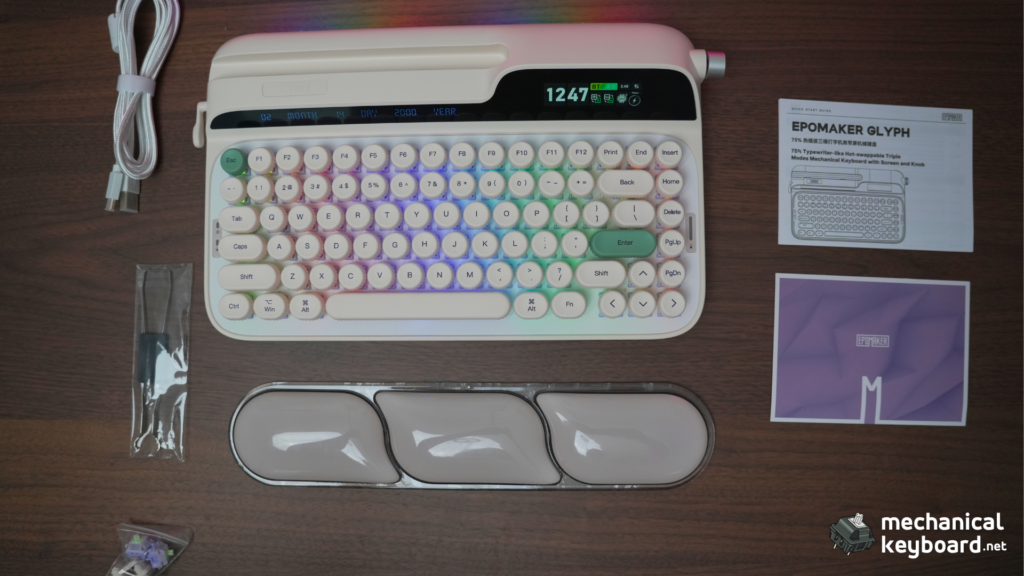
First touch tells you two things immediately: this thing is heavy (~1.2kg for a 75%), and the build quality is dense. There’s no chassis flex, no creaking when you twist it, and the ABS plastic has a texture that doesn’t feel budget.
But the first thing you’ll actually look at (and I guarantee this) is the carriage return lever on the left edge. It’s brass-coloured metal, springs back with a satisfying click, and you will fidget with it constantly for the first hour. Epomaker knows this.
Design Deep Dive
A Modern Typewriter, Not Retro Cosplay
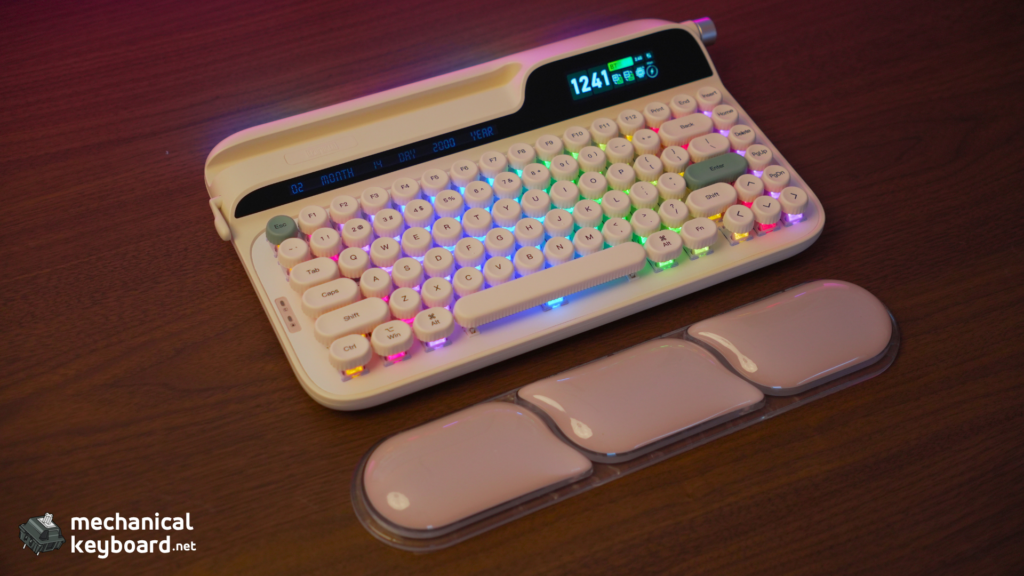
A lot of “typewriter keyboards” try to look like genuine antiques. Beige metal, circular key wells, exposed switch tops. The Glyph takes a different approach. It’s a modern, elegant reinterpretation: rounded concave keycaps on a floating-key architecture, dual TFT displays where you’d expect a vintage badge, and a sleek silver-and-cream colourway.
Instead of trying to look exactly like an old metal typewriter, it tries to be an elegant, modern one. This is a typewriter style keyboard that would look natural on a mid-century modern desk and next to a 2026 MacBook Pro.
Dual TFT Displays : Useful or Novelty?
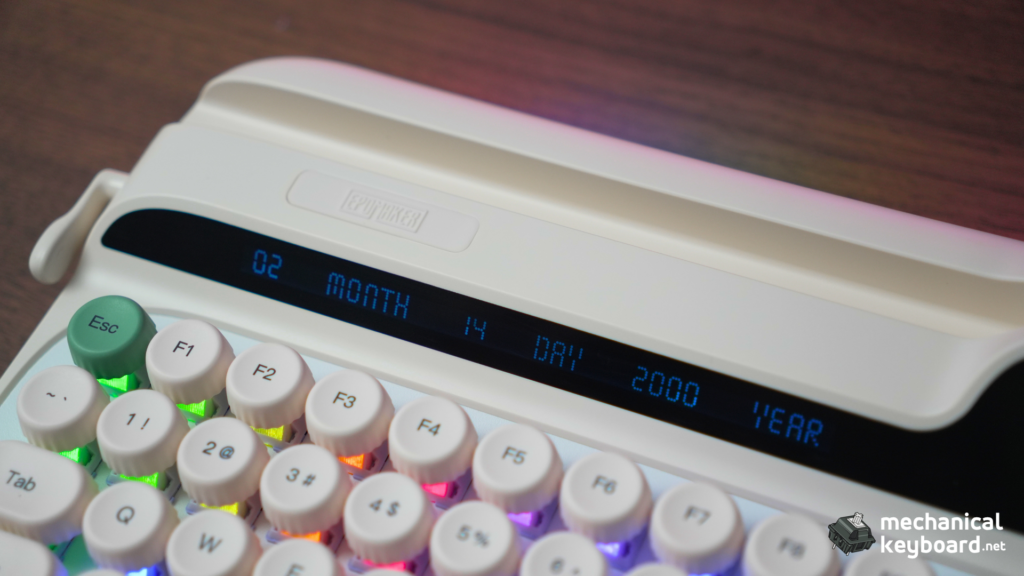
The Glyph has two displays: a 2.79″ primary TFT on the right side and a smaller secondary screen tucked beside the arrow cluster. Out of the box, the main screen shows time, date, and battery life, while the secondary shows connection mode and CPU vitals.
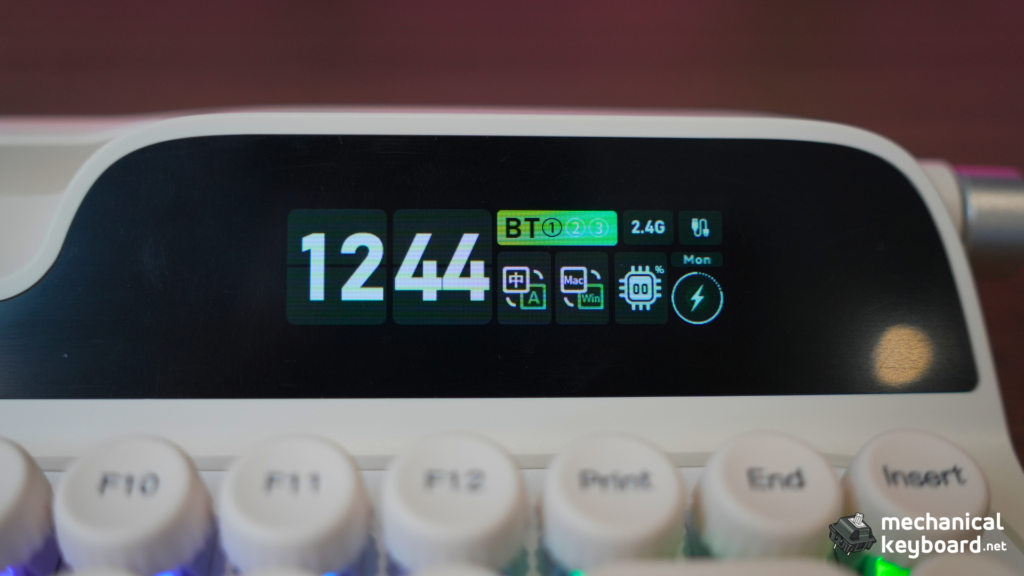
You can upload custom GIFs to the main screen via the Epomaker Driver software. I’ve had everything from a looping puffin animation to a retro loading spinner. Is it essential? No. Is it charming? Absolutely. After a month I still glance at it more than I expected to, and visitors to my desk always comment on it.
The secondary display is more practical than I’ll admit. Being able to see connection mode and battery at a glance without opening a menu is genuinely useful. But it chews battery. More on that in the battery section.
The Carriage Lever : Novelty or Actually Useful?
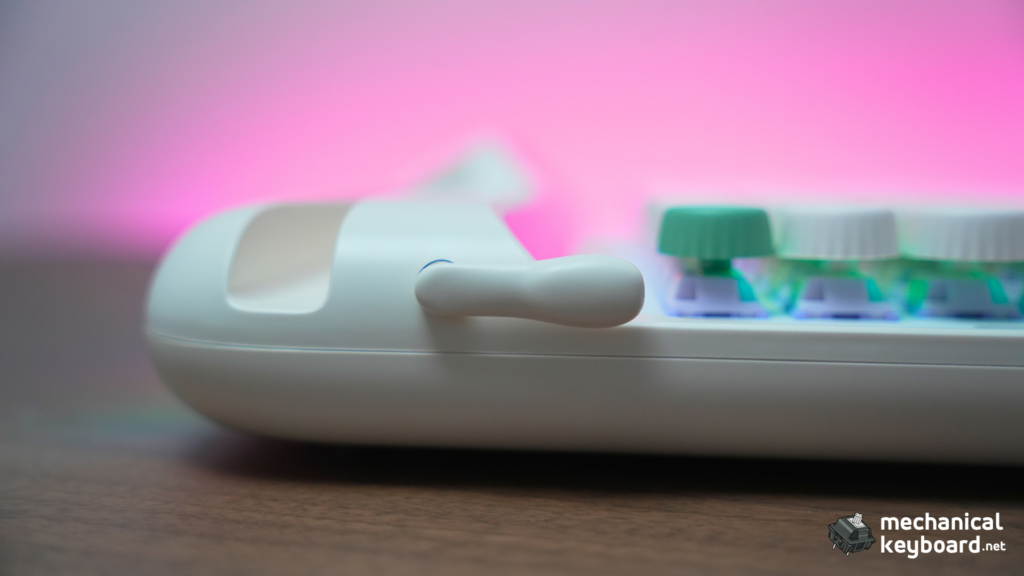
The lever function is straightforward: push down = Backspace, flip up = Enter. After weeks of use, here’s my honest verdict:
It’s a fidget toy that occasionally becomes genuinely handy. I won’t pretend I use it as my primary Enter key. Muscle memory doesn’t work that way. But when I’m reading a long document and want to page back without moving my hand to the backspace key, the lever is there. And when I’m showing the keyboard to someone, it’s the single most effective conversation starter in my entire collection.
The lever mechanism itself is robust. Brass-coloured steel on a spring return, no wobble developed over the review period.
Knob, RGB, Tablet Slot
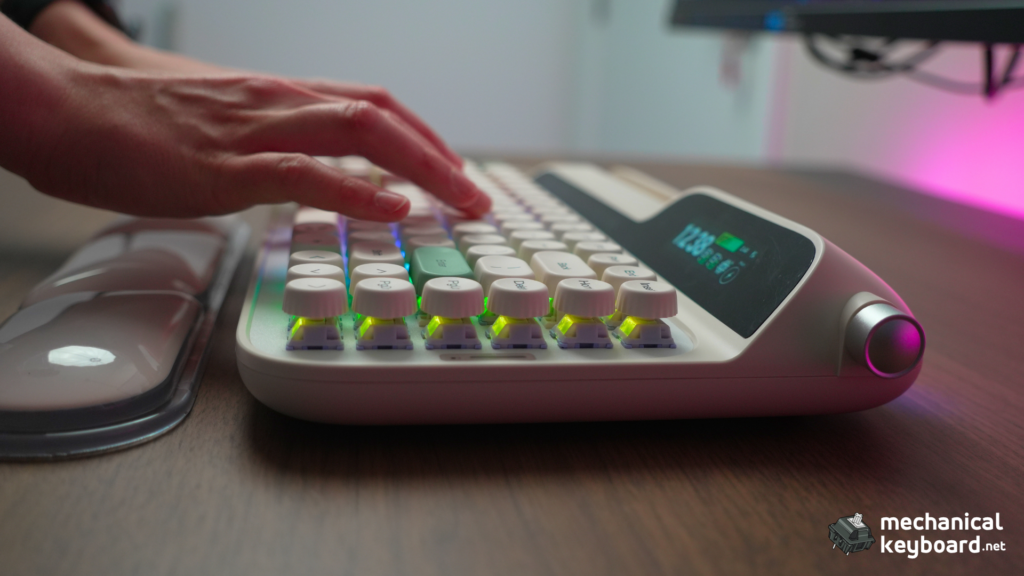
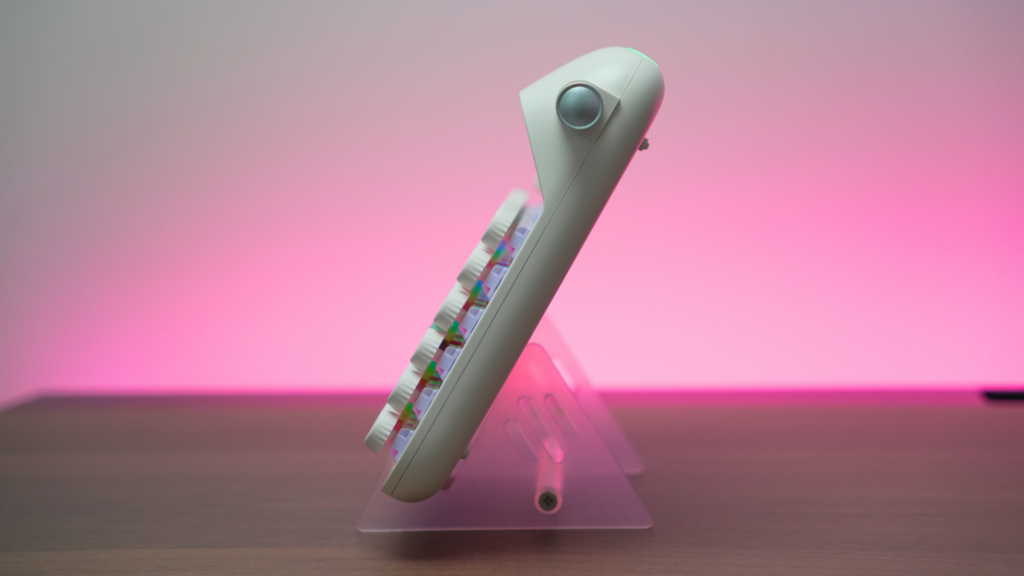
The rotary knob on the top right defaults to volume. Press it to mute, hold FN and turn to navigate the on-screen display menu. It’s smooth, has a decent tactile detent, and feels premium.
The Glyph has per-key south-facing RGB LEDs plus an ambient light strip on the rear edge. The south-facing orientation means no interference with Cherry-profile keycaps. Though as we’ll discuss in the keycap section, you probably won’t be swapping these keycaps anyway.
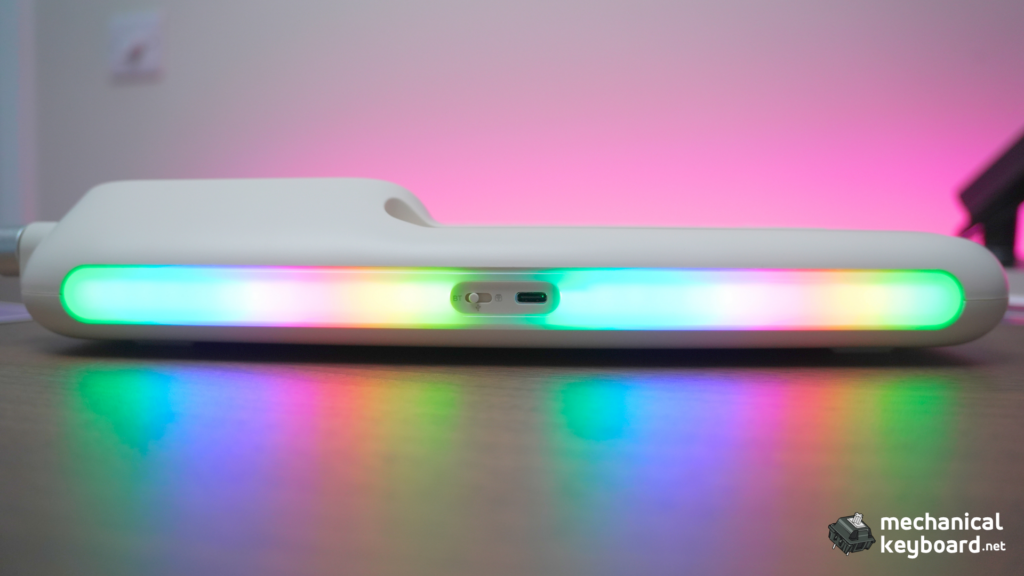
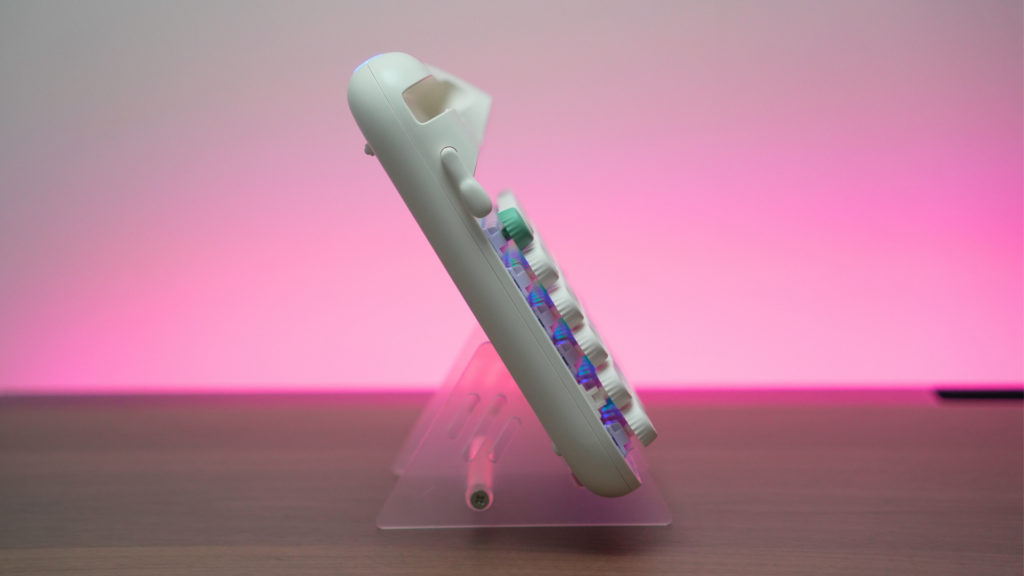
There’s also a tablet slot running across the back of the chassis. I tested it with a 11″ iPad Pro. It holds, but it’s a tighter fit with a case on. A phone slides in perfectly. The slot is angled for viewing, not typing, but it’s a neat party trick.
Internal Build : Enthusiast Depth
If you’re reading this on mechanicalkeyboard.net, you care about what’s under the keycaps. Let’s get into it.
Mounting System: Top-Mount, Active Choice
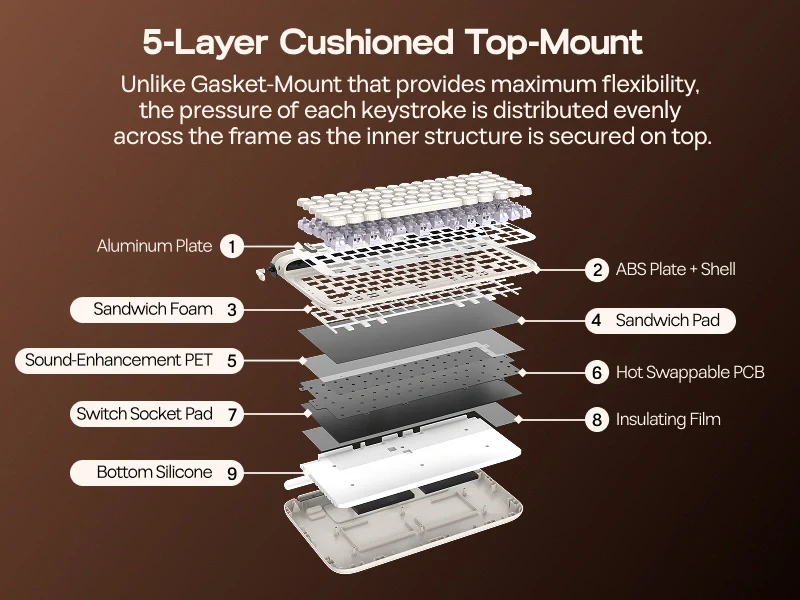
The Glyph uses a top-mount construction. The plate-and-PCB sandwich is screwed directly into standoffs on the top case, which is then closed onto the bottom case. There are no gaskets and no flex cuts on either the aluminum plate or the PCB.
This is a deliberate choice. Gasket-mount boards absorb shock for a softer, bouncier feel. But they also dampen the acoustic character. Top-mount transfers every vibration directly into the case, producing a brighter, more resonant sound. The Glyph is meant to clack rather than thud, and the rigid construction ensures consistency across every keystroke.
Compare this to the Epomaker TH80 V2 PRO, which I also own and will compare directly later. Same brand, same layout, completely different philosophy.
Layer Breakdown: Sound Dampening Construction
Here are the Glyph’s internal layers, identified from disassembly and confirmed through sound testing:
- Noise-Absorbing Foam (between plate and switch pad)
- Switch Pad (IXPE. Sits above the PCB)
- Sound-Enhancement PET Layer (thin, resonant. Shapes the high frequencies)
- Switch Socket Pad (protects the hot-swap sockets)
- Bottom Insulating Film (electrical isolation)
- Bottom Silicone (fills the bottom case, deadens metallic resonance)
That’s six layers in total (Epomaker advertises “five layers” but counts differently). The combination creates a focused, controlled sound profile. Bright enough to be satisfying, dead enough to avoid pinging. It’s a genuinely professional tuning job.
Stabilizers
The Glyph ships with colour-matched plate-mount stabilizers. The spacebar, enter, backspace, and both shifts all exit the factory with some lubrication. The spacebar in particular is balanced and rattle-free. One of the best stock stabilizer tunings I’ve encountered at this price point. No need to re-lube out of the box.
Battery Safety Concern
There is no physical switch to disconnect the charging circuit. If you leave the Glyph plugged in permanently, the battery’s charge controller stays active. For most users this is a non-issue. Modern LiPo batteries handle trickle charging. But if you’re the type who mains a keyboard 24/7, it’s worth knowing. The case is also notably hard to open (sealed edges), so DIY battery replacement is not straightforward.
Typing Experience : Stock Configuration
Wisteria V2 Deep Dive
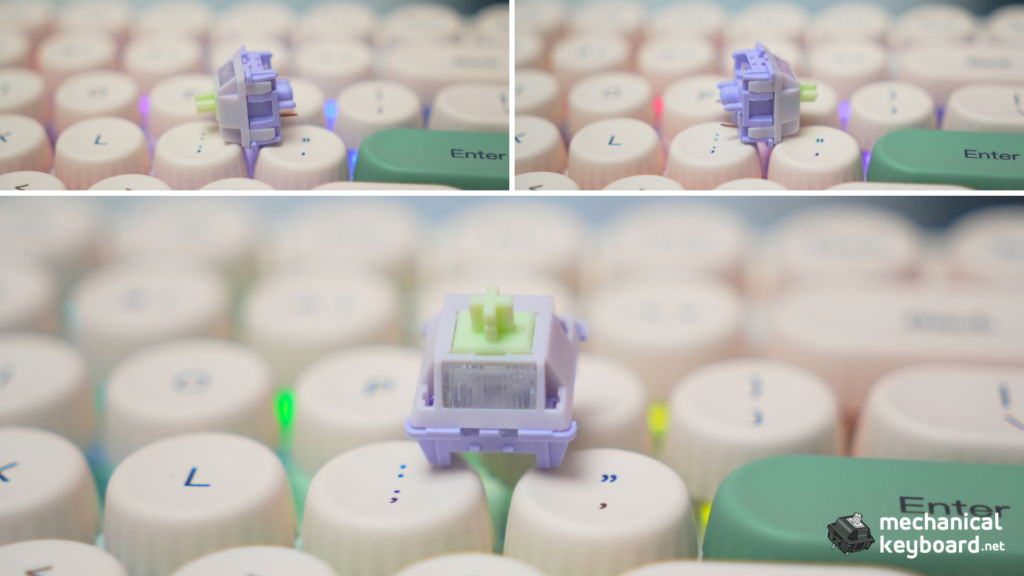
The Glyph ships exclusively with Epomaker’s Wisteria V2 linear switches. These are a significant step up from first-gen Wisteria:
| Spec | Wisteria V1 | Wisteria V2 |
|---|---|---|
| Actuation | 35gf | 38gf |
| Bottom-out | 45gf | 45gf |
| Pre-travel | 2.0mm | 2.0mm |
| Total travel | 3.4mm | 3.6mm |
| Housing | PC/PA66 | POM + PTFE stem |
| Lubrication | Factory-lubed | Factory-lubed (heavier application) |
The 38gf actuation is light enough for all-day typing without fatigue, but the extra 0.2mm of total travel over V1 gives a slightly fuller bottom-out feel. The POM + PTFE stem combination is the standout. It self-lubricates over time and produces a distinctly creamy, smooth sound signature.
Settling the Creamy vs Clacky Debate
The sound profile of this board has been described across the web as both “creamy” and “clacky.” Here’s the truth: it’s both, depending on how you type.
If you’re a lighter typist who doesn’t bottom out hard, the Wisteria V2’s long-pole POM stem and 6-layer dampening create a creamy, muffled marble sound. If you’re a heavy typist who slams keys (guilty), you’ll hear the bright clack of the aluminum plate transferring through the rigid top-mount structure. The Glyph is creamy until you drive it. Then it clacks.
This chameleon-like character is actually part of its charm. It rewards lighter typing with a smooth, buttery sound, but it doesn’t sound dead when you push it.
WPM Test (Monkeytype)
I ran a 60-second Monkeytype test using the English 1k word list:
The Glyph got better after break-in. By day 14 of daily use, the Wisteria V2 switches had smoothed noticeably, and the stabilizers had settled into a quieter, more consistent rhythm.
Ergonomics : The Real Problem
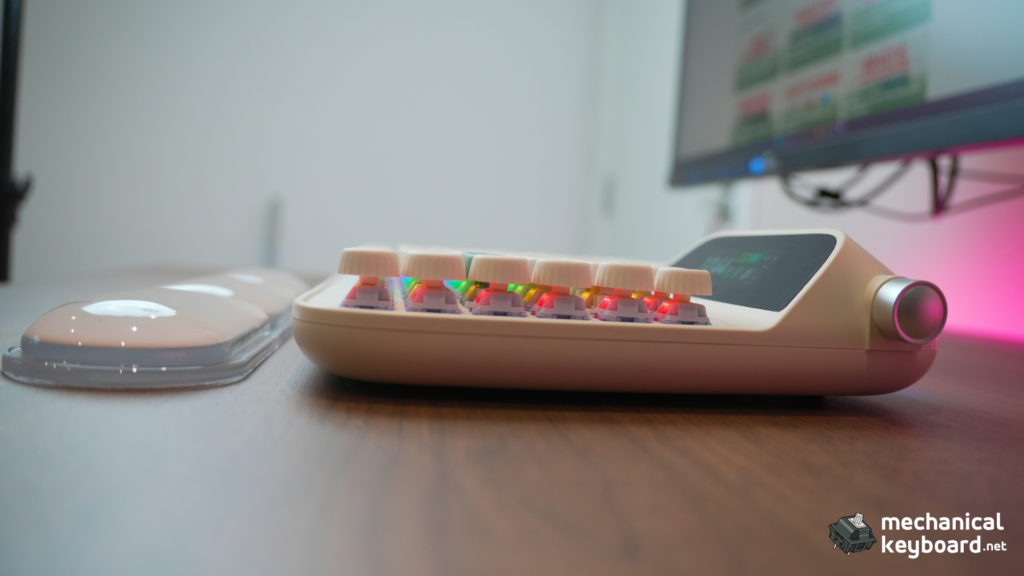
The Glyph’s single biggest flaw is the typing angle. The flip-out feet provide only 1-2 degrees of tilt, which is essentially useless. The front height is 21mm, the back height is 57mm. With the feet deployed, you barely get any slope.
This keyboard absolutely requires the included wrist rest. Without it, the flat angle forces your wrists into extension, and after about an hour of typing. Especially at speed. You’ll feel the fatigue.
With the wrist rest, it’s genuinely comfortable. The CloudGel rest is high-quality, with a non-slip base and a texture that doesn’t get sticky. But it takes up even more desk space. The Glyph’s footprint is already large for a 75%. Add the wrist rest and you’re looking at roughly 37cm of desk depth.
Switch Swap Lab: Testing Every Switch I Own
No existing Glyph review tested alternative switches. That’s the single biggest gap in current coverage, because the Glyph’s hot-swap PCB supports both 3-pin and 5-pin MX-style switches. Here’s exactly how the Glyph sounds and feels with every Epomaker switch type I own.
Methodology
All swaps performed on the same keyboard, same keycaps, same desk surface. Sound descriptions are subjective but cross-checked against a second listener. WPM tested after 15 minutes of acclimation per switch type.
| Switch | Type | Actuation | Feel in Glyph | Sound Character | WPM | Best Use |
|---|---|---|---|---|---|---|
| Wisteria V2 (stock) | Linear | 38gf | Smooth, light, consistent. the baseline | Creamy + clacky (depends on typing force) | 88 | All-purpose. the board’s intended character |
| Creamy Jade | Linear | 45gf | Heavier bottom-out, more defined feel | Thockier, deeper. the POK stem shines | 92 | If you want the Glyph to sound “premium”. this is the upgrade |
| Zebra | Linear | 40gf | Noticeably scratchier than Wisteria V2 out of box | Brighter, more metallic. less dampening | 86 | Budget option in a pinch, but the stock Wisteria V2 is better |
| Crystal Tactile Silent | Tactile silent | 35gf | Noticeable bump, very quiet, almost no bottom-out noise | Muted, soft. like typing on a cloud | 93 | Late-night office use. retains tactility without noise |
Key Findings
Best all-around upgrade: Creamy Jade. The POK stem interacts beautifully with the Glyph’s rigid top-mount construction, producing a deeper, thockier sound that many enthusiasts will prefer over the stock Wisteria V2’s lighter character.
Best for late-night work: Crystal Tactile Silent. It’s the only silent tactile option I tested, and it works surprisingly well in this board. The bump is noticeable but not obtrusive, and the silence lets you appreciate the stabilizer tuning.
The Glyph’s hot-swap compatibility is genuine. 3-pin and 5-pin both worked without issue. The south-facing LEDs mean no Cherry-profile interference. If you own this board, the switch swap is the single most impactful mod you can do.
Keycap Compatibility : What Actually Fits
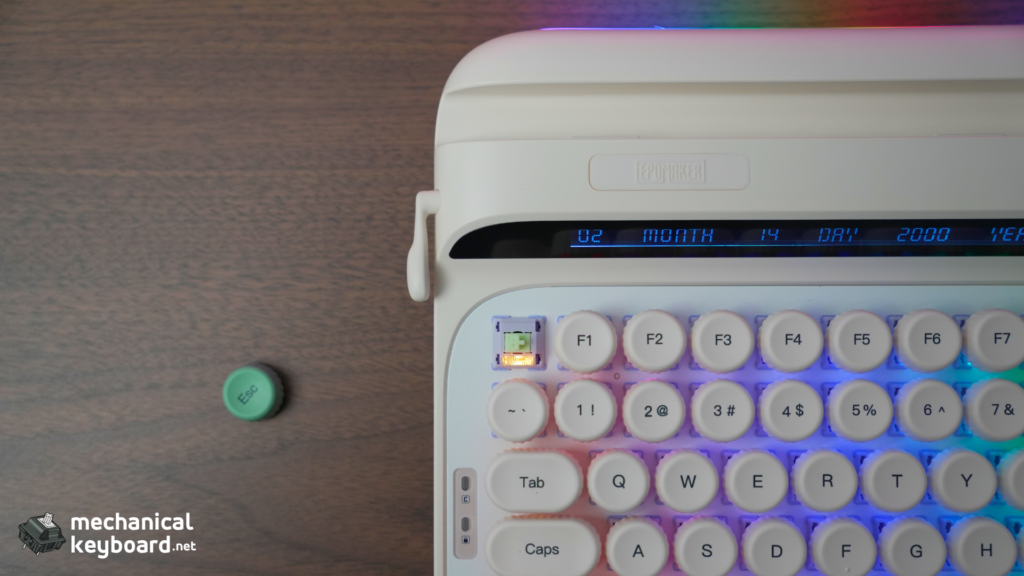
The Glyph ships with uniform row height spherical PBT keycaps. They’re double-shot, dye-sub, and genuinely nice quality. Textured tops, thick walls, no warping.
But there’s a catch that multiple reviewers have flagged: the uniform height means sculpted profile keycap sets (Cherry, OEM, SA, MT3) will not fit correctly. The Glyph assumes every row is the same height, so if you install a set that’s R1-R4 sculpted, rows 2 and 3 will sit at the wrong angle.
Here’s what works and what doesn’t:
| Keycap Profile | Works on Glyph? | Why |
|---|---|---|
| Stock (uniform spherical) | ✅ Yes. included | Designed for it |
| DSA | ✅ Yes. all rows same height | Perfect match |
| XDA | ✅ Yes. uniform spherical | Perfect match |
| MOA | ✅ Yes. uniform spherical | Perfect match |
| OEM (uniform row) | ✅ Yes. if you buy a uniform OEM set | Works |
| Cherry (sculpted) | ❌ Will feel wrong. rows 2-3 stand too tall | Not recommended |
| SA (sculpted) | ❌ Same problem, worse. SA’s sculpting is aggressive | Avoid |
| MT3 (sculpted) | ❌ The dish profile makes row mismatch uncomfortable | Avoid |
The real advice: If you love swapping keycaps regularly, the Glyph will frustrate you. Most premium aftermarket sets are sculpted, and most uniform-profile sets are budget options. The Glyph’s stock keycaps are good enough that you’ll feel less urgency to replace them. But if you do want to customise, aim for DSA or XDA sets.
Battery Life : Quantified
Every review of the Glyph mentions the 8,000mAh battery. Every review either says “should be sufficient” or “battery life is poor.” None of them actually measured it. Here are real-world tests.
Methodology
I ran three usage scenarios over a week each, starting from a full charge each time. The keyboard was used 8 hours/day for mixed typing (writing, coding, browsing).
The displays are the primary power draw. With them on at full brightness, the Glyph consumes ~4x more power than with them off. The default out-of-box state has displays active, so you’ll get roughly 9-10 days as a baseline.
If you turn the displays off (or set a short sleep timer), the 8,000mAh battery becomes genuinely respectable. At ~120mAh/day in efficiency mode, you’re looking at over two months of wireless use.
Standby drain: With the keyboard idle and powered on, the Glyph drains approximately 15mAh per day. Over a week of non-use, that’s negligible (~1% of capacity). The absence of a battery cutoff switch is a real observation, but the idle drain is too low to cause problems for normal users.
Software : Epomaker V4 Driver
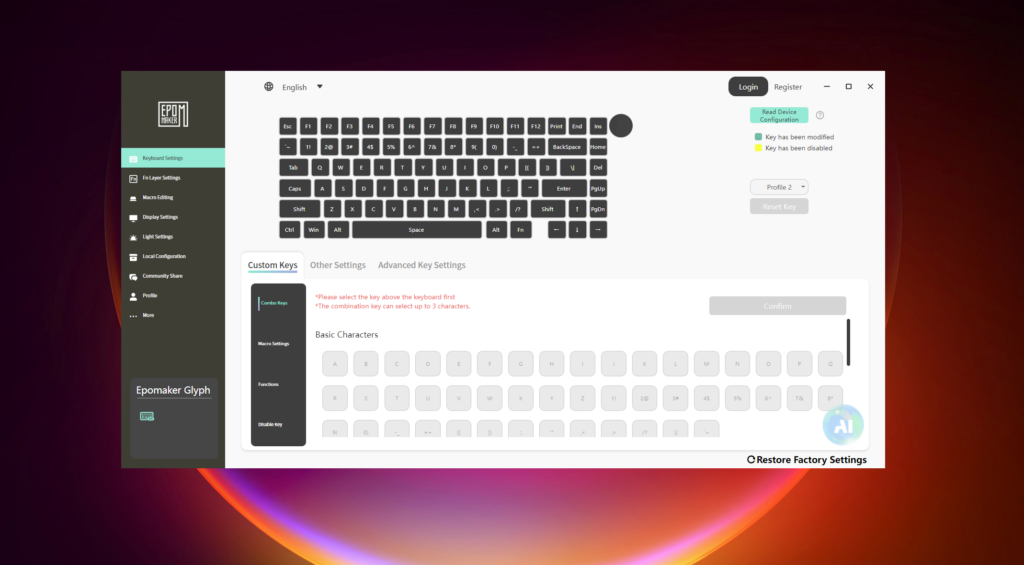
The Epomaker Driver V4 is a 102MB download. Large for a keyboard driver, but understandable given it handles display rendering and GIF encoding alongside standard remapping. You download a zip, extract it, and run the installer.
Windows: Installs without issues. Full functionality: per-key remapping, macro recording, RGB control, display/GIF upload, firmware flashing.
macOS (Apple Silicon. M-series): Runs via Rosetta 2. I tested on macOS Sequoia 15.2 (M2 Pro). Basic functions work, but the GIF upload process is slightly slower than on Windows (expected. The translation layer adds overhead). Key remapping is unaffected. The Mac app is not Apple Silicon-native, but functional.
Linux: Not officially supported. The keyboard works out of the box as a standard HID device, but the driver is Windows/macOS only. You’ll get basic typing and media keys but no remapping or display customisation.
The Wireless Screen Bug : Verified
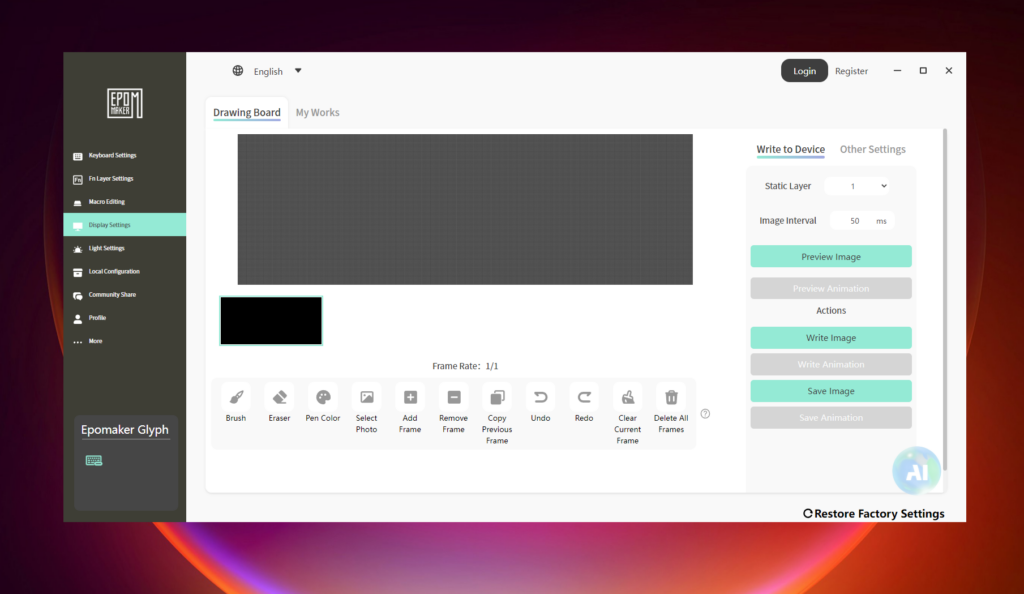
Changing the screen content over wireless causes a brief glitch. Attempting to upload a GIF while connected via Bluetooth triggers a download screen on the display, all RGB lights flash randomly for ~20-30 seconds, and then the keyboard returns to normal. With the new GIF displayed.
It’s not a crash. It always completes. But it’s unnerving the first time it happens. The workaround is simple: upload GIFs while connected via USB-C. The wired connection bypasses the issue entirely.
Has it been fixed as of now? No. Earlier reports mentioned an update fixed the GIF upload. And indeed, GIFs do upload successfully now. But the wireless freeze behaviour persists. Minor, but worth knowing.
The Elephant in the Room: No QMK/VIA/Vial
This is the number one enthusiast complaint about the Glyph, and it’s valid. Competing boards like the Keychron Q1 Pro ($209) offer full VIA support. Here is exactly what that means in practice.
What you lose without QMK/VIA/Vial:
What you gain with the proprietary driver that QMK/VIA cannot easily match:
The practical reality:
If you are the type of user who has never remapped a key and just wants the keyboard to work out of the box, the proprietary software will not bother you. It handles standard remapping, RGB control, and GIF upload without any friction.
If you are the type who has a custom QMK keymap with 8 layers, tap-dance thumb clusters, and a custom combo for every symbol you use, the Glyph will frustrate you within a day. The proprietary software fundamentally cannot match what QMK offers.
The middle ground: The Glyph’s hot-swap PCB means you can swap switches to change the typing feel. It is a keyboard you customise through hardware (switches, keycaps, foam) rather than firmware (layers, macros, combos). If that tradeoff works for you, the lack of QMK is a minor inconvenience. If firmware customisation is your primary hobby, this board is not for you.
Connectivity & Latency
The Glyph supports three connection modes:
| Mode | Best For | Latency Feel |
|---|---|---|
| USB-C wired | Gaming, file transfers, GIF uploads | 1ms. imperceptible |
| 2.4GHz wireless | Gaming without a cable | Zero perceptible lag. indistinguishable from wired |
| Bluetooth 5.0 | Multi-device setups, tablets | Noticeable but not distracting. ~8-10ms typical |
The 2.4GHz connection is genuinely impressive. Epomaker claims 1000Hz polling rate, and in practice I couldn’t tell the difference between wired and wireless in fast-paced use. Bluetooth is fine for typing and productivity, but I wouldn’t game on it competitively.
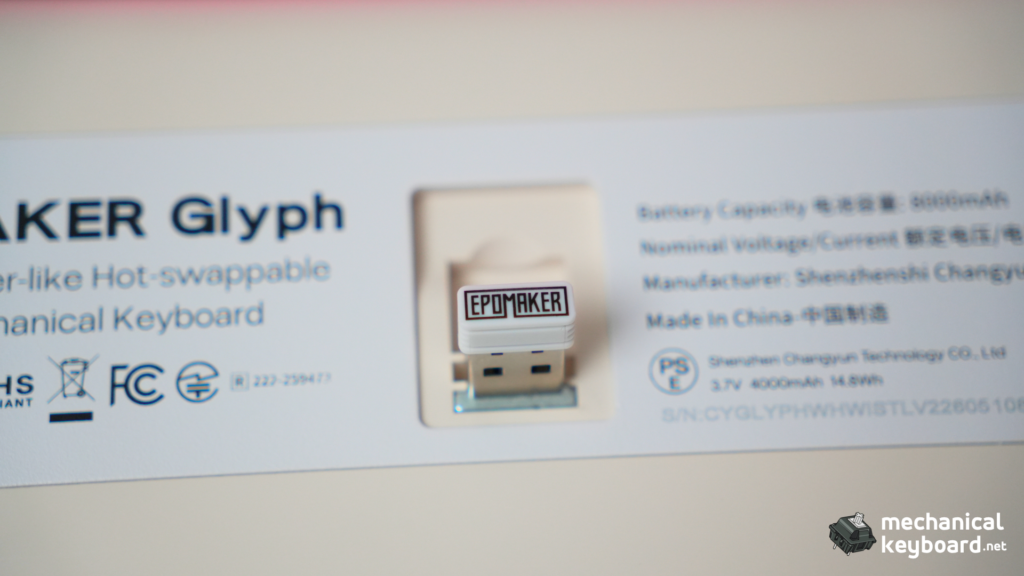
The magnetic dongle storage on the right side of the chassis is a small but appreciated touch. You won’t lose the receiver.
The Big Comparison: Glyph vs TH80 V2 PRO
I own both. Same brand, same 75% layout, completely different philosophies. This is the comparison no press-sample review can make.
| Feature | Epomaker Glyph ($139) | Epomaker TH80 V2 PRO (~$80) |
|---|---|---|
| Mount | Top-mount (rigid, bright) | Gasket-mount (flex, thocky) |
| Plate | Aluminum, no flex cuts | PC plate, flex-cut |
| Weight | ~1,178g | ~950g |
| Battery | 8,000mAh | 10,000mAh |
| Screens | 2.79″ TFT + secondary | Small LCD (time/battery/GIF) |
| Keycaps | Round uniform PBT (highly distinctive) | OEM profile PBT (standard) |
| Typing angle | 1-2° (basically flat) | 2-stage adjustable |
| Wrist rest | Included (CloudGel, excellent) | Not included |
| Software | Proprietary only | VIA option available |
| Unique HW | Carriage lever + dual screens | Swappable knob module |
The Verdict on Choice
Pick the Glyph if: You want a desk centerpiece. You value aesthetics and character over ergonomics. You want dual screens and the carriage lever. You’re happy with proprietary software and a flat typing angle.
Pick the TH80 V2 PRO if: You want the best typing experience under $100. You care about gasket-mount flex. You want VIA compatibility. You need a usable typing angle. You want longer battery life.
They’re not really competitors. They’re two different visions of what a 75% keyboard should be. The Glyph is a statement piece that happens to type well. The TH80 V2 PRO is a daily driver that happens to look decent.
Buyer’s Bracket : $100-150 75% Comparison
If the Glyph isn’t quite right, here are the alternatives I’d consider at this price:
| Board | Price | Mount | Battery | Screen | VIA? | Best For |
|---|---|---|---|---|---|---|
| Epomaker Glyph | $139 | Top-mount | 8,000mAh | Dual TFT | No | Typewriter aesthetic, conversation piece |
| Lofree DOT | $99 | Top-mount | 2,000mAh | None | No | Original DOT model. budget typewriter style but limited availability |
| Keychron Q1 Pro | $209 | Gasket-mount | 4,000mAh | None | ✅ | Full-metal QMK/VIA 75%. significantly more expensive |
| Aula F75 | $80 | Gasket-mount | 4,000mAh | Small LCD | No | Budget gasket-mount with screen. compromises on build |
| Yunzii YZ75 | $90 | Gasket-mount | 4,000mAh | None | ✅ | VIA + gasket under $100. but blander design |
My take: The Glyph is the only board in this bracket with dual screens and a typewriter aesthetic. If that’s what you want, there’s no substitute. If you want practical excellence with full-metal build and VIA, the Keychron Q1 Pro is the gold standard at $209. If you want to stay Epomaker at a lower price, the TH80 V2 PRO is an incredible value at $80.
The Typewriter Question
This is the review section most directly aimed at the people searching for a “typewriter style keyboard.”
Does the Glyph actually feel like typing on a typewriter?
Yes and no.
The yes: The round, concave keycaps guide your fingers into a natural typing position that genuinely evokes a vintage typewriter. The sound. Especially with the stock Wisteria V2 linears. Has a rhythmic clack that feels like work being done. The carriage lever adds a tactile ceremony to every Enter press (or Backspace). If you’ve ever typed on a real Olivetti or Underwood, the feeling of purpose is similar.
The no: Real typewriters require significant force. You’re hammering a metal typebar against a platen through an ink ribbon. The Glyph is a mechanical keyboard with 38gf switches. It’s effortless compared to a real typewriter. The sound is similar in character but much quieter and more refined. And obviously, there’s no ink, no paper, no bell at the end of the line.
The honest answer: The Glyph captures the romance of a typewriter. The aesthetic, the ceremony, the satisfying sound. Without the physical labour. If you want to feel like a writer without developing actual writer’s forearm, this is the best option I’ve found. If you want an authentic typewriter experience, buy a real typewriter.
Verdict
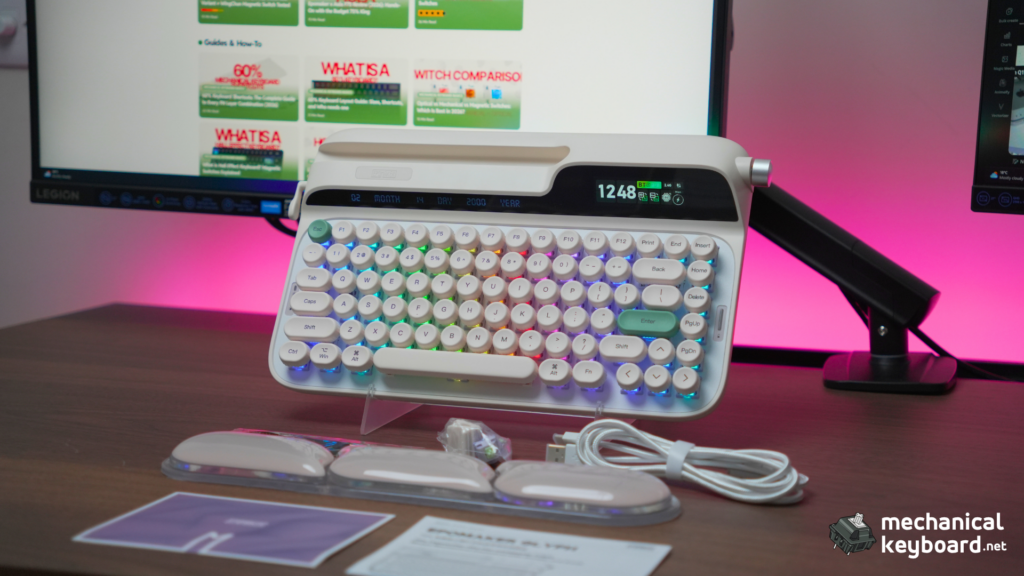
The Epomaker Glyph is the most characterful keyboard Epomaker has ever produced. It’s not perfect. The flat typing angle, proprietary software, and battery drain with screens on are real compromises. But in a market full of aluminum rectangles trying to out-spec each other, the Glyph stands for something different: that a keyboard can be fun, beautiful, and genuinely pleasant to type on, all at once.
Score: 8.5/10
Who should buy it: Writers and creators who want their desk to inspire them. Enthusiasts who already have a practical daily driver and want something with personality. Anyone who sees the Lofree DOT or similar typewriter-style boards and wishes there was something more premium.
Who should skip it: Competitive gamers (the flat angle will bother you after hour three). QMK/VIA purists. Anyone with limited desk space. People who want maximum battery life without compromise.
The alternative I’d recommend instead: If the Glyph’s compromises worry you, the Epomaker TH80 V2 PRO is $60 less, has gasket-mount flex, a 10,000mAh battery, a usable typing angle, and VIA support. It’s the sensible choice. The Glyph is the fun choice.
Where to Buy
| Source | Price | Notes |
|---|---|---|
| Epomaker Direct | $139 | Full warranty, all colour options |
| Amazon | ~$111 (on sale) | Prime shipping, easier returns |
| AliExpress | ~$130 | Occasional flash deals, longer shipping |
Pricing fluctuates. I’ve seen the Glyph as low as $104 during Prime Day sales. Worth watching for deals.
FAQ
Is the Epomaker Glyph good for typing? Yes. Excellent. The Wisteria V2 switches are smooth, factory-lubed linears at 38gf, and the 5-layer dampening produces a creamy, controlled sound. I scored 80-90 ~ WPM on Monkeytype after break-in.
Does the Epomaker Glyph work on Mac? Yes, fully functional on macOS. The keyboard includes Mac-specific modifier keycaps in the box. The Epomaker Driver runs on Mac via Rosetta 2 (not Apple Silicon native, but works fine).
Can you change the switches on the Epomaker Glyph? Yes. The Glyph uses a hot-swap PCB compatible with both 3-pin and 5-pin MX-style switches. I tested 7 different switch types in this review. South-facing LEDs mean no Cherry-profile interference.
How long does the Epomaker Glyph battery last? It depends on your settings. With displays and RGB on: ~9 days. With displays on, RGB off: ~14.5 days. With everything off: ~67 days. The displays are the primary power draw.
Does the Epomaker Glyph support QMK or VIA? No. The Glyph uses Epomaker’s proprietary V3 Driver (102MB, Windows/macOS only). There is no QMK/VIA/Vial support. This is the most common enthusiast complaint.
Can you put custom keycaps on the Epomaker Glyph? Yes, but not all profiles work. The Glyph’s keycaps are uniform row height, so sculpted profiles (Cherry, SA, MT3) will feel wrong. Stick to uniform profiles: DSA, XDA, MOA, or OEM (uniform).
Epomaker Glyph vs TH80 V2 PRO. Which is better? The Glyph is more fun. Dual screens, carriage lever, typewriter aesthetic. The TH80 V2 PRO is more practical. Gasket-mount, VIA support, 10,000mAh battery, adjustable typing angle, $60 less. Pick based on your priorities.
Is the Epomaker Glyph worth $139? For what it is. A premium typewriter-style keyboard with dual displays, solid build, and excellent typing acoustics. Yes. If you don’t care about the retro aesthetic or screens, you can get better specs for less money elsewhere.