
Quick Answer
Optical switches actuate faster and last longer, making them best for competitive gaming on a budget. Mechanical switches feel better, cost less, offer more variety, and are easier to mod, making them the best choice for typing and hobbyists. Magnetic Hall Effect switches like those in the Epomaker HE80 and Wooting 60HE combine the speed of optical with the feel of mechanical and add adjustable actuation, making them the best all-around choice in 2026 if budget allows.
How Each Switch Type Works
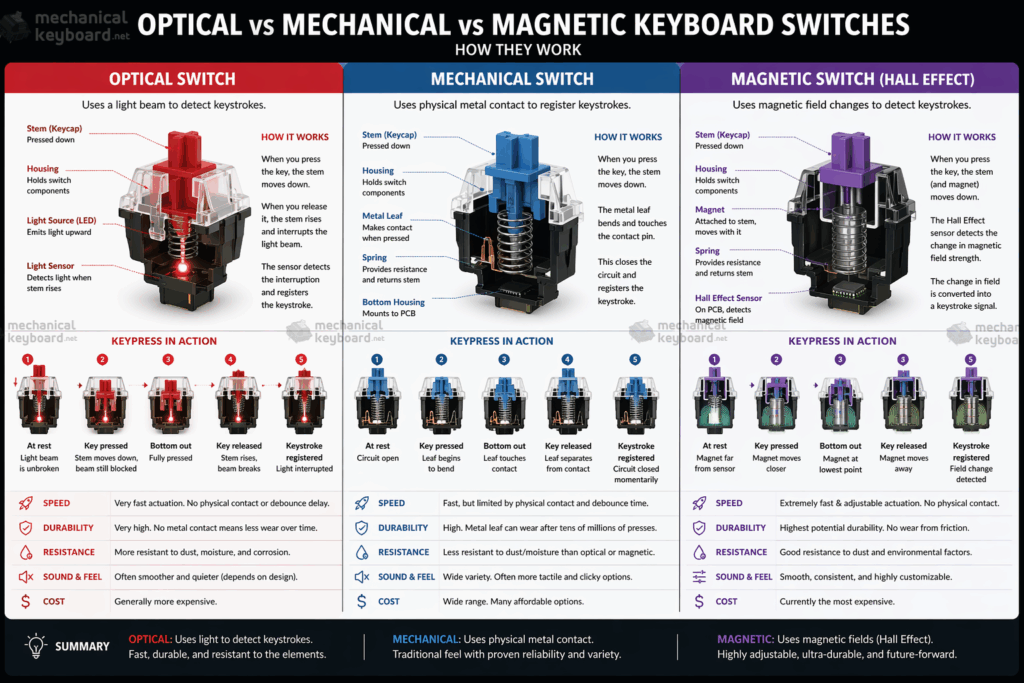
Before comparing performance, it helps to understand the fundamental difference in how each switch registers a keypress. They all do the same job but through completely different mechanisms.
Mechanical Switches
Traditional mechanical switches use a physical metal contact point. When you press a key down far enough, two metal leaves touch, completing an electrical circuit and registering the keypress. This is why they have a characteristic click or tactile bump: that is the physical moment of actuation happening. The spring underneath resets the key when you release.
The debounce algorithm is a small software delay (typically 5 to 10ms) required because metal contacts bounce microscopically on contact, which would otherwise register multiple keypresses. This matters a lot when comparing speed to optical switches.
Optical Switches
Optical switches replace the metal contacts with an infrared light beam and a sensor. When you press the key, the stem physically blocks the light beam, triggering the registration. Because there is no physical contact happening, there is no bouncing and therefore no debounce delay needed. This is the true source of their speed advantage.
They are also more durable in theory since there are no metal contacts to corrode or wear down. Most optical switches are rated for 100 million keystrokes versus 50 to 100 million for mechanical depending on the brand.
Magnetic (Hall Effect) Switches
This is where 2026 gets interesting. Hall Effect switches use magnets and a magnetic field sensor to detect key position. Instead of a fixed actuation point, they detect the exact position of the key at any point in its travel. This enables analog mode, where the key behaves like a joystick axis, and crucially, adjustable actuation points.
More Read
You can set actuation at 0.1mm for hair-trigger competitive gaming, or 3.8mm for a deliberate, heavy typing feel. All via software on the same switch. Keyboards like the Wooting 60HE and the Epomaker HE80 run Hall Effect switches. They combine the contactless speed of optical with far greater feel customisability than either optical or traditional mechanical.
Full Head-to-Head Comparison
Here is how all three switch types stack up across every dimension that matters to keyboard enthusiasts and gamers alike.
| Category | Optical | Mechanical | Magnetic (HE) |
|---|---|---|---|
| Speed | Very fast (no debounce) WIN | Slower (debounce delay) | Very fast + adjustable WIN |
| Feel | Hollow, less satisfying | Rich, tactile, thocky WIN | Good, improving rapidly |
| Sound | Loud, plasticky | Deep, customisable WIN | Similar to mechanical |
| Durability | 100M keystrokes WIN | 50 to 100M keystrokes | 100M+ (no contacts) WIN |
| Price | Mid-to-high | Budget to premium WIN | Premium only |
| Variety | Limited (few dozen) | Enormous (hundreds) WIN | Growing but limited |
| Moddability | Very limited | Excellent (lube, film, swap) WIN | Moderate |
| Adjustable Actuation | No | No | Yes, 0.1mm to 4.0mm WIN |
| Hot-swap Compatible | Requires optical PCB | Universal (most boards) WIN | Requires HE PCB |
| Best For | Competitive FPS | Typing, modding, value | All-around in 2026 |
Speed: The Real Data
Speed is the most cited reason to choose optical over mechanical. But the reality is more nuanced than most articles admit. Real-world reaction time testing across four popular switch types produced this result:
| Switch | Type | Actuation | Avg Reaction Time |
|---|---|---|---|
| Razer Optical Purple | Optical | 1.5mm | 0.2304s |
| Cherry MX Red | Mechanical | 2.0mm | 0.2466s |
| Cherry MX Speed Silver | Mechanical | 1.2mm | 0.2468s |
| Gateron Optical Black | Optical | 2.0mm | 0.2624s |
The key insight here: not all optical switches are fast. The Gateron Optical was actually slower than mechanical in testing. Only Razer’s implementation showed a meaningful 30ms advantage, because it genuinely eliminates the debounce delay. Most budget optical switches still apply a software debounce, which closes the gap considerably.
Hall Effect goes further. Magnetic switches on keyboards like the Wooting 60HE allow you to set actuation at just 0.1mm, shallower than any optical switch on the market. Combined with zero debounce and rapid trigger mode, they are technically the fastest keyboard switches available in 2026 by raw numbers.
Sound and Feel: Where Mechanical Wins
This is where traditional mechanical switches are unmatched, and where the keyboard enthusiast community lives. Optical switches produce a sound typically described as hollow and plasticky. There is a lack of weight to the bottom-out that fans of deep, thocky keyboards find unsatisfying.
Mechanical switches, by contrast, are endlessly moddable for sound. You can lube the switch stem for a smoother, deeper sound, add switch films to tighten housing rattle, swap in different springs for different weight, and install foam under the PCB to absorb high frequencies. The result is the kind of deep, full thock that optical simply cannot replicate.
Related Guide
Hall Effect switches sit between the two. They share a similar physical structure to mechanical (spring, stem, housing), so they can be modded and lubed, and they produce a comparable sound. Some enthusiasts note HE switches feel slightly lighter at the same actuation weight, but this is improving with each new generation.
Which Switch Type Should You Choose?
Competitive Gaming
You play FPS or battle royale and every millisecond counts. You do not care about typing feel.
Magnetic / Hall EffectTyping and Writing
You spend most of your time on documents, code, or email. Feel and sound matter more than speed.
MechanicalModding and Enthusiast
You want to lube, film, and tune your switches. You care deeply about thock and customisation.
MechanicalBudget Build
You want a great keyboard without spending a fortune. Value is the priority.
MechanicalBest of Both Worlds
You want gaming speed AND typing feel AND adjustable actuation on the fly.
Magnetic (HE)Office Use
You need a quiet keyboard for a shared space. Silent mechanical variants are the best fit here.
Mechanical (silent)Best Switches to Buy in 2026
Based on current availability and community consensus, here are the top picks for each category.
Best Optical Switch
Razer Gen-3 Optical is still the benchmark for pure optical speed. Available on the Razer Huntsman V3 series, it offers 0.2ms actuation and analog mode support on newer models. It is not cheap, but it is the fastest true optical on the market.
Best Mechanical Switch
Gateron G Pro 3.0 Yellow is pre-lubed, smooth, and produces a deep sound at budget pricing. For tactile, the Boba U4T remains the community favourite for its punchy tactile bump without a harsh click. For clicky, Kailh Box White offers a crisp, water-resistant experience with excellent feedback.
Best Magnetic / Hall Effect Switch
Gateron Magnetic Jade is used in the Wooting 60HE and several 2025 to 2026 boards. It offers adjustable actuation from 0.1 to 4.0mm, rapid trigger mode, and excellent build quality. Also worth considering are Epomaker’s own HE switches, as used in the HE80, which we have reviewed in detail.
Frequently Asked Questions
Are optical switches worth it?
For competitive gaming on a budget, yes. Optical switches offer faster actuation than standard mechanical without the premium price of Hall Effect keyboards. But in 2026, Hall Effect boards like the Wooting 60HE are increasingly affordable, making optical a harder sell at the same price point.
Can you put optical switches in any keyboard?
No. Optical switches require a PCB designed specifically for them and are not compatible with standard mechanical hot-swap sockets. You need a keyboard built to accept optical switches, like those in the Razer Huntsman line.
Can optical switches be lubed or modded?
Technically yes, but community resources are limited compared to mechanical switches. You can lube the stem and housing, but you need to avoid the optical sensor area. Most enthusiasts skip optical modding entirely and choose mechanical switches for that reason.
What is a Hall Effect switch?
A Hall Effect switch uses magnets and a magnetic field sensor to detect key position without physical contact. This enables adjustable actuation points, rapid trigger mode (re-actuation mid-keystroke), and analog input, all software-configurable without changing the physical switch.
Do pro gamers use optical or mechanical switches?
Many pros use optical (Razer Huntsman is popular in esports). However, Hall Effect keyboards like the Wooting 60HE are rapidly gaining adoption in competitive scenes due to rapid trigger mode, which allows re-actuation without fully resetting the key. This is a significant advantage in CS2 and Valorant.
Are optical switches louder than mechanical?
Generally yes. Most optical switches produce a hollow, high-pitched sound that is louder than mid-range mechanical switches. Mechanical switches have the advantage of silent variants (Gateron Silent Red, Topre Silence-X) which are significantly quieter. There are no mainstream silent optical switches as of 2026.
Our Verdict
For most people building or buying a keyboard in 2026, mechanical switches remain the best default choice with unmatched variety, moddability, feel, and price range.
If competitive gaming is your primary use case and budget allows, Hall Effect magnetic switches are now the clear technical winner: faster than optical, adjustable, and increasingly affordable.
Optical fills a middle ground that is becoming harder to justify as HE keyboards drop in price. That said, Razer’s optical implementation is still the fastest fixed-actuation switch you can buy.
Best for Gaming
Magnetic (Hall Effect): Wooting 60HE or Epomaker HE80
Best for Typing
Mechanical: Boba U4T, Gateron Yellow, Kailh Box
Best Value
Mechanical: budget clones from Gateron, Akko, or Outemu